Feedback Emulator by veles.audio: A Free Guitar Feedback VST Plugin for Realistic Sustain and Controlled Chaos
Feedback Emulator by veles.audio is a free VST plugin built for guitarists, producers and sound designers who want the sound of amp feedback without standing in front of a loud cabinet. Instead of simply looping or re-amping the signal, the plugin listens to a clean DI guitar performance and synthesizes feedback from scratch.
That idea makes Feedback Emulator unusually focused. It is not another general-purpose distortion plugin, amp simulator or one-knob sustain tool. It is a free guitar feedback VST plugin designed to create the bloom, sustain, octave squeals and harmonic movement normally associated with a loud amp in a room.
What Is Feedback Emulator by veles.audio?
Feedback Emulator is a free Windows VST3 effect from veles.audio. It is designed for clean DI electric guitar tracks and should be placed before an amp simulator in the effects chain. The intended setup is simple: guitar DI into Feedback Emulator, then into an amp sim, cabinet or impulse response loader.
The plugin analyzes what the player is doing, including pitch, dynamics and sustain, then generates feedback using resonators tuned to the harmonics of the note. The goal is to recreate the feeling of a guitar feeding back in front of a loud amp, but inside a DAW and at headphone volume.
Official website: Visit the Feedback Emulator page on veles.audio
Download: Download Feedback Emulator from veles.audio
Video Demo
Why This Free VST Plugin Matters for Producers Now
Guitar feedback is one of those sounds that is easy to recognize and surprisingly hard to fake. Real feedback depends on the relationship between the guitar, the amp, the room, the player’s hands and the volume level. In a home studio, that usually means one of two things: annoyed neighbors or no feedback at all.
Feedback Emulator solves that problem in a more musical way. It gives producers a controlled method for creating guitar feedback directly from a DI recording. That is useful for rock, metal, shoegaze, post-rock, cinematic scoring, trap rock, industrial music and experimental sound design.
For guitarists working silently through amp sims, this free VST plugin fills an important gap. It can make a direct recording feel more alive, especially when a note needs to bloom, scream or hang in the air instead of fading politely like it has an early train to catch.
What Is Included in the Plugin
Feedback Emulator is a focused guitar effect plugin rather than a large multi-effect suite. The official version is 1.0.0 and is available as a Windows VST3 plugin.
- Free Windows VST3 plugin for guitar feedback generation
- Designed for clean DI guitar before an amp simulator
- Monophonic pitch tracking optimized for single notes
- Mono in, mono out processing
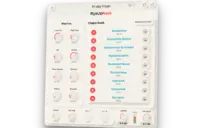
- Four harmonic modes: Natural, Fundamental, Octave and Upper Harmonic
- Feedback Amount control for setting how much feedback is generated
- Mix control for dry and processed balance
- Attack and Release controls for feedback bloom and decay
- Growl and Wander controls for feedback character and movement
- Advanced controls including Sensitivity, Stability, Output Gain and Gate Threshold through automation
- Five factory presets for different feedback behaviors
Sound, Style and Creative Direction
Feedback Emulator is clearly built for expression rather than generic processing. Its creative direction is guitar feedback, but not as an uncontrollable noise accident. The plugin turns feedback into a playable studio effect that reacts to performance.
Leave a note ringing and the feedback blooms. Keep playing, and the feedback ducks under the active performance. Mute the strings, and the feedback dies in a way that follows the physical gesture of guitar playing. That makes the effect feel connected to the player, not just pasted onto the signal.
The sound can move from subtle sustain extension to classic rock feedback, octave squeals, harmonic instability and ambient drone behavior. This makes it useful for both traditional guitar production and more experimental DAW-based sound design.
The Most Important Controls and Features
Feedback Amount
Feedback Amount is the main control. At low settings, it can add light support to a held note. At higher settings, the generated feedback becomes more assertive and can sit clearly on top of the guitar performance.
This control is where producers should start. A small amount can make a DI guitar feel more alive. A stronger amount can push the track toward classic rock sustain, aggressive lead moments or deliberate feedback effects.
Harmonic Mode
Harmonic Mode decides which part of the note will sing. Natural mode follows the first four harmonics and gives the most amp-like response. Fundamental mode creates a thicker, droning tone based around the played note. Octave mode produces the classic high feedback behavior, while Upper Harmonic mode pushes the sound into brighter and more piercing territory.
This makes the plugin flexible. A rock solo might benefit from Natural or Octave. A cinematic drone might prefer Fundamental. A noisier experimental passage can lean into Upper Harmonic, ideally with one eye on the output meter and the other on the coffee.
Growl
Growl adds saturation inside the feedback loop. At subtle settings, it thickens the feedback. At higher settings, the tone becomes more unstable and aggressive, with harmonics fighting for attention as the sound swells.
This is useful when a feedback tone feels too clean or synthetic. Growl brings in snarl and weight, especially before a driven amp sim.
Wander
Wander introduces slow movement in pitch and level, helping long sustained notes feel less static. Real guitar feedback rarely sits perfectly still, and this control gives the generated feedback a more living character.
For ambient, post-rock and cinematic use, Wander can be one of the most important parameters. It turns a sustained tone into something that breathes rather than freezes.
Attack and Release
Attack controls how fast the feedback swells once a note is detected. Short settings react quickly, while longer settings create smoother, more cinematic blooms. Release controls how the feedback fades when the note weakens or stops.
The official manual makes an important distinction: palm muting can cut the feedback faster than the release tail. That matters because it keeps the plugin playable from the guitar, not just adjustable from the mouse.
Sensitivity and Stability
Sensitivity controls how easily a note triggers feedback. Lower values react only to stronger notes, while higher values trigger more easily and hold longer. Stability controls how tightly the feedback follows pitch movement, bends, vibrato and glides.
Together, these controls help producers adapt the plugin to different guitars, pickup levels and playing styles. They are especially useful when moving from tight rock leads to looser experimental textures.
Factory Presets
Feedback Emulator includes five factory presets. These are useful starting points rather than finished answers, especially because guitar DI level, amp sim choice and playing style will strongly affect the final result.
- Natural Sustain: light feedback extension for held notes
- Classic Rock Feedback: more pronounced amp-like feedback behavior
- Octave Squeal: high octave feedback for lead moments
- Harmonic Chaos: upper harmonics with heavier Growl and Wander
- Ambient Drone: slow swell and long decay for pad-like feedback
Compatibility and Technical Requirements
Feedback Emulator is currently a Windows VST3 plugin. The official page lists version 1.0.0 and does not list macOS, Linux, AU, AAX or standalone versions.
The plugin is made for clean DI guitar and should be inserted before an amp simulator. The manual recommends keeping distortion, compression and amp processing after Feedback Emulator because the plugin needs a clean signal to read pitch and dynamics accurately.
- Plugin type: audio effect
- Format: VST3
- Operating system: Windows
- Current version: 1.0.0
- Standalone version: not listed
- Best signal chain: guitar DI into Feedback Emulator, then amp sim and cabinet processing
- Input behavior: mono in, mono out
- Tracking: optimized for monophonic single-note playing
Who Should Use This Free Guitar Feedback VST Plugin?
Feedback Emulator is best for guitarists and producers who record direct and want more expressive sustain from amp sim workflows. It is also useful for sound designers who want feedback behavior without setting up a loud room, a real amp and a carefully positioned guitar.
- Rock guitarists recording through amp sims
- Metal producers who want controlled lead feedback
- Shoegaze and post-rock musicians building long sustained textures
- Trap rock and alternative producers adding guitar drama to beats
- Cinematic composers creating tension, drones and guitar swells
- Sound designers looking for resonant feedback tones
- Home studio users who cannot record loud amp feedback
Best Use Cases for Music Production
The most obvious use case is lead guitar. Add Feedback Emulator before an amp sim, hold a note at the end of a phrase and let the feedback bloom. This can add emotion and realism to guitar parts that would otherwise fade too quickly.
For rhythm guitar, the plugin should be used more carefully. Since it is optimized for single notes, dense chords are not the ideal source. It can still work for held powerchord moments, transitions and controlled noise layers, but the strongest results will usually come from clear monophonic playing.
In cinematic scoring, Feedback Emulator can create slow guitar drones, tension beds and evolving harmonic tones. Use the Ambient Drone preset, increase release time and place the result into reverb or delay for larger sound design textures.
For experimental production, Harmonic Chaos and Upper Harmonic mode can turn a simple guitar note into something unstable and dramatic. This can work well in industrial, noise, dark ambient and trailer-style music.
License, Usage Rights and Download Details
veles.audio states that Feedback Emulator is free for personal and commercial use. The developer also describes it as free forever, with no trial and no upsell.
That makes it suitable for real music production, including commercial tracks, as long as users follow normal software usage expectations and do not redistribute the plugin installer as their own product.
The plugin can be claimed through the official veles.audio download page. The claim link currently leads through an account sign-in or account creation process, so users may need a free veles.audio account to download it.
Official page: https://veles.audio/plugins/feedback-emulator
Download page: https://veles.audio/plugins/feedback-emulator/claim
Why This Type of Free VST Plugin Matters
Many free VST plugins are useful because they copy familiar studio tools at no cost. Feedback Emulator is interesting for a different reason. It addresses a very specific musical behavior that stock DAW plugins rarely handle well: controlled guitar feedback from a DI signal.
That matters because modern guitar production often happens silently. Producers track at night, work in apartments, use amp sims and build entire records without ever placing a microphone in front of a speaker. The workflow is convenient, but it can remove the physical interaction that makes guitars feel alive.
A plugin like Feedback Emulator brings part of that interaction back. It does not replace a real amp in a real room, but it gives direct guitar recordings a way to bloom, sustain and react with more personality.
What Happens Next
After downloading Feedback Emulator, the best first test is simple: record a clean DI guitar line, place the plugin first in the chain, then load an amp simulator after it. Start with the Classic Rock Feedback preset, hold a single note and adjust Feedback Amount and Mix until the effect sits naturally.
From there, try changing Harmonic Mode. Natural is the safest starting point. Octave is better for lead squeals. Fundamental can create thicker drones. Upper Harmonic is the wild child, useful when the track needs danger and perhaps a small apology later.
For more realism, avoid overprocessing before the plugin. Feed it a clean DI, let it track properly, then shape the tone afterward with amp drive, cabinet simulation, EQ, delay and reverb.
Final Verdict
Feedback Emulator by veles.audio is a smart and highly focused free VST plugin for guitarists, producers and sound designers who want realistic feedback behavior inside a DAW. Its biggest strength is not size or complexity, but concept: it gives direct guitar recordings a way to bloom like they are interacting with a loud amp.
The plugin is especially useful for rock, metal, shoegaze, post-rock, cinematic scoring, experimental guitar textures and home studio amp sim workflows. The Windows-only VST3 format is the main limitation, and macOS users will have to wait unless veles.audio expands format support later.
For producers looking for a free guitar feedback VST plugin, a free VST plugin for amp sim workflows or a creative guitar sustain effect that does something genuinely specific, Feedback Emulator is a strong download and a promising first release from veles.audio.