filtrr by blepfx: A Free Nonlinear Filter VST
Morph between low-pass, high-pass, band-pass and peak filtering while adding saturation, audio-rate modulation and creative movement.
filtrr is a free nonlinear ladder filter plugin developed by blepfx. Released in 2025, it combines flexible frequency shaping, saturation and modulation inside a compact interface designed for fast creative processing.
The plugin can operate as a conventional low-pass, high-pass or band-pass filter, but it can also move continuously between different filter shapes. This makes it possible to create transitions that would normally require several automated filters or a more complicated multi-effect chain.
filtrr also includes six nonlinear processing modes, audio-rate modulation, an envelope follower, external sidechain modulation, adjustable oversampling and a built-in safety limiter.
The complete plugin is available through a name-your-price system. Producers can download it free by entering an email address, or make an optional payment to support the developer.
What Is filtrr?
filtrr is based on a nonlinear four-pole ladder filter. Ladder filters are commonly associated with warm low-pass filtering, resonance and analog synthesizer character, but this plugin extends the concept considerably.
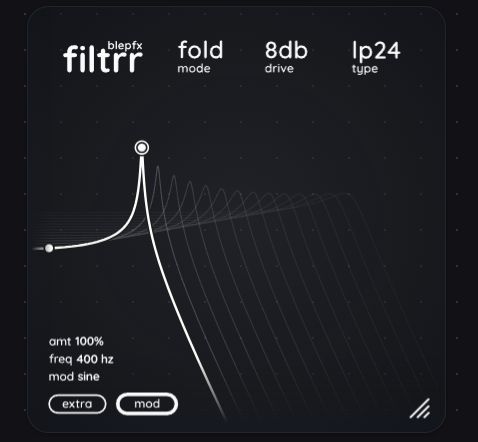
The main control point adjusts frequency, resonance and gain directly from the central visual display. The interface simultaneously displays the filter curve and the input and output spectra.
Rather than forcing the user to select one fixed response, filtrr can blend smoothly between several filter shapes. This allows producers to move gradually from a low-pass response into band-pass, peak or high-pass filtering.
The same filter-shape parameter can be modulated, turning the response itself into a moving sound-design element.
Morphable Filter Shapes
filtrr provides several filter configurations covering corrective processing, transitions and experimental sound design.
- Low-pass: Removes high frequencies with slopes ranging from 6 to 24 dB per octave.
- High-pass: Removes low frequencies with several selectable slopes.
- Band-pass: Isolates a selected frequency range.
- Asymmetric band-pass: Creates a less conventional band-focused response.
- Peak: Emphasises a selected area of the frequency spectrum.
Holding the appropriate modifier while changing the filter type allows the response to move continuously between these shapes.
This is useful for buildups, breakdowns and transitions because the spectrum can transform gradually instead of jumping suddenly from one filter mode to another.
Six Nonlinear Processing Modes
The nonlinear section adds harmonic character before and around the filter processing. A Clean mode is available when no additional saturation is required, while six other modes provide progressively stronger coloration.
- Subtle: Adds restrained harmonic enhancement.
- Heavy: Produces stronger saturation and compression.
- Warm: Softens the signal with a smoother tonal character.
- Fuzz: Introduces a more aggressive distorted texture.
- Chew: Creates heavier squashing and unusual nonlinear movement.
- Fold: Uses metallic wavefolding-style distortion for more extreme sound design.
The Drive control changes the level entering and leaving the nonlinear stage. This affects both the amount of distortion and the way the filter responds.
Lower settings work well for subtle enhancement on vocals, drums and instruments. Higher values can transform simple synthesizers and percussion into much more aggressive textures.
Built-In Modulation
filtrr includes an internal modulation system capable of controlling cutoff, resonance, drive, gain and filter shape.
The available modulation sources include:
- Oscillator: Sine, triangle, saw and square waveforms.
- Envelope follower: Reacts to the level and movement of the incoming signal.
- Sidechain envelope: Uses an external sidechain signal to control the filter.
- Audio-rate sidechain modulation: Uses an external audio signal directly as a fast modulation source.
The internal oscillator can run freely or synchronize with the DAW tempo. Slow settings are useful for rhythmic sweeps and auto-filter effects, while faster modulation can produce FM-style tones and metallic textures.
Because resonance, gain and distortion can also be modulated, the plugin can generate movement that goes beyond a conventional automated cutoff sweep.
Envelope-Follower Processing
The envelope follower allows the filter to react dynamically to the source material.
On a drum loop, the cutoff can open with each kick, snare or percussion transient. On a bassline, the filter can respond to the strength of individual notes, creating a more expressive and organic result.
Using an external sidechain signal provides additional possibilities. A kick can control the filtering applied to a bass, pad or effects return without being heard through the processed channel.
At restrained settings, this can create subtle rhythmic movement. Stronger modulation can produce pumping, talking-filter effects and more obvious transitions.
Mid, Side and Channel Processing
filtrr can process different parts of a stereo signal independently through its channel-selection options.
The filter can be applied to the complete stereo signal or focused on selected channel information. This makes it possible to filter the sides of a stereo pad while preserving the central information, or process only one side for experimental movement.
Mid and Side processing is particularly useful for transitions and atmospheric sounds. High frequencies can be reduced from the stereo sides while the kick, bass and lead elements remain more stable in the centre.
Always check extreme stereo processing in mono. A wide effect may sound impressive through headphones while becoming much less convincing on a mono speaker or club system.
Best Uses
Synthesizers: Create animated sweeps, resonant movement and saturated filter effects.
Drums: Add envelope-controlled filtering, harmonic colour and metallic distortion.
Basslines: Shape the upper harmonics while maintaining control over the lowest frequencies.
Vocals: Build telephone effects, transitions and more experimental formant-like movement.
House and Techno: Automate the filter shape and cutoff during buildups, breakdowns and drops.
Sound design: Use high resonance, audio-rate modulation and Fold processing to transform simple source material.
Effects returns: Place filtrr after reverb or delay to create moving, frequency-controlled ambience.
Production Tips
Begin with the Clean mode and establish the correct filter shape before introducing distortion. This makes it easier to understand which part of the result comes from filtering and which part comes from nonlinear processing.
Use the global Mix control for parallel processing. A heavily filtered or distorted signal can be blended underneath the original to preserve transients and clarity.
Synchronize the modulation oscillator with the project tempo when creating rhythmic movement. Free-running modulation works better for less predictable textures and ambient effects.
Use oversampling when applying strong drive or audio-rate modulation. Higher quality settings reduce aliasing but require more CPU resources.
Check the output level after changing resonance and drive. The plugin includes a safety limiter, but high-resonance filtering can still create a considerable change in perceived loudness.
Resonance is very good at turning one small frequency into the main character of the entire production. Introduce them carefully.
Safety Limiter and Oversampling
High resonance, gain and distortion settings can create significant output peaks. filtrr therefore includes a safety limiter set to prevent the output from exceeding 0 dBFS.
The limiter is enabled by default and can be disabled from the additional settings panel. Keeping it active is recommended when experimenting with self-oscillation, audio-rate modulation and stronger nonlinear modes.
The oversampling quality can also be adjusted. Higher settings help reduce aliasing during nonlinear processing, while lower settings reduce processor use.
For sound-design sessions, increase the quality when rendering the final result. During arrangement and composition, a lower setting may provide a more responsive workflow.
Compatibility and Installation
- Windows: Windows 8 or later, 64-bit
- macOS: macOS 10.13 or later
- Linux: 64-bit system with glibc 2.30 or later
- Plugin formats: VST3, CLAP and AUv2 on macOS
- Processor support: x86 and ARM, including Apple Silicon
- Graphics: OpenGL 3.3 or later
- Interface: Resizable with dark, light and simplified themes
- Price: Name your price, including a free download
filtrr does not support VST2 or AAX. It can be installed manually by copying the plugin files into the standard VST3, CLAP or Audio Unit folder used by the operating system.
The developer also provides a command-line installation option for users who prefer an automated setup.
Final Verdict
filtrr is a creative free filter plugin that offers considerably more depth than its compact interface initially suggests.
The continuously morphable filter shapes make it useful for smooth transitions, while the nonlinear modes add everything from gentle warmth to aggressive metallic folding.
Its strongest feature is the modulation system. Cutoff, resonance, drive, gain and filter shape can react to oscillators, envelopes, sidechain signals and audio-rate modulation.
This makes filtrr suitable for conventional mixing tasks, rhythmic electronic production and more extreme sound design. It can clean a bass, animate a pad, reshape a drum loop or turn a simple sine wave into something much less innocent.
For producers looking for a free filter VST released in 2025, filtrr combines a fast workflow, deep modulation and a genuinely distinctive sound without adding another complicated workstation to the plugin folder.
Download filtrr from the official blepfx website: