Giada: A Free Loop-Based DAW for Live Music Production
Record loops, trigger samples, sequence MIDI, host plugins and build live electronic performances inside a lightweight open-source production environment.
Giada is a free and open-source music production application designed for DJs, electronic musicians and live performers.
Rather than copying the traditional multitrack layout of larger recording studios, Giada focuses on loops, samples, MIDI events, scenes and real-time performance. Producers can layer audio, record instruments, trigger sounds from a keyboard or MIDI controller and edit the resulting performance inside one compact interface.
Giada can also host VST3 and LV2 plugins, allowing users to expand the software with compatible virtual instruments and audio effects.
Completely free: Giada is distributed under the GNU GPL open-source licence. It does not require a subscription, paid activation or premium upgrade to unlock its production features.
What Is Giada?
Giada is described by its developer as a hardcore loop machine and minimal music-production tool. It combines several functions normally divided between a sampler, looper, MIDI sequencer and lightweight DAW.
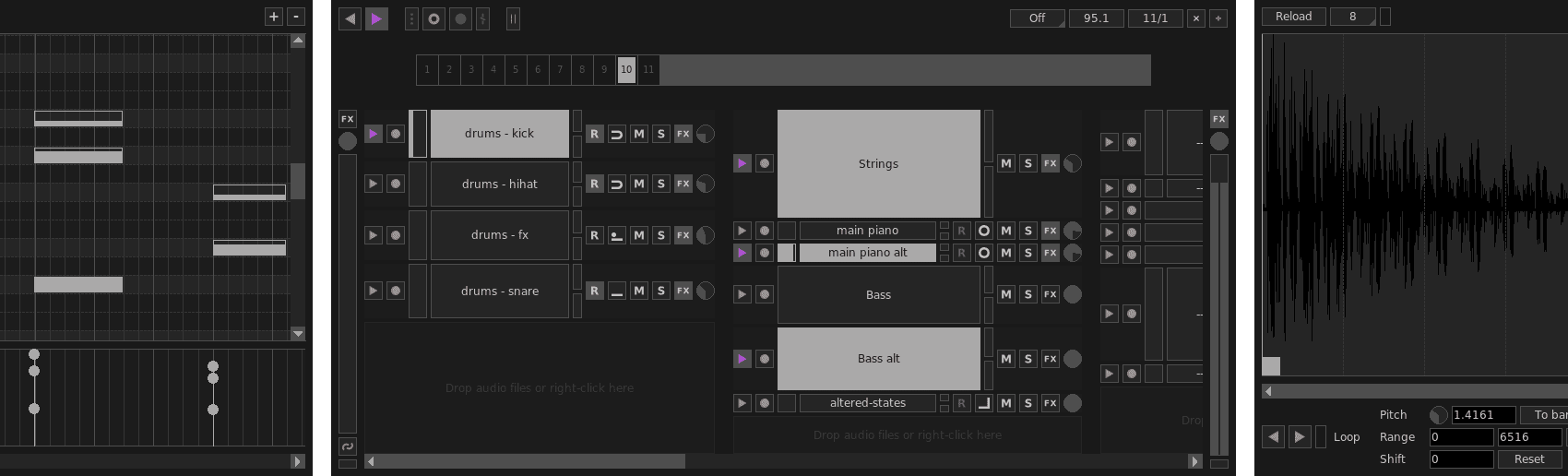
Audio samples and MIDI events are placed inside channels. These channels can be arranged into columns, triggered manually, controlled by the main sequencer or assigned to an external MIDI controller.
The workflow is particularly well suited to electronic music, live looping, beatmaking, DJ sets and experimental performances.
Main concept: Giada allows producers to create a song while performing it. Audio and MIDI actions can be recorded in real time, then corrected and rearranged inside the Action Editor.
Main Features
- Real-time audio loop playback
- Audio and MIDI recording
- Sample triggering from a computer keyboard
- External MIDI controller support
- Main pattern-based sequencer
- Action Editor for recorded performances
- Detailed Sample Editor
- Up to eight scenes per project
- VST3 plugin hosting
- LV2 plugin hosting
- Audio and MIDI input and output
- Live sampling
- Project saving and loading
- Multi-threaded audio engine
- Free and open-source GPL licence
A Workflow Built Around Channels
Channels are the central building blocks of a Giada project. A channel can contain an audio sample or MIDI events.
Sample channels can hold drum hits, vocal phrases, loops, sound effects or complete musical sections. MIDI channels can control hosted virtual instruments or external hardware synthesizers.
Channels can be grouped into columns to keep the project organised. A producer might place drums in one column, melodic loops in another and vocals or effects in a third.
Organisation tip
Use separate columns for drums, basses, instruments and effects. A live project becomes considerably easier to control when every channel has a clear role and is not named “sample final new 4.”
Loop and One-Shot Playback Modes
Giada provides several playback modes for audio samples. Loop modes remain connected to the main sequencer and follow the project structure, while one-shot modes can be triggered more freely.
A drum hit can be configured to restart whenever a pad is pressed. A longer atmospheric sound can continue playing until it is stopped. A musical loop can wait for the next bar before beginning, keeping the performance synchronized.
Loop Basic: Starts on the first beat and continues until it is stopped.
Loop Once: Plays the complete sample and restarts during the following cycle.
One-Shot Press: Plays only while the assigned key or pad remains pressed.
One-Shot Retrig: Restarts the sample each time it is triggered.
One-Shot Endless: Loops the sample continuously until another trigger stops it.
Record Live Performances
Giada can record audio from microphones, instruments and external equipment. It can also capture MIDI notes from keyboards, controllers and other software.
The action-recording system stores the timing of channel triggers during a performance. Producers can launch samples manually, record the result and then open the Action Editor to adjust individual events.
This approach combines the spontaneity of a live session with the precision of step-based editing.
Performance workflow: Start the sequencer, enable action recording and trigger the channels from a MIDI controller. Once the performance is captured, correct timing, velocity and MIDI notes in the Action Editor.
The Action Editor
The Action Editor displays recorded events across a beat-based grid. Actions can be added, deleted, moved and resized directly with the mouse.
For sample channels, the editor can manage trigger, release and stop actions. MIDI channels provide a piano-roll view for editing notes and velocity.
Grid and snapping options make it possible to correct timing while preserving the character of the original performance.
Editing reminder: Quantization can tighten a performance, but placing every action perfectly on the grid may remove the timing differences that gave the groove its personality.
The Sample Editor
Giada includes an integrated Sample Editor for preparing loops, drum hits and recorded audio.
Users can define playback ranges, adjust pitch, reverse audio, normalize levels and apply fades. Samples can also be cut, copied, pasted, trimmed or silenced.
The pitch control can stretch or compress a sample so that it fits the complete song or the current bar. This is useful when adapting loops created at another tempo.
- Adjust sample start and end points
- Change pitch and playback duration
- Cut, copy and paste audio
- Trim or silence selected sections
- Reverse audio
- Normalize sample volume
- Create fade-ins and fade-outs
- Copy a selected section into a new channel
The editing operations affect the copy loaded in memory rather than permanently modifying the original file stored on the computer.
Build Songs With Scenes
Giada supports up to eight scenes inside a project. A scene can contain different samples, MIDI notes and recorded actions while preserving the overall channel structure.
Scenes can represent the intro, verse, chorus, breakdown or drop of a song. When the sequencer is running, a selected scene can wait until the next first beat before becoming active.
This allows performers to change complete sections without losing synchronization.
Arrangement idea: Use scene one for the introduction, scene two for the main groove and scene three for a reduced breakdown. Reserve another scene for improvisation or emergency recovery when the live set develops independent opinions.
VST3 and LV2 Plugin Hosting
Giada can scan and load compatible VST3 and LV2 plugins. Instruments and effects can be placed on individual channels, columns or the main input and output.
The plugin stack allows processors to be reordered, enabled, bypassed or removed. Plugins with their own graphical interfaces open normally, while plugins without a custom interface can be controlled through parameter sliders.
An unlimited number of compatible plugins can be loaded, although practical limits depend on the computer and the complexity of the project.
Virtual instruments: Load synthesizers, samplers and drum machines on MIDI channels.
Channel effects: Add filters, distortion, modulation or dynamics processing to individual sounds.
Master processing: Place EQ, compression or limiting on the main output.
Live input processing: Apply compatible effects to instruments or microphones while performing.
Official Audio Recording Tutorial
The official Giada tutorial below demonstrates how to record audio and build a synchronized loop-based performance using physical instruments and sample channels.
Giada Audio Recording and Looping Tutorial
What Changed in Giada 1.5?
Giada 1.5 introduced a major redesign of the internal timing and sequencing system.
The new tick-based engine improves precision during playback, action editing and sequencing. Plugin transport reporting and MIDI plugin routing were also improved.
- New tick-based audio-rendering engine
- Improved timing and sequencing consistency
- Reworked internal action storage
- MIDI output forwarding between plugins
- Improved plugin transport information
- CPU-load meter in the main window
- Cleaner interface and internal optimisations
- Fixes for audio glitches during project saving
Best Uses
Live electronic performance: Trigger synchronized loops, instruments and effects from a MIDI controller.
Beatmaking: Combine drum one-shots, percussion loops and MIDI instruments inside a pattern-based environment.
Live looping: Record instruments and layer new audio while the performance continues.
DJ sets: Launch loops, vocal phrases, effects and longer musical sections in real time.
Experimental music: Combine samples, MIDI devices and plugins through a less conventional production workflow.
Sound design: Edit, reverse, stretch and process samples before recording new variations.
Main Limitations
Giada is more specialised than a conventional recording DAW. It does not provide the same linear multitrack editing, advanced comping, notation or large mixing console found in Studio One, Cubase or Pro Tools.
Its interface and sequencer are designed primarily around loops, actions and performance. Producers creating large vocal sessions or detailed film-scoring projects may need another application.
- No conventional full-length multitrack timeline
- Workflow requires adjustment for traditional DAW users
- No large factory instrument or effect collection
- No integrated notation editor
- Best suited to loops and live performance
- Plugin performance depends on CPU capacity
Compatibility
- Current version: Giada 1.5.0 Leshy
- Release date: June 17, 2026
- Windows: 64-bit x86 download
- macOS: Apple Silicon ARM64 download
- Linux: Flatpak distribution
- FreeBSD: Supported by the project
- Plugin formats: VST3 and LV2
- MIDI: Input, output and clock synchronization
- Licence: GNU GPL open source
- Account required: No account listed for the official downloads
System note: The official website does not publish detailed minimum operating-system or processor requirements. Check the available build and test your audio interface before preparing an important live performance.
How to Download Giada
- Open the official Giada website.
- Select the Windows, macOS or Linux download.
- Extract the downloaded archive when required.
- Launch Giada and configure the audio device.
- Configure the MIDI input and output devices.
- Scan the folders containing compatible VST3 or LV2 plugins.
- Create a project and add audio or MIDI channels.
Final Verdict
Giada is a distinctive free production tool for electronic musicians who prefer loops, samples and real-time interaction over a conventional studio timeline.
Its combination of live audio recording, MIDI sequencing, sample editing, scenes and plugin hosting provides enough flexibility to create complete electronic performances.
The workflow will not replace a traditional DAW for every producer. It is less suitable for large recording sessions, detailed vocal editing and complex linear arrangements.
For live looping, beatmaking, experimental performance and sample-based production, however, Giada offers a focused environment with no subscription, activation manager or artificial feature limit.
It is not the DAW that asks you to prepare everything before pressing play. It is the DAW that quietly suggests pressing play first and dealing with the consequences musically.
Download Giada for Free
Get the latest Windows, macOS or Linux edition directly from the official Giada website.