The Bass Particle: A Free Sub-Bass Resonator VST
Add controlled low-end weight, analog-style saturation and deeper resonance to basses, kicks and low vocals.
The Bass Particle is a free low-frequency enhancement plugin developed by Jesus Oyola. It is designed to add weight and resonance to bass instruments, kick drums and deep vocal recordings without relying on a complicated multiband processing chain.
The plugin combines a resonant sub-bass generator with a clean high-pass filter and three analog-style saturation modes. Its compact interface provides direct control over the amount, frequency and character of the added low end.
Completely free: The Bass Particle is available without payment from the developer’s official Patreon page. Separate downloads are provided for Windows, macOS and Linux.
What Is The Bass Particle?
The Bass Particle is a resonant low-frequency processor inspired by classic hardware sub-bass enhancement units.
Instead of simply increasing the volume of the existing bass frequencies, the plugin creates a controlled resonance around a selected frequency. This can make a kick feel deeper, give a bass instrument more physical weight or add body to a low vocal performance.
The processor is intended to strengthen the bottom end while maintaining enough control to prevent the complete mix from becoming muddy.
Main concept: The plugin generates a focused low-frequency resonance rather than applying a broad bass boost across the entire signal.
Main Features
- Resonant sub-bass enhancement
- Up to 14 dB of additional low-frequency energy
- Adjustable resonance frequency
- 40 Hz and 100 Hz range selectors
- Clean high-pass filter mode
- Tube saturation
- Tape saturation
- Transformer-style saturation
- Oversampled saturation processing
- Parallel saturation mix control
- Free versions for Windows, macOS and Linux
Amplitude Resonance Control
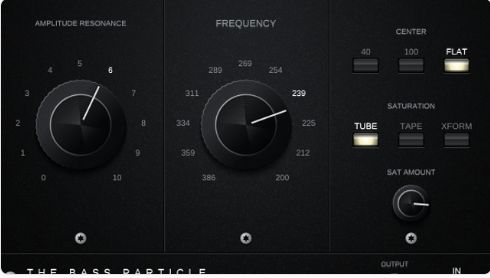
The large Amplitude Resonance control determines the intensity of the generated low-frequency resonance.
At its lowest setting, the processing remains relatively transparent. Increasing the control gradually adds more low-frequency weight, with the maximum setting capable of introducing up to approximately 14 dB of sub-bass energy.
This range makes it possible to move from subtle reinforcement to a more obvious low-end effect. Moderate settings will usually be more suitable for complete mixes, while stronger settings can work for sound design or parallel processing.
Starting point
Begin with the Amplitude control at a low setting, match the output level and increase the resonance gradually. Sub-bass is rather good at arriving unnoticed and occupying the entire building.
Choosing the Resonance Frequency
The Frequency control selects the area where the resonance is generated. Lower numerical positions target higher frequencies, while higher settings move the resonance further into the sub-bass range.
The 40 Hz and 100 Hz buttons modify the operating range of the frequency control. This allows the plugin to adapt to different sources rather than applying the same frequency to every bass or kick.
For a kick drum, the best setting will often depend on its existing fundamental frequency. Bass guitars and synthesizers may require a different range according to the notes being played and the musical key of the track.
Frequency tip: Sweep the frequency control while the complete arrangement is playing. The setting that sounds largest in solo may not be the one that fits the kick, bass and mix together.
Flat Mode and High-Pass Filtering
The Flat button bypasses the resonant enhancement while leaving the plugin’s clean high-pass filter active.
This mode can be useful for comparing the generated resonance with the filtered source. It can also help remove unnecessary subsonic information before applying other low-frequency processing.
Using a high-pass filter before adding controlled resonance may appear contradictory, but the approach can produce a cleaner result. Unfocused low-frequency energy is removed before a more deliberate resonance is introduced.
Three Saturation Modes
The Bass Particle includes three saturation characters labelled Tube, Tape and Xform.
Tube: Adds harmonics inspired by tube-style processing and can make the bass feel warmer and more present.
Tape: Introduces a softer saturated character that can help round transients and thicken the signal.
Xform: Provides transformer-style coloration for additional density and midrange definition.
The saturation stages use oversampling to reduce digital aliasing. This is particularly useful when processing bass sources with strong harmonics or when using more aggressive saturation settings.
Parallel Saturation Control
The Sat Amount control works as a dry and wet mix for the saturation section.
Lower settings preserve more of the original signal and transient response, while higher values reveal more of the selected saturation character.
This parallel approach can be helpful on kick drums. The dry signal maintains the initial impact, while the saturated signal adds harmonic content that remains audible on smaller speakers.
Useful workflow: Set the resonance first, select the saturation mode second and use Sat Amount last to blend the processed harmonics with the original transient.
Using The Bass Particle on Kick Drums
The plugin can reinforce kick drums that lack sufficient low-frequency weight or feel too light inside a club-oriented production.
Start by identifying the kick’s fundamental frequency. Adjust the range buttons and Frequency control until the resonance supports that area rather than creating a second unrelated low note.
Increase Amplitude carefully and compare the result with the bypassed signal at a similar volume. Tube or transformer saturation can then add harmonics and improve translation on headphones, laptops and smaller speakers.
Using It on Bass
The Bass Particle can add density to electric bass, synthesizer bass and sampled basslines.
For melodic bass parts, use a restrained resonance setting. A fixed low-frequency boost may behave differently as the bass moves between notes, especially when the arrangement covers a wide range.
The plugin may work particularly well on simple basslines, sustained sub tones and parts built around a limited group of notes.
Important: Check the processed bass in mono and on several playback systems. Very low frequencies can feel impressive on studio monitors while becoming almost invisible on smaller devices.
Using It on Deep Vocals
The developer also recommends The Bass Particle for deep vocal recordings.
A small amount of low-frequency resonance can add chest weight and authority to spoken voice, rap vocals, cinematic dialogue and low male performances.
This application requires restraint. Excessive resonance can increase plosives, handling noise and room vibration. Use high-pass filtering and automation when only selected phrases need additional weight.
Compatibility
- Plugin format: VST3
- Windows: Supported
- macOS: Supported
- Linux: Supported
- Dedicated account: Not required for the attached downloads
- Paid licence: Not required
- Audio Unit: No official version listed
- AAX: No official version listed
How to Download The Bass Particle
- Open the official Jesus Oyola Patreon post.
- Choose the Windows, macOS or Linux archive.
- Download and extract the ZIP file.
- Move or install the VST3 file in the appropriate plugin folder.
- Open the DAW and rescan the VST3 folder if necessary.
Final Verdict
The Bass Particle is a focused free plugin for producers who need more controlled weight in kicks, basses and low vocal recordings.
Its resonant processing provides a different result from a conventional low-shelf EQ, while the three saturation modes help the processed signal remain audible beyond the deepest sub frequencies.
The interface is simple enough for quick mixing decisions, but the combination of frequency selection, resonance strength and parallel saturation still provides useful tonal flexibility.
It should not replace careful arrangement, monitoring or low-end management. Used with restraint, however, The Bass Particle can add the physical weight that a clean recording occasionally forgot to bring with it.
Download The Bass Particle for Free
Get the official Windows, macOS or Linux version directly from the developer.