KrystalPeak is a free VST plugin designed for producers, beatmakers, mixing engineers and home studio users who need a clean, visual and practical limiter for modern music production. Created by Krystal Dynamics, this transparent digital limiter focuses on peak control, loudness shaping and mix integrity without turning the mastering process into a technical labyrinth.
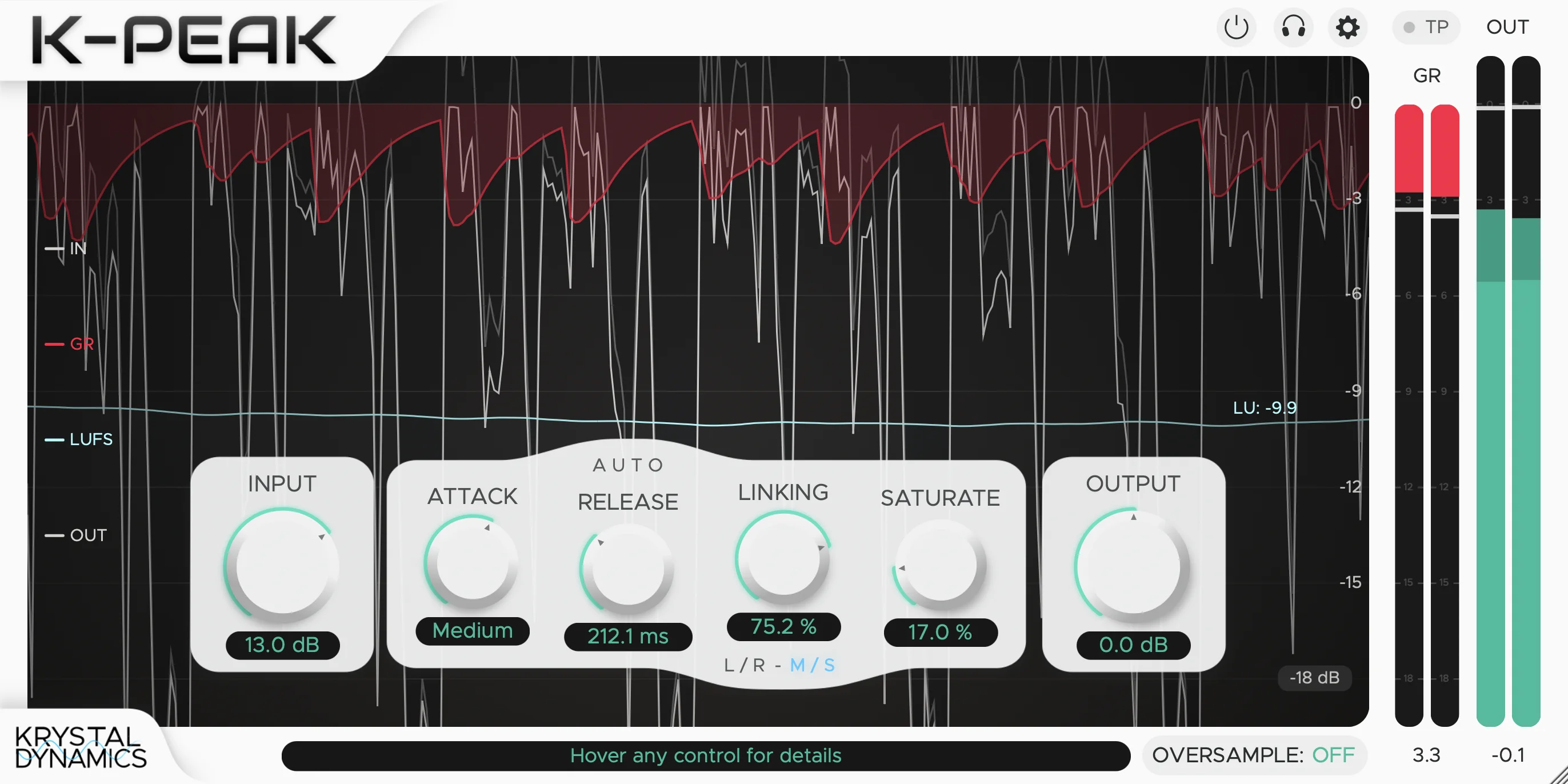
In a crowded plugin market full of compressors, clippers, saturators and oversized mastering suites, KrystalPeak keeps its mission clear: suppress peaks, raise loudness and help the user understand what limiting is actually doing to the sound. That visual feedback is one of its strongest points. The plugin shows waveform movement, gain reduction, output level and short-term LUFS metering, which makes it useful not only as a final loudness tool, but also as a learning tool for producers improving their mastering workflow.
For anyone building tracks in a home studio, this free audio plugin can be a serious addition to the final stage of a mix. It is simple enough for beginners, detailed enough for experienced users and clean enough to be used on individual channels, buses or a full mix when handled with taste.
What Is KrystalPeak?
KrystalPeak is a transparent digital limiter from Krystal Dynamics. Its purpose is to control peaks and maximize loudness while preserving clarity, punch and musical balance. Instead of offering dozens of hidden menus, it presents the core controls producers expect from a modern limiter: input gain, output gain, attack, release, stereo linking, saturation and oversampling.
This makes it a useful free music production plugin for mixing and mastering. On a master bus, it can help catch final peaks and increase perceived loudness. On a drum bus, it can control sharp transients before they overload the mix. On a synth bus, it can tame aggressive peaks while keeping the sound forward. On vocals, it can work gently as a final safety limiter after compression and EQ.
The plugin is especially interesting because it gives visual feedback in real time. Limiting can be difficult to understand by ear alone when producers are still learning how loudness, peaks and gain reduction interact. KrystalPeak helps connect what the user hears with what is happening inside the signal.
What This Free VST Plugin Does
KrystalPeak reduces peaks and allows the output level to be controlled more safely. When the input signal pushes too high, the limiter reacts according to the attack and release settings, shaping the transient response and preventing the signal from exceeding the desired output level.
The plugin also includes an optional saturation control. This gives users the choice between clean limiting and a slightly warmer or denser output character. Used gently, saturation can add energy and perceived loudness. Used too heavily, it can start to change the tone, so the real skill is in finding the sweet spot. As usual in mastering, the plugin can help, but it will not save a mix that was arranged with boxing gloves.
KrystalPeak also includes Left/Right and Mid/Side linking modes. This is useful because stereo material does not always behave the same in the center and on the sides. A limiter that gives control over stereo linking can feel more stable on full mixes, wide synths, drum buses and electronic productions where stereo width plays an important role.
Main Features
- Transparent digital limiting: Designed to suppress peaks while preserving clarity, impact and mix integrity.
- Attack control: Shapes how quickly the limiter reacts to incoming peaks.
- Release control: Includes an auto-adaptive mode for smoother recovery behavior.
- Input and output gain: Allows proper level staging before and after limiting.
- Left/Right stereo linking: Useful for traditional stereo limiting behavior.
- Mid/Side stereo linking: Gives extra control over center and side response.
- Optional saturation: Adds warm output character when a cleaner limiting pass feels too polite.
- Oversampling up to 8x: Helps improve quality when limiting is pushed harder.
- Bypass control: Useful for quick A/B comparison.
- Delta mode: Lets users listen to the limited signal being removed.
- Real-time visual feedback: Includes waveform display, gain reduction, input, output and short-term LUFS metering.
- Free for personal and commercial use: A practical choice for independent producers and home studio users.
- Windows and macOS support: Available as VST3 for Windows and AU/VST3 for macOS.
Sound, Workflow and Creative Use
The strength of KrystalPeak is its focused workflow. A limiter should help the producer make confident level decisions, not turn the final stage of a mix into a guessing game. KrystalPeak gives enough control to shape the response, while keeping the interface readable and direct.
For transparent mastering, the best approach is usually subtle. Raise the input until the limiter catches peaks, watch the gain reduction, check the LUFS reading and compare the processed signal with the bypassed version. If the mix starts losing punch, the limiter is probably working too hard. If the track becomes louder without feeling smaller, the setting is moving in the right direction.
On drum buses, KrystalPeak can be used to catch hard transient spikes before they hit the master chain. This can help keep kicks, snares and percussion under control without using heavy compression. On synth buses, it can manage sudden peaks from resonant filters, layered leads or bright electronic textures.
The saturation control gives producers a second option. A clean limiter is ideal when transparency matters, but some genres benefit from density and edge. Hip-hop, trap, EDM, techno, house, synthwave and rock productions can sometimes use a little saturation at the output stage to add attitude. The key is restraint. A good limiter should make the track feel finished, not fried.
Who Should Use KrystalPeak?
KrystalPeak is a strong choice for producers who want a free audio plugin for peak control, loudness shaping and final mix polishing. It is especially useful for independent artists who master their own tracks, beatmakers preparing instrumentals, electronic producers pushing loud drops and home studio users who need a reliable limiter without buying a premium mastering suite.
Beginners will appreciate the clear layout and visual metering. Seeing waveform activity, gain reduction and LUFS values helps explain how limiting affects the signal. More experienced users will appreciate the Mid/Side linking, oversampling, Delta mode and optional saturation, which give the plugin more depth than a basic ceiling-only limiter.
It is also useful for producers who already own paid limiters but want another flavor in the toolbox. Sometimes a simple limiter with clear feedback is faster than a complex mastering processor, especially during production or demo mastering.
Best Use Cases for Producers and Mixing Engineers
Final Master Bus Limiting
The most obvious use for KrystalPeak is on the final master bus. It can help control peaks, raise loudness and prepare a track for sharing, testing or release. For professional results, it should be used after proper gain staging, EQ balance and mix cleanup.
Drum Bus Peak Control
Drums often create short peaks that can eat headroom quickly. KrystalPeak can catch those peaks before they overload the rest of the mix. This is useful for punchy hip-hop drums, EDM kicks, house percussion, rock drums and aggressive electronic grooves.
Synth and Bass Bus Management
Layered synths and bass sounds can produce unpredictable peaks, especially when saturation, distortion or filter automation is involved. A transparent limiter can keep those moments controlled without flattening the entire part.
Quick Demo Mastering
When a producer wants to send a demo, test a song in the car or upload a private preview, KrystalPeak can help create a louder and cleaner reference master quickly. It is not a replacement for careful mastering decisions, but it is very practical for fast workflow.
Learning Loudness and Gain Reduction
Because KrystalPeak provides real-time waveform and LUFS feedback, it is a useful educational tool. Producers can hear and see how limiting changes a track, which is one of the best ways to understand mastering dynamics.
Official Website and Download
KrystalPeak is available from the official Krystal Dynamics website. The plugin is free for personal and commercial use, with separate download packages for Windows and macOS.
- Official website: Visit the official KrystalPeak page
- Download for Windows: Download KrystalPeak for Windows
- Download for macOS: Download KrystalPeak for macOS
Final Verdict
KrystalPeak is an excellent example of what a modern free VST plugin should be: focused, useful, visually clear and genuinely practical. It does not try to replace an entire mastering environment. Instead, it gives producers a clean limiter with enough control to shape peaks, manage loudness and understand the processing in real time.
The combination of attack, release, stereo linking, saturation, oversampling, Delta mode and LUFS metering makes it more advanced than many simple free limiters, while still remaining easy to use. That balance is important. A limiter should help producers make better decisions, not bury them under unnecessary complexity.
For home studio mastering, quick demo loudness, drum bus control, synth bus management and final peak safety, KrystalPeak is a strong free audio plugin worth testing. It is especially valuable for producers who want to learn how limiting works while still getting usable results inside a real session.
KrystalPeak may be free, but it does not feel disposable. It feels like a serious music producer tool built around a real studio need: controlling peaks while keeping the mix alive. For anyone searching for a free limiter plugin in 2026, this one deserves a place near the top of the list.
« `