Voxengo Overtone GEQ: A Free Harmonic Graphic EQ VST
Shape mixes, buses and individual tracks with seven EQ bands, harmonic enhancement, Mid/Side processing and flexible channel routing.
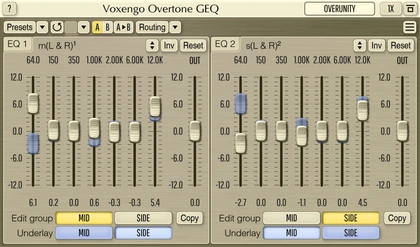
Voxengo Overtone GEQ is a free graphic equalizer designed for fast tonal shaping with additional harmonic coloration.
Instead of behaving like a completely transparent digital EQ, the plugin applies a separate harmonic-enhancement stage to each of its seven frequency bands. This allows producers to adjust the tonal balance while adding density and character to the processed signal.
Overtone GEQ can be used on individual instruments, drum buses, vocals, complete mixes and multichannel projects. It also provides Mid/Side processing, internal channel routing, oversampling and two graphic EQ panels for working with different channel groups.
Completely free: Voxengo provides direct Windows and macOS downloads from the official product page. No reduced edition or temporary trial is required.
What Is Voxengo Overtone GEQ?
Overtone GEQ is a seven-band graphic equalizer with integrated harmonic enhancement.
A conventional graphic EQ divides the frequency spectrum into several fixed or adjustable areas. Moving a fader increases or reduces the level around the corresponding frequency.
Overtone GEQ adds another stage to this process. Each EQ band includes its own harmonic-enhancement module, creating additional coloration as the signal is shaped.
Main difference: Overtone GEQ changes both the frequency balance and the harmonic character of the audio. It is therefore better suited to musical tone shaping than completely transparent corrective work.
Seven Bands With a ±12 dB Range
The plugin provides seven graphic EQ bands, each offering up to 12 dB of boost or attenuation.
This is enough range for subtle balancing, broader tonal correction and more obvious creative shaping. Adjacent bands interact because the equalizer uses overlapping bell-shaped filters.
When several neighbouring bands are boosted simultaneously, the combined audible gain may therefore exceed the value displayed by one individual fader.
- Seven graphic equalizer bands
- Up to 12 dB of boost per band
- Up to 12 dB of attenuation per band
- Adjustable frequency values
- Two independent graphic EQ panels
- Curve inversion and scaling tools
- Individual output-level control
Harmonic Enhancement on Every Band
Overtone GEQ uses seven harmonic-enhancement modules, one for each EQ band.
This means that boosting a frequency area does more than make that area louder. The processing can introduce additional overtones related to the incoming audio, creating a richer and more coloured result.
The effect is particularly noticeable on material containing strong harmonic content, including vocals, guitars, basses, synthesizers and complete drum groups.
Starting point
Use small boosts of one or two decibels before attempting larger curves. Harmonic enhancement often makes a change feel stronger than the fader value suggests.
Two Graphic EQ Panels
The interface contains two complete graphic EQ panels. These are provided for convenience when working with separate channel groups.
For example, one panel can display the Mid channel while the other displays the Side channel. They can also be used for independent left and right processing or for comparing different multichannel groups.
The two panels do not represent two effects placed in series. They provide simultaneous access to separate routing groups inside the same plugin.
Useful workflow: Assign the Mid signal to one panel and the Side signal to the second. This makes it possible to shape the centre and stereo information without repeatedly switching between views.
Mid/Side Equalization
Mid/Side processing separates a stereo signal into its central information and its stereo differences.
The Mid channel usually contains elements positioned near the centre, such as kick, bass, lead vocal and snare. The Side channel contains more of the stereo width created by panning, ambience, delays, reverbs and wide instruments.
Overtone GEQ can process these areas independently through its internal routing system.
Clarify the centre: Reduce excessive low-mid energy in the Mid channel without removing the same frequencies from wide ambience.
Shape the sides: Add gentle brightness to stereo instruments and reverbs while leaving the central vocal less affected.
Control stereo bass: Reduce low-frequency information in the Side channel when the bottom end feels unstable.
Add width carefully: A small high-frequency boost on the sides can increase perceived openness without using a dedicated stereo widener.
Internal Channel Routing
The plugin supports detailed internal routing and channel grouping.
Different input channels can be assigned to separate processing groups, allowing the same plugin instance to handle stereo, dual-mono and multichannel material.
Overtone GEQ supports up to eight input and output channels when the host application provides the required configuration.
This makes it useful beyond standard stereo production. It can also process 5.1, 7.1 and other supported multichannel formats.
Routing note: The available channel configurations depend on the DAW and track format. A normal stereo insert will expose fewer routing options than a multichannel bus.
Channel Group Underlays
The Underlay function displays the EQ curve of another channel group behind the curve currently being edited.
This can help when matching or comparing left and right channels, Mid and Side processing, or several channels inside a surround mix.
One group can also be copied to another before making small independent adjustments.
Practical example: Copy the Mid curve to the Side group, then reduce the lower bands on the sides while preserving a similar general tonal direction.
Up to 8x Oversampling
Overtone GEQ provides up to eight-times oversampling.
Oversampling processes the internal signal at a higher sample rate before returning it to the project rate. This can improve the behaviour of nonlinear processing, including the harmonic-enhancement stages.
Higher oversampling settings require more processor resources. They are generally more useful during final rendering than during low-latency recording sessions.
CPU reminder: Overtone GEQ already runs seven harmonic modules. Eight-times oversampling on every channel may provide excellent quality, but the processor may begin drafting a resignation letter.
Zero Processing Latency
The plugin reports zero processing latency, making it suitable for buses and individual tracks without introducing additional delay into the session.
This is useful during production and mixing, particularly in projects where several latency-producing processors are already active.
Zero latency does not mean zero CPU consumption. Harmonic processing, oversampling and multichannel routing can still require meaningful processing power.
64-Bit Floating-Point Processing
Overtone GEQ uses 64-bit floating-point internal processing.
This provides substantial numerical headroom inside the plugin and helps maintain precision while several bands, routing stages and harmonic modules are active.
Producers should still avoid unnecessary clipping between plugins. Internal precision does not prevent an overloaded output from affecting the next processor in the chain.
Using Overtone GEQ on a Mix Bus
The plugin was designed primarily for mixes and submixes where broad tonal shaping and harmonic richness are desirable.
Place it on the mix bus and begin with every band at zero. Make small adjustments while listening to the complete arrangement rather than soloing individual frequency areas.
- Play the loudest section of the track.
- Reduce any broad frequency area that feels excessive.
- Add small boosts where the mix needs weight, presence or openness.
- Match the output level with the bypassed signal.
- Check the result in mono.
- Listen again at a lower monitoring level.
A broad curve using several small adjustments will usually sound more natural than one extreme boost.
Using It on a Drum Bus
Overtone GEQ can add weight and character to a complete drum group.
Use the lower bands to adjust the relationship between kick weight and low-mid body. The middle bands can influence snare presence and drum-room density, while the upper bands affect cymbals and transient brightness.
The harmonic processing can make drums feel more energetic without using a separate saturator, although the result should be compared at equal loudness.
Drum tip: Try a small low-frequency boost and a slight upper-mid reduction before increasing the output. This can produce a heavier tone without making the cymbals unnecessarily aggressive.
Using It on Vocals
The plugin can provide broad vocal shaping when surgical correction is not required.
Lower bands can reduce excessive proximity or chest resonance. Middle bands influence intelligibility and nasal character, while upper bands control presence and air.
Because each adjustment also contributes harmonic colour, Overtone GEQ can help a dull vocal feel more forward without relying only on a conventional high-shelf boost.
Important: Use a parametric or dynamic EQ first when the vocal contains narrow resonances, harsh consonants or specific problem frequencies. Overtone GEQ is better suited to broad tonal character.
Using It on Guitars and Synthesizers
Distorted guitars and synthesizers often contain enough harmonics to respond strongly to Overtone GEQ.
Small changes can increase body, presence or brightness while introducing additional density. This can help a sound remain audible inside a crowded arrangement without applying a large volume increase.
The plugin can also be placed before distortion or amplifier simulation. In that position, its EQ curve changes which frequencies drive the following processor most strongly.
Before distortion: Shapes the frequencies entering the nonlinear processor.
After distortion: Shapes the finished tone and adds further harmonic coloration.
A/B Comparison and Undo History
Overtone GEQ includes A and B states for comparing two different settings.
One state can contain a subtle curve while the other uses a more noticeable tonal shape. Switching between them is faster and more reliable than trying to remember several fader positions.
The plugin also provides undo and redo history, a preset manager and contextual hints for explaining interface controls.
Resizable and Customisable Interface
The interface can be resized and supports Retina and HighDPI displays.
Voxengo also provides several colour schemes and interface customisation options. These do not change the sound, but they can improve readability across different screens and studio environments.
Compatibility
- Official documentation version: 1.19
- Windows formats: VST, VST3 and AAX
- macOS formats: VST3, Audio Unit and AAX
- Apple Silicon: Native support
- Processing: 64-bit floating point
- Maximum channels: Eight input and output channels
- Oversampling: Up to 8x
- Reported latency: Zero samples
- Minimum processor: 2.5 GHz dual-core or faster
- Minimum memory: 4 GB RAM
- Linux: No official version listed
How to Download Overtone GEQ
- Open the official Voxengo Overtone GEQ page.
- Select the Windows or macOS download.
- Download the installer containing the required plugin formats.
- Run the installer and select VST3, Audio Unit or AAX as required.
- Open the DAW and rescan the plugin folders if necessary.
- Load Overtone GEQ as an audio effect.
Final Verdict
Voxengo Overtone GEQ is a distinctive free equalizer for producers who want broad tonal control and harmonic coloration inside the same plugin.
Its seven-band design is faster than a detailed parametric equalizer, while the harmonic modules give it more personality than a conventional graphic EQ.
Mid/Side processing, dual-mono operation and multichannel routing make it useful for individual tracks, buses, stereo masters and surround projects. Oversampling, A/B comparison and zero-latency processing add further flexibility.
Overtone GEQ is not designed for narrow resonance removal or completely transparent mastering. Its strength is musical colour. Used carefully, it can add weight, presence and harmonic richness without constructing a long chain of separate EQ and saturation plugins.
Download Voxengo Overtone GEQ for Free
Get the latest Windows or macOS version directly from the official Voxengo website.