
Little Duck is a free tempo-synchronized ducking plugin released by Snorkel Audio in 2026. It creates the familiar pumping effect associated with sidechain compression without requiring a kick drum, sidechain input or additional routing.
The plugin locks directly to the host tempo and provides a compact set of controls for shaping the volume movement. Little Duck is available as a VST3 plugin for Windows, as VST3 and Audio Unit versions for macOS, and as an AUv3 effect for iPad.
What Is Little Duck?
Little Duck is a volume-shaping effect designed to reproduce sidechain-style movement without listening to another audio track.
A traditional sidechain compressor reacts whenever an external signal, usually a kick drum, crosses its detection threshold. Little Duck replaces that process with a repeating curve synchronized to the DAW tempo.
This makes it particularly useful for electronic producers who want fast, predictable pumping on basses, pads, synths, vocals or effect returns. Because the curve follows the project grid, the effect remains consistent even when no kick drum is present.
Main Features
- Free tempo-synchronized ducking effect
- No external sidechain routing required
- Five rhythmic rates from 1/1 to 1/16
- Depth, Attack, Release and Shape controls
- Live ducking-curve display
- Cycle-synchronized audio scope
- Light and dark interface themes
- VST3 support for Windows and macOS
- Audio Unit support for macOS
- AUv3 version for compatible iPad hosts
Simple Pump Shaping
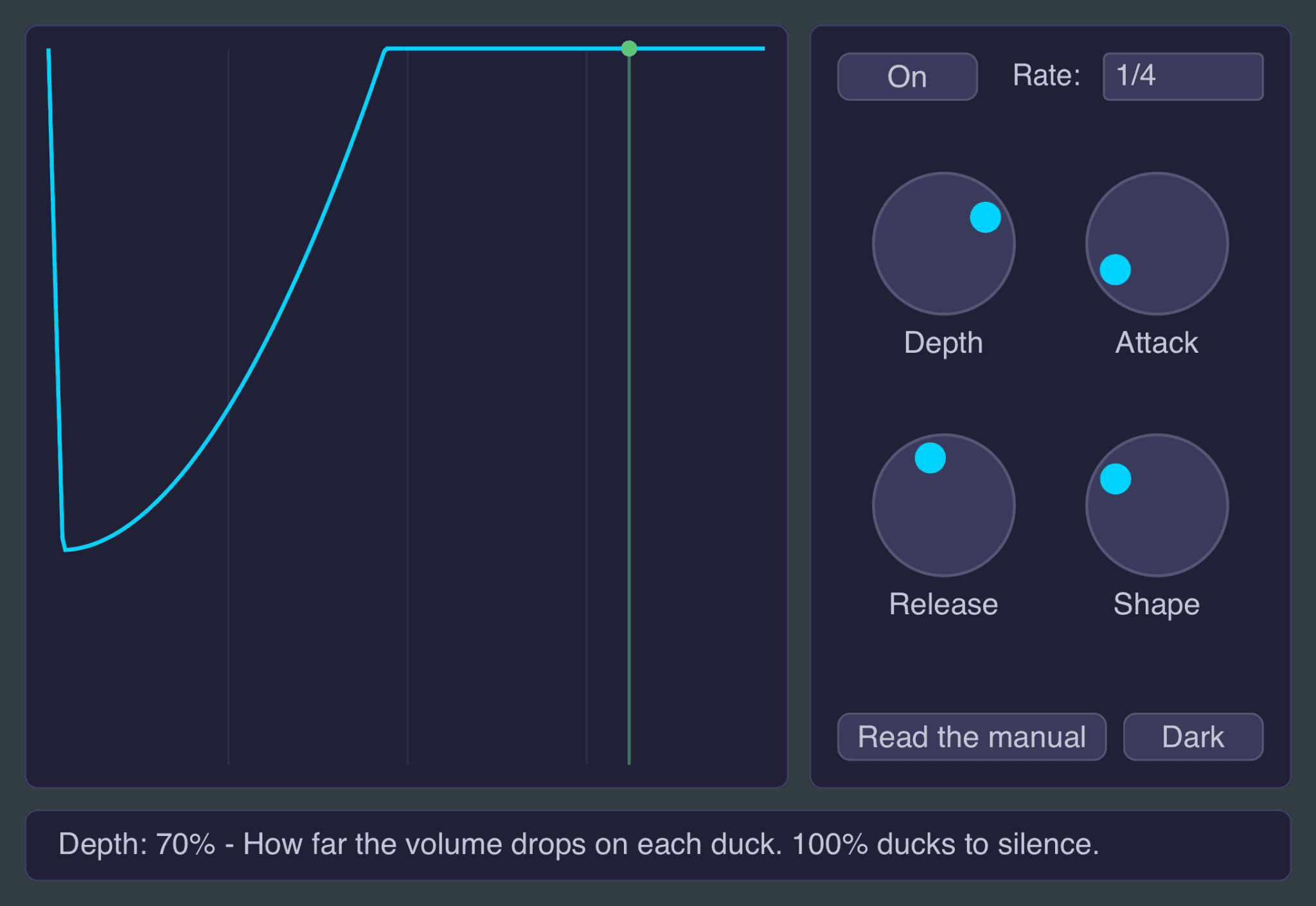
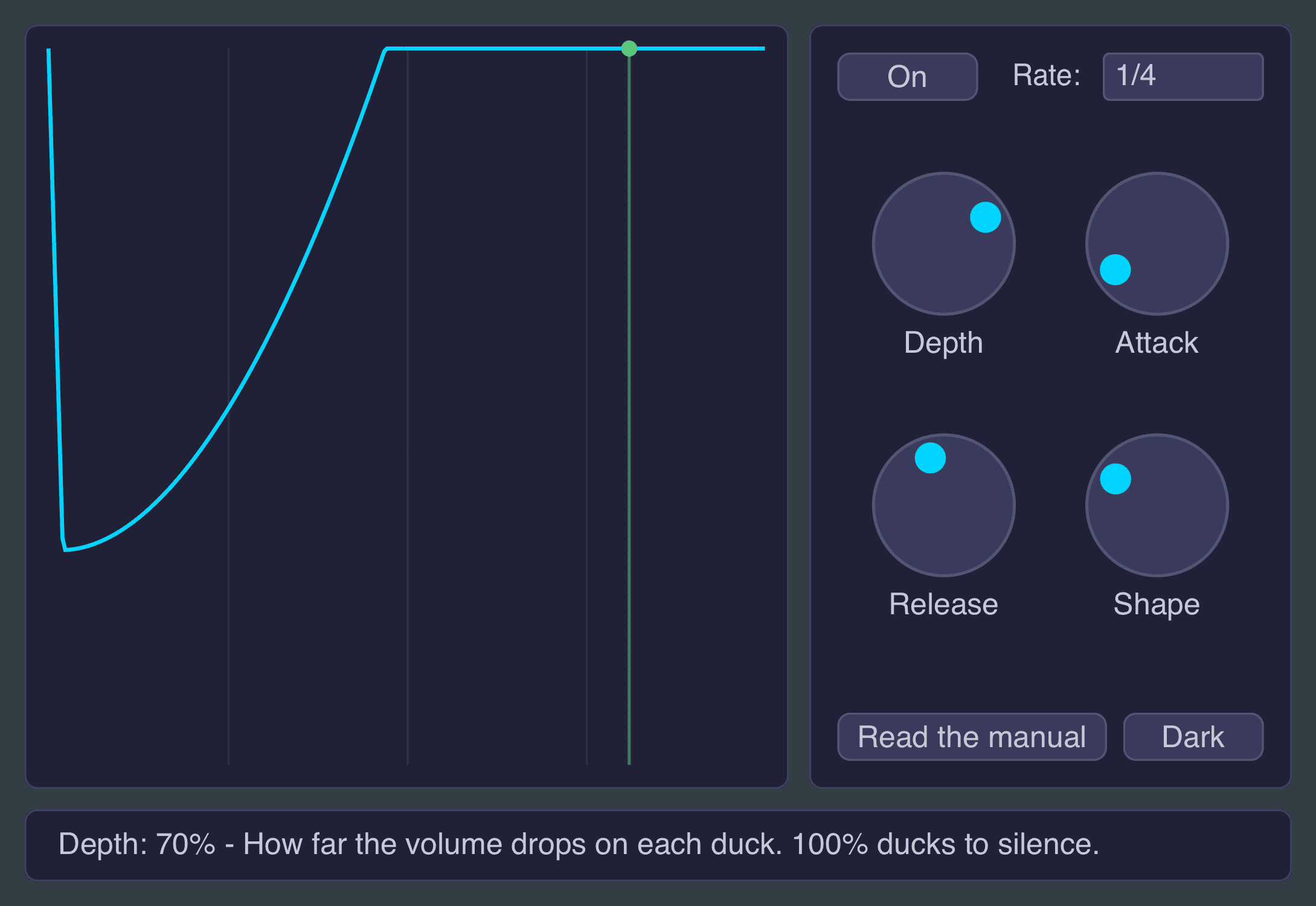
Little Duck uses four main controls to define the volume curve.
Depth determines how far the signal level drops. Lower values create subtle movement, while a setting of 100 percent can reduce the sound completely at the deepest point of each cycle.
Attack controls how quickly the volume falls after the cycle begins. Short settings produce a sharp drop, while longer values create a smoother movement.
Release determines how long the signal takes to return to its original level.
Shape changes the curvature of that recovery. Negative settings hold the signal lower for longer before it returns, creating the familiar EDM-style scoop. Positive values allow the sound to recover earlier and more gradually.
Attack and Release are calculated as percentages of the rhythmic cycle rather than fixed milliseconds. This means the overall pump shape remains consistent when changing from a slower rate to a faster one.
Five Tempo-Synced Rates
The Rate menu provides five musical divisions:
- 1/1 for one ducking cycle per bar
- 1/2 for slower rhythmic movement
- 1/4 for classic four-on-the-floor pumping
- 1/8 for faster rhythmic pulses
- 1/16 for rapid tremolo-style effects
The 1/4 setting is the most obvious choice for House, Techno, EDM and other styles based around a kick on every beat. Slower rates work well on pads and atmospheric layers, while faster divisions can transform percussion, vocals and sustained synths into rhythmic textures.
Best Uses
Bass and Kick Separation
Place Little Duck on a bass or sub-bass channel and select the 1/4 rate. Adjust the curve until the bass moves away from the position normally occupied by the kick.
This does not react to the actual kick waveform, so traditional sidechain compression may remain preferable when the drum pattern contains irregular accents. For steady club rhythms, however, Little Duck offers a much faster setup.
Synth Pads and Chords
Long pads can occupy too much space in a dense arrangement. Moderate ducking creates breathing room while adding rhythmic movement to otherwise static chords.
Use a lower Depth value when the effect should remain subtle, especially behind vocals or melodic leads.
Reverb and Delay Returns
Little Duck can be placed on an auxiliary effect channel to reduce reverb and delay during each beat. This keeps the dry signal clearer while allowing the ambience to return between rhythmic accents.
This technique works particularly well on vocals, synth leads and large atmospheric effects.
Creative Rhythmic Effects
The 1/8 and 1/16 settings can turn sustained sounds into synchronized pulses. Try them on noise, drones, field recordings or long vocal notes, then automate the Depth and Shape controls during transitions.
Visual Feedback
The central display shows the active ducking curve together with a synchronized scope representing the incoming audio.
The brighter section displays the signal passing through the effect, while the darker section indicates the amount being removed. A moving playhead follows the current position inside the cycle.
This visual feedback makes it easier to understand how Attack, Release and Shape affect the result. Your ears remain in charge, but the graph is useful when they request administrative assistance.
Compatibility
Little Duck is available as a VST3 plugin for Windows. macOS users can install either the VST3 or Audio Unit version.
The iPad edition runs as an AUv3 audio effect in compatible hosts including Logic Pro, GarageBand, AUM and Cubasis.
The desktop plugin can be used in compatible DAWs such as Studio One, Ableton Live, FL Studio, Cubase, Reaper and Bitwig Studio. Logic Pro users should install the Audio Unit edition.
Final Verdict
Little Duck is a practical free plugin for producers who want tempo-synchronized pumping without configuring a sidechain input.
Its five rates, flexible curve controls and clear visual display make it suitable for bass management, rhythmic pads, cleaner reverb returns and experimental volume shaping.
It cannot react to complex kick patterns like a true sidechain compressor, but for steady electronic rhythms it is faster, lighter and considerably less interested in cable management.
Download Little Duck from the official website:
https://snorkelaudio.com/little-duck/