3D Panner is a free spatial audio plugin developed by Almudio for producers, mixing engineers and sound designers who want to position sounds beyond conventional left and right panning.
Using binaural HRTF processing, the plugin can place mono or stereo sources in front of, behind, above, below or around the listener. Version 2.0.0 is currently available free of charge until August 15, 2026, and licenses activated during the promotion remain usable afterward.
What Is 3D Panner?
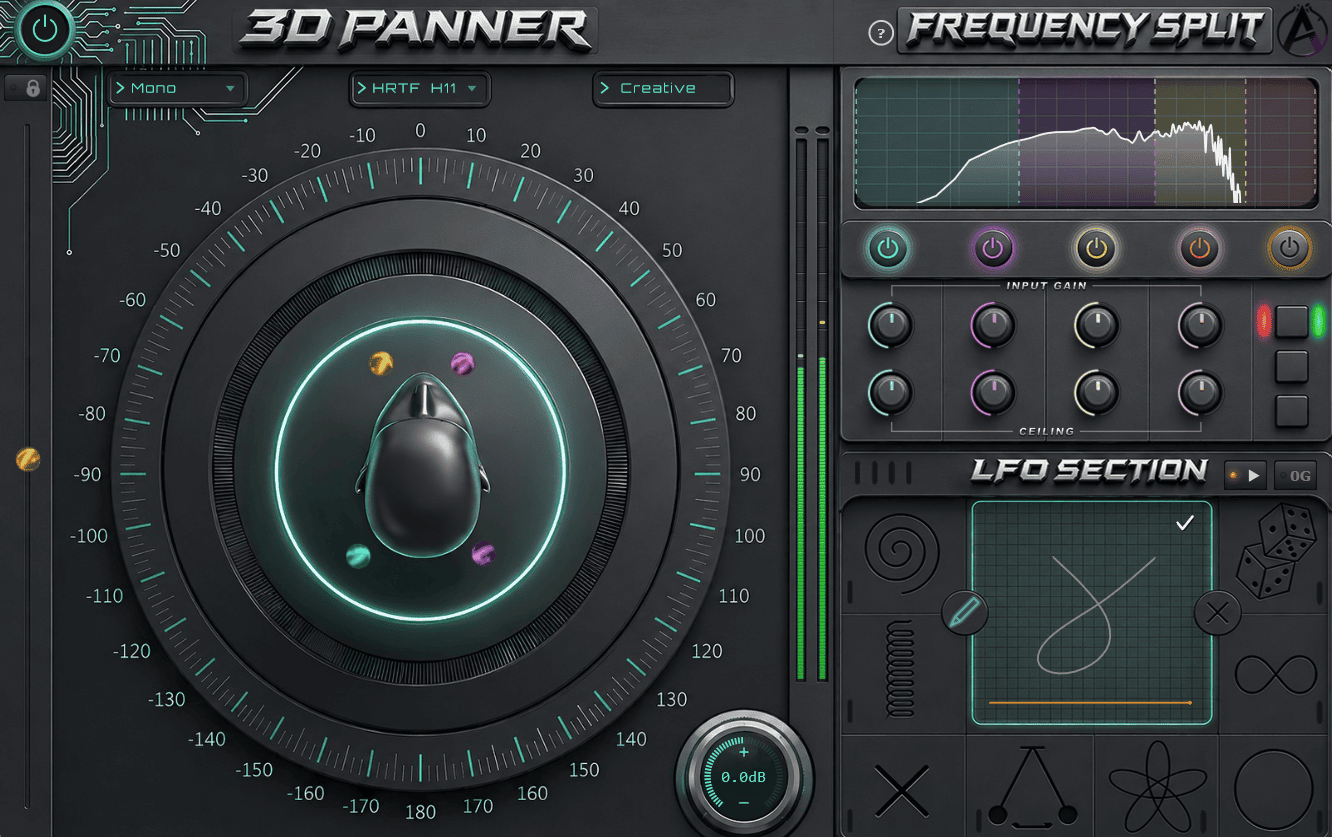
3D Panner is designed primarily for headphone-based immersive production. Its HRTF engine reproduces the directional cues created when sound interacts with the listener’s head and ears.
Instead of controlling only horizontal stereo position, producers can adjust height, distance and depth. A sound can appear close to the left ear, behind the listener, above the mix or moving continuously around the head.
This makes the plugin useful for electronic music, cinematic scoring, ASMR, podcasts, game audio, virtual reality and experimental sound design.
Main Features
- HRTF-based binaural spatial positioning
- Control over horizontal position, height and depth
- Support for mono and stereo audio sources
- Up to eight independently positioned frequency bands
- Built-in limiter for every frequency band
- Eight LFO movement patterns
- Custom drawable motion paths
- Tempo-synchronized and free-running modulation
- VST3 and Audio Unit formats
- Windows and macOS compatibility
Independent Frequency Positioning
One of the most original features is the ability to divide a sound into as many as eight frequency bands. Each band can then occupy a different position in the virtual space.
For example, the low frequencies of a synth can remain centred while its midrange moves behind the listener and its brighter harmonics orbit around the stereo field.
Each band also includes a limiter with input gain and ceiling controls. This helps keep complex spatial movements under control without adding a separate dynamics processor after every frequency split.
The feature is particularly useful for pads, drones, sound effects and processed vocals. Bass-heavy material should still be handled carefully, since extreme low-frequency movement can weaken mono compatibility.
Built-In Motion and Custom LFOs
3D Panner includes eight movement shapes for animating the sound automatically. Available patterns include circular, random, pendulum and more complex multidirectional movements.
Producers can adjust the speed, direction, size and orientation of each path. Motion can run freely or synchronize with the DAW tempo, making it suitable for both atmospheric sound design and rhythmically controlled production.
A custom drawing mode allows the user to create an original movement directly on the XY display. This can produce less predictable trajectories than a conventional sine or circular LFO.
Best Uses
Electronic Music
Use slow spatial movement on pads, arpeggios and effects to create width without relying exclusively on chorus or stereo delay.
Faster tempo-synchronized motion can add rhythmic energy to percussion, vocal chops and transition sounds. Keep the main kick, bass and lead elements more stable so the mix retains a clear centre.
Cinematic and Game Audio
Dialogue, ambience, Foley and effects can be positioned around the listener to create a stronger sense of environment. Footsteps can move from behind to the front, while drones and atmospheric sounds can occupy different heights.
The plugin is also useful for sketching immersive ideas on headphones before transferring a project into a larger surround or Dolby Atmos workflow.
ASMR and Spoken Content
Whispers, taps and close microphone recordings can be positioned near either ear or moved gradually around the listener. Subtle automation generally sounds more convincing than sending every sound on a full-speed journey around the skull.
Creative Sound Design
Frequency splitting can turn a simple noise recording or synth patch into a layered spatial texture. Place each frequency range in a different position, automate the movement and record the result as a new audio file.
Production Tips
Monitor with headphones: Binaural height and depth cues are easier to hear accurately through headphones.
Keep the low end stable: Leave sub-bass frequencies close to the centre while moving higher bands more aggressively.
Use slow movement first: Fast spatial modulation can become distracting, especially on vocals and important melodic parts.
Check mono compatibility: Compare the processed signal in stereo and mono before final export.
Resample complex movement: Record several spatial passes, then edit the strongest moments inside the arrangement.
Compatibility
3D Panner 2.0.0 is available in VST3 and Audio Unit formats for Windows and macOS. It requires Windows 10 or 11, or macOS 11 or later, with support for Intel and Apple Silicon Macs.
The developer recommends at least 8 GB of RAM and approximately 1 GB of available storage. The plugin can run inside compatible DAWs such as Studio One, Ableton Live, FL Studio, Cubase, Reaper, Bitwig Studio and Logic Pro.
A free Almudio account and an initial online activation are required. After activation, the plugin can operate offline.
Official Demo
Final Verdict
Almudio 3D Panner is an ambitious free plugin for producers who want to explore binaural positioning, frequency-dependent movement and immersive headphone mixes.
Its eight-band spatial splitting and drawable LFO paths provide considerably more flexibility than a standard stereo panner. It can be subtle enough for mix placement or extreme enough for cinematic and experimental sound design.
The only urgent detail is the calendar: the free offer ends on August 15, 2026. Apparently, even three-dimensional audio cannot escape a two-dimensional deadline.
Download 3D Panner from the official website:
https://almudio.com/3d-panner