
Moonwave FX Ripple: Free LFO Effect Plugin
Some plugins are made to fix problems. Others are made to wake up sounds that feel too still. Moonwave FX Ripple belongs to the second category. It is a compact LFO-based effect designed to add pulse, motion, and rhythmic energy to audio without forcing producers into a complicated modulation system.
Ripple focuses on one clear idea: take a static sound and make it move. A pad can start breathing, a synth can begin pulsing, a vocal chop can gain rhythm, a guitar can shift into tremolo-like motion, and a simple loop can suddenly feel more alive inside the mix.
What Is Moonwave FX Ripple?
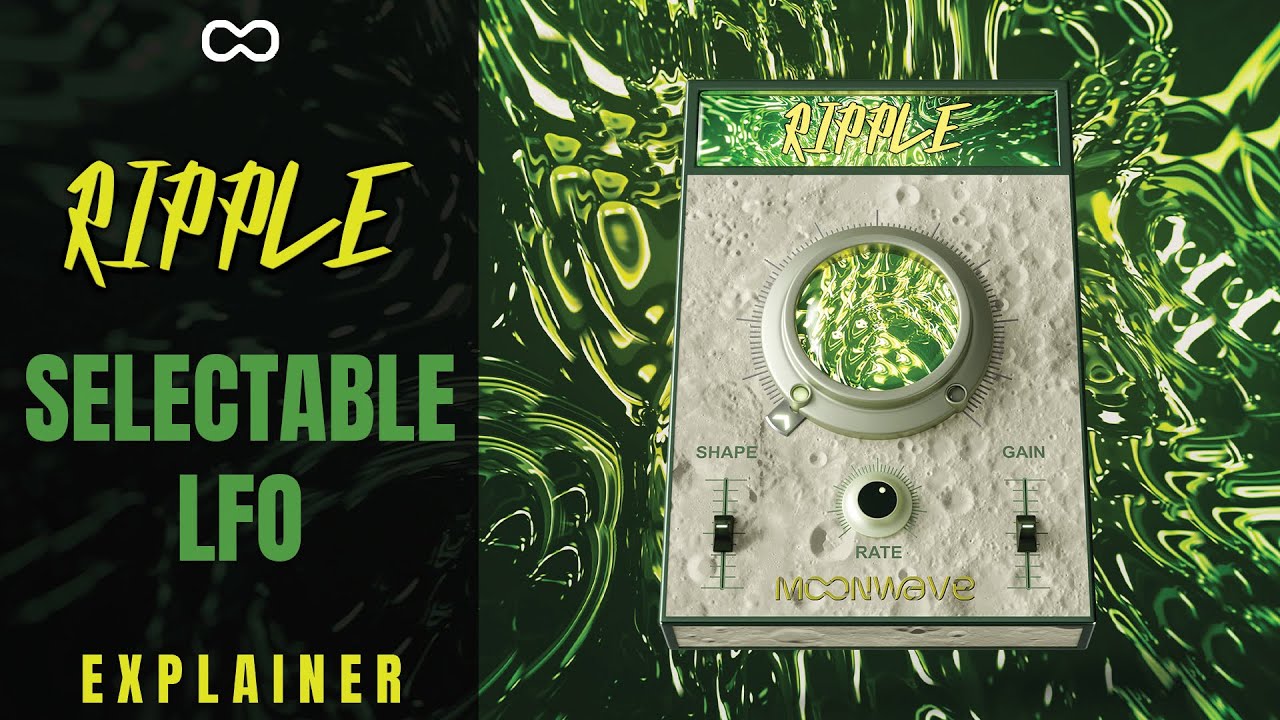
Ripple is a selective LFO effect plugin from Moonwave FX. It uses a Gain LFO engine to modulate volume over time, creating rhythmic movement that can range from subtle waves to stronger pulsing effects.
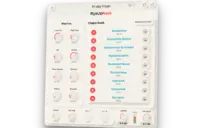
The plugin is designed around a streamlined workflow. Instead of presenting producers with a large modulation matrix, Ripple gives quick access to intensity, shape, and rate controls, supported by simple input and output gain sliders. The result is an effect that feels immediate, musical, and easy to place inside a production.
Video Overview
A Simple Plugin With a Very Musical Purpose
Ripple is not trying to replace a full modular modulation environment. Its strength is speed. Load it on a sound, adjust the movement, shape the pulse, balance the level, and the part starts to respond differently in the track.
This makes it especially useful during creative sessions. When a loop feels flat, Ripple can introduce groove. When a pad sits too still, it can add motion. When a synth line needs a more rhythmic feel, it can create a controlled volume pulse without having to draw automation manually.
Movement Without Losing the Sound
The best thing about a focused LFO effect is that it does not need to completely transform the source. Ripple can be used subtly, creating gentle movement that helps a sound breathe inside the mix. It can also be pushed harder for more obvious tremolo-style effects, pulsing rhythmic gates, or energetic electronic movement.
That flexibility makes it useful across different genres. It can add life to ambient textures, rhythm to house chords, movement to synthwave pads, instability to cinematic drones, or bounce to lo-fi samples.
Sound and Character
Ripple’s sound is based on amplitude modulation rather than heavy coloration. It does not aim to saturate, distort, or radically redesign the tone of the source. Its character comes from motion: how the signal rises, falls, breathes, trembles, and locks into the groove.
At gentle settings, it can create soft undulation, almost like a musical wave under the surface. On stronger settings, it can become more pronounced and rhythmic, giving synths, guitars, keys, pads, vocals, and loops a pulsing identity that can help them stand out in an arrangement.
From Subtle Waves to Strong Pulses
The intensity control determines how much movement is applied. The shape control changes the feel of the modulation curve, while the rate control defines how fast the movement happens. Together, these controls make Ripple useful for both delicate texture work and more obvious rhythmic effects.
This is where the plugin becomes creatively interesting. A slow rate can make a pad swell and drift. A faster rate can create dance-friendly pulse. A sharper shape can make the movement feel more percussive. A softer shape can keep the motion smooth and atmospheric.
Creative Uses in Music Production
Electronic Music and House Chords
Ripple can be very effective on chord stabs, pads, synth layers, and atmospheric loops. In house, deep house, melodic techno, and electronic music, it can help static harmonic parts feel more rhythmically connected to the groove.
Lo-Fi, Chill Beats, and Ambient Textures
For lo-fi and ambient producers, Ripple can add gentle motion to keys, samples, pads, and vinyl-textured layers. It is useful when a sound needs movement without becoming overly processed or too bright.
Synthwave, Cinematic, and Sound Design
Ripple also fits well in synthwave, cinematic music, and sound design. Slow LFO movement can add tension to drones, while more dramatic settings can create pulsing effects for transitions, risers, background textures, and retro-inspired synth parts.
Vocals, Guitars, and Experimental Effects
Used creatively, Ripple can bring rhythmic motion to vocal chops, clean guitars, background vocals, and experimental audio layers. It can function almost like a modern tremolo effect, but with a more direct producer-friendly interface.
Why Ripple Is Worth Trying
Ripple stands out because it solves a common creative problem with very little friction. Many tracks do not need another synth, another drum loop, or another plugin chain. Sometimes they simply need movement. Ripple gives producers a fast way to create that movement without interrupting the session.
It is also a useful alternative to manual volume automation. Drawing automation can be powerful, but it can slow down the writing process. Ripple lets producers experiment quickly, then decide whether the movement belongs in the final arrangement.
Who Is Ripple Best Suited For?
Ripple is best suited for producers, beatmakers, musicians, and sound designers who want an easy way to add rhythmic motion to static sounds. It will be especially useful for electronic music, house, synthwave, ambient, cinematic scoring, lo-fi, pop production, and experimental sound design.
It is also a good choice for beginners who want to understand how LFO-based movement can change a sound without diving into complex modulation routing. For experienced producers, it can become a quick utility effect for adding pulse, bounce, and movement in seconds.
Compatibility and Workflow
Moonwave FX Ripple is available for Windows and macOS in VST3 and AU formats. It works in major compatible DAWs such as Ableton Live, FL Studio, Logic Pro, Studio One, Cubase, Reaper, Bitwig Studio, and other hosts that support these plugin formats. It is not intended for Pro Tools compatibility.
The workflow is simple: insert Ripple on a track, choose the LFO movement, adjust the intensity, shape the curve, set the rate, and balance the input and output levels. It is quick enough for production sketches, but musical enough to remain useful in finished mixes.
Official Website and Download Link
Ripple is available from the official Moonwave FX website. At the time of writing, it is also available as a limited-time free download through VST Alarm until June 7, 2026.
Official product page:
https://moonwavefx.com/effects/ripple-selective-lfo/
Limited-time free download:
https://vstalarm.com/product/ripple-by-moonwave-fx-limited-time-free/
Conclusion: A Fast Way to Add Pulse, Groove, and Life
Moonwave FX Ripple is a focused creative effect with a clear purpose: making static sounds move. Its Gain LFO engine, simple controls, and rhythmic behavior make it a useful tool for producers who want instant motion without building complex automation or modulation chains.
For pads, synths, guitars, vocals, loops, textures, and atmospheric layers, Ripple can bring just enough movement to make a production feel more alive. Add it to your plugin folder, try it on a sound that feels too still, and let the motion decide where the track wants to go next.
Product Description
Moonwave FX Ripple is a selective LFO effect plugin for Windows and macOS. It uses a Gain LFO engine to create pulsing movement, tremolo-style motion, rhythmic waves, and evolving textures. Ripple includes intensity, shape, and rate controls, plus input and output gain sliders for quick level balancing. It is available in VST3 and AU formats.
Official website or download link:
https://moonwavefx.com/effects/ripple-selective-lfo/