
Free DAW
MusE: A Free Linux DAW for Audio and MIDI Production
A complete open-source production environment combining multitrack recording, detailed MIDI editing, automation, mixing and Linux plugin support.
MusE is a free and open-source digital audio workstation developed by the MusE development team. Originally created as a MIDI sequencer, it has evolved into a broader production environment covering recording, composition, editing, mixing and plugin-based sound design.
The software is designed primarily for GNU/Linux and is published under the GNU General Public License. There is no paid edition, subscription, activation system or artificial track restriction separating users from its main production features.
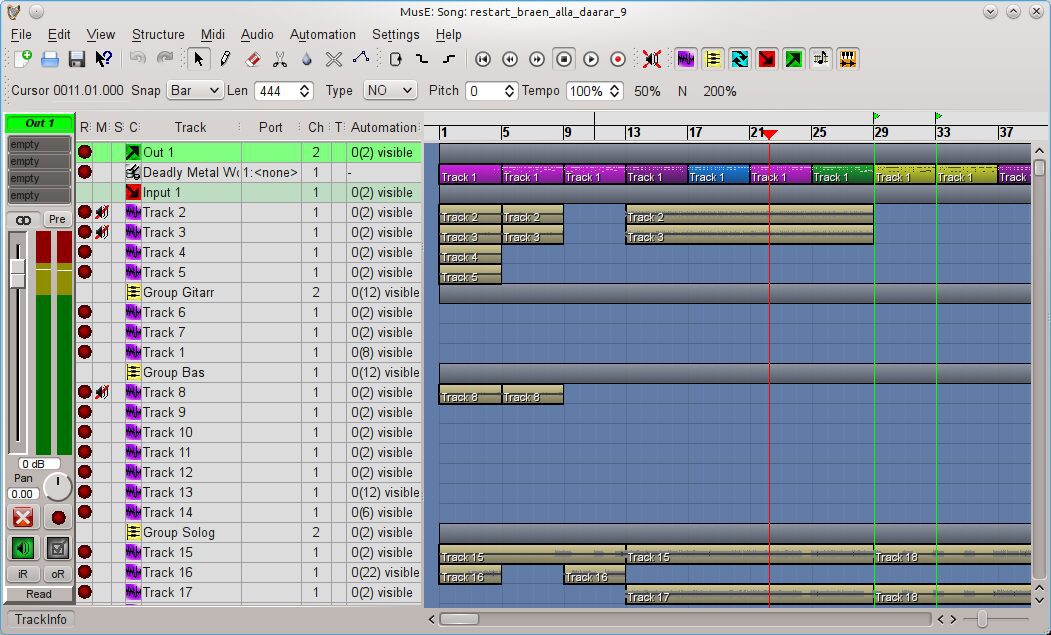
MusE is particularly relevant for Linux musicians who need strong MIDI sequencing alongside conventional audio recording. Its workflow includes a horizontal arranger, several dedicated MIDI editors, wave tracks, group channels, auxiliary sends, synthesizer tracks and detailed automation.
| Developer | MusE development team |
|---|---|
| Software type | Audio and MIDI digital audio workstation |
| Platform | GNU/Linux, with an experimental FreeBSD port |
| Audio recording | Realtime mono and stereo multitrack recording |
| MIDI production | Realtime recording, piano roll, drum editor, list editor and score editor |
| Plugin support | LADSPA, DSSI, LV2 and Linux VST2 |
| Included instruments | FluidSynth SoundFont player, Deicsonze FM synth and additional internal synths |
| Audio system | JACK, PulseAudio and Linux MIDI through ALSA or JACK MIDI |
| Price | Free and open source |
Audio and MIDI Workflow
MusE organizes projects around tracks and parts. MIDI tracks contain note and controller information, drum tracks provide a dedicated percussion workflow, and wave tracks handle recorded or imported audio.
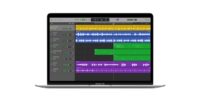
The main arranger follows a familiar horizontal timeline. Producers can move, copy, clone and edit individual parts while keeping the original musical or audio material organized inside the project.
Audio input tracks route signals from an interface into the session, while output tracks connect the project to the monitoring system. Group and auxiliary tracks provide additional routing for submixes, shared effects and more structured mixing sessions.
Multitrack Audio Recording
MusE can record several mono or stereo audio sources in realtime. A typical recording setup uses an audio input track connected to a physical interface input and a wave track armed to capture the performance.
Recorded files are stored alongside the MusE project, making the project folder an important part of session management. The software recommends creating a dedicated subfolder when starting projects that will contain recorded audio.
This workflow is suitable for vocals, guitars, synthesizers, podcasts and other external sources. JACK remains the preferred audio system for low-latency recording, while PulseAudio can provide a simpler option for editing and mixing when realtime monitoring is less important.
Detailed MIDI Editing
MIDI remains one of MusE’s strongest areas. The software includes realtime MIDI recording, file import and export, input filtering, external hardware support and several editing environments.
The piano roll handles conventional melodic and harmonic programming. A dedicated drum editor provides a clearer view for percussion, while the list editor displays individual events numerically. Producers working with traditional notation can also use the score editor.
MIDI tracks can control external synthesizers, drum machines or software instruments loaded inside MusE. MIDI transformer tools and external scripting support provide additional options for producers who want to reshape performances or automate repetitive editing tasks.
Internal Synths and Plugin Support
MusE includes internal software instruments such as a FluidSynth-based SoundFont player and Deicsonze, an FM synthesizer inspired by the Yamaha DX11. These instruments provide a starting point for MIDI production without requiring a separate commercial collection.
Third-party plugin support includes LADSPA effects and DSSI, LV2 and Linux VST2 instruments or effects. Plugins can be inserted on input, output, group, wave, synth and auxiliary tracks.
Each audio effects rack currently accommodates up to eight plugins. Plugin parameters can be automated, and MusE can display either a plugin’s native interface or a generic control panel when required.
MusE does not officially provide native VST3 hosting. Windows VST plugins are also not supported directly simply because they use the VST name. Producers should choose plugins built for Linux and one of the formats supported by the application.
Mixing, Routing and Automation
The mixer displays the different track types as channel strips with level, pan, mute, solo, routing and effects controls. Two separate mixer views can be configured, which is useful for separating recording channels from buses, synthesizers or effects returns.
Almost every graphical audio control can be automated. This includes track volume, panning, plugin parameters and synthesizer controls. MusE offers Off, Read, Touch, Latch and Write automation modes, along with editable automation graphs in the arranger.
Physical MIDI controllers can also be assigned to mixer and plugin parameters through a MIDI Learn function. This makes MusE suitable for hands-on mixing, live parameter recording and hardware-centered studio setups.
Best Uses
- Linux-based music production
- MIDI composition and sequencing
- Electronic music and beatmaking
- Recording vocals and instruments
- External synthesizer control
- SoundFont-based production
- Songwriting and arrangement
- Detailed automation and hardware control
Compatibility and Installation
MusE is primarily developed for GNU/Linux. Most major Linux distributions provide an installable package through their software repositories, although these packages may not always contain the newest available version.
An official distro-independent AppImage is also available. Users can download it, make the file executable and launch the application without performing a traditional system-wide installation.
MusE supports audio through JACK and PulseAudio, while MIDI hardware and applications can connect through ALSA MIDI or JACK MIDI. A low-latency or realtime Linux configuration is recommended for more demanding recording sessions.
No online account, subscription, product manager or activation code is required.
Main Limitations
- No official Windows or macOS version
- No native VST3 plugin hosting
- Linux-compatible plugins are required
- Each effects rack is limited to eight plugin slots
- Low-latency JACK configuration can be technical for beginners
- The latest stable release is older than many competing DAWs
- The interface is functional but less polished than leading commercial platforms
Final Verdict
MusE is a capable free DAW for Linux users who need both audio recording and serious MIDI sequencing. Its collection of editors, flexible track types, plugin automation and external hardware support gives it considerably more depth than a basic recording application.
Its strongest audience includes MIDI composers, electronic producers, Linux home-studio musicians and artists working with external synthesizers. The absence of Windows, macOS and native VST3 support limits its wider appeal, while JACK configuration may require some patience.
MusE occasionally expects the producer to understand the computer as well as the chord progression, but at least neither requires a subscription.
For musicians already comfortable with Linux, MusE remains a genuinely free and flexible production environment worth exploring.