By using this site, you agree to the Privacy Policy and Terms of Use.
Accept
AudiartistAudiartistAudiartist
Notification Show More
Font ResizerAa
  • Home
  • Music
    • New music release
    • We love
    • Afro Music
    • Cinematic
    • Classical Music
    • Electro / House
    • Jazz
    • Latina Music
    • Lo-fi
    • Pop Music
    • Rock
    • Synthwave
  • Music Production
  • Music Promotion
  • BREAKING NEWS
  • Freebie (VST, Samples, Presets)
    • FREE VST
    • Free Sample Pack
    • Free Kontakt sound
    • Free Serum Preset
    • Free Preset
    • Free FL Studio template
  • Free music submission
    • Submit your music for free with DailyPlaylist
    • Our playlists
    • Afro House
    • Afro music
    • Christmas Music
    • Cinematic Music
    • Classical Music
    • Dance Music
    • Electro Music
    • Hard Rock
    • House Music
    • Latina Music
    • Lo-fi
    • Mainstream
    • Pop Music
    • RAP & Hip Hop
    • Reggaeton
    • Rock Music
    • Synthwave
Search
Artists
  • Nodachi
  • Sebastian McQueen
  • Spycho Fox
  • Snake Russell
  • Mister BoO
  • Sébastien BACCI
  • Carlito Home
Reading: Panning and Stereo Imaging in Music Production
Share
Font ResizerAa
AudiartistAudiartist
  • Home
  • Music
  • Music Production
  • Music Promotion
  • BREAKING NEWS
  • Freebie (VST, Samples, Presets)
  • Free music submission
Search
  • Home
  • Music
    • New music release
    • We love
    • Afro Music
    • Cinematic
    • Classical Music
    • Electro / House
    • Jazz
    • Latina Music
    • Lo-fi
    • Pop Music
    • Rock
    • Synthwave
  • Music Production
  • Music Promotion
  • BREAKING NEWS
  • Freebie (VST, Samples, Presets)
    • FREE VST
    • Free Sample Pack
    • Free Kontakt sound
    • Free Serum Preset
    • Free Preset
    • Free FL Studio template
  • Free music submission
    • Submit your music for free with DailyPlaylist
    • Our playlists
    • Afro House
    • Afro music
    • Christmas Music
    • Cinematic Music
    • Classical Music
    • Dance Music
    • Electro Music
    • Hard Rock
    • House Music
    • Latina Music
    • Lo-fi
    • Mainstream
    • Pop Music
    • RAP & Hip Hop
    • Reggaeton
    • Rock Music
    • Synthwave
Have an existing account? Sign In
Follow US
Audiartist > Blog > Music Production > Panning and Stereo Imaging in Music Production
Music Production

Panning and Stereo Imaging in Music Production

audiartist
Last updated: 1 avril 2025 16h38
audiartist
Published: 1 avril 2025
Share

Panning and Stereo Imaging in Music Production: How to Create Width and Separation in Your Mix

Introduction
A great mix isn’t just about EQ and compression—it’s about space. Stereo space. Learning how to properly use panning and stereo imaging helps you place instruments across the left–right field, creating clarity, width, and emotional depth. Whether you’re mixing house, trap, pop, or ambient, this guide will teach you how to make your tracks sound bigger, wider, and more immersive.


What Is Panning?
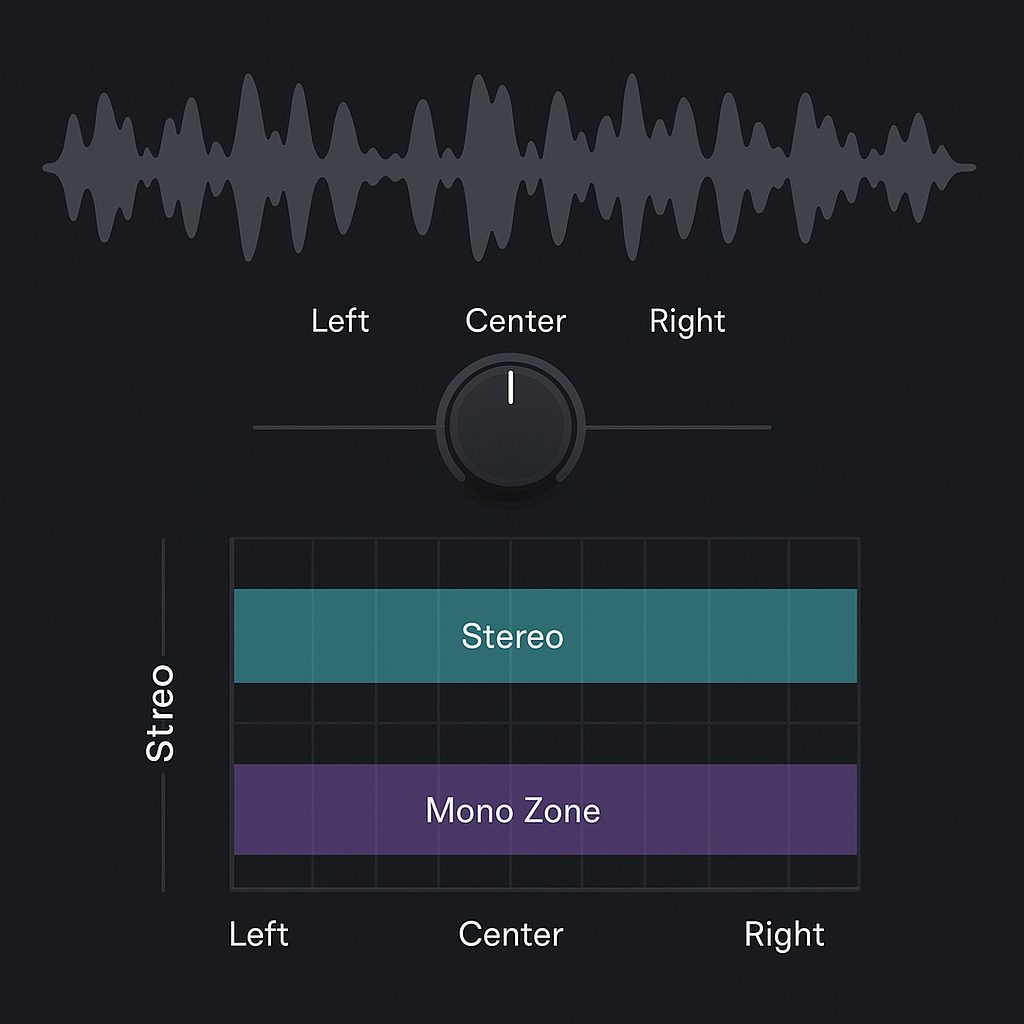
Panning refers to placing a sound between the left and right speakers in the stereo field. In most DAWs, every channel has a pan knob that lets you send a signal more to the left, center, or right.

Why panning matters:

  • Prevents frequency clashes in the center
  • Creates a wide, open mix
  • Mimics how we hear instruments in real space
  • Adds realism and movement

Basic Panning Guidelines for Beginners

  • Center (Mono Zone): Kick, snare, bass, lead vocals
  • Slightly off-center: Backing vocals, guitars, synths
  • Wide left/right: Hi-hats, shakers, ambient FX, keys, pads

🎯 Tip: Always check your mix in mono to make sure it still holds up.


What Is Stereo Imaging?
Stereo imaging enhances or manipulates the width and position of sounds in the stereo field. While panning places a mono signal left or right, stereo imaging can expand stereo signals or add artificial width to mono sounds.

Stereo imaging tools can:

  • Spread a stereo signal wider
  • Narrow overly wide sounds
  • Balance uneven stereo fields
  • Add dimension to synths, pads, or FX

Tools for Stereo Imaging

✅ DAW Panners – Basic L/R control
✅ Stereo Imaging Plugins – Widen or narrow stereo width
✅ Mid/Side EQ – Treat center (mono) and side (stereo) frequencies separately
✅ Reverb & Delay – Add width naturally
✅ Double Tracking – Record two takes and pan hard L/R

Free and Paid Stereo Imaging Plugins

Free Plugins

  • Ozone Imager – Visual stereo width control
    https://www.izotope.com/en/products/ozone-imager.html
  • A1StereoControl – Simple and powerful width adjustment
    https://www.alexhilton.net/A1AUDIO/index.php/a1stereocontrol
  • Voxengo Stereo Touch – Converts mono to stereo using delay/phase
    https://www.voxengo.com/product/stereotouch/

Paid Plugins

  • Waves S1 Stereo Imager – Industry standard for stereo balance
    https://www.waves.com/plugins/s1-stereo-imager
  • Nugen Stereoizer – Clean, precise stereo enhancement
    https://nugenaudio.com/stereoizer/
  • FabFilter Pro-Q 3 (Mid/Side Mode) – Use for spatial EQ control
    https://www.fabfilter.com/products/pro-q-3-equalizer-plug-in

Creative Panning & Imaging Techniques

  • LCR Mixing – Place sounds hard Left, Center, or Right for maximum space
  • Automation – Pan FX or risers during breakdowns/build-ups
  • Panning Percussion – Give bounce and groove to rhythm
  • Fake Width – Use stereo delays or phase tricks for mono synths
  • Dynamic Stereo Movement – Modulate pan or stereo field over time

Common Mistakes to Avoid

  • Too much width → Phase issues, weak mono compatibility
  • Unbalanced field → Mix feels lopsided
  • Over-reliance on stereo plugins → Bad translation to phones/small speakers
  • Panning bass elements → Weak low-end

Conclusion
Panning and stereo imaging give your mix space to breathe. Instead of stacking sounds on top of each other, spread them out—and let them play off each other. Whether it’s subtle panning or creative stereo tricks, these tools help your music feel wide, pro, and exciting. The stereo field is your canvas—paint with intention.

Download a free stereo plugin and start experimenting today.
Freebie (Vst, Preset, Sample)

  • Freebie
  • Free FL Studio template
  • Free Kontakt sound
  • Free Preset
  • Free Sample Pack
  • Free Serum Preset
  • FREE VST
TAGGED:beginner panning guidehow to pan instrumentsLCR panningmono vs stereo mixmusic mix separationpanning in music productionstereo imager pluginsstereo imaging tutorialstereo width tipswiden synths in mix
Share This Article
Facebook Whatsapp Whatsapp Tumblr Telegram Threads Bluesky Email Copy Link Print

Lasts Posts

Top VST Plugins 2026 by Genre: 25 Essential Plugins for Music Producers
Music Production
ModeAudio Ambient Cassette Loops free royalty-free sample pack
Ambient Cassette Loops: 11 Free Royalty-Free Loops by ModeAudio
Free Sample Pack Freebie
MAIM free MP3 distortion VST3 plugin
MAIM: A Free MP3 Distortion VST3 Plugin for Digital Glitch and Lo-Fi Sound Design
FREE VST Freebie
Tape Fiasco free glitch multi-effect VST3 plugin
Tape Fiasco: A Free Glitch Multi-Effect VST3 Plugin for Creative Sound Design
FREE VST Freebie

Buy Me A Coffee


Buy me a coffee

Popular

Jeesonic EQ Pro free dynamic EQ VST plugin interface
Jeesonic EQ Pro: A Free Dynamic EQ VST Plugin for Surgical Mixing and Mastering
FREE VST Freebie
FAULTLINE by X-Audio free glitch VST plugin interface
FAULTLINE by X-Audio: A Free Glitch VST Plugin for Beat Repeat, Freeze and Digital Destruction
FREE VST Freebie
MARYLANE Enter A Darker Rock Era With “Mirror Maze”
Hard Rock Music New music release Rock We love
ABYZOR Genesis free MIDI generator VST plugin interface
ABYZOR Genesis: A Free MIDI Generator VST Plugin for Fast Melodies, Basslines and Chord Progressions
FREE VST Freebie

Find Us on Socials

News

  • Top VST Plugins 2026 by Genre: 25 Essential Plugins for Music Producers
  • Ambient Cassette Loops: 11 Free Royalty-Free Loops by ModeAudio
  • MAIM: A Free MP3 Distortion VST3 Plugin for Digital Glitch and Lo-Fi Sound Design
  • Tape Fiasco: A Free Glitch Multi-Effect VST3 Plugin for Creative Sound Design
  • Peak Time Techno Essentials: 20 Free Serum 2 Presets by Frecta Audio

You Might Also Like

Music Production

Mastering the Art of Home Studio: Tutorials for Beginners

24 mai 2024
FREE VSTMusic Production

Free Autotune VST Plugins: The Free VST Options Worth Trying for Modern Vocals.

23 avril 2026
Music Production

Compression Explained Simply for New Producers

28 avril 2026
Music Production

The Best Synthesizers on the Market for Beginner Artists: A Comprehensive Guide

24 mai 2024
Previous Next
© Audiartist. All Rights Reserved.
Welcome Back!

Sign in to your account

Username or Email Address
Password

Lost your password?