
Spitfire Symphony Orchestra Discover: A Free Kontakt Orchestra
Explore 44 orchestral instruments, 74 techniques and cinematic sounds recorded at AIR Studios, all inside the free Kontakt Player.
Spitfire Symphony Orchestra Discover is a free orchestral Kontakt library created for producers, songwriters and composers who want to begin writing cinematic music without purchasing a large premium collection.
The library brings together strings, brass, woodwinds, percussion, piano, harp and several mixed ensemble patches. Its streamlined design provides the essential orchestral sounds and articulations needed to sketch arrangements, create dramatic layers and learn the foundations of orchestration.
All sounds were selected from Spitfire Symphony Orchestra, the developer’s flagship orchestral collection recorded at AIR Studios Lyndhurst Hall in London.
Completely free: Spitfire Symphony Orchestra Discover is a complete free library rather than a time-limited demo. It works in the free Kontakt Player, although Spitfire Audio and Native Instruments accounts are required for installation and activation.
What Is Spitfire Symphony Orchestra Discover?
Spitfire Symphony Orchestra Discover is a compact version of the much larger Spitfire Symphony Orchestra collection. It has been designed to provide the core sections of a symphonic orchestra inside a more accessible 5.68 GB library.
The collection contains 44 instruments and ensembles with 74 playing techniques. These include sustained notes, short articulations, plucked strings, tremolos and performance patches that respond to the way notes are played.
It also includes mixed orchestral patches that allow composers to create full arrangements quickly without loading every instrumental section separately.
Main advantage: The library covers all four principal orchestral families while remaining significantly smaller and easier to navigate than a complete professional scoring collection.
44 Instruments and Ensembles
The library provides a broad orchestral palette covering strings, woodwinds, brass, tuned percussion and unpitched percussion.
Strings
- Solo violin
- Sixteen violins
- Twelve violas
- Ten cellos
- Eight double basses
Woodwinds
- Woodwind ensemble
- Solo piccolo and flute
- Solo clarinet and bass clarinet
- Solo oboe and cor anglais
- Solo bassoon
Brass
- Two trumpets
- Two horns and solo horn
- Two tenor trombones
- Solo bass trombone
- Solo tuba
Additional instruments: Grand piano, harp, celeste, glockenspiel, marimba, vibraphone, xylophone, timpani, orchestral drums, cymbals, percussion and mixed full-orchestra patches.
Essential Orchestral Techniques
An orchestral articulation describes how a note is performed. The same instrument can sound smooth, short, aggressive, delicate or rhythmic depending on the selected technique.
Spitfire Symphony Orchestra Discover includes several important articulations for building realistic and expressive arrangements.
Long: Sustained notes for melodies, chords and evolving harmonic layers.
Spiccato: Short and lively bowed notes suitable for rhythmic string patterns.
Pizzicato: Plucked string performances with a bright and percussive attack.
Tremolo: Rapidly repeated notes that can create tension and dramatic movement.
Staccato: Short, defined notes for rhythmic brass, woodwind and orchestral accents.
Performance: Adaptive patches designed to respond to the playing style and create smoother transitions.
Orchestrator Long: Layered sustained sounds combining several orchestral sections.
Orchestrator Shorts: Layered short notes for cinematic rhythm, accents and immediate impact.
Recorded at AIR Studios Lyndhurst Hall
The source recordings were created at AIR Studios Lyndhurst Hall, a famous London scoring venue used for film, television and game music.
Discover provides one selected microphone signal rather than the four microphone perspectives included with the complete Spitfire Symphony Orchestra.
This limitation reduces the amount of storage and mixing complexity. Producers receive a balanced orchestral sound without needing to combine close, room and ambient microphone positions manually.
Workflow benefit: A single microphone mix makes the library faster to load and easier to place inside an arrangement, especially for producers who are still learning orchestral mixing.
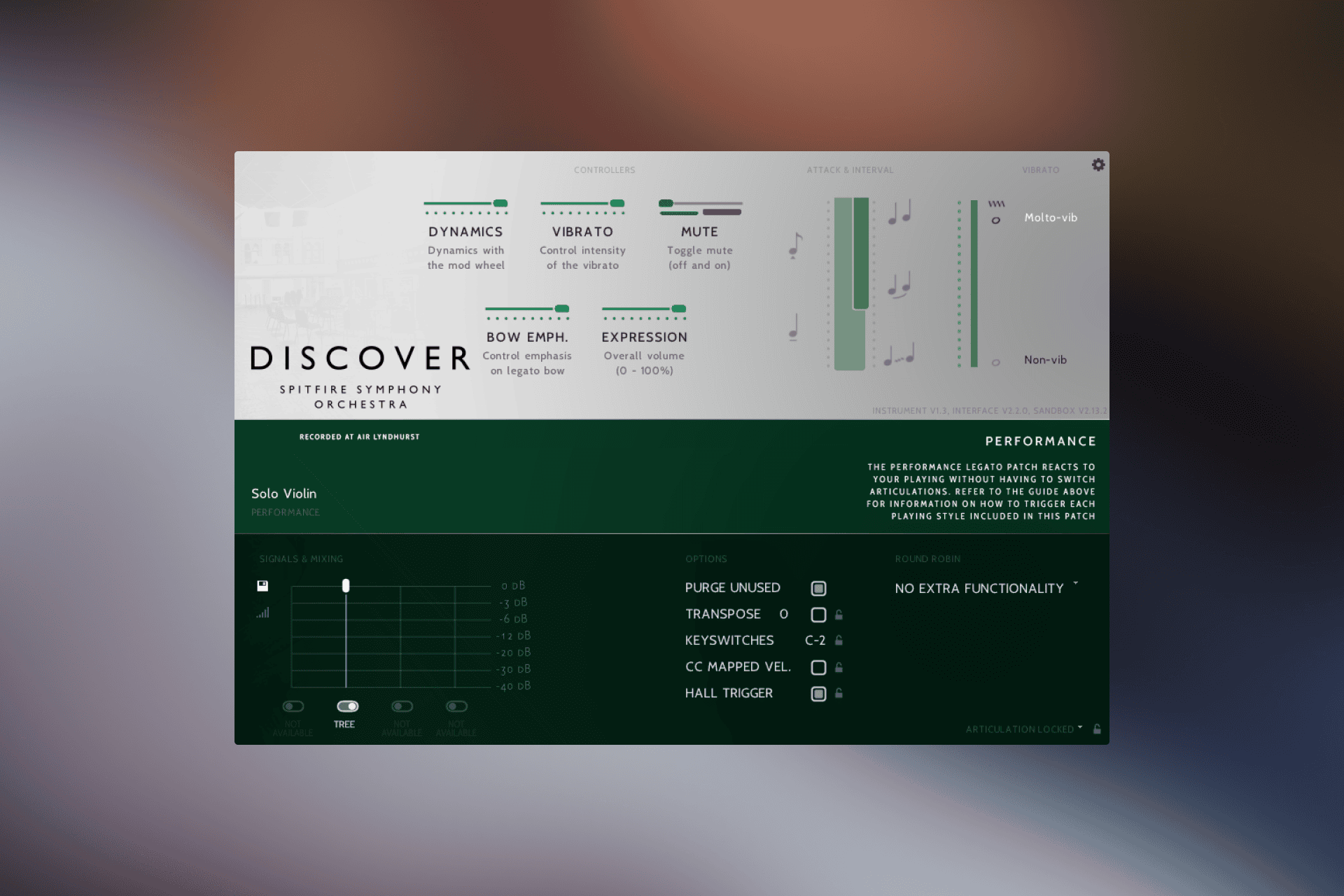
Performance and Expression Controls
The Kontakt interface provides direct access to the most important performance parameters. Available controls vary according to the selected instrument and articulation.
The dynamics control can be assigned to the modulation wheel, allowing performers to move between softer and stronger dynamic layers while playing or recording MIDI automation.
Expression adjusts the general performance volume without changing the selected dynamic layer. This is useful for shaping phrases and creating gradual fades.
Additional controls can include vibrato, bow emphasis, attack and release behaviour. These options provide enough flexibility to make a basic MIDI performance feel more musical without exposing every advanced parameter found in the full collection.
Performance tip: Do not rely only on note velocity. Record or automate dynamics and expression separately to create phrases that grow, breathe and relax instead of sounding like an orchestra operated by a very determined spreadsheet.
Official Getting Started Video
Spitfire Audio co-founder Paul Thomson demonstrates the library’s interface, instrument selection and essential controls in the official walkthrough below.
Spitfire Symphony Orchestra Discover Walkthrough
Best Uses
Cinematic composition: Create orchestral sketches, emotional themes and dramatic arrangements for film, television and online media.
Game music: Build exploration themes, battle cues, atmospheric sections and interactive musical ideas.
Pop production: Add strings, brass, piano or orchestral percussion behind vocals and contemporary arrangements.
Hip-hop and electronic music: Layer orchestral textures with drums, synthesizers and sampled production.
Songwriting: Test melodies and chord progressions with realistic instrumental colours before arranging for live musicians.
Orchestration practice: Learn how strings, woodwinds, brass and percussion interact without purchasing several separate libraries.
Writing with the Mixed Orchestra Patches
The Full Orchestra and Orchestrator patches are useful when speed matters more than individual section control.
A composer can play broad chords, short rhythmic patterns or cinematic accents from one Kontakt instance. These patches are practical for sketching an idea before replacing individual notes with separate string, brass and woodwind instruments.
They can also remain in the final production when a fast, blended orchestral sound is more important than detailed orchestration.
Arrangement tip: Begin with the mixed orchestra patch to establish the harmony and rhythm. Once the idea works, separate the important lines across individual sections to improve clarity, expression and realism.
Free Orchestral Composition Course
Spitfire Audio also includes access to a free introductory orchestration course produced with ThinkSpace Education.
The course is presented by Emmy-winning composer Guy Michelmore and covers the basic principles of writing for orchestra. It includes exercises, templates and example projects for Ableton Live, Cubase and Logic Pro.
This makes Discover more than a folder of orchestral samples. New composers receive both the sounds and a structured starting point for understanding how to use them.
Kontakt Player Compatibility
Spitfire Symphony Orchestra Discover runs in the free Kontakt Player. Purchasing the full edition of Kontakt is not required.
- Kontakt requirement: Kontakt Player 7.5.x or later
- Library size: 5.68 GB
- Content: 44 instruments and 74 techniques
- Microphone signals: One
- macOS: macOS 11 to macOS 26
- Mac processors: Intel and Apple Silicon
- Windows: Windows 10 or Windows 11
- Processor: Intel Core i5 or equivalent
- RAM: 4 GB minimum
- Recommended RAM: 6 GB for larger Kontakt instruments
- NKS: Compatible
Kontakt Player can run as a standalone application or as a plugin inside compatible hosts, including Studio One, Ableton Live, Cubase, Logic Pro, FL Studio, Pro Tools, GarageBand and Reaper.
How to Download and Install the Library
The installation process uses both the Spitfire Audio App and Native Access. A Spitfire Audio account and a Native Instruments account are required.
- Visit the official Spitfire Symphony Orchestra Discover page.
- Create or sign in to a Spitfire Audio account.
- Subscribe with an email address to access the free product.
- Install and open the Spitfire Audio App.
- Find Discover under My Products and download the library.
- Install Native Access and the free Kontakt Player.
- Copy the supplied serial number from the Spitfire Audio account.
- Select Add Serial inside Native Access and enter the code.
- Locate the downloaded Discover folder when Native Access requests its location.
- Open Kontakt Player and load the library.
Is Spitfire Symphony Orchestra Discover Really Free?
The official Spitfire Audio store lists the library as free. It is not restricted by a short trial period and does not require the paid edition of Kontakt.
Access is provided to Spitfire Audio email subscribers. Users must also create the accounts required to download, register and activate the library.
The free edition is intentionally smaller than the complete Spitfire Symphony Orchestra. Discover includes 44 instruments, 74 techniques and one microphone signal, while the complete library provides substantially more articulations, solo instruments, legatos and microphone positions.
Final Verdict
Spitfire Symphony Orchestra Discover is one of the most complete free starting points for composers who want a traditional orchestral palette inside Kontakt Player.
Its 44 instruments cover the essential string, woodwind, brass and percussion sections, while the mixed orchestral patches make it possible to sketch ideas quickly.
The single microphone signal and reduced articulation list limit the level of detailed control compared with the full Spitfire Symphony Orchestra. However, these restrictions also make Discover easier to understand and less demanding on storage.
For cinematic sketches, songwriting, orchestration practice and hybrid production, it provides an impressive amount of usable material for exactly zero euros. The only thing missing is a conductor, although most DAWs already have enough people waving their hands at them.
Download Spitfire Symphony Orchestra Discover
Get the free orchestral Kontakt Player library directly from the official Spitfire Audio website.