
Free DAW
Rosegarden: A Free Linux DAW for MIDI, Audio and Notation
A free open-source production environment combining detailed MIDI sequencing, score editing, audio recording and flexible Linux studio integration.
Rosegarden is a free and open-source music production application developed for Linux. It combines a MIDI sequencer, musical notation editor and basic digital audio workstation inside one traditional arrangement environment.
The software is especially relevant for composers, musicians, students and home-studio users who work extensively with MIDI or written scores. It can also record, arrange and mix audio, although its audio editing tools are less comprehensive than those found in larger commercial DAWs.
Rosegarden 26.06 is the current stable release. The program is distributed under the GNU General Public License, with no subscription, account, activation manager or paid version required to unlock its core features.
| Developer | Rosegarden development team |
|---|---|
| Software type | MIDI sequencer, notation editor and audio workstation |
| Platform | Linux only |
| Audio recording | Multitrack recording and audio arrangement through JACK |
| MIDI production | Recording, piano roll, event editing, notation and hardware control |
| Plugin support | LADSPA, DSSI and LV2 |
| Track capacity | Practical capacity depends on the computer and audio setup |
| Included content | MIDI editors, notation tools, mixer, routing and device definitions |
| Price | Free and open source |
A MIDI-Focused Production Workflow
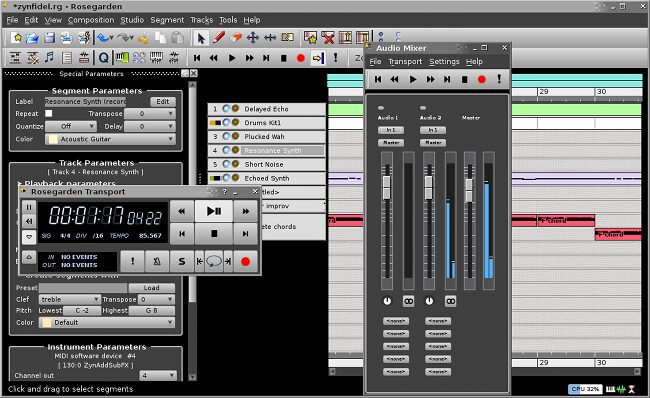
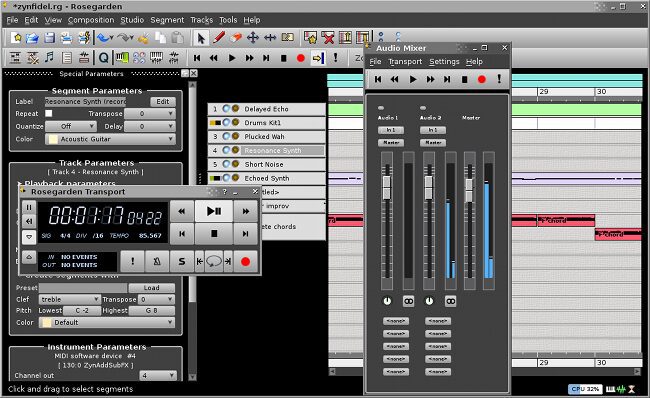
Rosegarden is built around a conventional horizontal arrangement window where MIDI and audio segments can be recorded, moved, copied, resized and repeated. Producers familiar with traditional sequencing software should understand the basic structure quickly.
MIDI remains the strongest part of the application. Rosegarden stores detailed information about connected devices, including their banks, programs and available controllers. Definitions for more than 100 hardware synthesizers are included, and custom device configurations can also be created.
The matrix editor provides a piano-roll workflow for adjusting notes, timing, velocity, pitch bend and controller data. Incoming MIDI can be recorded from keyboards and external equipment, while MIDI Thru routing allows the selected instrument to be played directly during recording or playback.
Notation and Score Editing
Rosegarden distinguishes itself from many free DAWs through its extensive notation tools. Musical ideas can be entered and edited as traditional notes rather than only as blocks inside a piano roll.
The notation editor supports score preparation, lyrics, dynamics, articulations, tempo markings and multiple staves. This makes Rosegarden particularly useful for composers, arrangers, music students and musicians who need both MIDI playback and readable notation.
Scores can be exported to LilyPond for higher-quality typesetting and PDF preparation. MIDI and MusicXML export are also available, although some project-specific information may be lost when moving a composition into a more general interchange format.
Audio Recording and Arrangement
Rosegarden can record audio from microphones, guitars, synthesizers and other sources connected through a compatible Linux audio interface. Existing audio files can also be dragged into the arrangement and positioned alongside MIDI segments.
Audio segments can be moved, split, repeated and resized using the main timeline. The audio engine provides sample-accurate playback, while the mixer controls track levels, panning and routing.
The software does not include a detailed waveform editor. Producers can arrange and split recordings, but corrective editing, noise removal and destructive sample processing are better handled in a dedicated audio editor before the files are returned to Rosegarden.
Mixer, Routing and Effects
The audio mixer provides channel faders, panning, monitoring and routing controls for audio and supported software instruments. Projects can use up to eight internal submaster groups for organizing drums, instruments, vocals or other related tracks.
Each audio or synth channel provides five insert slots. LADSPA effects can be used for processing tasks such as compression, delay, filtering and reverb, while DSSI and LV2 support extends the available selection of Linux instruments and effects.
Rosegarden also connects to external Linux audio applications through JACK. This makes it possible to build a wider studio environment involving standalone synthesizers, effects processors, recorders and routing utilities.
Project and Export Options
Native Rosegarden compositions are stored in the RG format. Projects containing external audio can also be packaged into an RGP file to collect the composition, recordings and related plugin data in one transferable bundle.
MIDI files can be imported and exported, while notation can be transferred through LilyPond or MusicXML. Rosegarden also provides WAV export, although mixdowns involving external synthesizers or separate JACK applications may require an additional recording workflow.
Best Uses
- MIDI composition and sequencing
- Musical notation and score preparation
- Controlling external synthesizers
- Linux-based home recording
- Songwriting and arrangement
- Orchestral and classical composition
- Music education
- Small studio audio projects
Compatibility and Installation
Rosegarden is available only for Linux. It depends on ALSA for MIDI and sound-device communication, while JACK is required for audio sequencing, recording, effects and hosted software synthesizers.
Installable packages are available through the repositories of many Linux distributions. A Flatpak edition is also offered through Flathub, while advanced users can download and compile the official source code.
Distribution packages may contain an older release than the current official version. Producers should check the version provided by their operating system before installation.
Main Limitations
- No official Windows or macOS version
- No integrated waveform editor
- No official native VST hosting documented
- Audio production requires JACK configuration
- No large factory instrument or sample library
- Mixing and routing are less immediate than in modern commercial DAWs
- Some Linux distribution packages may be outdated
Final Verdict
Rosegarden is a valuable free DAW for Linux musicians who place MIDI sequencing and musical notation at the center of their workflow. Its device management, score editor and hardware integration make it particularly suitable for composers, arrangers and musicians working with external synthesizers.
Its audio functions are useful for recording and arranging smaller projects, but producers who need advanced waveform editing, modern VST compatibility or a large factory library may require additional software.
JACK configuration may occasionally feel like inviting an audio engineer to assemble flat-pack furniture, but the result can be an impressively flexible Linux studio.
For composers and MIDI-focused producers seeking a genuinely free, actively maintained and open-source environment, Rosegarden remains a distinctive option worth exploring.