
Free Vocal Plugin
VLA-One: A Free Vocal Leveling Plugin for Clearer Recordings
Control loud peaks, lift quieter details and create more consistent vocals with a focused dynamics processor for Windows, macOS and Linux.
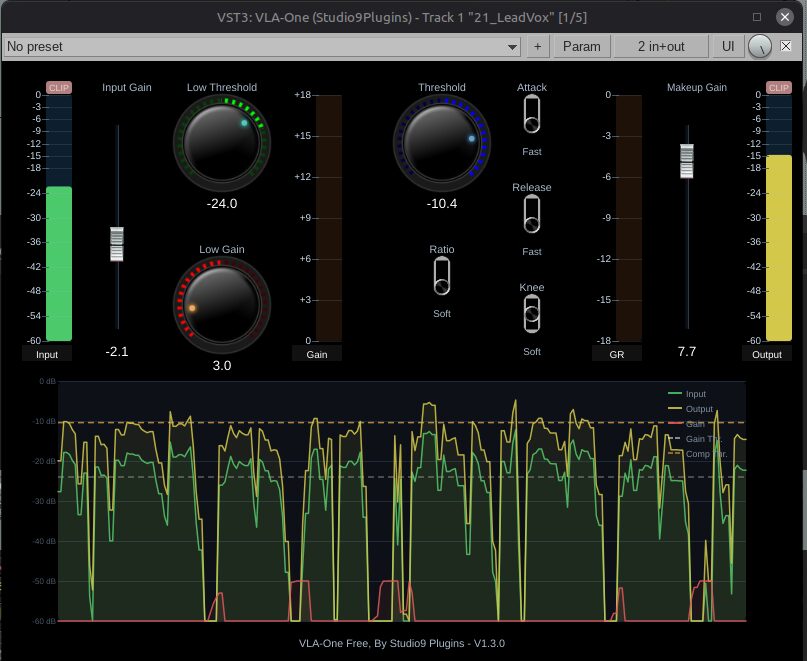
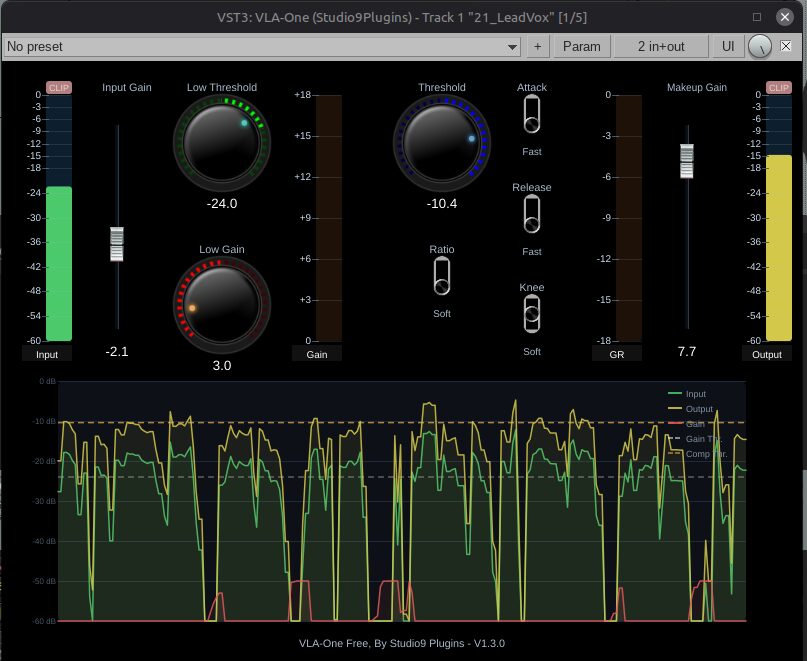
VLA-One, short for Voice Levelling Amplifier One, is a free dynamics plugin developed by Recording Studio9 under the Studio9 Plugins name.
The processor is designed to reduce the difference between quiet and loud sections of a recording. It combines low-level gain processing with compression, helping softer words become more audible while controlling peaks that move too far above the average level.
This makes VLA-One particularly useful for vocals, podcasts, voiceovers, acoustic instruments and other sources with inconsistent dynamics. The current version is 1.3.0 and introduces Hard, Soft and Smooth knee options for adjusting how gradually the compression begins.
VLA-One is completely free and does not require an account, license key, subscription or installer manager.
| Developer | Studio9 Plugins |
|---|---|
| Plugin type | Voice leveler and dynamics processor |
| Current version | 1.3.0 |
| Platforms | Windows, macOS and Linux |
| Plugin formats | VST3 and Audio Unit, depending on the platform |
| Main processing | Low-level gain and compression |
| Knee modes | Hard, Soft and Smooth |
| Activation | None required |
| Price | Free |
A Different Approach to Vocal Compression
Conventional downward compression mainly reduces sounds that exceed a selected level. This helps control loud words, sharp consonants and unexpected peaks, but it does not automatically make quieter details easier to hear.
VLA-One adds low-level gain processing to the workflow. Instead of only pushing the loudest sections downward, it can also bring quieter material forward, reducing the overall dynamic distance between the softest and strongest parts of a performance.
This approach can be useful on vocals recorded by singers who naturally move closer to and farther from the microphone. It can also help dialogue and podcast recordings where sentence endings become quieter or individual words disappear beneath background music.
Low-Level Gain for Quieter Details
The low-level section is designed to raise material below the main vocal level. This can reveal softer syllables, breaths and phrase endings without applying the same amount of gain to the loudest moments.
Moderate settings usually produce the most natural result. Raising quiet material too strongly can also increase room noise, microphone hiss, headphone bleed and unwanted breaths.
A clean recording remains important. VLA-One can improve level consistency, but it cannot distinguish an emotional whisper from an air-conditioning system that has been waiting patiently for its solo.
Compression for Peak Control
The compression section controls louder parts of the signal. When combined with low-level gain, it can create a more stable vocal before additional processing such as equalization, de-essing, saturation or reverb.
This is useful when a performance contains both quiet verses and stronger choruses. The compressor reduces excessive peaks while the leveler keeps softer sections from falling too far behind.
Producers should avoid removing every natural dynamic change. A consistent vocal should remain expressive rather than sounding permanently pinned to one exact level.
Hard, Soft and Smooth Knee Modes
Version 1.3.0 introduces three knee options that change how the compressor moves into gain reduction.
Hard Knee applies compression more directly once the signal reaches the processing area. It can be useful for controlling obvious peaks or creating a firmer vocal sound.
Soft Knee introduces compression more gradually. This generally produces a smoother transition and can sound more natural on singing, dialogue and acoustic instruments.
Smooth Knee provides the most progressive response of the three options. It is intended for transparent leveling where the gain changes should remain less noticeable.
The best mode depends on the recording. A dense Rap vocal may benefit from firmer control, while an exposed acoustic performance may require a gentler transition.
A Practical Vocal Workflow
VLA-One can be placed near the beginning of a vocal chain, after basic cleanup and corrective filtering. Its purpose is to create a more stable signal before tonal and creative processing.
A possible workflow is to remove obvious unwanted noise, apply VLA-One for level control, use an equalizer to shape the tone and add a de-esser if the raised quiet sections make sibilance more noticeable.
Saturation, delay and reverb can then be added after the vocal has reached a more consistent level. This helps time-based effects respond more evenly throughout the performance.
Gain matching is important when comparing processed and unprocessed signals. A louder vocal often appears clearer even when the processing itself has not improved the sound.
Useful Beyond Lead Vocals
Although VLA-One is designed primarily for voices, its level-control approach can also work on other dynamic sources.
Acoustic guitars can benefit when quiet picked notes disappear beside stronger strums. Bass guitar may become easier to place in a mix when soft notes receive additional support and louder attacks are controlled.
The plugin can also be tested on backing vocals, spoken-word recordings, podcasts and narration. More aggressive settings may produce creative density on room microphones, percussion or parallel processing channels.
Best Uses
- Lead vocal leveling
- Rap and melodic vocal production
- Podcast and voiceover processing
- Backing-vocal consistency
- Acoustic guitar dynamics
- Bass guitar level control
- Dialogue and spoken-word editing
- Parallel dynamics processing
Compatibility and Installation
The official Windows package is intended for Windows 10 and Windows 11. A compatible 64-bit DAW with VST3 support is required.
The current macOS release adds support for Apple Silicon. The developer also introduced support for Intel Macs running macOS 11 or later during the previous update. VST3 and Audio Unit versions are available for compatible Mac hosts.
A Debian Linux package is supplied for compatible 64-bit systems and DAWs that support VST3 plugins.
Installation is manual. Download the appropriate archive, copy the plugin file into the system plugin directory and ask the DAW to rescan its installed effects.
No account, license key, online authorization or product manager is required.
License
Studio9 Plugins allows VLA-One to be used in personal and commercial projects without payment.
The plugin itself may not be resold or redistributed. Users should download the original files directly from the developer’s official page.
Main Limitations
- No official AAX or CLAP version is listed
- The current Linux download is specifically presented for Debian
- Installation is manual rather than managed by an installer
- The plugin is a focused dynamics processor, not a complete vocal channel strip
- Strong low-level gain may also raise breaths, room tone and background noise
- Heavy compression can reduce the natural expression of a performance
Final Verdict
VLA-One is a useful free plugin for producers who want to control both sides of a vocal performance: the peaks that become too loud and the quieter details that disappear inside the mix.
Its combination of low-level gain, compression and three knee modes provides a focused alternative to using several separate processors for basic vocal stabilization.
The plugin is best suited to vocals, dialogue, podcasts and acoustic sources with uneven dynamics. It does not replace detailed clip-gain editing or a complete vocal chain, but it can reduce the amount of manual level correction required before mixing.
For Windows, macOS and Linux users looking for a free and activation-free vocal leveler, VLA-One is a practical download with a refreshingly direct workflow.
« `