
AURA: A Free Master Bus Enhancement VST
Add weight, density and forward energy to a complete mix with spectral tonal shaping and harmonic saturation.
AURA is a free master bus enhancement plugin created by Laureano Studios in collaboration with Ablaze Audio.
The processor combines two stages: a specially designed spectral EQ curve and a harmonic saturation circuit. Together, they can reinforce low-end weight, reduce brittle high-mid energy and give the complete mix a denser, more assertive character.
AURA is deliberately not a transparent mastering processor. It is intended to change the tone and attitude of a mix, making it particularly relevant for Metal, Rock, Hip-Hop, Electronic music and other productions that benefit from additional density.
Completely free: AURA is distributed through the official Laureano Studios store using a pay-what-you-want system. Enter zero in the price field to download the complete plugin without purchasing a reduced edition.
What Is AURA?
AURA is a tonal enhancement processor designed primarily for the master bus. It can also be used on drum buses, guitar groups, basses, synthesizers and individual tracks.
The plugin was created to reproduce a specific master bus sound that producer and mixing engineer Justin Laureano had previously obtained from the preamp section of an older analog-modelled processor.
Rather than copying the complete original effect, AURA focuses on the elements that shaped the final mix: broad spectral rebalancing, low-end reinforcement and controlled harmonic drive.
Main concept: AURA is designed as a character processor rather than a corrective mastering tool. It changes the general tone and density of the mix instead of repairing narrow frequency problems.
Two Main Processing Stages
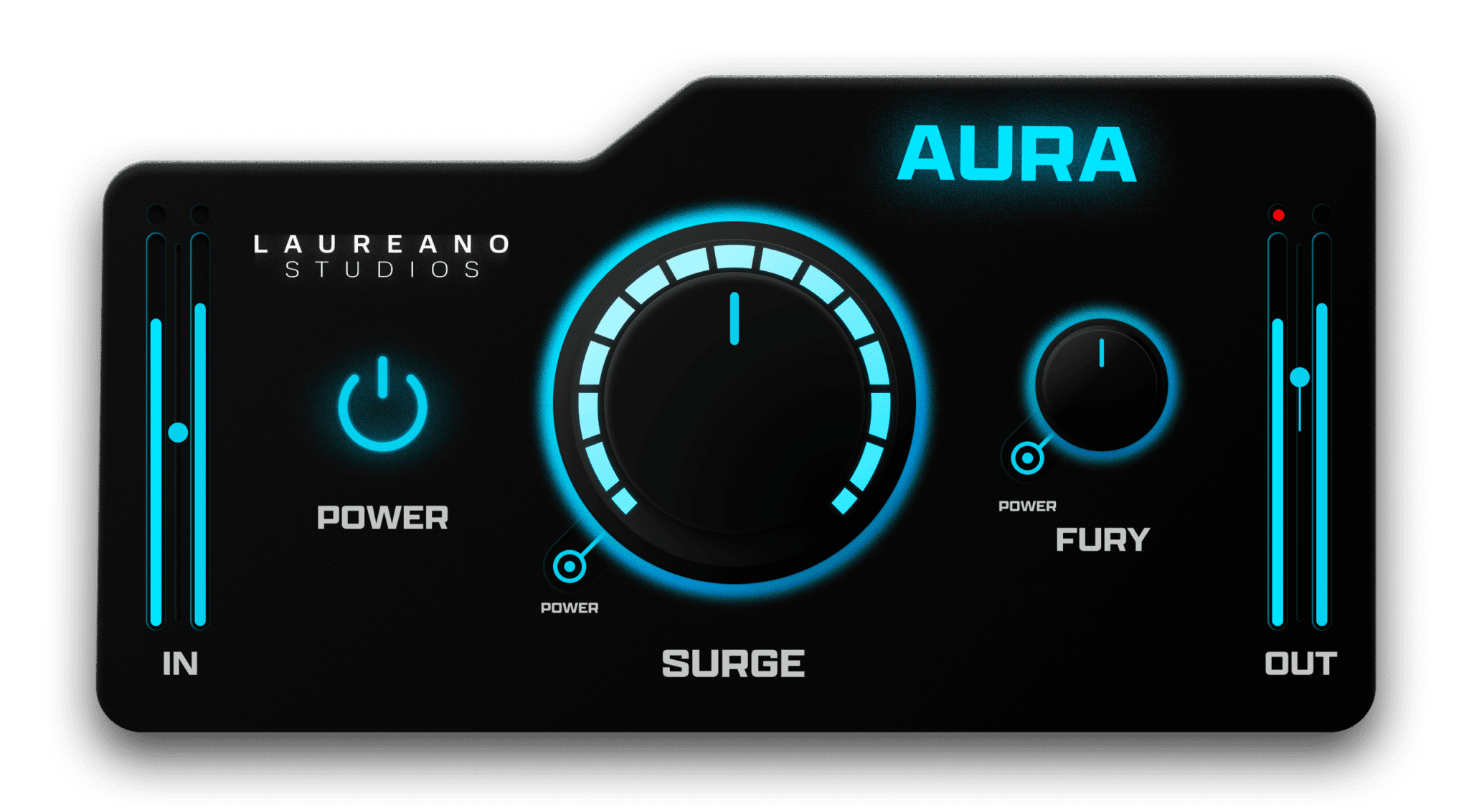
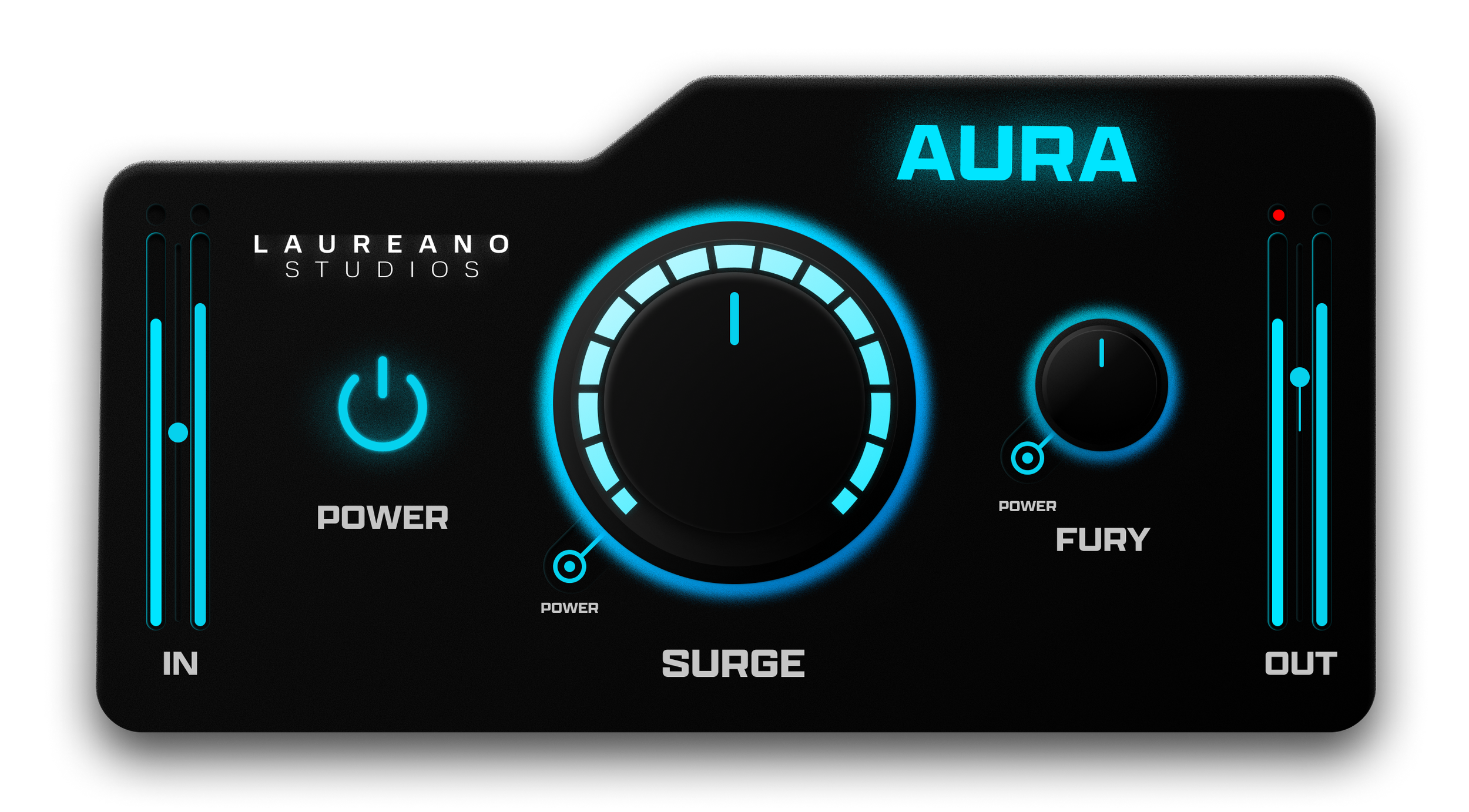
AURA provides two principal controls named Surge and Fury. Each processing stage can be adjusted independently or switched off completely.
Surge: Controls a custom spectral EQ curve designed to reinforce weight, smooth brittle high-mid frequencies and reshape the tonal balance of the mix.
Fury: Controls the harmonic saturation stage, adding density, edge and perceived intensity.
This separation allows producers to use only the spectral shaping, only the saturation or a combination of both stages.
Surge Spectral Shaping
The large Surge control determines the intensity of AURA’s predefined spectral curve.
Unlike a conventional parametric EQ, it does not display individual frequency bands or allow surgical adjustments. The curve is already designed as a broad tonal treatment for the complete mix.
Increasing Surge can add a stronger low-frequency foundation while smoothing areas of the upper midrange that may feel brittle or excessively forward.
Recommended starting point
Begin between 20 and 30 percent, then compare the result at a similar output level. The full setting represents the complete intended curve, but mastering does not issue prizes for reaching every knob’s final destination.
Fury Harmonic Saturation
Fury adds harmonic content and a more aggressive character to the incoming signal.
At subtle settings, the saturation can increase perceived density and help the mix feel more cohesive. Higher settings create a stronger and more obvious driven tone.
The effect can become aggressive quickly, especially on dense mixes containing distorted guitars, bright cymbals, clipped drums or heavily processed vocals.
Important: Fury should normally be adjusted while listening to the loudest section of the track. A setting that sounds exciting during a quiet introduction may become excessive when the complete arrangement arrives.
Master Bus Placement
AURA can be placed near the end of a mastering chain, before the final clipper or limiter.
Example chain: Corrective EQ > bus compression > AURA > clipper > true peak limiter > loudness meter.
The exact order will depend on the track. Placing AURA before compression changes the signal entering the compressor, while placing it after compression preserves more of the original dynamic response before adding its tonal character.
Because AURA can reinforce low-frequency energy, always check how the kick and bass affect the processors placed after it.
Top-Down Mixing With AURA
AURA can also be placed on the master bus at the beginning of the mixing process.
This top-down approach means that individual tracks are balanced and processed while already passing through AURA. Mix decisions are therefore made in response to its tonal curve and saturation.
This can produce a more integrated result than adding a strong character processor after the mix has already been completed.
Workflow tip: When mixing into AURA, choose conservative settings early and avoid changing them dramatically near the end. Large changes will alter every balance decision made before them.
Using AURA on a Drum Bus
AURA can add density and tonal weight to a complete drum group.
Use Surge to strengthen the general body of the drums and Fury to add harmonic aggression. This can help programmed drums feel more connected and make live drum recordings sound more forceful.
Pay particular attention to the kick, snare attack and cymbal harshness. Excessive saturation can make the drums appear louder while reducing their actual transient impact.
Drum bus tip: Compare the processed and bypassed versions at a similar volume. A genuinely stronger drum bus should still feel stronger after the louder-version advantage has been removed.
Using AURA on Guitars
AURA was developed within a modern heavy-music production workflow, making it particularly suitable for layered guitar buses.
The spectral curve can reinforce body while controlling some of the brittle energy that develops when several distorted guitars are stacked together.
Fury can increase density, but high-gain guitar tones already contain significant harmonic distortion. Small amounts are usually sufficient.
Using AURA on Electronic Music
Although AURA is strongly associated with modern Metal, its processing can also work on House, Techno, EDM, Trap and Synthwave productions.
House and Techno: Add density to drums and synth buses while reinforcing the low-end foundation.
EDM: Increase the forward character of drops and layered electronic arrangements.
Trap and Hip-Hop: Add harmonic weight to drum buses, 808s and full instrumental mixes.
Synthwave: Introduce a more driven and cohesive character across analog-style synthesizers and electronic drums.
For bass-heavy genres, check the plugin against a clean low-frequency reference. Additional weight is useful only when the kick and bass remain controlled.
What AURA Does Not Replace
AURA is not an automatic mastering suite and does not replace the essential processors required for a complete mastering workflow.
- It does not provide surgical parametric EQ.
- It does not control dynamic range like a compressor.
- It does not provide a final output ceiling.
- It is not a true peak limiter.
- It does not measure LUFS or loudness range.
- It does not automatically correct mix problems.
Use AURA as a tonal finishing stage alongside dedicated EQ, compression, clipping, limiting and metering tools.
Official AURA Walkthrough
The official Laureano Studios walkthrough demonstrates the controls, intended master bus workflow and audible effect of the plugin.
AURA Free Mastering Plugin Walkthrough
How to Use AURA Safely in Mastering
- Place AURA before the final limiter.
- Start with Surge and Fury fully reduced.
- Play the loudest part of the track.
- Increase Surge until the tonal change becomes audible.
- Reduce it slightly to avoid overprocessing.
- Add a small amount of Fury for density.
- Match the output level for an honest comparison.
- Check the mix in mono and on smaller speakers.
- Confirm that the final limiter is not working significantly harder.
Gain Matching Matters
Saturation and low-end reinforcement can increase perceived loudness. This makes it easy to prefer the processed signal simply because it sounds louder.
Use the input and output meters to maintain a similar listening level during comparisons. AURA should improve weight, balance and attitude rather than only increasing volume.
Critical listening tip: Bypass AURA regularly and compare at equal loudness. If the processed version sounds smaller, harsher or less dynamic after gain matching, reduce the settings.
Compatibility
- Current official version: 1.0.1
- Windows: Windows 10 or later
- macOS: macOS 10.13 or later
- Plugin formats: VST, AU and AAX
- Primary use: Master bus and mix bus enhancement
- Alternative uses: Drums, guitars, basses and instrument buses
- Licence: Free, pay what you want
- Premium edition: None listed
- Linux: No official desktop version listed
How to Download AURA
- Open the official Laureano Studios AURA store page.
- Enter zero in the pay-what-you-want price field.
- Complete the free checkout process.
- Download the supplied archive.
- Run the Windows or macOS installer.
- Open the DAW and rescan the plugin folders.
- Load AURA on the master bus or selected group.
Final Verdict
AURA is a focused free plugin for producers who want a stronger and more deliberate master bus character without building a large processing chain.
The Surge control provides broad spectral shaping, while Fury adds harmonic density and aggression. Both stages can be used independently, making the plugin more flexible than its compact interface initially suggests.
AURA is not designed for transparent mastering, surgical correction or final true peak protection. Its tonal curve is intentionally opinionated and will not suit every arrangement.
Used carefully, however, it can add weight, cohesion and forward energy to Metal, Rock, Electronic and beat-driven productions. The key is to use enough processing to improve the mix without turning the master bus into a competitive distortion event.
Download AURA for Free
Get the complete Windows or macOS plugin directly from the official Laureano Studios store.