AURA Lite: A Free Ducking Reverb VST
Create spacious vocals, instruments and effects while automatically moving the reverb tail away from the original source.
AURA Lite is a free algorithmic reverb plugin developed by FRCTL Audio for producers who want more ambience without losing clarity.
Its central Clarity control automatically reduces the reverb tail while the incoming source is active. When the vocal, instrument or drum hit leaves space, the ambience returns and becomes more audible.
This integrated ducking behaviour can help producers use longer or wetter reverbs without building a separate sidechain compressor and effect-return chain.
Completely free: AURA Lite requires no account, email address, licence activation or subscription. FRCTL Audio permits commercial use and provides lifetime updates.
What Is AURA Lite?
AURA Lite is a streamlined version of FRCTL Audio’s larger AURA reverb processor.
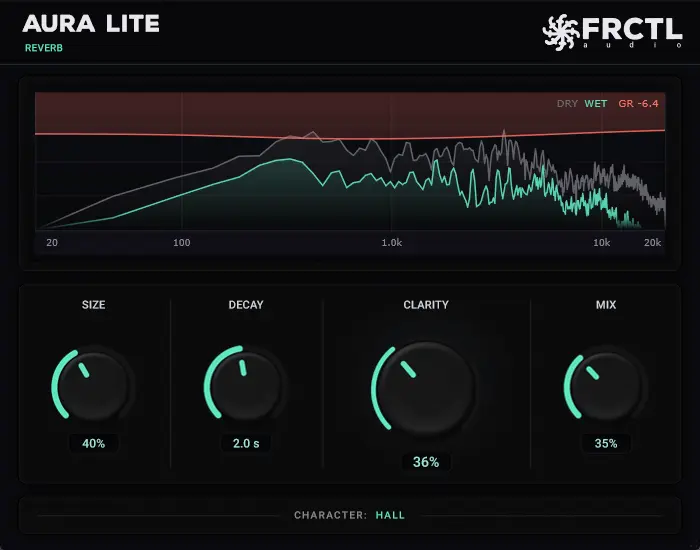
It provides four controls named Size, Decay, Clarity and Mix. These parameters cover the essential stages required to create a space, adjust its duration, control how strongly it competes with the source and blend the result with the original audio.
The interface also contains a spectrum display that shows the dry and processed signals while providing visual feedback for the gain reduction created by Clarity.
Main advantage: AURA Lite combines reverb and automatic ducking inside one simple processor, reducing the need for additional routing and sidechain configuration.
The Four Main Controls
Size: Changes the perceived dimensions and general scale of the virtual space.
Decay: Determines how long the reverb tail continues after the original sound.
Clarity: Reduces the ambience while the source is active and allows it to return during quieter moments.
Mix: Blends the dry source with the processed reverb signal.
The limited number of controls makes AURA Lite suitable for fast production decisions. Producers can create a usable space without navigating several pages of diffusion, modulation and reflection parameters.
How the Clarity Control Works
Reverb can make a vocal or instrument feel larger, but its tail may also overlap the source and reduce definition.
The Clarity control responds to the incoming audio. As the source plays, the reverb tail is attenuated. When the source becomes quieter or stops, the ambience is allowed to return.
This creates a clearer foreground and a more spacious background. The listener can hear the original performance more easily while still experiencing a long or noticeable reverb during the spaces between notes and phrases.
Simple example
On a lead vocal, the reverb becomes quieter while each lyric is sung. At the end of the phrase, the tail returns and fills the available space without covering the next word.
Ducking Reverb Without Sidechain Routing
A traditional ducking-reverb setup often requires an effect channel, a reverb plugin, a compressor and a sidechain input from the original source.
This workflow is effective but requires several routing decisions. The compressor threshold, ratio, attack and release must also be adjusted according to the source.
AURA Lite places the main behaviour inside the reverb itself. The source entering the plugin controls the reduction automatically, allowing the same processor to be used directly as an insert or on an effect return.
Workflow benefit: Producers can create a ducked ambience without configuring an external sidechain signal or loading a separate compressor after the reverb.
Using AURA Lite on Vocals
Vocals are one of the most natural applications for a ducking reverb.
A long tail can make a performance sound polished and emotional, but excessive ambience may reduce intelligibility. Consonants become softer, words overlap and the vocal begins to move behind the instrumental.
Start with a moderate Size and a Decay of around two seconds. Increase Mix until the ambience becomes clearly audible, then raise Clarity until the words return to the front of the production.
Lead vocals: Use Clarity to preserve intelligibility while creating a longer tail behind each phrase.
Backing vocals: Reduce Clarity slightly when the harmonies need to sit further behind the lead.
Ad-libs: Increase Decay and Mix for wider, more atmospheric responses.
Spoken vocals: Use a smaller room and shorter decay to create depth without making the speech distant.
Using It on Synth Leads and Plucks
Synth leads and plucks often need space, especially in House, Techno, EDM and cinematic electronic production.
Long reverb can create scale and atmosphere, but it may also soften the rhythmic precision of short notes. Clarity can reduce the wet signal around each attack while allowing the tail to bloom after the note.
This is particularly useful for melodic plucks that need to remain rhythmically defined while still producing a wide atmospheric background.
Production tip: Set Mix higher than you normally would, then increase Clarity until the original transient becomes clear again. This demonstrates the central strength of the plugin.
Using AURA Lite on Drums
AURA Lite can add space to snares, claps, percussion and selected drum loops.
For snares and claps, use a shorter decay to create a compact room or plate-style effect. Clarity can prevent the ambience from masking the initial impact.
On percussion, a longer decay can create movement between the hits. The ducking behaviour allows the rhythmic transients to remain defined while the reverb fills the gaps.
Low-end warning: Avoid placing large amounts of reverb on the kick or sub-bass unless the effect is intentional. A clearer reverb tail can still occupy a considerable amount of low-frequency space.
Using It on Guitars and Acoustic Instruments
Clean guitars, acoustic guitars, pianos and strings can benefit from the plugin’s simplified workflow.
A smaller Size setting can create the impression of a studio room, while a larger value produces a more spacious and cinematic environment.
Clarity is useful when an instrument contains fast picking, repeated chords or detailed transients. The control keeps the performance forward while allowing the ambience to remain audible between the notes.
Natural-space tip: Use a lower Mix value and shorter Decay for realistic room ambience. Increase both controls only when the reverb should become an obvious part of the arrangement.
Insert or Send Workflow
AURA Lite can be placed directly on a track or used on a shared effect channel.
Insert workflow: Place the plugin directly on a vocal, instrument or drum channel and use Mix to control the dry and wet balance.
Send workflow: Place the plugin on an auxiliary effect channel, set Mix fully wet and control the amount of reverb from each track’s send level.
A send workflow allows several tracks to share the same space. It also provides separate control over the total reverb level and makes additional processing easier.
An insert workflow is faster when only one source needs the effect or when the dry and wet relationship is part of the sound design.
Creating a Clear Vocal Reverb Send
- Create a stereo effect channel in the DAW.
- Load AURA Lite on the effect channel.
- Set Mix to 100% wet.
- Send the lead vocal to the effect channel.
- Choose the required Size and Decay.
- Increase Clarity until the lyrics remain understandable.
- Adjust the effect-return fader inside the complete mix.
This setup keeps the original vocal and the reverb on separate channels, making it easier to automate or process the ambience independently.
Creative Automation Ideas
The four controls can be automated from the DAW to create arrangement changes.
Increase Decay before a breakdown: Extend the ambience as the drums and bass disappear.
Reduce Clarity at the end of a phrase: Allow one final word or instrument note to produce a larger tail.
Automate Mix during transitions: Move gradually from a dry sound into a more atmospheric section.
Change Size between sections: Use a smaller space in the verse and a larger environment in the chorus.
Automation is often more effective than leaving one large reverb setting active throughout the complete arrangement.
The Visual Spectrum Display
The interface includes a spectrum display showing the relationship between the incoming source and the processed reverb.
A gain-reduction readout indicates how strongly Clarity is reducing the tail. This provides visual confirmation while the producer adjusts the central control.
The display is useful for understanding the plugin, but the final setting should still be chosen by listening inside the complete arrangement.
Mixing reminder: A beautiful display does not automatically produce a beautiful mix. The ears remain inconveniently employed.
Official AURA Lite Demonstration
The official FRCTL Audio demonstration below shows how Clarity reduces the reverb tail while the original source is active.
This Free Reverb Ducks Itself
What Is Missing From the Full AURA?
AURA Lite focuses on the main reverb and Clarity workflow. The commercial edition provides a broader sound-design and mixing environment.
- Six additional reverb characters
- Duck Lows processing
- Attack and release controls for the clarity stage
- Predelay control
- Early-reflection controls
- Additional tail and response shaping
- Reverb gate
- Editable frequency-based decay curve
- A/B comparison
- Delta monitoring
- External sidechain support
These limitations do not prevent AURA Lite from functioning as a complete everyday reverb. They mainly reduce the amount of detailed editing available after choosing the basic space.
Best Uses
Pop vocals: Create polished ambience without pushing the lyrics behind the instrumental.
House and EDM: Add long tails to plucks, leads and vocal chops while preserving rhythmic definition.
Techno: Build atmospheric percussion and synth spaces that return between transient events.
Hip-Hop and Trap: Add depth to vocals, piano melodies, bells and melodic samples.
Ambient music: Use longer decay times and lower Clarity values for slowly developing spaces.
Cinematic production: Create large environments around strings, pianos, impacts and sound-design elements.
Mixing Tips
Set the dry track level before adjusting the reverb. Ambience should support the source rather than compensate for a poorly balanced signal.
Listen to AURA Lite inside the complete mix instead of setting it only in solo. A reverb that feels subtle alone may already occupy enough space behind the other instruments.
Use automation when the song needs different reverb behaviour between the verse, chorus and breakdown.
Finally, compare the mix with the reverb bypassed. The processed version should feel deeper or more emotional without becoming less intelligible.
Practical starting point: Size at 40%, Decay around two seconds, Mix at 20% and Clarity between 25% and 40%. Adjust from there according to the source and arrangement.
Compatibility
- Plugin type: Algorithmic ducking reverb
- Windows formats: VST3 and CLAP
- macOS formats: VST3, Audio Unit and CLAP
- Linux formats: VST3 and CLAP
- Windows requirement: Windows 10 or Windows 11
- Mac processors: Intel and Apple Silicon
- Commercial use: Permitted
- Account required: No
- Email required: No
- Licence activation: No activation listed
- Updates: Lifetime updates included
How to Download AURA Lite
- Open the official AURA Lite product page.
- Select the free download button.
- Choose the installer for Windows, macOS or Linux.
- Download and install the required plugin formats.
- Open the DAW and rescan the plugin folders if necessary.
- Load AURA Lite on an audio track, bus or effect-return channel.
Final Verdict
AURA Lite is a practical free reverb for producers who regularly struggle to balance ambience with clarity.
Its central control reduces the reverb tail during active notes or vocal phrases, then allows the space to become more audible during the gaps. This makes it possible to use richer ambience without immediately covering the original performance.
The four-control design is intentionally limited, but it also makes the plugin fast. There are no complex routing pages, threshold settings or modulation menus to configure before obtaining a useful result.
The absence of predelay, detailed tone shaping and manual ducking ballistics may matter to advanced users. These functions are reserved for the full AURA processor.
For everyday vocals, synths, guitars, percussion and atmospheric production, AURA Lite provides a focused reverb that understands an important principle: sometimes the best way to sound larger is to move politely out of the way first.
Download AURA Lite for Free
Get the Windows, macOS or Linux version directly from the official FRCTL Audio website.