ANCHOR is a free mix balance preservation plugin developed by quietformat for producers, mixing engineers and mastering engineers. Released in July 2026, it automatically compensates for unwanted level changes introduced by EQ, compression, saturation, clipping, limiting and other processors.
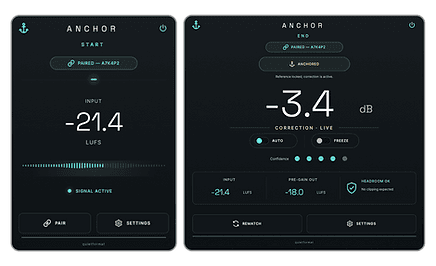
The plugin uses two paired modules placed before and after a processing chain. ANCHOR START captures the original reference level without altering the signal, while ANCHOR END compares the processed output and applies a broadband gain adjustment. The tonal changes, dynamics, harmonics, transients and stereo image created by the processing remain intact.
ANCHOR is available as a free download for Windows and macOS. A valid email address and newsletter consent are required to receive the installer.
What Is ANCHOR?
Audio processing frequently changes the overall level of a track. A compressor may make a vocal feel louder, a saturator may add apparent density or an EQ boost may increase the output enough to influence the balance of the entire mix.
This can make before-and-after comparisons unreliable. A louder signal is often perceived as clearer, fuller or more exciting, even when the processing itself has not genuinely improved the sound.
ANCHOR is designed to remove that loudness advantage. Instead of modifying the tone or dynamics, it measures the difference between the signal entering and leaving the processing chain, then adjusts the final level to remain closer to the original balance.
How the Two-Plugin Workflow Works
ANCHOR consists of two separate but connected modules:
- ANCHOR START is placed before the effect or processing chain.
- ANCHOR END is placed after the final processor in that chain.
START measures the incoming reference level and remains bit-transparent, meaning it does not change the audio. END analyzes the corresponding processed section and applies a single broadband trim adjustment.
If the processing chain increases the overall level, END reduces it. If the chain makes the signal quieter, END raises the output toward the established reference. The plugin does not attempt to undo EQ curves, compression, saturation, transient shaping, stereo widening or spatial processing.
Why ANCHOR Is Useful in a Real Mix
ANCHOR can be placed around a single plugin, a complete vocal chain, a drum bus, a mix bus or a mastering chain. Its main purpose is to preserve the level relationships already established between the different elements of a production.
For example, a producer may add saturation to a bass track and accidentally increase its output by several decibels. The bass can then appear more powerful simply because it has become louder, while also upsetting the balance between the kick, bass and vocals.
With ANCHOR placed around the saturation plugin, the level change is compensated while the added harmonics remain audible. This creates a fairer comparison and helps the producer decide whether the processing is actually improving the sound.
Best Uses
ANCHOR is particularly useful when evaluating compressors, saturators, clippers, limiters, equalizers, transient shapers and complete channel strips.
On vocals, it can preserve the original placement of the performance while several processors shape dynamics and tone. On drums, it allows compression and clipping to be assessed without automatically favoring the louder version.
During mastering, the plugin can surround a complete processing chain so broad tonal, dynamic and harmonic decisions can be judged at a more consistent output level.
The REMATCH function should be used after major adjustments. This creates a new reference based on the updated chain instead of continuing to compare the signal against an earlier configuration that is no longer relevant.
Production Tips
Play a continuous musical section while ANCHOR establishes its reference. A representative chorus or dense section will usually provide a more useful measurement than a single isolated kick or short transient.
Place START immediately before the first processor being evaluated and END directly after the final one. Other gain-changing utilities placed outside the pair will not be included in the comparison.
ANCHOR should support critical listening rather than replace it. The plugin corrects the broad level difference, but producers must still decide whether the processing improves punch, clarity, tone, depth or emotional impact.
It is also worth checking the mix at different monitoring levels. ANCHOR removes one common source of bias, but it cannot stop the human ear from becoming suspiciously enthusiastic when the speakers are turned up.
Compatibility and Download
ANCHOR is available in VST3 format for Windows and macOS. An Audio Unit version is also provided for macOS users.
The official download page requires an email address and agreement to receive the quietformat newsletter. The plugin is presented as a genuinely free product rather than a time-limited trial or reduced demonstration version.
ANCHOR is an audio-processing utility and does not include samples, loops or copyrighted musical content. The official page does not state any restriction preventing users from commercially releasing music processed with the plugin.
Final Verdict
ANCHOR solves a practical problem that affects almost every mixing session: processing changes the level, and level changes influence judgment. Its paired START and END workflow helps producers compare effects more objectively while preserving the tone, compression, saturation and stereo character they intentionally created.
It is not a glamorous synthesizer or a reverb capable of simulating a cathedral on Mars. It is a focused utility that can improve everyday decisions, which may ultimately be more useful than another folder containing 700 presets called “Huge.”
Download ANCHOR from the official website:
https://www.quietformat.com/products/free/anchor