
Mango: A Free Modular Glitch VST3 for Creative Audio Mangling
Sequence granular loops, reverses, filters, distortion, rhythmic gates and spectral freezes across eight flexible effect lanes.
Mango is a free and open-source audio effect developed by Olivier Doaré under the FX-Mechanics name. Released in July 2026 and updated to version 0.1.3 in August, the plugin is designed for producers who want to transform loops, drums, vocals, synthesizers and complete buses through tempo-synchronised effects.
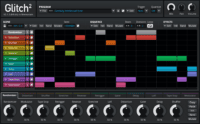
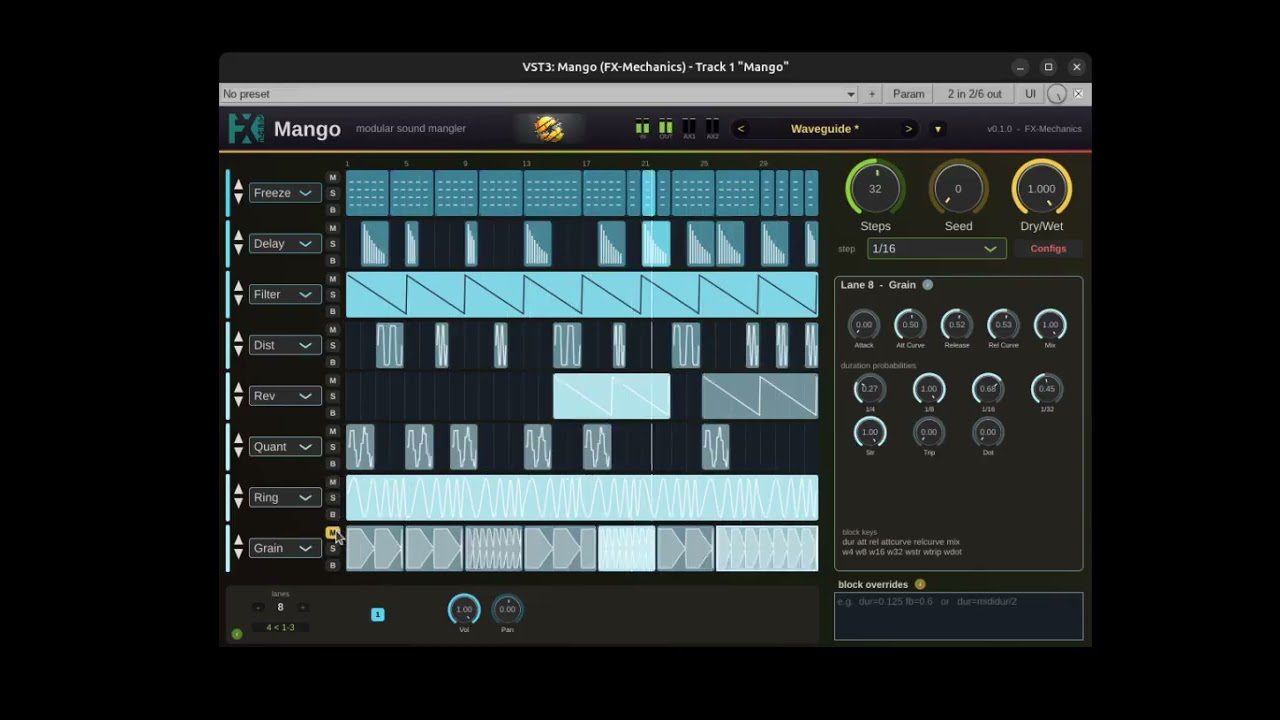
Its central feature is a modular step sequencer containing up to eight effect lanes. Producers draw blocks directly onto each lane to decide when an effect becomes active. Outside those blocks, the signal passes through without that particular processor.
This approach makes Mango useful for controlled glitch production. It can create short drum fills, rhythmic filtering, granular repetitions, reverse effects, spectral freezes and complex transitions without permanently processing the entire audio track.
Mango is completely free and distributed under an open-source licence. It is not a time-limited trial or a reduced preview edition. Downloads are provided directly through the official FX-Mechanics GitHub releases page.
What Is Mango?
Mango is an audio effect rather than a virtual instrument. It must receive an existing sound from a track, instrument or bus before it can begin processing.
The main sequencer can display between one and eight lanes. Each lane controls one effect, and producers can draw, resize, copy, move or delete blocks directly inside the rhythmic grid.
The lanes operate from top to bottom, so their order determines the processing chain. A distorted signal sent into a delay produces a different result from a delayed signal processed through distortion. Mango allows the lanes to be reordered whenever the effect chain needs to change.
The sequencer can contain up to 64 steps. Step lengths range from sixteenth notes to whole notes, allowing patterns to cover short fills, complete bars or longer evolving sections.
Included Effect Modules
Each lane can load one of several rhythmic or creative processors. Every module has its own parameters and wet or dry control.
- Gater: Creates rhythmic volume patterns with adjustable attack and release curves.
- Grain: Captures a short audio fragment and repeats it throughout the selected block.
- Delay: Provides tempo-synchronised repeats with feedback, damping and time glide.
- Distortion: Offers several tube-inspired saturation models with drive, bias, sag and output gain.
- Filter: Produces low-pass, high-pass or formant sweeps between selected frequencies.
- Quantizer: Reduces bit depth and sample rate for digital Lo-Fi and aliasing effects.
- Ring Modulator: Moves a sine-wave carrier between two frequencies across the duration of a block.
- Reverser: Divides the incoming audio into rhythmic slices and plays them backwards.
- Spectral Freeze: Captures a short spectrum and sustains it as a static atmospheric texture.
- Rhythmic Pan: Moves the signal between left, centre and right positions.
- Aux Send: Routes selected rhythmic sections toward two additional stereo outputs.
Because several lanes can operate simultaneously, Mango can create effect combinations that would normally require several plugins and a large amount of automation.
Deterministic Randomisation
Randomisation is an important part of Mango, but the plugin does not produce a completely different result every time the project plays.
Rhythmic durations and other variable settings are calculated from a Seed value. The same seed always creates the same result, including during an offline export. Turning the Seed knob generates a new variation while preserving repeatable playback.
This is particularly useful for electronic music. Producers can explore unexpected combinations without worrying that a successful pattern will disappear during the final render.
Each effect can also use weighted rhythmic probabilities. A grain or delay may favour eighth notes while occasionally selecting sixteenth, dotted or triplet values. The result can feel less mechanical while remaining synchronised with the project tempo.
Best Uses
Drum loops: Add short gates, reverses, granular repetitions and fills without rebuilding the original rhythm.
Vocals: Transform individual words with spectral freezing, filtering, delay or digital degradation.
Synth sequences: Introduce movement into repetitive arpeggios, plucks and bass patterns.
House and Techno transitions: Combine filtering, reverse processing and delay before a breakdown or drop.
Ambient sound design: Use spectral freeze and granular processing to turn short notes into evolving textures.
Experimental beatmaking: Randomise the seed, record several passes and select the most interesting fragments.
Mango can also be placed on a group or effects bus. This allows several tracks to enter the same rhythmic processing chain while preserving the original channels.
How to Use Mango
Insert Mango after an instrument or audio source. Start with one lane and draw a short block near the end of a musical phrase.
Select an effect such as Grain, Delay or Reverser, then press play. The effect will operate only while the playhead passes through the block.
Once the first lane works musically, add a second processor. A short reverse effect can lead into a filtered delay, while a spectral freeze can be followed by distortion or panning.
The global Dry/Wet control is useful for preserving the original groove. Complex processing often sounds more musical when blended with some of the untreated signal.
Mango also provides eight configuration slots for storing complete sequencer patterns. Producers can prepare several variations and automate which configuration is active during different sections of the arrangement.
Production Tips
Begin with short effect blocks. A one-step reverse or granular repeat often creates more impact than continuous processing across an entire section.
Use the lane order deliberately. Distortion placed before a spectral freeze creates a different texture from distortion applied after the frozen signal.
Keep low frequencies under control when processing full drum buses. Heavy delays, distortion and stereo movement can weaken the relationship between the kick and bass.
Render successful patterns to audio. This makes it easier to edit the strongest moments, create custom fills and reduce CPU use later in the arrangement.
Randomisation is most effective when some decisions remain fixed. Let Mango create variations in rhythm or effect duration while preserving the important musical structure. Complete chaos is entertaining, but it rarely remembers where the chorus begins.
Compatibility and Installation
Mango is available for Windows, macOS and Linux.
- Windows: 64-bit VST3 and standalone application
- Linux: 64-bit VST3 and standalone application
- macOS: Universal VST3, Audio Unit and standalone application
- Mac processors: Intel and Apple Silicon
- Minimum macOS version: macOS 10.13
- Price: Free and open source
Installation is manual. Copy the VST3 or Audio Unit file into the standard plugin folder used by the operating system, then rescan the plugin list inside the DAW.
The macOS build is not signed with an Apple Developer certificate. Some users may therefore need to remove the quarantine attribute through Terminal or approve the installer through the Privacy and Security settings.
Version 0.1.3 also corrects MIDI reception in the Audio Unit edition. Logic users will find the updated plugin inside the MIDI-controlled Effects category rather than the standard Audio FX menu.
Final Verdict
Mango is an ambitious free glitch processor that combines rhythmic sequencing, modular routing and deterministic randomisation inside one flexible interface.
Its eight effect lanes can create simple fills or highly detailed processing chains, while the Seed system keeps generated variations consistent during playback and export.
The plugin is particularly relevant for House, Techno, IDM, Drum and Bass, ambient music, experimental beatmaking and cinematic sound design. It can also bring controlled movement to vocals, pads and repetitive melodic loops.
Mango is still a young plugin, and its workflow is deeper than a conventional one-knob glitch effect. However, the official documentation, active development and multiplatform support make it a strong free resource for producers who enjoy designing effects rather than selecting a preset called “Instant Chaos 04.”
Download Mango from the official FX-Mechanics GitHub page:
« `