Bad Humors is a free open-source glitch effect plugin built for producers who want to sequence audio destruction directly in sync with their DAW. Instead of loading a slicer, bitcrusher, distortion and reverb as four separate effects, the plugin combines all four inside a 4 × 16 step sequencer designed for rhythmic processing.
Developed by niflheimmer under the Circuitdust name, Bad Humors can transform drum loops, synths, vocals, basses and almost any incoming audio into chopped repetitions, degraded digital textures, distorted patterns and rhythmic bursts of reverb. Each effect has its own row in the sequencer, allowing different processors to switch on and off across the pattern.
The result is a free VST3 plugin that sits somewhere between a multi-effect, a glitch sequencer and a creative performance tool. It is not designed for subtle corrective mixing. Bad Humors is built to interrupt, repeat, crush and destabilize audio in time with the music.
What Is Bad Humors?
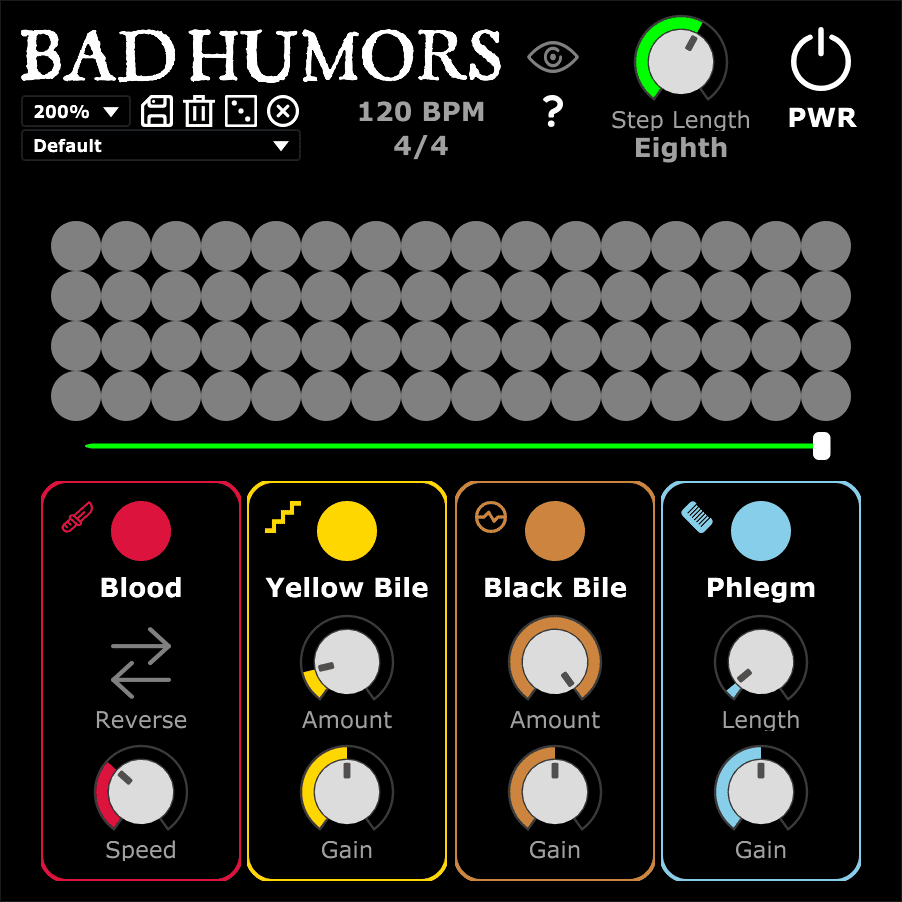
Bad Humors is a free audio effect plugin that synchronizes four different processors to a step sequencer inside your DAW.
The sequencer contains four rows and up to 16 steps. Each row controls one effect. Activating a step determines when that processor becomes active as the pattern moves from left to right.
The four effects are:
- Blood: a rhythmic audio slicer
- Yellow Bile: a bitcrusher and downsampling effect
- Black Bile: a waveshaping distortion effect
- Phlegm: a comb-based reverb effect
The effects are chained together from left to right. This means the order of processing is fixed, but several effects can be activated on the same sequencer step to create more complex combinations.
A 4 × 16 Step Sequencer for Audio Effects
The central feature of Bad Humors is its 4 × 16 grid.
Each horizontal row belongs to one of the four effects. Each vertical position represents a sequencer step. When playback starts in the host DAW, the plugin follows the transport and moves through the active sequence.
The pattern can use between one and 16 steps. This makes the plugin useful for standard repeating patterns but also for less obvious rhythmic cycles.
A one-step sequence can keep a selected effect continuously active. Longer sequences can introduce processing only on specific beats or subdivisions.
Because the grid follows the DAW, producers can build effects that feel connected to the rhythm of the track rather than relying on random timing.
Tempo-Synchronized Step Length
The sequencer speed can be adjusted using musical note values based on the project tempo.
The available step lengths range from whole notes down to 32nd notes.
- Whole notes
- Half notes
- Quarter notes
- Eighth notes
- 16th notes
- 32nd notes
Slower values can create long structural changes across an arrangement. Faster settings can turn the same effect pattern into rapid glitch processing.
This makes Bad Humors useful both for occasional transitions and for highly detailed rhythmic destruction.
Blood: Rhythmic Slicing and Reverse Effects
The first processor is Blood, a slicer designed to capture incoming audio and repeat it as a loop.
This can turn a drum hit, vocal fragment or section of a synth into a repeated rhythmic element.
Blood includes a Reverse function that reverses the output of the slicer. The Speed control changes the slicing rate in relation to the project tempo.
On drums, the slicer can create repeated hits and sudden fills. On vocals, it can turn a short phrase into a rhythmic fragment. On sustained synths or textures, it can generate repeated pulses that were not present in the original performance.
Because Blood is controlled by the step sequencer, the effect does not need to remain active throughout the entire signal. It can appear only on selected steps and disappear immediately afterward.
Yellow Bile: Bitcrushing and Digital Degradation
Yellow Bile is the plugin’s bitcrushing and downsampling stage.
The effect uses a Folds parameter to control the amount of processing. The developer specifies a range from 1, which represents no effect, up to 250 for considerably more extreme degradation.
An additional Gain control adjusts the output level of this processing stage.
This makes Yellow Bile useful for several types of sound design. Light processing can introduce digital roughness, while heavier settings can push the source toward aggressive lo-fi and broken textures.
Because the bitcrusher can be sequenced independently, producers can leave most of a loop untouched and apply digital degradation only to selected moments.
Black Bile: Waveshaping Distortion
Black Bile is the distortion stage.
The processor waveshapes the incoming audio using a sigmoid waveform. The Amount control moves from no distortion toward increasingly heavy processing, while a separate Gain control manages the output level.
Sequenced distortion can be more interesting than placing a static distortion effect across an entire track.
A clean drum loop can suddenly become aggressive for one beat. A bassline can be pushed into heavier distortion at the end of a phrase. A vocal can switch between clean and processed states as the pattern moves through the sequence.
This allows distortion to become part of the arrangement rather than simply part of the tone.
Phlegm: Comb Reverb for Rhythmic Space
Phlegm is the fourth effect in the chain and provides a comb-based reverb process.
The developer describes it as passing reverberation through a comb filter with a 0.05-second setting. The Length parameter controls the duration of the reverb in relation to the project BPM.
A Gain control is also provided, and the developer specifically warns that this effect can become loud.
Because Phlegm is sequenced, reverb can appear only on selected steps. This can create sudden bursts of space rather than applying one continuous reverb tail across the entire signal.
That approach can work especially well for transitions, fills and experimental rhythmic processing.
Combine Several Effects on the Same Step
The four processors can be combined.
A sequencer step can activate more than one effect, allowing the incoming signal to move through several stages of processing.
For example, a sound can be sliced, then bitcrushed and distorted before reaching the reverb stage.
Because the effects are chained from left to right, the interaction between them becomes part of the sound design.
A bitcrusher placed after the slicer will process the repeated fragment. Distortion can then reshape the already degraded signal. Reverb at the end of the chain can spread the result into a larger texture.
This is where Bad Humors becomes more than four simple effects placed behind a sequencer. The combinations can create much more complex results than any individual module used alone.
Randomize Patterns for Fast Experimentation
Bad Humors includes a pseudo-random pattern generator.
Pressing the randomize control clears the existing sequencer grid and creates a new effect pattern.
This can be useful when the session needs a quick injection of unpredictability. Instead of manually programming every effect trigger, producers can generate a pattern and then edit the most interesting result.
A separate Clear control removes the current pattern completely.
Randomization works particularly well with a plugin like Bad Humors because the source material has a major influence on the result. The same pattern can behave very differently on drums, vocals, synths or ambient textures.
Preset Saving and Loading
The plugin includes preset functionality.
Default presets can be loaded from the preset menu, and users can create and save their own configurations.
Saved presets are stored through the BadHumors.snaps system used by the plugin.
This is useful because a successful glitch pattern can be difficult to recreate from memory. Saving a preset allows the sequencer configuration and effect settings to become part of a reusable production toolkit.
Using Bad Humors on Drum Loops
Drum loops are one of the most obvious sources for Bad Humors.
The step sequencer can introduce slices, digital degradation, distortion and reverb without permanently changing the complete groove.
A producer can use Blood to create a rapid repeat at the end of every four bars, trigger Yellow Bile on selected percussion hits and introduce a short burst of Phlegm before a transition.
Because the plugin follows the DAW tempo, these effects can become part of the rhythmic arrangement.
Using Bad Humors on Vocals
Vocals can generate very different results.
Short phrases can be sliced into repeated fragments, while bitcrushing and distortion can create artificial transitions and backing textures.
Sequenced reverb can produce sudden spatial changes without washing the entire vocal in a continuous effect.
For electronic music, hyperpop, experimental hip-hop, industrial music and more abstract production styles, this can turn a simple vocal recording into much more varied material.
Using Bad Humors on Synths and Bass
Synthesizers and bass sounds can also benefit from rhythmic effect sequencing.
A sustained synth can be interrupted by the slicer. A clean bassline can receive distortion only on selected steps. Digital degradation can appear briefly before the signal returns to its original tone.
This can create movement without rewriting the MIDI performance.
However, producers should monitor low-frequency material carefully when using heavy distortion and reverb. The effect chain can generate significant changes in level and spectral density.
A Useful Tool for Glitch and Experimental Music
Bad Humors is particularly well suited to genres where sudden changes and digital artifacts are part of the production language.
Potential uses include:
- Glitch
- Experimental electronic music
- Industrial music
- Breakbeat
- Drum and bass
- Techno
- Experimental hip-hop
- Sound design
- Lo-fi processing
- Cinematic transitions
The plugin can also be useful in more conventional productions when used selectively. One unusual effect sequence before a chorus or drop can create more impact than processing every bar.
Plugin Formats and Operating System Compatibility
Bad Humors is a 64-bit plugin and is available in different formats depending on the operating system.
- Windows: VST and VST3
- macOS: AU and VST3
- GNU/Linux: VST
The official release provides separate downloads according to operating system and plugin format.
A compatible host supporting the selected plugin format is required.
Important Requirement: Csound Must Be Installed
Bad Humors has one important installation requirement that users should understand before downloading it.
Csound must be installed on the system for the plugin to run.
On Windows, the developer instructs users to install Csound in its default location and create a PATH environment variable when the Csound installer provides that option.
This makes the installation process less immediate than a completely self-contained VST3 plugin.
Producers who want a simple drag-and-drop installation should be aware of this additional dependency before adding Bad Humors to an important session.
How to Install Bad Humors
First, download the correct plugin archive for your operating system and format from the official GitHub Releases page.
Install Csound according to the developer’s instructions.
On Windows, the required BadHumors folder and associated files must be copied to the appropriate VST or VST3 plugin directory.
On macOS, the AU component or VST3 package should be placed in the corresponding Audio Units or VST3 plugin folder.
GNU/Linux users can install the supplied VST version in the relevant VST directory.
Download Bad Humors from the official GitHub release page
Free and Open-Source Software
Bad Humors is a genuine free and open-source audio plugin.
The developer publishes the source code through the official GitHub repository and states that the plugin code is licensed under GPLv2.
No account or commercial license manager is required to access the official download.
Visit the official Bad Humors GitHub repository
Important Limitations
The most important limitation is the Csound dependency. Bad Humors is not completely self-contained and requires additional software to run.
The plugin is also intentionally specialized. It is not a traditional delay, reverb, distortion or bitcrusher designed for detailed individual processing. Its main strength is the interaction between four effects and the sequencer.
The effect order is fixed from left to right, so users looking for fully modular routing will need a different tool.
The latest published release is version 1.0.0, so producers should test the plugin carefully with their own operating system and DAW before relying on it in critical sessions.
Level management is also important. Bitcrushing, distortion and the comb-based reverb can create aggressive output changes, particularly when several effects are active together.
Why Sequenced Effects Still Matter
Modern DAWs already provide automation, modulation and complex effect routing, but building a detailed rhythmic multi-effect chain manually can take time.
Bad Humors places the essential idea directly inside one interface.
The producer sees a grid, chooses when each effect should become active and immediately hears the relationship between the pattern and the music.
That immediacy is useful. Creative effects are often most effective when they encourage experimentation before the producer starts overthinking every decision.
Bad Humors turns glitch processing into something closer to programming a drum machine. The events are visible, rhythmic and editable.
Final Verdict
Bad Humors is a distinctive free VST3 plugin for producers who want rhythmic glitch processing without building a complicated multi-plugin effect chain from scratch.
Its 4 × 16 step sequencer gives direct control over four very different processors: slicing, bitcrushing, distortion and comb-based reverb. The ability to combine those effects on individual steps creates a large range of possibilities from subtle rhythmic interruptions to complete digital destruction.
The Csound requirement makes installation more involved than a standard standalone plugin package, and the fixed effect order will not suit every workflow. Those limitations are important, but they do not erase the creative value of the concept.
For glitch, experimental electronic music, techno, breakbeat, drum and bass, industrial production and creative sound design, Bad Humors offers a genuinely different free audio effect that can turn static material into sequenced chaos.