MAIM by Wildergarden Audio is a free VST3 plugin that turns MP3 compression into a creative sound design effect. Instead of simply simulating generic digital degradation, MAIM processes audio through real modified MP3 encoders in real time, allowing producers to explore everything from subtle low-bitrate coloration to extreme spectral glitches.
Designed by Arden Butterfield, the plugin combines authentic codec artifacts with experimental circuit-bending controls. It is a particularly interesting free audio plugin for electronic music producers, beatmakers and sound designers looking for digital textures that go beyond conventional bitcrushing.
What Is MAIM?
MAIM is a free and open-source digital distortion plugin built around real audio compression encoders.
The plugin includes two different MP3 encoding engines, LAME and Blade, each with its own sonic character. Version 1.1 also introduced a circuit-bent Opus encoder for another style of compressed digital degradation.
This makes MAIM very different from a standard bitcrusher. Instead of simply reducing bit depth or sample rate, it recreates and manipulates the spectral artifacts produced by lossy audio compression.
Real MP3 Compression as a Creative Effect
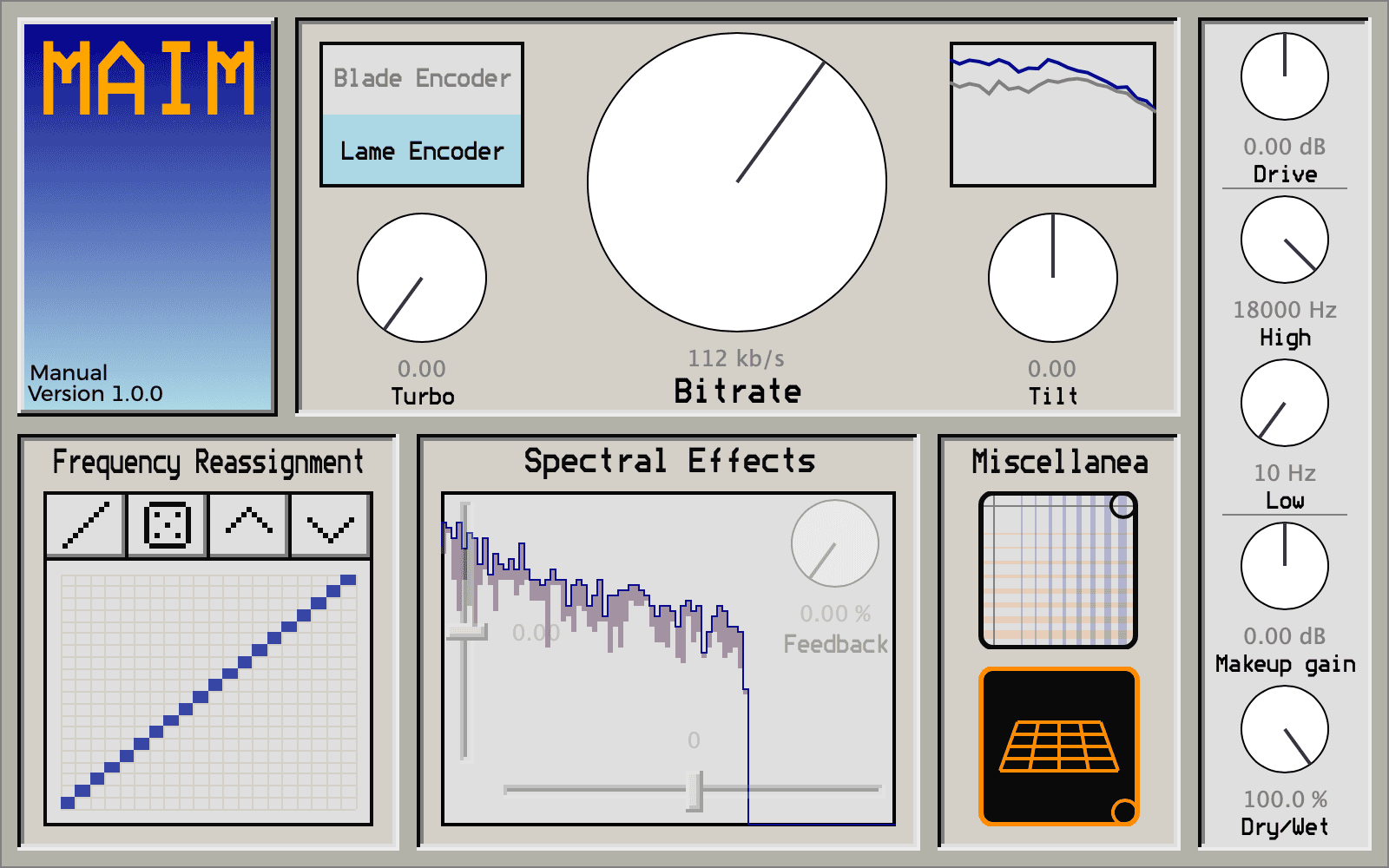
The main Bitrate control determines how aggressively the audio is compressed. Higher settings can produce relatively subtle coloration, while lower values introduce the familiar blurred highs, bubbling artifacts and unstable textures associated with heavily compressed MP3 files.
The Turbo control pushes the encoding process further, while Tilt changes which areas of the frequency spectrum the encoder prioritizes.
This can create sounds ranging from nostalgic early-internet degradation to completely broken digital textures.
LAME, Blade and Opus Processing
MAIM offers different codec personalities rather than one fixed distortion algorithm.
LAME generally provides a more controlled MP3 character, while Blade has a rougher and more obvious effect on transients. The later Opus mode introduces another type of compressed, communication-style digital destruction.
Switching between these processing engines can dramatically change how drums, vocals, synths and complete loops react to the plugin.
Frequency Reassignment for Extreme Glitch Effects
One of MAIM’s most unusual features is its Frequency Reassignment matrix.
This section allows frequency information to be redirected to different spectral positions. Producers can reset the mapping, randomize it or shift the complete structure up and down.
Used carefully, this can introduce strange tonal changes. Pushed further, it can completely reorganize the spectral character of the source.
Spectral Effects and Feedback
MAIM also includes dedicated spectral processing controls.
Horizontal Shift moves frequency content higher or lower, while Vertical Shift changes the behavior of quieter spectral information. A Feedback control feeds processed spectrum frames back into the next frame, creating buzzy and resonant textures.
These tools make the plugin especially useful for glitch, experimental electronic music and creative resampling.
Useful Controls for Mixing and Sound Design
The plugin includes familiar controls alongside its more experimental sections:
- Drive for controlling the level entering the encoder
- High and Low filters for shaping the processed output
- Makeup Gain for final level adjustment
- Dry/Wet control for parallel processing
- Smooth parameter automation inside a compatible DAW
The Dry/Wet control is particularly useful when the full effect becomes too aggressive. Producers can keep the original signal intact while blending compressed digital artifacts underneath it.
Best Uses for MAIM
MAIM can process almost any audio source, but it is especially effective on:
- Drum loops and percussion
- Vocals and vocal chops
- Synths and pads
- Lo-fi textures
- Transitions and glitch effects
- Experimental sound design
- Resampling sessions
On drums, low bitrates can soften transients or create bubbling digital movement. Vocals can be pushed toward broken internet-call textures, while pads and ambient sounds can become unstable spectral layers.
A Strong Plugin for Creative Resampling
One of the best ways to use MAIM is to record its output and edit the results.
Automate Bitrate, Turbo, spectral controls or the Frequency Reassignment matrix while audio is playing, then bounce the processed result to a new track.
The most interesting moments can then be chopped into fills, transitions, textures and one-shots. This approach can turn a simple loop into a much larger collection of original production material.
Plugin Formats and Compatibility
- Windows: VST3 64-bit
- macOS: VST3 and AU 64-bit
- Linux: VST3 64-bit
A compatible 64-bit DAW or plugin host is required.
Free and Open Source
MAIM is completely free and open source under the GPL-3.0 license.
No account, subscription or license manager is required. Installers are available for Windows and macOS, while Linux users can install the supplied VST3 file in their plugin directory.
Visit the official MAIM product page
Download MAIM from the official GitHub releases page
Important Limitations
MAIM is a specialized creative effect rather than a transparent mixing processor. Heavy settings can radically change transients, frequency balance and perceived clarity.
The unpredictable behavior is part of the appeal, but producers should monitor levels carefully and use the Dry/Wet control when the processing becomes too dominant.
Final Verdict
MAIM is one of the more distinctive free VST plugins available for digital degradation and experimental sound design.
Its use of real MP3 and Opus encoding technology gives it a character that conventional bitcrushers cannot easily reproduce. The additional spectral controls, frequency reassignment and feedback processing push the plugin far beyond simple low-bitrate emulation.
For electronic music producers, beatmakers and sound designers looking for free glitch effects, MP3 distortion and unusual digital textures, MAIM is a powerful open-source plugin worth exploring.