
bx_masterdesk Classic: A Free All-in-One Mastering VST
Compression, tonal balance, saturation, stereo enhancement and dynamic-range metering inside one streamlined mastering plugin.
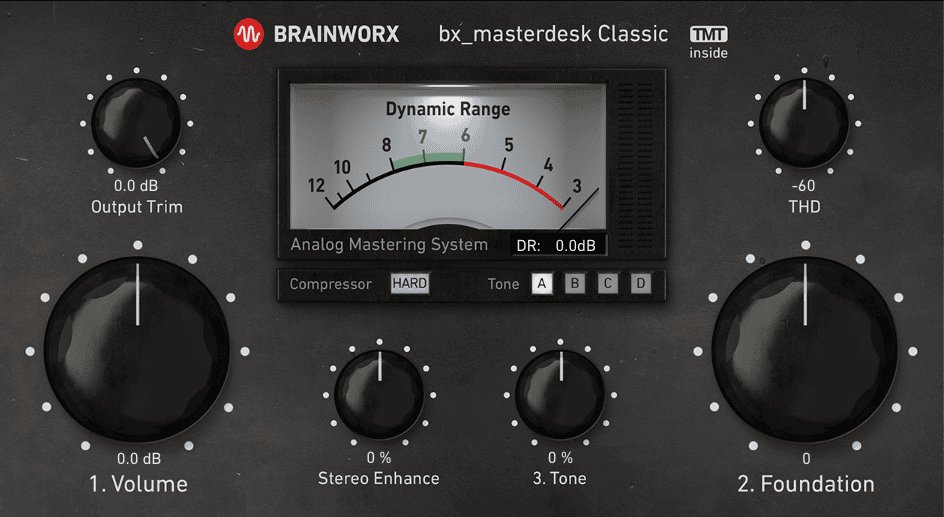
bx_masterdesk Classic is a free all-in-one mastering plugin developed by Brainworx and distributed by Plugin Alliance. It combines several processes normally found across a complete mastering chain inside a compact interface designed around three main controls.
The plugin is intended for producers, musicians and mixing engineers who want to create polished, competitively loud masters without building a complicated chain of separate compressors, equalizers, saturators, stereo processors and limiters.
bx_masterdesk Classic is included permanently with every free Plugin Alliance account. It is not a time-limited trial or a restricted demonstration version. After creating an account, users can install and activate the complete plugin through the Plugin Alliance Installation Manager.

What Is bx_masterdesk Classic?
bx_masterdesk Classic places a preconfigured analog-style mastering chain behind a simplified set of controls. Instead of asking the user to adjust every compressor, equalizer and limiter parameter individually, Brainworx has connected the processors and limited their ranges to settings intended for mastering.
The workflow is built around three steps:
- Volume: Controls how strongly the mix enters the internal compression and limiting chain.
- Foundation: Adjusts the overall balance between low-frequency weight and upper-frequency energy.
- Tone: Refines the final tonal character using four selectable EQ behaviors.
Additional controls provide harmonic saturation, stereo enhancement, compressor character and output-level adjustment. This gives producers more flexibility without turning the interface into a cockpit requiring three manuals and a co-pilot.
Volume and Dynamic-Range Metering
The Volume control determines how hard the incoming mix drives the mastering chain. Increasing it creates more compression, limiting and perceived loudness.
A central Dynamic Range VU meter shows the relationship between the peaks and the denser body of the track. The green area provides a practical starting point for balancing loudness and musical dynamics.
The meter is not a complete LUFS or true-peak measurement system, but it helps producers avoid blindly increasing the level until the waveform resembles a perfectly rectangular piece of modern architecture.
For streaming releases, leave enough transient movement and compare the result with commercially released reference tracks at the same perceived loudness. A louder master will often appear more detailed during a quick comparison even when it has lost punch and clarity.
Foundation and Tone Controls
The Foundation control changes the broad tonal relationship between the low and high frequencies. Increasing it gives the master a heavier bass foundation, while lower settings place more emphasis on clarity and upper-frequency energy.
This is useful when a mix feels technically balanced but lacks the correct overall weight. House, Hip-Hop and electronic productions may benefit from a stronger foundation, while acoustic or vocal-focused material may require a more restrained setting.
The Tone section provides four modes labelled A, B, C and D. Each mode changes the behavior of the underlying tone stack.
Some modes apply broad brightening or darkening, while others reshape the relationship between the midrange and the outer frequencies. The available curves are intentionally limited to musical ranges, making extreme and destructive EQ moves less likely.
These controls should still be used conservatively. Mastering EQ usually involves smaller adjustments than track-level mixing because every change affects the complete arrangement.
Compression, Saturation and TMT
bx_masterdesk Classic includes two compressor modes with different response characteristics. Switching between them also selects different channels from Brainworx’s Tolerance Modeling Technology system.
TMT introduces small variations inspired by the tolerances found between individual channels of analog equipment. The objective is to avoid the perfectly identical behavior associated with basic digital processing and introduce a more hardware-like character.
The THD control adds total harmonic distortion before the final stages. Moderate settings can increase density, control sharp transients and help the mix feel more cohesive.
Higher THD values can produce a more forward and slightly brighter sound. This may work for Pop, Rock, Hip-Hop and electronic music, but excessive saturation can reduce depth and make cymbals or vocals feel aggressive.
Use the control while monitoring at a matched output level. Harmonic processing can increase perceived loudness, which makes objective comparison considerably more difficult.
Stereo Enhancement
The Stereo Enhance control is designed to increase width and depth without behaving like a simple mid-side gain adjustment.
Brainworx uses an automated EQ-based process intended to emphasize useful stereo information such as guitars, synthesizers and atmospheric elements while avoiding excessive amplification of muddy room tones and reverb tails.
Small settings can make a master feel more open, particularly when the original mix is slightly narrow. Stronger settings should be checked carefully in mono because excessive width can weaken central elements and introduce phase-related problems.
Keep kicks, basses, lead vocals and other essential elements stable near the centre. Stereo enhancement works best when it supports a balanced mix rather than attempting to repair poor panning or arrangement decisions.
How to Use bx_masterdesk Classic
Insert the plugin near the end of the master bus and begin with the default preset. Make sure the incoming mix has enough headroom and is not already clipping.
Increase Volume while watching the Dynamic Range meter. Stop when the track gains useful density without losing the impact of the kick, snare and other transients.
Adjust Foundation to balance the low end against the rest of the spectrum. Compare the result with a reference track from a similar musical style.
Select the Tone mode that best suits the mix, then make a small adjustment with the Tone control. Avoid using it to correct narrow resonances or serious frequency problems that should have been solved earlier in the mix.
Finally, test the two compressor modes and introduce small amounts of THD and Stereo Enhance when they improve the result. Use Output Trim to create additional peak headroom before export.
Important Mastering Limitations
bx_masterdesk Classic simplifies mastering, but it does not analyse and repair every possible problem automatically. Resonances, excessive sibilance, unstable bass and poor mix balance should be corrected before the final mastering stage.
The plugin does not replace dedicated LUFS, loudness-range and true-peak metering. For commercial releases, use an accurate metering plugin after bx_masterdesk Classic and check the finished master against the technical requirements of the destination platform.
The official manual also recommends considering an additional intersample peak limiter and dithering processor when preparing professional masters for streaming, broadcast or physical distribution.
Export the final file at the original project sample rate and bit depth before creating lower-resolution delivery formats. Apply dithering only when reducing the bit depth, and apply it once at the final stage.
Compatibility and Installation
bx_masterdesk Classic is available for current Windows and macOS production systems.
- Windows: Windows 10 and Windows 11
- macOS: macOS 13 through macOS 26
- Mac processors: Intel and Apple Silicon
- Formats: VST2, VST3, Audio Unit and AAX
- Minimum RAM: 2 GB
- Current version: 1.8.0
- Price: Free with a Plugin Alliance account
Create a free Plugin Alliance account, download the Installation Manager and install bx_masterdesk Classic from the list of available products. The full licence can then be activated on the computer through the Plugin Alliance account.
Final Verdict
bx_masterdesk Classic is one of the most accessible free mastering plugins available for producers who want a fast and coherent final-processing workflow.
Its preconfigured chain combines compression, limiting, tonal shaping, saturation, stereo enhancement and dynamic-range monitoring without overwhelming the user with technical parameters.
The plugin is particularly useful for independent producers, musicians and beginners who need convincing demo masters, reference versions or release-ready starting points. More experienced engineers may also appreciate its speed when preparing alternative loudness versions or evaluating a mix quickly.
It cannot replace careful mixing, reliable monitoring or dedicated loudness and true-peak measurement. Used responsibly, however, it can provide a strong final layer of polish with remarkably little setup.
Mastering may still require good ears, good speakers and a little restraint. At least bx_masterdesk Classic removes the need to open seven plugins before discovering that the mix was already too bright.
Download bx_masterdesk Classic from the official Plugin Alliance website:
Download bx_masterdesk Classic Free
https://www.plugin-alliance.com/products/bx_masterdesk-classic