
Identity by SocaLabs: A Free Formula Synth Plugin for Mathematical Sound Design
Identity by SocaLabs is a free formula synth plugin built for producers who want to design waveforms with mathematical expressions rather than relying only on conventional oscillator shapes. Its two programmable oscillators turn equations into playable sound, supported by filters, modulation, effects, an arpeggiator and MPE control.
The result is a polyphonic virtual instrument that sits somewhere between a modern synthesizer, an experimental sound laboratory and a very musical mathematics lesson. Fortunately, no examination is scheduled at the end. Producers can begin with simple expressions, hear the waveform immediately and gradually explore more complex harmonic structures.
What Is Identity by SocaLabs?
Identity is a free polyphonic synthesizer developed by SocaLabs. Its central feature is a pair of formula oscillators, programmable sound generators that allow users to write waveforms as mathematical expressions.
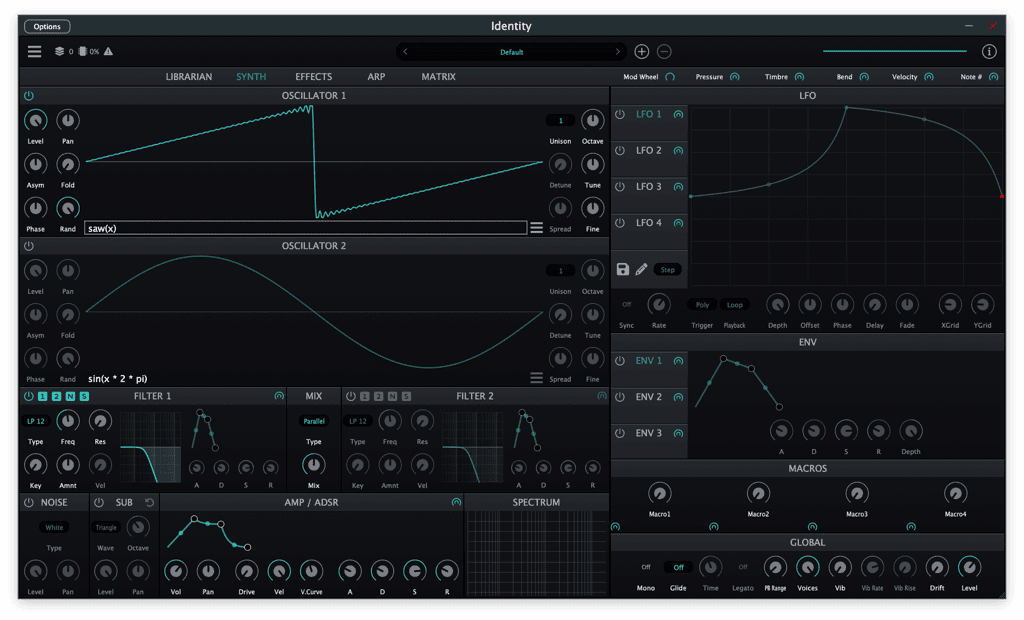
Instead of selecting only a fixed sine, saw, square or triangle waveform, producers can define oscillator behavior through formulas. Built-in waveform and filter functions provide a foundation for creating harmonic shapes, digital timbres and more unusual oscillator movement.
The instrument expands this concept with a sub-oscillator, white and pink noise, two multimode filters, multiple envelopes and LFOs, a modulation matrix, eleven reorderable effects and a built-in arpeggiator.
Official website: Visit the Identity page on SocaLabs
Download: Download Identity for Windows, macOS or Linux
Core Concept
Identity is based on a different approach to oscillator design. Most synthesizers begin with a collection of predefined waveforms or imported wavetables. Identity lets the user describe the waveform through an expression.
The formula becomes part of the sound generator itself. A simple expression can create a familiar waveform, while more complex combinations can introduce additional harmonics, asymmetry, folding and unusual digital movement.
This does not mean producers need to become mathematicians before writing a bassline. The formula system can be approached gradually. Start with a simple expression, change one component and listen to how the waveform and tone respond.
The visual oscillator display makes this process easier to understand. Changes to the expression are reflected in the waveform, connecting what the user types with what the instrument produces.
Main Features
- Two programmable formula oscillators
- Built-in waveform and filter functions
- Oscillator level, pan, tuning, detuning and spread controls
- Unison and octave controls
- Asymmetry, wave-folding and phase shaping
- Dedicated sub-oscillator
- White and pink noise generator
- Two multimode filters
- Low-pass, high-pass, band-pass and notch modes
- 12 and 24 dB per octave filter slopes
- Four MSEG-based LFOs
- Three modulation envelopes
- Flexible modulation matrix
- Eleven reorderable effects
- Built-in arpeggiator
- Four assignable macro controls
- Per-voice vibrato and analog drift
- MPE support
Formula Oscillators
The two formula oscillators are the defining feature of Identity. Each oscillator includes a field where the waveform can be written as an expression, alongside more familiar synthesizer controls for level, pan, tuning, detuning, spread, unison and octave placement.
This combination is important. Identity is experimental, but it does not abandon the controls producers already understand. Once a waveform has been created, it can still be tuned, widened, layered and balanced like a conventional oscillator.
The formula system can produce straightforward electronic tones, but its real appeal lies in harmonic exploration. Small changes to an expression can create new waveform shapes that would be difficult to reach with a normal waveform selector.
For sound designers, this makes Identity useful for building original oscillator sources before filters, effects and modulation are added. The tone begins with the formula rather than being rescued later by a large processing chain.
Wave Shaping Controls
Identity supplements its formula system with asymmetry, folding and phase controls. These parameters provide additional ways to reshape the oscillator without rewriting the entire expression.
Wave folding can introduce new harmonics by bending the waveform back on itself. Asymmetry changes the balance of the shape, while phase control adjusts its starting position and relationship to the note trigger.
These tools are useful when a formula is close to the desired sound but needs more bite, movement or harmonic density. A relatively simple waveform can become much more aggressive once folding is introduced.
For cleaner patches, the shaping controls can remain subtle. For experimental basses, leads and textures, they can push the oscillators into sharper and more complex territory.
Sub-Oscillator and Noise Generator
Formula-based tones can be detailed and harmonically rich, but they may still need a stable foundation. Identity includes a dedicated sub-oscillator for adding weight beneath the main oscillators.
This is particularly useful for bass patches. The formula oscillators can handle movement and character, while the sub-oscillator supports the fundamental frequency with a more controlled low end.
The white and pink noise generator adds another layer of flexibility. White noise can introduce brightness, attack and air, while pink noise offers a softer spectral balance.
Noise can be used for percussion-style attacks, atmospheric pads, wind-like effects, transitions and additional texture. It can also help formula-based sounds feel less mathematically perfect, which is sometimes exactly what the equation ordered.
Dual Multimode Filters
Identity includes two multimode filters, each offering low-pass, high-pass, band-pass and notch responses with 12 or 24 dB per octave slopes.
The dual-filter structure gives producers several routing and tone-shaping possibilities. A low-pass filter can soften bright harmonics from the formula oscillators, while a high-pass stage can remove unnecessary low-frequency material from pads, textures and effects.
Band-pass and notch modes are useful for more focused or animated sounds. With modulation applied, they can create moving resonances, vocal-style sweeps and rhythmic spectral changes.
Each filter also has an envelope section, allowing the cutoff response to evolve independently across the note. This makes it possible to create short plucks, sharp bass attacks, swelling pads and more complex filter movement without using an external effect.
MSEG LFOs
Identity includes four MSEG-based LFOs. MSEG means multi-stage envelope generator, a modulation system that can create more detailed shapes than a standard sine or triangle LFO.
Instead of being limited to a repeating geometric waveform, users can draw or define a modulation shape with several stages. This can create rhythmic sequences, unusual pulses, stepped movement and long evolving curves.
The LFOs support polyphonic, monophonic, legato and free trigger behavior. This allows modulation to restart with each voice, continue globally or respond differently depending on the performance mode.
For electronic music, these LFOs can drive rhythmic filter changes, wavetable-style oscillator movement, panning, effect parameters and complex repeating patterns.
Modulation Envelopes and Matrix
Three additional modulation envelopes are included alongside the filter and amplitude shaping tools. These envelopes can control parameters across the instrument and help patches evolve beyond a basic attack, decay, sustain and release structure.
The modulation matrix manages connections between modulation sources and destinations. It includes bipolar and unipolar behavior, along with curve controls for changing how modulation depth responds.
This is where Identity becomes much more than a mathematical oscillator demonstration. A static formula can be turned into a playable, evolving patch by modulating folding, phase, filter cutoff, effects, oscillator balance and other parameters.
Producers can use gentle modulation for movement that stays in the background, or build highly animated sounds where every note develops differently.
Eleven Reorderable Effects
Identity includes an internal effects processor with eleven reorderable modules. The official feature list names gate, chorus, distortion, delay, reverb, EQ and filter among the available effects.
Reordering is valuable because effect placement changes the result. Distortion before filtering behaves differently from distortion after filtering. Reverb before a gate can create rhythmic ambience, while delay before distortion can turn clean repeats into a denser texture.
The effects are also part of Identity’s modulation environment. This means effect parameters can move with envelopes, LFOs, macros and performance controls rather than remaining static.
A raw formula oscillator can therefore move from a simple digital tone into a polished lead, atmospheric pad, distorted bass or rhythmic sequence without leaving the instrument.
Arpeggiator and Macro Controls
The built-in arpeggiator provides a fast way to turn held notes and chords into rhythmic patterns. It is useful for electronic sequences, melodic techno motifs, synthwave lines, ambient pulses and game-style patterns.
Four assignable macros provide broader performance control. A macro can be connected to several parameters, allowing one knob to reshape multiple parts of a patch at once.
A single macro might open a filter, increase oscillator folding, add delay and widen the sound. This makes complex patches easier to automate inside a DAW and more practical for live performance.
Macros also help keep sound design musical. Instead of automating twelve small parameters individually, producers can build a few intentional performance movements and concentrate on the arrangement.
Per-Voice Vibrato, Drift and MPE
Identity includes per-voice vibrato and analog drift. These features can add small variations between notes, reducing the rigid quality that sometimes appears in highly digital synthesis.
Drift is especially useful on pads, chords and sustained leads. Applied carefully, it can make several voices feel less perfectly synchronized without turning the patch into an out-of-tune committee meeting.
MPE support adds another performance dimension. With a compatible controller and DAW, individual notes can respond independently to pressure, pitch movement and other expressive data.
This makes Identity suitable for more detailed playing techniques, especially on leads, evolving pads and expressive polyphonic sounds.
Sound and Creative Direction
Identity has a naturally digital and experimental character, but it is not restricted to abstract sound design. Its architecture can produce practical basses, leads, pads, keys, plucks, sequences and effects.
The formula oscillators are particularly suited to harmonically complex tones. Metallic keys, sharp digital basses, animated leads and unusual plucks are natural areas to explore.
The modulation system also supports slower and more atmospheric work. Long MSEG shapes, filter movement, drift, noise and internal effects can create evolving pads, drones and cinematic textures.
For glitch, IDM and experimental electronic music, the oscillator formulas and flexible modulation offer a large amount of controlled unpredictability. For house, techno and synthwave, the same engine can be kept simpler and focused on rhythmic, playable patches.
Compatibility and Technical Requirements
Identity is available for Windows, macOS and Linux in several modern plugin formats. It is a 64-bit virtual instrument and should be loaded on an instrument track inside a compatible DAW.
- Windows formats: VST3 and CLAP, 64-bit
- macOS formats: VST3, AU and CLAP, 64-bit
- Linux formats: VST3, LV2 and CLAP
- AAX version: not listed
- Standalone version: not listed
- Current verified version: 1.0.4
- Plugin type: polyphonic software synthesizer
Windows producers can use the VST3 or CLAP version. macOS users can choose between VST3, AU and CLAP depending on the DAW. Linux users receive VST3, LV2 and CLAP options.
Because Identity supports several plugin standards, it should fit into a wide range of modern production environments. Producers should still verify that their DAW supports the selected format before installation.
Who Should Use Identity?
Identity is best suited to producers who enjoy designing sounds rather than relying entirely on factory presets. It gives technically curious users a different relationship with oscillator synthesis while keeping the rest of the instrument familiar enough for practical music production.
- Electronic producers looking for original synth tones
- Sound designers interested in mathematical waveform generation
- Techno producers creating evolving sequences and metallic sounds
- Ambient artists building long pads and digital textures
- Game composers needing unusual electronic timbres
- Cinematic producers creating futuristic and abstract layers
- Experimental musicians exploring MSEG modulation
- Linux producers looking for a free native synth plugin
- MPE users who want more expressive polyphonic control
Creative Applications
For bass design, begin with a relatively simple formula and use the sub-oscillator to stabilize the low end. Add folding or asymmetry for harmonic character, then control the brightness with one of the filters.
For plucks, use a short amplitude envelope and a fast filter envelope. A simple formula can produce a clean attack, while modulation and delay add more movement around the note.
For pads, combine both formula oscillators at different octave positions. Use slow MSEG shapes, per-voice drift, chorus and reverb to create a wider evolving texture.
For techno sequences, use the arpeggiator with filter and folding modulation. Assign the most important changes to macros so the pattern can develop gradually across the arrangement.
For cinematic sound design, use noise, notch filtering and long modulation envelopes to build drones, tension layers and synthetic atmospheres. The formula oscillators can provide a less familiar starting point than traditional analog waveforms.
For game audio, short envelopes and oscillator folding can generate interface tones, digital effects and retro-inspired sound elements. Longer modulation shapes can support environmental drones and science-fiction textures.
Download and Usage Status
Identity is distributed free of charge through the official SocaLabs website. Separate downloads are provided for Windows, macOS and Linux.
The public Identity page does not require a paid purchase and does not list a subscription. SocaLabs describes its wider plugin collection as free for everyone.
The product page does not publish a separate statement claiming that the software or its output is royalty-free. The safest description is therefore that Identity is a free software synthesizer distributed by SocaLabs for music production and sound design.
Official page: https://socalabs.com/synths/identity/
Windows download: Download Identity for Windows
macOS download: Download Identity for macOS
Linux download: Download Identity for Linux
Production Tips
Start with simple formulas. A basic waveform gives a clearer understanding of how the expression influences the sound before folding, filtering and modulation are added.
Change one part of the formula at a time. When several values are edited simultaneously, it becomes much harder to understand which change created the useful result.
Use the sub-oscillator for bass stability. Complex formulas can create interesting harmonics, but the lowest frequencies often benefit from a simpler foundation.
Keep an eye on output level when experimenting with folding, unison and effects. Harmonic density can increase quickly, and fascinating mathematics remains perfectly capable of clipping a master bus.
Use macros to simplify finished patches. Once the sound is working, connect its most useful movements to the four macro controls for easier automation and performance.
Save useful formulas separately or create patch variations. A small expression change can produce an entirely different tone, so preserving earlier versions prevents good accidents from disappearing.
Industry Context
Most modern synthesizers offer large waveform collections, sample import or wavetable editing. Identity explores another route by placing a mathematical expression directly at the center of the oscillator.
This approach connects music production with techniques more commonly associated with digital signal processing and experimental synthesis. It gives producers a way to create oscillator material that is not limited to familiar analog shapes or commercial wavetable collections.
Identity also reflects the growing quality of free audio software. Its formula oscillators are supported by a complete synthesis architecture with filters, modulation, effects, macros, an arpeggiator and MPE.
For independent producers, tools like this expand access to deeper synthesis without adding another subscription or paid upgrade. The only real cost may be several hours disappearing while one equation becomes thirty-seven bass patches.
Final Verdict
Identity by SocaLabs is an original free formula synth plugin for producers who want to explore mathematical waveform generation inside a complete polyphonic instrument.
Its two programmable oscillators provide the main creative attraction, but the surrounding architecture is equally important. Dual filters, four MSEG LFOs, three modulation envelopes, a flexible matrix, eleven reorderable effects, macros, an arpeggiator, analog drift and MPE support make Identity capable of serious production work.
The synth is especially valuable for electronic music, experimental sound design, techno, ambient production, game audio and cinematic textures. Its formula system may require more curiosity than a conventional waveform selector, but that difference is exactly what gives the plugin its identity.
For producers looking for a free VST plugin, a free formula synthesizer or an experimental synth with deep modulation and cross-platform support, Identity is a distinctive and worthwhile download from SocaLabs.