Cartridge by DsgDnB is a free sampler and slicer VST plugin designed for producers, beatmakers, drum and bass creators, hip-hop producers, electronic musicians and sample-based artists who want a fast way to chop audio, trigger one-shots, reshape loops and build playable sample ideas inside the DAW.
The plugin is currently in testing, which means users should expect some bugs and updates along the way. Still, Cartridge already offers a serious feature set: four playback modes, sample slicing, MIDI export, time-stretching, pitch bend, MIDI CC support, auto root note detection, looping with fades, phase-click protection and extra Reaper integration for producers who live inside that DAW.
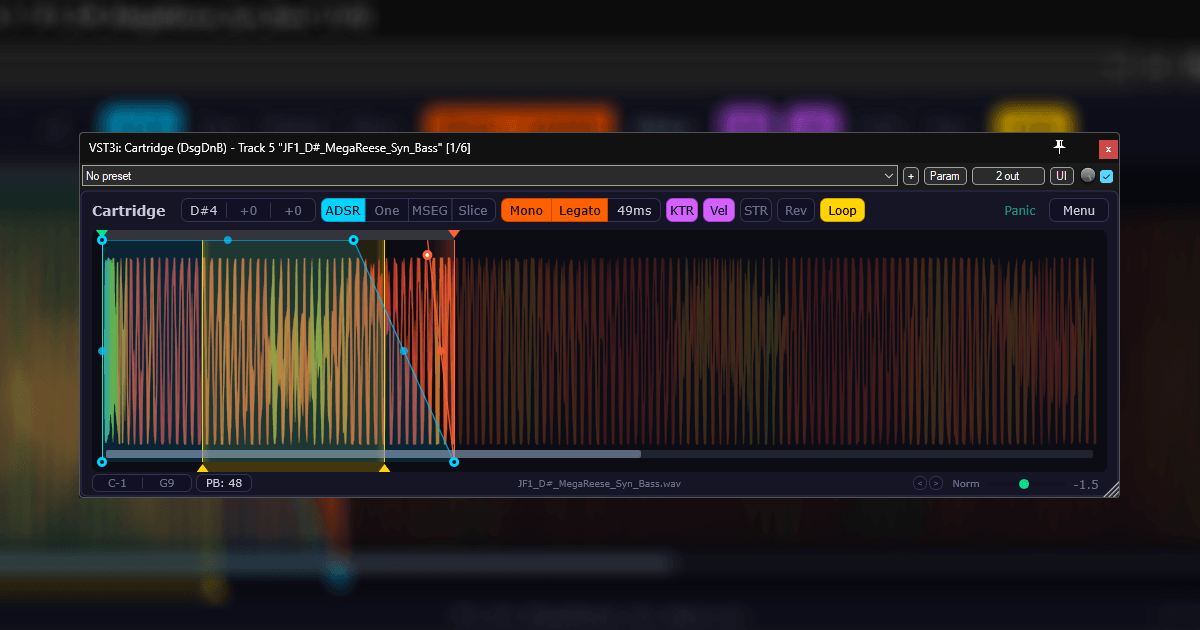
What Is Cartridge by DsgDnB?
Cartridge is a free sample and slicer plugin from DsgDnB. It is built around four playback modes that cover several common sampling workflows, from simple one-shot triggering to more advanced loop slicing with MIDI export.
Instead of acting like a huge sampler workstation with endless menus, Cartridge focuses on direct sample handling. Load audio, choose how it should play, shape the envelope, slice it, reverse it, loop it, stretch it, map it or export MIDI from the slices. It is the kind of tool made for producers who want to move quickly while working with samples.
Cartridge works in modern DAWs and is available for Windows, macOS and Linux. Windows users get VST3, macOS users get VST3 and AU, and Linux users get VST3 and LV2. The free version has no time limit and no feature restrictions, although it includes a small badge in the interface unless the user supports the developer with a key.
Why This Free Sampler and Slicer VST Plugin Matters
The free sampler and slicer VST plugin category is important because sample-based production is still one of the fastest ways to create original ideas. A good sampler can turn a forgotten loop, vocal fragment, drum break, field recording or synth bounce into the foundation of a full track.
Many DAWs already include samplers, but third-party tools can still bring a different workflow. Cartridge is interesting because it combines several sample approaches in one plugin. It can behave like a classic sampler, a one-shot trigger, a volume-shaping MSEG tool or a loop slicer with MIDI export.
That flexibility makes it useful for modern production. A beatmaker can chop drums. A drum and bass producer can slice breaks. A trap producer can pitch vocal fragments. An electronic musician can turn a loop into a playable rhythmic instrument. A sound designer can use reverse playback, fades and time-stretching to create new textures from ordinary audio.
Main Features
- Free sampler and slicer plugin currently in testing.
- Four playback modes: ADSR, One, MSEG and Slice.
- ADSR mode for classic envelope-driven sample playback.
- One mode for quick one-shot triggering.
- MSEG mode for drawing custom volume curves.
- Slice mode for loop slicing with MIDI export.
- Auto-normalize for quick level preparation.
- Auto root note detection for easier melodic sample mapping.
- Zero-crossing snap to reduce clicks when editing sample points.
- MIDI map support for building drum racks in workflows such as FL Patcher or Reaper containers.
- Legato, reverse and sample hot-swapping for performance and creative variation.
- Looping with fades for smoother sustained playback.
- Phase-click protection for cleaner sample triggering.
- Pitch bend and MIDI CC support for performance control.
- Time-stretching to change pitch without changing playback speed.
- Samples stored inside the project as FLAC for safer collaboration and archiving.
- Scalable and themable interface.
- Extra Reaper integration through optional scripts.
- Windows VST3, macOS VST3/AU and Linux VST3/LV2 support.
Four Playback Modes for Different Sampling Workflows
The strength of Cartridge comes from its four playback modes. Each mode is aimed at a different kind of sample work, which makes the plugin more flexible than a simple one-shot player.
ADSR Mode
ADSR mode works like a classic sampler envelope. The user can shape attack, decay, sustain and release behavior to control how the sample starts, holds and fades. This is useful for turning melodic samples into playable instruments, shaping pads from audio, cleaning up sustained sounds or creating controlled sample layers.
One Mode
One mode is built for immediate one-shot playback. This is useful for drums, impacts, vocal hits, FX stabs, percussive sounds and short audio clips that need to fire quickly without complex envelope work.
MSEG Mode
MSEG mode lets users draw custom volume curves. This opens the door to rhythmic gating, custom fades, choppy motion, tremolo-style movement, pumping effects and more experimental amplitude shaping. For producers who enjoy turning loops into new grooves, this mode is one of the most creative parts of Cartridge.
Slice Mode
Slice mode turns Cartridge into a loop slicer. It can divide audio into playable slices and export MIDI, making it useful for chopping drum breaks, rearranging loops, building new grooves and transforming sample material into something more personal.
Why Slice Mode Is the Creative Center
Slice mode will probably be the main reason many producers download Cartridge. Loop slicing remains one of the most powerful techniques in electronic music, hip-hop, drum and bass, jungle, breakbeat, garage and sample-based pop.
A loop becomes much more interesting when it can be rearranged. A drum break can be chopped into individual hits. A melodic phrase can become a new pattern. A vocal loop can be turned into a playable rhythm. A percussion groove can be broken apart and rebuilt around a new beat.
Cartridge’s MIDI export makes this workflow more practical. Once slices are detected and mapped, the producer can export the rhythmic information and edit it in the DAW’s piano roll. That means the sample is no longer locked to its original performance. It becomes raw material.
Time-Stretching, Pitch and Performance Control
One of the most important features in Cartridge is time-stretching. The plugin can change pitch without changing playback speed, which is essential when working with melodic loops, vocal fragments, atmospheric samples or drums that need to stay in time.
This matters because old-school pitch shifting often changes duration. Raise the pitch and the sample gets shorter. Lower the pitch and it gets longer. Time-stretching gives producers more control, especially when matching samples to a project tempo or key.
Pitch bend and MIDI CC support add another layer of performance. Producers can automate movement, perform pitch gestures, control parameters from hardware or bring more expression into sample playback. For a free plugin still in testing, that level of control is very welcome.
Sample Storage and Collaboration
Cartridge stores samples inside the project as FLAC. This is a smart workflow feature because missing samples are one of the classic nightmares of sample-based production. Every producer knows the pain of opening an old project and discovering that half the magic lived in a folder called “New Folder 7” on a drive that no longer exists.
By storing sample data inside the project, Cartridge helps make sessions safer for archiving and collaboration. This is especially useful when sharing projects with another producer, moving sessions between computers or returning to old work months later.
FLAC storage also keeps the file size more efficient than uncompressed audio while preserving lossless quality. For producers who work with many small chops and loops, this can make a real practical difference.
Extra Reaper Integration
Cartridge works in modern DAWs, but it offers deeper integration for Reaper users through optional scripts. These scripts can create a new track from a sample selected in Reaper’s Media Explorer, load a selected sample into the active Cartridge instance or wrap a selected media item into a new Cartridge track.
This is a strong advantage for Reaper producers because it turns Cartridge into a faster part of the DAW workflow. Instead of manually loading samples through menus, users can build shortcuts and move from browsing to chopping more directly.
That kind of integration reflects the developer’s practical background. Cartridge feels like a tool made by someone who actually wants to work faster with samples, not just decorate a plugin interface with features nobody uses.
Sound, Workflow and Creative Use
Cartridge does not impose one fixed sound. Its personality comes from what the user loads into it and how the sample is manipulated. That makes it useful across many genres.
For drum and bass, it can slice breaks, reshape drum loops, trigger bass stabs and handle quick sample edits. For hip-hop and trap, it can chop melodic phrases, vocal hits, one-shots and 808 layers. For house and techno, it can rearrange percussion loops, create rhythmic stutters and build sampled hooks. For ambient and experimental music, it can stretch, reverse, loop and curve sounds into more atmospheric shapes.
The workflow is hands-on. Cartridge is not trying to become a full cinematic sampler or a giant instrument library. It is closer to a creative utility for producers who like to grab audio, shape it and keep moving.
Who Should Use Cartridge?
Cartridge is ideal for beatmakers, sample-based producers, drum and bass creators, jungle producers, hip-hop producers, electronic musicians, Reaper users and sound designers who want a free VST plugin for chopping and reshaping audio.
It is especially useful for producers who work with loops and want more control than simple audio stretching on the timeline. Slice mode and MIDI export make it attractive for anyone who likes to rebuild rhythms from sample material.
It is less suited to users who need a polished commercial sampler with a finished manual, a huge preset library and guaranteed stability. Cartridge is still in testing. That means it can be powerful, but users should treat it like an evolving tool rather than a perfectly finished product.
Best Use Cases for Producers
Drum Break Chopping
Use Slice mode to chop drum breaks, rearrange hits and export MIDI for detailed rhythm editing inside the DAW.
One-Shot Drum Racks
Use One mode and MIDI mapping to build custom kits from kicks, snares, hats, percussion hits and FX sounds.
Melodic Sample Instruments
Use ADSR mode, root note detection and pitch controls to turn melodic samples into playable instruments.
Vocal Chop Workflows
Load vocal phrases, slice them, reverse selected parts, stretch them and trigger new melodic or rhythmic patterns.
Loop Reshaping
Use MSEG mode to draw custom amplitude curves and create rhythmic gates, stutters and evolving loop movement.
Reaper Sample Workflow
Use the optional Reaper scripts to move faster from Media Explorer to a loaded Cartridge instance.
Project Collaboration
Use FLAC project storage to reduce missing sample problems when moving sessions between systems or collaborators.
Compatibility and Download Details
Cartridge is available from the official DsgDnB website. The plugin is currently in testing, so users should expect active development and possible bugs. The free version has no time limit and no feature restrictions, but includes a small badge in the interface. A paid key can remove the badge and support development.
- Official website: Cartridge by DsgDnB
- Download: Download Cartridge for free
- Formats: Windows VST3, macOS VST3/AU, Linux VST3/LV2
Industry Impact: Free Samplers Are Becoming More Practical
Cartridge shows how free sampling tools are becoming more practical and more workflow-focused. Instead of simply offering basic playback, modern freeware tools can now include slicing, MIDI export, time-stretching, project-safe sample storage and deeper DAW integration.
This matters because sampling is central to modern music production. Producers need tools that help them move quickly from idea to groove. A slow sampler can kill momentum. A fast one can turn a random sound into a track before the coffee goes cold.
The fact that Cartridge supports Windows, macOS and Linux also makes it more accessible than many freeware tools. Linux support remains especially valuable for producers who work outside the usual macOS and Windows ecosystem.
What Happens Next
Cartridge is still in testing, so its future will depend on stability, updates, user feedback and how the developer expands the workflow. Version updates have already added useful improvements such as play-through behavior in Slice mode, automatic transient detection, hover tooltips and clearer slice display.
The best way to test Cartridge is simple: load a drum loop, enter Slice mode, export MIDI and rebuild the groove in your DAW. Then try a vocal phrase, a bass loop or a field recording. If the plugin helps you create something new from old audio in a few minutes, it has already justified the download.
Final Verdict
Cartridge by DsgDnB is a promising free sampler and slicer VST plugin for producers who want fast sample chopping, loop slicing, one-shot triggering and creative audio manipulation inside the DAW.
With ADSR, One, MSEG and Slice modes, MIDI export, time-stretching, pitch bend, MIDI CC support, auto root note detection, looping with fades, phase-click protection, FLAC project storage and extra Reaper integration, it offers a strong workflow for a free tool.
It is still in testing, so it should be used with that in mind. But for beatmakers, drum and bass producers, sample choppers and electronic musicians who enjoy turning audio into new ideas, Cartridge is absolutely worth trying. It may not be polished like a huge commercial sampler yet, but it has something better for creative work: speed, focus and the feeling that a loop is about to become trouble.