A Clean Soft Clipper for Louder, Tighter Mixes
Free plugins often fall into two categories: charming studio toys or genuinely useful tools that quickly become part of a serious workflow. Mesa Lite by Venomode belongs to the second camp. This free soft clipper is designed for producers, beatmakers, mixing engineers, and mastering-focused creators who want to control peaks, increase perceived loudness, and add subtle density without reaching immediately for a heavy limiter.
Available from the official Venomode website, Mesa Lite keeps the concept refreshingly direct: push your signal into controlled clipping, shape how the peaks are rounded, and watch the waveform respond in real time. For a free VST, that combination of clarity, practicality, and visual feedback makes it far more than a quick download for the folder of forgotten plugins.
What Is Mesa Lite?
Mesa Lite is a free soft clipper plugin built to smooth peaks and help a mix feel louder without the pumping behavior that can happen when a limiter is pushed too aggressively. Instead of simply catching the loudest transients at the end of a chain, Mesa Lite lets you shape the way audio is clipped, from harder peak control to a gentler rollover that feels more natural.
It supports major plugin formats including VST, VST3, AU, and AAX, with versions for Windows, macOS, and Ubuntu. That makes it a flexible option for producers working in modern DAWs, whether the goal is a cleaner drum bus, a louder synth group, a more stable vocal chain, or a final touch before mastering export.
Download Mesa Lite: the plugin is available as a free download directly from Venomode. Visit the Mesa Lite download page to get the latest version for your system.
What It Is Used For in Music Production
Soft clipping has become a common technique in modern production because it can make a track feel more controlled and energetic without always sounding obviously processed. Mesa Lite is useful when a signal has sharp transient peaks that steal headroom, especially on drums, percussion, bass, aggressive synths, or full mix buses that need a little extra firmness.
On a drum bus, it can help tame snare and kick peaks while keeping the groove forward. On electronic music, it can add pressure to a synth stack or make a bass line feel more compact. On vocals, it can be used carefully before compression to catch occasional peaks. On a mix bus, it can offer a controlled loudness lift before the final limiter, provided the processing stays subtle and musical.
Sound, Workflow, and Strengths
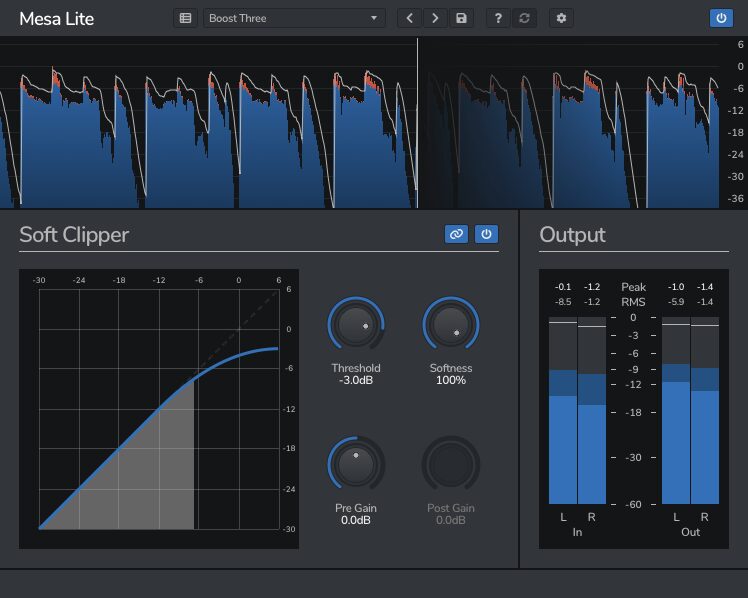
The strength of Mesa Lite is its focus. It does not try to be an oversized mastering suite or a complicated saturation laboratory. It gives you a direct soft clipping workflow with a variable shape control, internal 4x oversampling, and a waveform display that makes the process easier to understand. For producers who like visual feedback while mixing, that waveform metering is a real advantage.
The variable clipping shape is the heart of the plugin. A harder setting can control peaks more assertively, while a softer curve can round off transients in a smoother way. This makes Mesa Lite useful for both transparent gain management and mild tonal enhancement. Used gently, it can make a bus feel more glued together. Pushed harder, it can introduce saturation and edge, which may suit modern electronic, hip-hop, rock, trap, techno, or house productions.
A Practical Tool for Loudness Without Losing Control
The main appeal of Mesa Lite is not that it magically masters a track in one click. Its value is more professional than that. It helps producers manage headroom before the final loudness stage. By shaving fast peaks before they hit a limiter, the final limiter often has less work to do, which can result in a mix that feels louder without collapsing under obvious compression artifacts.
This is especially useful in genres where impact matters: EDM drops, Afro house drums, tech house grooves, rap beats, cinematic percussion, rock choruses, and dense pop productions. The plugin can also be used creatively on individual elements when a sound needs more bite or thickness.
Who Will Enjoy Mesa Lite?
Mesa Lite is a strong fit for beatmakers who want punchier drums, electronic producers who need controlled loudness, and mixing engineers looking for a clean peak-shaping tool that does not slow down the session. It is also a good educational plugin for beginners who want to understand the difference between limiting, clipping, saturation, and headroom management.
Mastering engineers may prefer more advanced clipping tools for detailed commercial work, but Mesa Lite remains useful as a quick, free, and efficient option. For producers working from a home studio, it can be one of those small plugins that quietly solves real problems, which is exactly what a good free VST should do.
Why This Free VST Is Worth Trying
Mesa Lite stands out because it focuses on a task that matters in everyday production. Many producers struggle to make tracks louder without destroying the punch, widening the distortion, or flattening the groove. A good soft clipper can help, and Mesa Lite gives that function in a simple, approachable, and genuinely useful form.
The fact that it is free, available through the official developer website, and does not require unnecessary complications makes it even more appealing. No bloated installation ritual, no creative momentum being sacrificed to plugin bureaucracy. The studio gods are merciful, for once.
Final Verdict
Mesa Lite is an elegant free VST for producers who want better peak control, stronger perceived loudness, and a more confident signal chain. It is not overloaded with unnecessary extras, and that is precisely why it works. It does one important job, keeps the workflow clear, and gives enough visual and sonic control to make it useful across mixing, beatmaking, sound design, and pre-mastering situations.
For anyone building a serious free plugin collection, Mesa Lite deserves a place in the toolbox. Download it from the official Venomode Mesa Lite page, test it on drums, bass, synth buses, and your mix bus, then listen carefully. The best free plugins are not always the loudest names in the room. Sometimes, they are the ones that quietly make everything hit harder.