
Chronos is a free convolution plugin developed by Pataki Audio for room correction, active speaker systems, FIR filtering, impulse response processing and accurate monitoring workflows. Unlike many convolution effects designed primarily for reverb, Chronos focuses on technical precision, predictable latency and transparent processing.
The plugin is available as donationware for Windows. Producers can download it for €0 without creating an account, joining a newsletter or installing a license manager. Optional contributions support future development, but the complete plugin remains accessible without mandatory payment.
What Is Chronos?
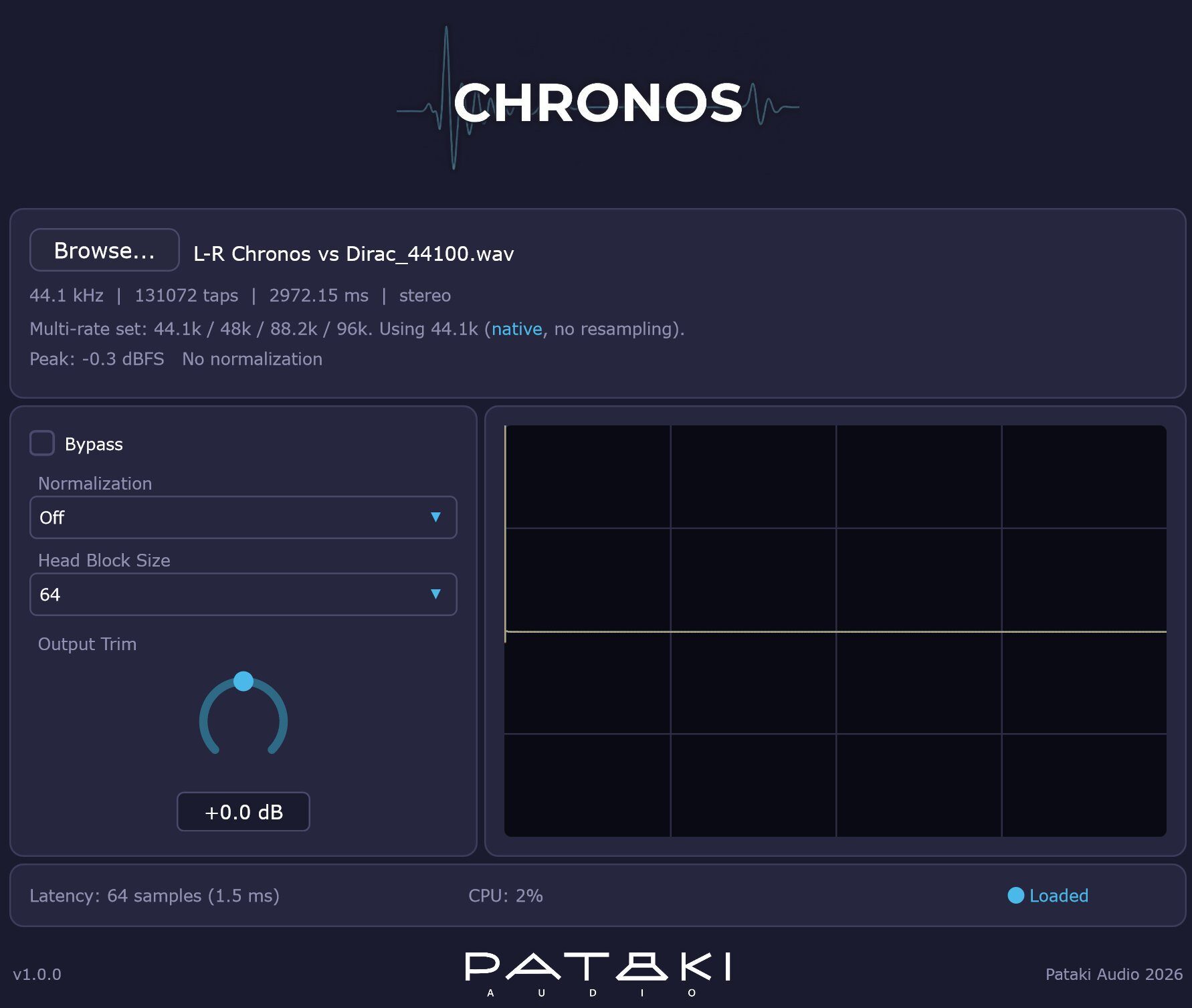
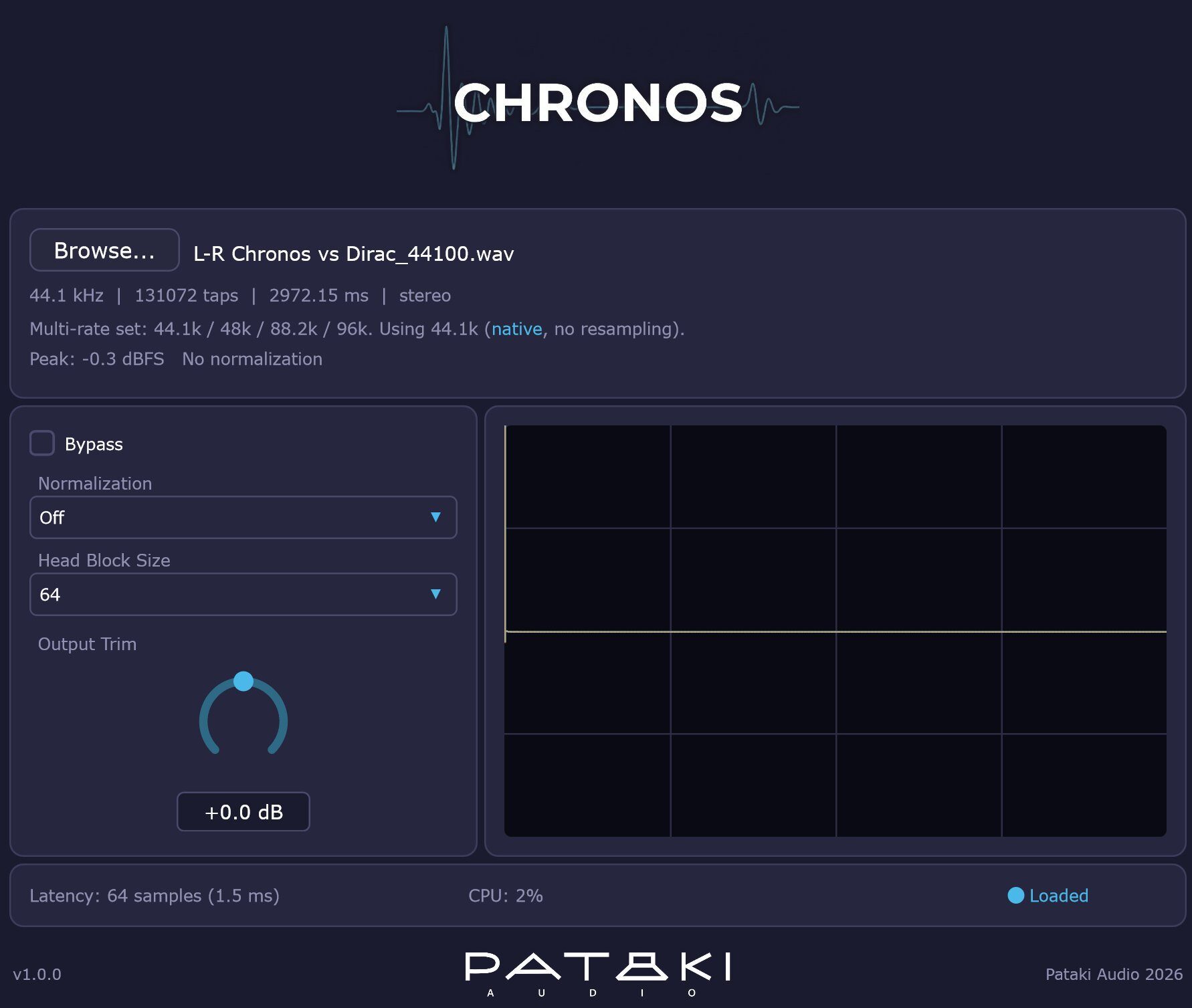
Chronos is a stereo VST3 convolver that processes audio through an impulse response loaded from a WAV file. An impulse response can capture the frequency and time behavior of a room, loudspeaker, equalization curve, microphone setup or hardware signal path.
The plugin performs every stage of the process in 64-bit double precision. This includes the input buffers, partitioned convolution engine, FFT calculations and output stage. Pataki Audio designed this architecture primarily for long correction filters, where accumulated numerical errors can become measurable.
Chronos can still load conventional reverb impulse responses, but that is not its main purpose. Its strongest applications are room correction, active speaker filtering, IR-based equalization, hardware coloration and accurate playback chains.
Main Features
- End-to-end 64-bit double-precision processing
- Double-precision FFT engine with SIMD acceleration
- Non-uniform partitioned convolution
- Impulse responses up to 262,144 taps
- Mono and stereo WAV file support
- Sample rates from 44.1 kHz to 192 kHz
- User-selectable head block size
- Accurate latency reporting to the host
- Automatic plugin delay compensation support
- Hot-swappable impulse response loading
- Optional IR normalization
- Manual output trim
- Impulse response waveform display
- CPU and latency monitoring
- Multi-rate impulse response support
Adjustable Latency and CPU Usage
Chronos exposes the head block size used by its partitioned convolution engine. This allows the producer to decide how the plugin balances latency and processor usage.
A smaller block size produces lower latency but requires more CPU power. A larger block reduces the processing load while increasing latency. The default setting of 64 samples adds approximately 1.45 milliseconds at 44.1 kHz.
Settings of 16 to 64 samples are better suited to monitoring and tracking chains where responsiveness matters. Values between 256 and 1024 samples are more appropriate for mixing, mastering or playback systems where lower CPU usage is more important than real-time performance.
The exact latency is shown inside the interface and reported to the DAW, allowing the host to compensate for the delay automatically.
Multi-Rate Impulse Response Support
One of Chronos’ most useful technical features is its ability to manage several versions of the same filter at different sample rates.
A producer can export separate files such as room_44100.wav, room_48000.wav and room_96000.wav. When one file is loaded, Chronos searches the same folder for matching versions and automatically selects the IR corresponding to the current DAW sample rate.
This avoids unnecessary sample-rate conversion and preserves the exact response of a filter created in software such as REW, rePhase, Acourate or Audiolense.
When a native version is unavailable, Chronos resamples the closest compatible file using the r8brain-free-src engine. The interface clearly indicates whether an IR is running natively or has been converted.
Best Uses
For room correction, Chronos can load a measured FIR filter created from the response of a studio or listening position. It can be inserted on a monitoring or playback path to compensate for frequency and phase problems identified during measurement.
In an active speaker system, separate instances can process different driver bands or channel pairs. Pataki Audio also offers MetaHost for routing several Chronos instances across multichannel configurations.
Chronos can load impulse responses captured from preamps, consoles, tape machines and other analog equipment. These IRs reproduce the linear frequency and phase behavior of the hardware, although they do not recreate dynamic saturation or nonlinear distortion by themselves.
The plugin can also operate as a custom linear-phase or minimum-phase equalizer. Producers can design an FIR curve externally, export it as a WAV file and load it directly into Chronos.
Production Tips
Leave normalization disabled when using a precisely measured correction filter. This preserves the level encoded in the original IR. Use Output Trim only when gain matching is required.
Check the file information displayed after loading an impulse response. Chronos reports its sample rate, length, duration, channel format and peak level, making it easier to catch the wrong file before wondering why the monitors suddenly sound philosophical.
For real-time monitoring, begin with a head block size of 64 samples. Increase it when processing long IRs during mixing or playback and CPU consumption becomes unnecessarily high.
Remember that Chronos reproduces whatever is contained in the impulse response. A minimum-phase IR preserves a different transient behavior from a linear-phase filter, which may introduce pre-ringing. The plugin is the engine, but the IR remains responsible for the destination.
Compatibility and Download
Chronos is available as a 64-bit VST3 plugin for Windows 10 or later. It processes stereo input and output and supports host sample rates between 44.1 kHz and 192 kHz.
The installer is approximately 6 MB. The official page does not currently list macOS, Linux, Audio Unit or AAX versions.
Chronos is distributed as donationware. Users may select €0 and download the complete plugin without an account, newsletter registration, advertisements, popup reminders or telemetry.
Final Verdict
Chronos is a specialized free plugin rather than a general-purpose creative effect. Its double-precision engine, adjustable partitioning, multi-rate IR management and transparent technical feedback make it particularly valuable for room correction, speaker systems and measurement-focused workflows.
Most producers will not need 262,144 taps before breakfast, but engineers who work with long FIR filters finally have a convolver that takes the numbers as seriously as they do.
Download Chronos from the official website:
https://patakiaudio.com/