
Delay plugins are everywhere, but good delay plugins still need a reason to exist. DLAY Lite by FRCTL Audio has one: it turns echoes into something you can shape visually, quickly and musically, without forcing producers into a deep editing session every time they want movement, space or atmosphere.
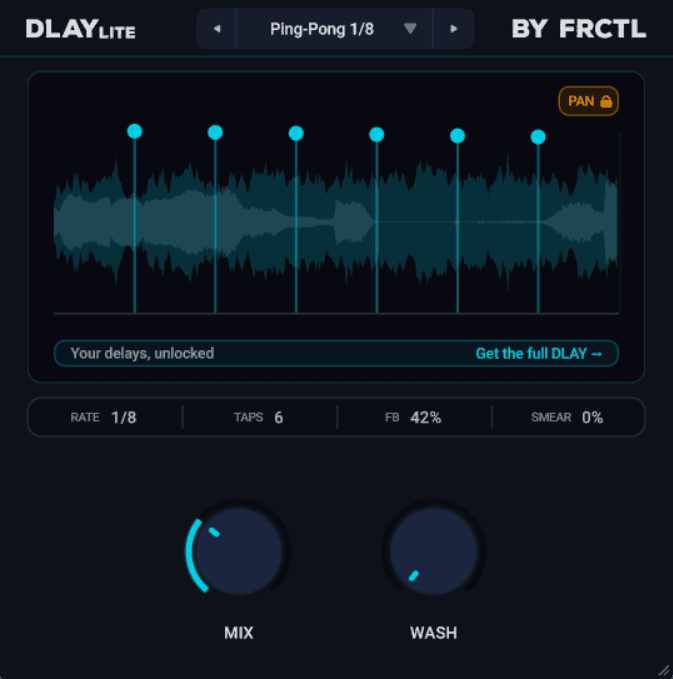
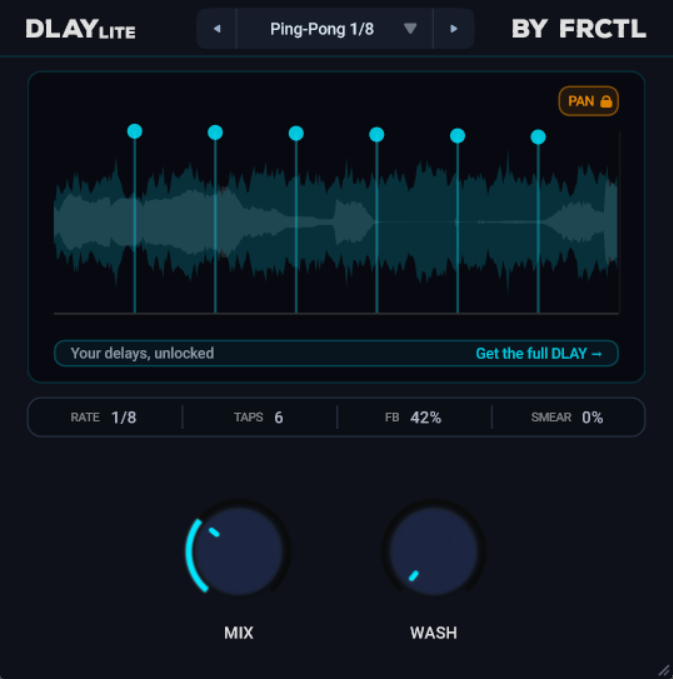
This free VST plugin is a streamlined multi-tap delay effect built for producers who want fast results inside a DAW. It gives you a visual echo canvas, up to 12 taps, 12 presets and two main controls: MIX and WASH. That makes it a useful free delay VST plugin for home studio users, beatmakers, sound designers, vocal producers and electronic musicians who want a creative delay without spending half the afternoon negotiating with tiny menus.
What Is DLAY Lite?
DLAY Lite is a free multi-tap delay plugin developed by FRCTL Audio. It is the free, simplified version of the full DLAY delay plugin, designed to give producers a fast way to create rhythmic echoes, slapbacks, washed-out tails and atmospheric delay textures.
The idea is refreshingly direct. Instead of opening a traditional delay interface filled with separate timing, feedback, modulation and tone controls, DLAY Lite presents echoes as taps on a visual grid. You can arrange up to 12 echoes, shape their timing and level, then use the WASH control to expand the delay into a smoother, more diffuse tail.
For a free audio plugin, that makes DLAY Lite interesting because it sits between a basic delay and a more creative sound design tool. It is simple enough for beginners, but still gives experienced producers a quick way to build echo patterns that feel more intentional than a standard quarter-note delay preset.
Why This Free VST Plugin Matters for Producers Now
Modern music production is fast, crowded and often loop-based. A static synth riff, vocal phrase or drum groove can sound finished on paper, yet still feel flat in a real arrangement. Delay is one of the easiest ways to add depth and movement, but it can also become predictable if every track uses the same ping-pong preset.
DLAY Lite matters because it makes delay feel visual and immediate. The plugin encourages producers to think about echoes as arranged events rather than background decoration. That is useful for house, techno, ambient, pop, trap, lo-fi, cinematic music and any production style where space and movement need to feel musical.
It also fits the reality of home studio work. Not every session needs a huge delay designer with pages of modulation. Sometimes you need a free delay VST plugin that opens quickly, sounds useful immediately and lets you move on before inspiration leaves the room to make coffee.
Main Features
- Free multi-tap delay: create delay patterns using up to 12 echo taps.
- Visual tap canvas: arrange echoes in a more direct and musical way.
- MIX control: blend the dry and delayed signal from subtle thickening to fully wet effects.
- WASH control: push clear echoes into a longer, smoother and more diffuse tail.
- 12 presets: includes ready-made delay settings, from short slapbacks to longer washes.
- Commercial license: the plugin can be used in personal and commercial music projects.
- No account required: the developer states that no email or account is needed to download it.
- Cross-platform support: available for Windows, macOS and Linux.
- Plugin formats: listed as VST3 and AU.
- Lifetime updates: included with the free plugin according to the developer.
Sound, Workflow and Creative Use
DLAY Lite is built around speed. Its sound can move from tight, clean repeats to wider ambient tails, depending on how you use the WASH control. At lower settings, it can behave like a practical delay for vocals, guitars, synths or drums. Push it further and the echoes begin to smear into a more spacious, reverb-like cloud.
That makes the plugin useful in two very different situations. First, it can handle everyday delay tasks: slapback vocals, small rhythmic echoes, dub-style throws, guitar widening and synth depth. Second, it can become a creative transition tool, especially when you want a sound to bloom into the next section of a track.
The workflow is where DLAY Lite earns its place. Because the plugin keeps the control set small, it avoids the classic problem of delay plugins: endless tweakability that kills the musical idea. You pick a preset, adjust MIX, turn WASH until the space feels right and move on. Very civilised. Almost suspiciously so.
The Most Important Controls Explained
The Visual Tap Canvas
The visual tap canvas is the main creative idea behind DLAY Lite. It lets you see echoes as taps rather than only hearing them as repeats. This is useful because delay is fundamentally rhythmic. When you can see where the echoes land, it becomes easier to shape a delay pattern that supports the groove.
For producers working in a DAW, this can make delay editing feel closer to arranging clips or MIDI notes. You are not just adding “some delay” to a track. You are deciding how the repeats behave in time, how present they feel and how much space they create around the original sound.
MIX
MIX controls the balance between the dry signal and the delayed signal. At lower settings, DLAY Lite can add subtle width and depth without taking over the track. This works well on vocals, guitars, keys and synth leads when you want space but still need the source to remain upfront.
At higher settings, the effect becomes more obvious and can be used for creative delay throws, ambient layers, fully wet textures or transition effects. For sound design, raising MIX can help turn a simple source into a new rhythmic or atmospheric element.
WASH
WASH is the character control that gives DLAY Lite much of its personality. It expands tight echoes into a longer, smoother and more diffuse tail. In practical terms, it can make the delay feel less like separated repeats and more like a spacious cloud.
This is especially useful for pads, intros, breakdowns, ambient transitions and emotional vocal moments. A short phrase can be pushed into a wide tail, creating depth without needing to load a separate reverb plugin. Used carefully, WASH can make a mix feel larger while keeping the workflow simple.
Presets
DLAY Lite includes 12 presets designed to get producers moving quickly. The preset system is not the deepest part of the plugin, and that is probably the point. It gives users a set of practical starting points, from quick slapback-style echoes to longer, more spacious delay washes.
For beginners, presets make the plugin approachable. For experienced producers, they offer fast starting points that can be adjusted in seconds. A delay plugin does not always need to be a laboratory. Sometimes it just needs to help the track breathe.
Who Should Use DLAY Lite?
DLAY Lite is a strong choice for producers who want a free delay VST plugin that is quick, visual and easy to place inside real sessions. It is especially useful for home studio producers who need space and movement without buying another paid effect.
Vocal producers can use it for slapbacks, throws and atmospheric tails. Beatmakers can place it on snares, percussion, melodic loops or one-shot phrases. Electronic producers can use it for synth echoes, dub-style movement and breakdown transitions. Sound designers can use the WASH control to turn short sounds into more spacious textures.
It is also a good fit for musicians who find complex delay plugins distracting. DLAY Lite keeps the focus on musical results rather than parameter archaeology, which is always welcome. Nobody wants to discover a hidden modulation page at 2:17 a.m. unless there is coffee and a legal witness.
Best Use Cases for Producers
- Vocal slapback: add short, controlled echoes behind a lead vocal.
- Delay throws: automate the plugin on selected words or phrases for transitions.
- Synth depth: give leads, plucks and pads a wider sense of space.
- Ambient washes: use WASH to create smoother tails for intros and breakdowns.
- Drum movement: place subtle echoes on snares, rims, claps or percussion hits.
- Lo-fi and chill production: create soft, spacious repeats around melodic samples.
- Dub-inspired effects: use higher wet levels to create more obvious rhythmic echo movement.
- Home studio mixing: add depth without loading a heavy multi-effect chain.
Compatibility and Download Details
DLAY Lite is available as a free download from FRCTL Audio. The developer lists the plugin in VST3 and AU formats, with support for Windows, macOS and Linux. Windows support is listed for Windows 10 and Windows 11, while macOS support includes Intel and Apple Silicon systems.
The official page also states that DLAY Lite can be used commercially, includes lifetime updates and does not require an account or email address to download. As always, producers should check the official product page before installing, since compatibility details can change when a developer updates a plugin.
Official website: Visit the DLAY Lite page on FRCTL Audio
Download link: Download DLAY Lite for free
Industry Impact: Why This Type of Free Plugin Matters
Free plugins are no longer just stripped-down curiosities. Many independent developers now use free tools to introduce their design philosophy, their sound and their workflow. DLAY Lite is a good example of that shift. It is clearly simpler than the full DLAY plugin, but it still presents a distinct idea: delay as a visual, editable echo canvas.
That matters because producers do not only need more effects. They need better ways to make decisions. A free VST plugin that helps users shape space quickly can be more valuable than a huge processor filled with features they never touch.
DLAY Lite also gives newer producers access to a more creative type of delay workflow without asking for money upfront. For home studio musicians, students, beatmakers and independent artists, that kind of free audio plugin can make a real difference. It lowers the barrier to better sound design while keeping the process simple.
What Happens Next?
DLAY Lite feels like a smart gateway into FRCTL Audio’s broader delay concept. The full DLAY expands the same idea with deeper control, more taps, additional character shaping, more presets and advanced editing options. But the free Lite version already has enough personality to stand on its own as a practical music production plugin.
The most interesting part is how producers will use it beyond standard delay duties. Its visual tap system and WASH control make it suitable for quick mix enhancement, but also for atmospheric sound design, transition building and rhythmic echo patterns.
In other words, DLAY Lite is not just another free delay plugin to collect and forget. It is the kind of tool that can become part of a regular workflow because it solves a common problem quickly: making a sound feel deeper, wider and more alive.
Final Verdict
DLAY Lite by FRCTL Audio is a clean, focused and genuinely useful free delay VST plugin. It does not try to overwhelm producers with endless modulation or deep engineering options. Instead, it offers a visual way to arrange echoes, 12 practical presets and two main controls that can move from subtle space to atmospheric wash.
For vocal producers, beatmakers, electronic musicians, sound designers and home studio users, it is an easy recommendation. It is free, direct, cross-platform and useful in real sessions. The full DLAY may be the deeper instrument, but DLAY Lite gives enough of the concept to make the free version worth downloading.
If your DAW already has a basic delay, DLAY Lite still deserves a look. Not because it replaces every delay plugin you own, but because it makes echo design feel fast, visual and musical. For a free audio plugin, that is more than enough reason to open the door.