FabFilter Pro-Q 3 is usually associated with precise mixing, corrective equalization and professional mastering, but a free collection of 72 presets from audio professional Rob Walker explores a very different side of the EQ plugin.
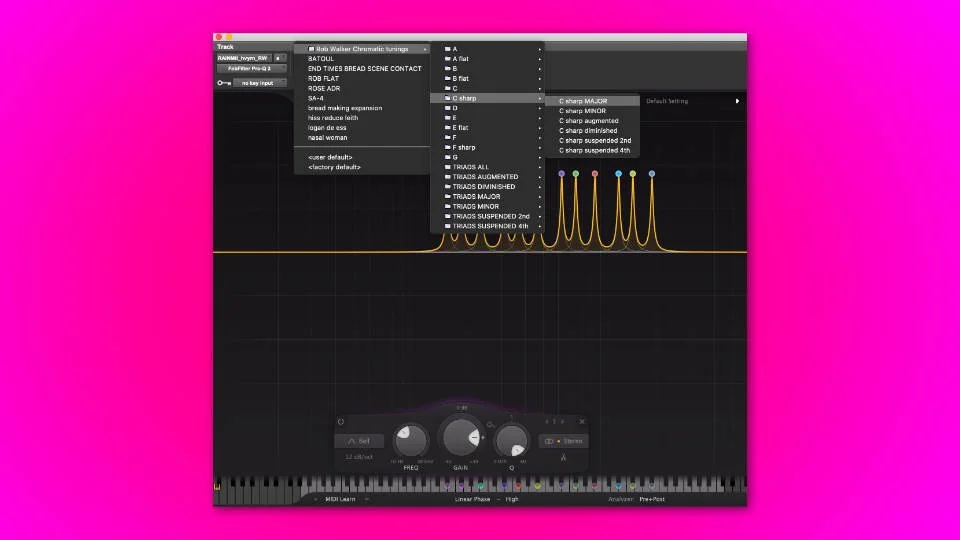
These free FabFilter Pro-Q 3 presets are designed around musical tuning. Instead of providing another collection of generic vocal, bass or mastering curves, the presets use groups of peak filters tuned to musical frequencies, allowing producers and sound designers to boost or cut frequency content according to musical scales and harmonic structures.
The concept opens up an unusual creative workflow for sound effects, atmospheres, percussion, noise, field recordings and experimental music production. Rather than using EQ only to fix problems, the presets can help reshape the tonal identity of a sound.
What Are the Free FabFilter Pro-Q 3 Musical EQ Presets?
The collection was created by audio professional Rob Walker and contains 72 presets for FabFilter Pro-Q 3.
The central idea is to use multiple EQ peaks tuned to musically relevant frequencies. A preset can therefore emphasize or reduce a group of frequencies related to a particular musical structure rather than simply boosting a broad bass, midrange or treble area.
Each EQ configuration uses a series of peak filters positioned according to musical tuning. The presets make this otherwise time-consuming setup immediately accessible inside FabFilter Pro-Q 3.
This approach is particularly useful for producers and sound designers who want to make non-musical source material interact more naturally with a composition.
72 Free Presets Designed for Creative EQ Processing
The complete collection contains 72 presets. They were created to provide fast access to chromatically tuned EQ configurations without requiring users to calculate and position every individual frequency manually.
Instead of opening Pro-Q 3 and building a complex series of harmonically related EQ bands from scratch, producers can load a preset and immediately begin experimenting.
The settings can be used for boosting or cutting musical frequencies, which creates two very different workflows.
Boosting the tuned frequencies can exaggerate the tonal or resonant qualities hidden inside a recording. Cutting those frequencies can create space for music that follows the same tonal structure.
Turning EQ Into a Sound Design Tool
Equalization is normally considered a corrective or balancing process. Producers use an EQ to remove rumble, reduce muddiness, control harsh resonances or improve the relationship between sounds in a mix.
These free Pro-Q 3 presets approach EQ as a creative processor.
A noisy sound effect, field recording or atmospheric texture may contain energy across a large part of the frequency spectrum. By emphasizing frequencies associated with a musical scale, the EQ can bring out resonances that make the source feel more connected to the harmonic context of a track.
The opposite approach is equally interesting. Cutting a set of musically related frequencies can help create space for instruments, effects or atmospheric material occupying those tonal areas.
How the Musical EQ Concept Works
The presets use multiple peak EQ bands positioned at musically relevant frequencies.
When several related frequencies are boosted together, a broadband sound can begin to reveal a stronger sense of pitch and resonance. Noise, ambience, percussion and sound effects can respond very differently depending on their original spectral content.
The technique does not magically convert every recording into a perfectly tuned instrument. The result depends heavily on the source material, the amount of EQ gain and the interaction between the preset and the existing frequencies.
That unpredictability is part of the creative appeal.
Useful for Sound Effects and Cinematic Audio
The collection was originally presented with adventurous post-production mixers, effects editors and sound designers in mind.
This makes the presets particularly interesting for cinematic sound design, game audio and experimental composition.
A large impact can be shaped to reinforce the tonal center of a scene. A drone can be pushed toward a more musical resonance. Environmental recordings can be filtered to interact with a soundtrack. Abstract sound effects can be shaped around the harmony of a composition.
These techniques can help create a stronger connection between music and sound design without forcing every element to behave like a conventional instrument.
Useful for Electronic Music Producers Too
The presets are not limited to film or post-production work.
Electronic music producers can use tuned EQ processing on noise layers, percussion, textures, transitions, drones, effects and resampled audio.
A producer working on ambient music might use the presets to bring a tonal character out of a field recording. A techno producer could process metallic percussion to reinforce frequencies related to the track. A cinematic electronic producer could use the presets to shape impacts, atmospheres and transition effects around the composition.
For experimental beatmaking, the presets can also become part of a resampling workflow. Process a sound aggressively, record the result, chop the most interesting section and continue processing from there.
Boosting Musical Frequencies
One of the most direct ways to use the presets is to boost the configured EQ bands.
With tonal source material, this can reinforce existing harmonic information. With noisy or broadband audio, it can highlight resonances that were previously buried inside the sound.
The amount of gain matters. Small boosts can subtly change the tonal focus, while aggressive boosts can produce ringing, resonant and highly artificial effects.
For creative sound design, both approaches can be useful.
Cutting Frequencies to Make Space
The same presets can also be used in the opposite direction.
Instead of emphasizing the tuned frequencies, producers can reduce them. This can help move a sound away from frequency areas that are important to the music.
For example, an atmospheric effect may sound impressive on its own but compete with the harmonic content of the composition. Using a musically tuned series of cuts can change the relationship between the effect and the music.
As with any EQ preset, the final settings should always be adjusted by ear.
Presets Are Starting Points, Not Automatic Mixing Solutions
The 72 presets provide complex EQ configurations quickly, but they should not be treated as automatic solutions for every source.
Every recording has different spectral content. A preset that creates an interesting resonance on one sound may produce almost no useful effect on another.
The best workflow is to load a preset, listen carefully and then adjust the amount of boost or cut according to the source material.
Producers should also monitor output level carefully. Multiple resonant boosts can significantly increase the level of a signal.
Creative Sources to Try
The presets can be tested on almost any audio material, but some sources are particularly interesting for tuned EQ processing.
- Field recordings
- Ambient textures
- Noise recordings
- Cinematic impacts
- Metallic percussion
- Foley recordings
- Drum loops
- Drones
- Sound effects
- Experimental vocals
- Resampled audio
- Synth textures
Broadband and noisy material can be especially revealing because the EQ has more frequency information available to shape.
FabFilter Pro-Q 3 Is Required
These are preset files, not a standalone plugin and not a free VST.
You need FabFilter Pro-Q 3 to use the collection as originally designed.
The presets were specifically created for Pro-Q 3. Users working exclusively with another EQ plugin should not expect to load these files directly into unrelated software.
The presets should also not be confused with a free copy of FabFilter Pro-Q. The FabFilter plugin itself is commercial software.
How to Get the 72 Free Pro-Q 3 Presets
The collection is presented through Production Expert, where Rob Walker explains the concept behind the presets and provides access to the free collection.
The presets are offered at no cost. The page also provides an optional way to support the creator, but there is no stated requirement to make a donation to access the free presets.
Get the 72 free FabFilter Pro-Q 3 presets from Production Expert
Why These Free FabFilter Presets Stand Out
Most EQ preset packs focus on familiar tasks such as vocal cleanup, drum processing, bass shaping or mastering.
Rob Walker’s collection takes a more experimental approach. The goal is not to provide a universal curve that supposedly makes every sound better. Instead, the presets offer a technical shortcut to a creative process that would otherwise require a considerable amount of manual setup.
That makes the collection especially valuable for producers who already understand basic EQ and want to explore less conventional applications.
Final Verdict
Rob Walker’s 72 free FabFilter Pro-Q 3 presets turn a professional mixing EQ into a much more experimental sound design tool.
By using groups of musically tuned peak filters, the presets give producers a fast way to explore resonant boosting, harmonic filtering and frequency carving based on musical relationships.
They will not replace careful EQ decisions, and they are not designed to make every sound instantly better. Their value lies in providing a creative starting point for processing sounds that might otherwise remain difficult to connect with the musical context of a project.
For sound designers, cinematic composers, electronic music producers and experimental musicians who already own FabFilter Pro-Q 3, this free collection of 72 presets is well worth exploring.