Microbiome is a free open-source audio effect built for producers and sound designers who prefer transformation over predictability. Instead of behaving like a conventional delay with a fixed feedback loop and a few modulation controls, the plugin uses delay lines, looping and resampling to generate evolving audio artifacts through a system of independent sound processes called Colonies.
Each Colony can capture and reinterpret part of a global delay line, creating layers that loop, regenerate or follow the incoming signal. Add built-in reverb, compression, low-pass filtering and parameter automation, and Microbiome becomes an unusual free VST3 plugin for turning ordinary audio into unstable textures, rhythmic fragments and evolving experimental effects.
What Is Microbiome?
Microbiome is a real-time audio effect developed by dsmaugy and released as free open-source software.
The plugin is based on delay lines and looping, but its workflow is different from a traditional delay effect. The main processing engine uses independent sound structures called Colonies. Each Colony resamples a user-defined section of a global delay line and feeds its processed output back into the overall signal path.
The developer describes the concept as an attempt to create vibrant audio artifacts inspired by the evolving behavior of biological systems.
In practical terms, Microbiome is designed for producers who want audio to change, repeat, mutate and develop over time rather than simply generate a predictable series of echoes.
Why This Free VST Plugin Is Different
Most delay plugins are built around familiar controls such as delay time, feedback, filtering and wet/dry balance. Microbiome starts from a different idea.
Instead of relying on one repeating delay line, it allows several independent Colonies to work with different sections of captured audio. These layers can be activated or deactivated and configured separately.
This creates a workflow closer to experimental looping and resampling than conventional delay processing.
A short sound can become a repeating texture. A drum loop can break into fragments. A sustained synthesizer can generate evolving layers around itself. Environmental recordings and vocals can become raw material for more abstract sound design.
The plugin is therefore most interesting when used as a creative processor rather than a transparent mixing utility.
Up to Four Independent Sound Colonies
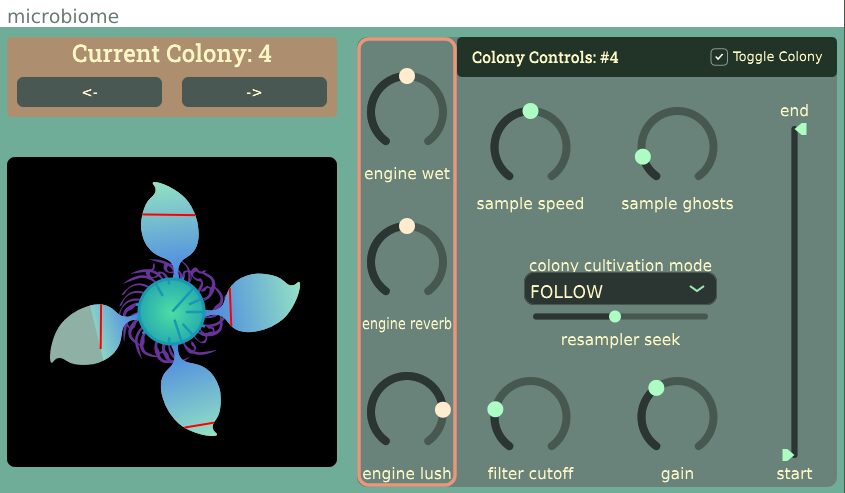
Microbiome supports up to four Colonies inside its processing engine.
Each Colony works with audio taken from the plugin’s global delay system. The user can move between Colonies from the interface and activate only the layers required for a particular sound.
This architecture makes it possible to build more complex processing gradually.
One Colony can provide a relatively simple repeating layer. Additional Colonies can introduce different timing, resampling behavior, loop regions, filtering and gain relationships.
Because the Colonies operate as separate processing elements, the final result can become much more complex than a single delay or looper.
A 30-Second Global Delay Line
The official source code defines a global delay line with a maximum length of 30 seconds.
Each Colony works with its own 10-second buffer section inside that broader system.
This gives Microbiome enough captured audio to work with longer phrases and evolving material rather than limiting the effect to extremely short delay times.
For producers, this can be particularly useful on:
- Drum loops
- Vocal phrases
- Synth sequences
- Ambient recordings
- Guitar performances
- Percussion
- Sound effects
- Field recordings
The source material continues to influence the effect, but the Colonies can reinterpret different sections of that captured audio in different ways.
Loop, Regenerate and Follow Modes
Microbiome provides three officially defined Colony modes:
- LOOP
- REGENERATE
- FOLLOW
These modes provide different approaches to how a Colony interacts with the available audio material.
The exact musical result depends on the source, loop region, resampling settings and other Colony parameters, so the most useful approach is often experimental. Switch between modes while audio is playing and listen to how the behavior of the selected Colony changes.
This is one of the areas where Microbiome encourages exploration rather than a fixed preset-driven workflow.
Resampling as a Creative Tool
Each Colony includes control over its resampling behavior.
Changing playback or resampling relationships can alter the timing and character of captured material. This can move the effect away from a recognizable repetition and toward a more transformed texture.
On rhythmic material, resampling can create unexpected movement and variation. On sustained sounds, it can contribute to a more fluid and unstable atmosphere.
Because each Colony can have its own settings, several transformed versions of the same incoming signal can interact simultaneously.
Control the Active Loop Region
Microbiome provides start and end controls for the audio region used by each Colony.
This is important because different sections of a source can produce completely different results.
A short region can create tighter repetition and more obvious looping. A wider section can preserve more of the original phrase before the processing cycles again.
Moving the active region can also expose different transients, notes or textures inside the source material.
For sound design, this means a single recording can generate many variations without requiring the producer to edit the original audio file first.
Artifacts and Ghosts
The interface includes a Sample Ghosts control, while the internal parameter structure refers to generated artifacts.
This part of the engine is designed to increase the complexity of the resampled Colony output.
Rather than treating every repetition as a perfectly clean duplicate, Microbiome is intentionally interested in variation and audio artifacts.
This makes it particularly suitable for experimental electronic music, glitch, ambient production and cinematic sound design, where irregularity can be more useful than perfect repetition.
Filtering Each Colony
Microbiome includes filtering as part of the Colony processing system.
Filtering can help control how much frequency information remains in an individual layer. This becomes increasingly important when several Colonies are active at the same time.
A full-frequency feedback texture can quickly become dense. Reducing high-frequency content or shaping the tonal range of individual Colonies can help separate the layers and create more controlled results.
The built-in low-pass filtering also allows darker, more distant textures without requiring an additional plugin immediately after Microbiome.
Individual Gain Control
Each Colony includes its own gain parameter.
This allows the different processed layers to be balanced against one another rather than forcing every Colony to operate at the same level.
One layer can remain dominant while another sits quietly underneath as texture. More extreme configurations can create several competing layers for deliberately chaotic processing.
Gain management is especially important when using multiple looping and feedback-based processes. Producers should monitor the output level carefully as the effect becomes more complex.
Built-In Reverb and Compression
The developer confirms that Microbiome includes built-in reverb and compression as part of its processing system.
Reverb can help transform repeated fragments into a more continuous atmosphere, while compression can influence the density and dynamic behavior of the processed signal.
These integrated tools make it possible to move from dry loop manipulation toward more developed textures without immediately building a long external effect chain.
That does not mean the internal processing replaces a dedicated mixing compressor or reverb. Microbiome is primarily a creative sound design effect, and its built-in processing should be approached in that context.
Wet Control and Global Processing
The plugin includes a global wetness control for balancing the processed engine against the incoming audio.
This is useful because Microbiome can produce dramatic results very quickly.
A fully processed signal may work for transitions, experimental resampling or dedicated effect tracks. A lower wet balance can introduce movement around the original source while preserving more of its identity.
For drums and vocals, parallel-style use can be particularly effective. The original signal can remain clear while Microbiome adds irregular movement and texture around it.
Parameter Automation
Microbiome supports parameter automation.
This significantly expands its potential inside a DAW. Instead of leaving a Colony in one static configuration, producers can automate processing parameters across an arrangement.
A relatively subtle texture can become more active before a transition. Loop regions can change over time. Wet processing can enter only during selected sections. Filtering and Colony behavior can evolve with the music.
Automation also makes the plugin useful for creating one-off transitions rather than leaving the effect active across an entire track.
Using Microbiome on Drum Loops
Drum loops are a natural source for this type of processing because they contain clear transients and repeated rhythmic information.
Microbiome can capture sections of a beat and reinterpret them through different Colonies. This can generate fills, broken repetitions, background rhythms and unexpected transition effects.
A useful workflow is to keep the original drum loop available on one track and use Microbiome on a duplicate or send channel. The processed output can then be recorded and edited into the arrangement.
This approach gives the producer the freedom to explore extreme settings without losing the original groove.
Using Microbiome on Synths and Pads
Sustained synthesizers and pads can produce very different results.
Instead of emphasizing obvious rhythmic fragments, the Colonies can create overlapping layers and evolving textures from the sustained source.
Built-in reverb and filtering can push these layers further into ambient territory.
For cinematic music, ambient production and experimental electronica, a simple synth chord can become raw material for a much more complex background sound.
Using Microbiome on Vocals
Vocal phrases can be particularly effective because the human voice contains complex tonal and transient information.
Short words, breaths and sustained notes can all produce different results when captured and looped.
Producers can use the effect to create background fragments, abstract vocal textures and transition elements.
Because the plugin is capable of creating unpredictable results, recording the processed output and selecting the most interesting moments can be more productive than expecting one static setting to work throughout an entire song.
A Strong Tool for Resampling Workflows
Microbiome becomes especially interesting when combined with resampling.
Instead of treating the plugin as the final stage of an effect chain, record its output to a new audio track.
The resulting material can then be:
- Chopped into one-shots
- Rearranged into new rhythms
- Reversed
- Pitch-shifted
- Layered underneath the original source
- Processed with distortion or saturation
- Used as transition material
- Turned into cinematic textures
This workflow can transform a single source recording into a much larger collection of original production material.
Plugin Formats and Operating System Compatibility
Microbiome is available in different formats depending on the operating system.
- Windows: VST3
- macOS: AU
- Linux x86: VST3 and LV2
The developer notes that the macOS version was last built for macOS Monterey 12.3.
No macOS VST3 version is listed in the official installation instructions, so Mac users should use the supplied AU version in a compatible host.
There is also no AAX version listed.
Installation
Microbiome is distributed through the official GitHub Releases page.
On Windows, users download the VST3 archive and place the Microbiome.vst3 directory in the system VST3 plugin folder.
On macOS, the AU component is placed in the appropriate Audio Units Components folder.
Linux users can install either the VST3 or LV2 version in the corresponding plugin directory.
No account, license manager or subscription is required.
Download Microbiome from the official GitHub Releases page
Free and Open-Source Software
Microbiome is released as open-source software under the GPL-3.0 license.
The source code is publicly available alongside the downloadable plugin builds.
This distinguishes Microbiome from a free trial or restricted commercial edition. The published plugin is a genuine free open-source project.
Visit the official Microbiome GitHub repository
Important Limitations
Microbiome is a specialized experimental effect rather than a conventional everyday delay.
Producers looking for precise tempo-synchronized echoes, polished preset libraries or a familiar tape delay workflow should understand that this plugin is designed around a different concept.
The current official release is version 1.0.0. Platform formats also differ between operating systems, with Windows receiving VST3, macOS receiving AU, and Linux receiving VST3 and LV2.
The macOS build is specifically noted as having been built for Monterey 12.3, so users on different macOS versions should verify compatibility on their own system.
The interface and workflow may also require experimentation before the relationship between the different Colonies becomes intuitive.
Why Experimental Free Plugins Matter
The most interesting free music production software does not always try to replace an expensive commercial plugin.
Sometimes its value comes from offering a workflow that is unusual enough to change how producers approach sound.
Microbiome fits that category. Its Colony-based delay, looping and resampling architecture encourages producers to treat incoming audio as material that can evolve rather than simply pass through a predictable effect.
For independent producers and sound designers, tools like this can lead to results that would be difficult to plan in advance. That unpredictability can become a creative advantage, especially when the processed output is recorded and edited into a final arrangement.
Final Verdict
Microbiome is a distinctive free VST3 plugin for producers who enjoy experimental delay processing, looping, resampling and evolving sound design.
Its biggest strength is the Colony system. Up to four independent processing layers can reinterpret sections of a larger delay buffer, creating a workflow that feels closer to an evolving audio ecosystem than a standard delay effect.
Built-in reverb, compression, filtering and parameter automation expand the possibilities, while the open-source GPL-3.0 release makes the software freely accessible without registration or a license manager.
Microbiome will not replace a conventional delay for precise mixing tasks, and that is not really the point. It is a creative audio effect for generating unexpected material from sounds you already have.
For ambient music, electronic production, glitch, cinematic sound design and experimental resampling, Microbiome is an unusual free audio plugin worth exploring.