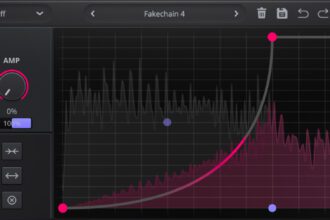
FreeEQ8 is a free VST plugin that brings together parametric equalization, dynamic processing, linear-phase filtering, Match EQ, Mid/Side control and per-band saturation inside one resizable interface.
Developed by Gary Doman under the GareBear99 and TizWildin names, the plugin is aimed at producers, mixing engineers, mastering engineers, podcasters and home studio users who need more than a basic static equalizer.
FreeEQ8 provides eight independent EQ bands, six filter types, selectable slopes, dynamic controls for every band and a real-time spectrum analyzer. It is available as an open-source plugin for Windows, macOS and Linux.
The plugin is completely free, requires no activation and does not impose a demo timeout. A separate commercial edition called ProEQ8 is included in some download packages, but FreeEQ8 remains a distinct unrestricted free version.
What Is FreeEQ8?
FreeEQ8 is an eight-band parametric equalizer designed for corrective mixing, tonal shaping, dynamic resonance control and creative filtering.
Each band can operate as a conventional static EQ or as a dynamic processor that reacts to the incoming signal. This allows the plugin to reduce problematic frequencies only when they become excessive, rather than applying the same gain change throughout the entire performance.
The plugin also includes linear-phase processing, Match EQ, Mid/Side routing, oversampling, adaptive Q, band linking, per-band saturation and real-time frequency analysis.
FreeEQ8 is an audio effect rather than a virtual instrument. It must be inserted on an audio track, instrument channel, bus or master output inside a compatible DAW.
Why This Free EQ Plugin Matters
Many free EQ plugins provide a reliable frequency curve and little else. That is often enough for routine mixing, but more advanced jobs usually require additional tools.
A producer may need a dynamic EQ for vocal harshness, a linear-phase mode for parallel processing, a spectrum matcher for tonal reference work and Mid/Side control for stereo mastering.
FreeEQ8 combines these functions in one plugin. That makes it useful for independent producers who want a deeper mixing tool without immediately moving to a commercial EQ suite.
Its open-source status also makes the project interesting to developers and students who want to inspect how real-time equalization, FFT analysis and dynamic processing are implemented.
Eight Independent EQ Bands
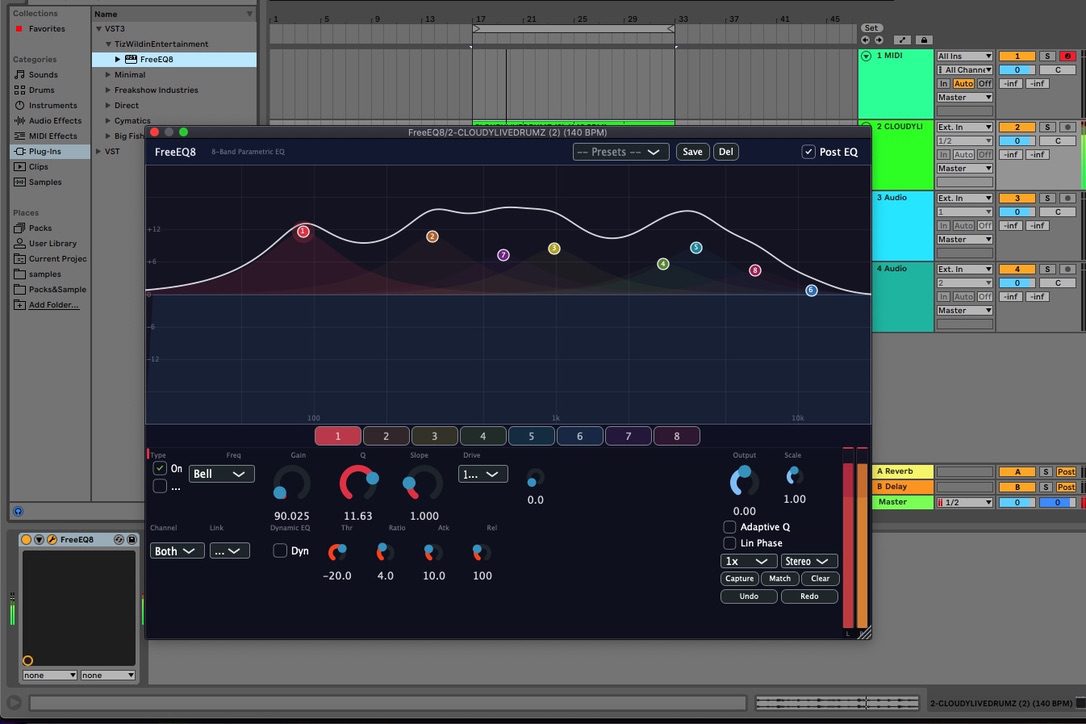
FreeEQ8 provides eight bands that can be enabled, disabled and adjusted independently.
Each band includes frequency, gain and Q controls. The graphical response display allows users to move the band nodes directly, while the detailed controls beneath the display provide more precise parameter editing.
Eight bands are enough for most common mixing jobs, including removing low-frequency rumble, controlling muddy low mids, reducing harsh resonances and adding broad tonal balance.
The plugin is not intended to replace a 24-band surgical equalizer in every situation, but its eight-band design offers a practical balance between flexibility and visual clarity.
Filter Types and Slopes
FreeEQ8 includes six officially documented filter types:
- Bell filter
- Low-pass filter
- High-pass filter
- Low-shelf filter
- High-shelf filter
- Band-pass filter
The filters support slopes of 12, 24 and 48 dB per octave where applicable.
A gentle 12 dB slope can be useful for natural low-end cleanup or broad tonal shaping. Steeper 24 and 48 dB slopes provide more focused removal when unwanted frequencies need to be controlled more aggressively.
Bell filters can be used for narrow corrective cuts, broader boosts or resonance control. Shelf filters are suitable for overall brightness and low-frequency balance, while band-pass filtering can isolate a specific frequency region for creative effects or analysis.
Dynamic EQ on Every Band
Each FreeEQ8 band can operate dynamically.
The dynamic section includes threshold, ratio, attack and release controls. An envelope follower analyzes the incoming signal and changes the gain of the selected band when the signal crosses the chosen threshold.
This is useful when a frequency problem is not present all the time.
A vocal may become harsh only on louder notes. A snare may ring only on certain hits. A bass may overload the low mids only when specific notes are played. Dynamic EQ can control these moments without permanently reducing the frequency range.
FreeEQ8 can therefore function as a focused resonance controller, frequency-dependent compressor or tonal stabilizer.
Using Dynamic EQ on Vocals
Vocals often contain frequency areas that change according to the singer’s pitch, dynamics and microphone position.
A static cut may remove too much energy from quieter phrases, while leaving aggressive syllables insufficiently controlled.
With FreeEQ8, a band can be placed over the problematic area and activated only when the signal reaches the threshold.
This approach can help control nasal low mids, harsh upper mids or excessive brightness without making the entire performance sound dull.
FreeEQ8 is not a dedicated de-esser, but its dynamic bands can also be used for broader sibilance control when carefully adjusted.
Linear-Phase Processing
FreeEQ8 includes a linear-phase mode based on FIR processing.
Linear-phase equalization preserves the phase relationship between frequencies when applying the EQ curve. This can be useful for mastering, parallel processing and situations where phase rotation between layered signals may become problematic.
The mode uses a 4,096-tap symmetric FIR process and introduces 2,048 samples of latency. This latency is reported to the host so a compatible DAW can compensate for it.
Linear phase is not automatically better for every source. It can introduce pre-ringing around sharp transients, especially when using steep filters or large gain changes.
For drums, percussion and other transient-heavy material, minimum-phase processing may sound more natural.
Important Linear-Phase Limitations
Some FreeEQ8 functions are unavailable while linear-phase mode is active.
Dynamic EQ, Mid/Side processing, per-band drive and oversampling are based on the plugin’s minimum-phase processing path and are therefore disabled in linear-phase mode.
The affected controls are greyed out in the interface to make the limitation visible.
This means users must choose between the phase-preserving linear mode and the additional character or dynamics tools available in the minimum-phase engine.
Match EQ
FreeEQ8 includes a Match EQ system that captures the frequency spectrum of a reference signal and calculates a corrective curve.
This can be used to compare the tonal balance of two recordings, instruments or mixes.
For example, a producer could analyze a reference mix, capture its overall spectrum and use the generated correction as a starting point for tonal comparison.
Match EQ should be used carefully. Two tracks can have very different arrangements, keys, instruments and dynamics, so copying a spectrum does not automatically produce a better mix.
The most useful approach is to treat the generated curve as a diagnostic suggestion rather than a final mastering decision.
The developer notes that the reference capture is mono-summed, while the correction is applied independently to the output channels.
Mid/Side Processing
FreeEQ8 supports Mid/Side equalization with per-band channel routing.
Mid processing affects the information common to the left and right channels, which usually includes centered vocals, kick drums, snares and bass instruments.
Side processing affects the difference between the channels, often containing stereo ambience, panned instruments, reverb and width information.
This allows a mastering engineer to adjust the center and sides differently.
A low-frequency band can be focused on the Mid channel to keep bass energy centered, while a high shelf can add brightness to the Side channel without making the lead vocal more aggressive.
Mid/Side EQ can also create phase and balance problems when used excessively. Small, deliberate changes are usually more reliable than extreme curves.
Per-Band Saturation
Each band includes a drive control based on a gain-compensated tanh waveshaper.
This allows saturation to be applied around the selected frequency region rather than across the entire signal.
A small amount of drive can add density to bass, drums or vocals. More extreme settings can create audible harmonic color and distortion.
Frequency-specific saturation can be useful when a source needs more presence in one area without processing its entire spectrum.
For example, a producer could add harmonic weight to the low mids of a bass or increase edge around the attack frequencies of a snare.
The free version includes one saturation character. ProEQ8 expands this area with additional modes, but those commercial features should not be confused with the FreeEQ8 feature set.
Oversampling
FreeEQ8 offers oversampling settings of 1x, 2x, 4x and 8x.
Oversampling increases the internal processing rate before nonlinear processing and then converts the signal back to the project sample rate.
This can reduce aliasing when using the per-band saturation controls, especially on bright material or aggressive drive settings.
Higher oversampling settings require more CPU power. The most efficient workflow is to use lower settings during production and increase oversampling only when the sonic difference is useful.
The developer notes that changing the oversampling mode while audio is playing may produce a brief click. It is safer to change this setting while playback is stopped.
Adaptive Q
The Adaptive Q option changes the filter width according to the amount of gain being applied.
Stronger boosts or cuts can become more focused, while smaller adjustments remain broader and smoother.
This can make EQ moves feel more musical and reduce the amount of manual Q adjustment required during general tonal shaping.
Adaptive Q is optional, so users can disable it when they need fully predictable fixed-width filters.
Band Linking
FreeEQ8 includes two band-linking groups, identified as A and B.
Linked bands can follow changes in frequency, gain and Q while preserving their relative relationship.
This is useful for creating parallel tonal movements, harmonic filter structures and coordinated adjustments across several bands.
A producer could link two bands that control related resonances, then move them together while maintaining their spacing.
Band linking can also be used creatively for automated filter effects and complex tonal sweeps.
Real-Time Spectrum Analyzer
The plugin includes a 4,096-point FFT spectrum analyzer with pre-EQ and post-EQ viewing options.
The pre-EQ display shows the incoming frequency content, while the post-EQ display shows how the signal changes after processing.
This can help identify resonances, compare tonal balance and confirm whether a filter is affecting the intended region.
The analyzer should support listening rather than replace it. Frequency displays are particularly useful for locating problems, but the final decision should still be based on how the signal sounds in the full mix.
Stereo Level Metering
FreeEQ8 provides stereo output meters with peak hold and RMS information.
Peak metering helps identify short level spikes, while RMS provides a broader indication of average signal energy.
This is useful when comparing processed and unprocessed levels, especially after boosts or saturation.
Matching the output level before bypassing the plugin can prevent louder settings from being mistaken for better settings.
Auto-Gain Bypass
The plugin includes an RMS-based auto-gain bypass system intended to make level-matched comparisons easier.
When a large EQ boost increases the output volume, a normal bypass comparison may favor the processed signal simply because it is louder.
Level matching reduces that bias and helps users judge whether the tonal change itself is beneficial.
Automatic gain compensation is not perfect in every musical situation, so users should still monitor the output and make manual adjustments when necessary.
Presets and Workflow
FreeEQ8 includes factory presets covering sources and styles such as vocals, kick drums, guitars, bass, drums, broadcast processing, EDM and lo-fi production.
Presets can provide useful starting points, but they should be adapted to the actual recording.
A vocal preset created for one microphone and singer cannot automatically solve another recording. Frequency problems depend on the source, room, performance and arrangement.
The interface also supports undo and redo, preset saving, tooltips and resizing.
Best Uses for FreeEQ8
- Corrective equalization on vocals and instruments
- Dynamic resonance control
- Master-bus tonal shaping
- Mid/Side mastering adjustments
- Frequency-dependent compression
- Linear-phase filtering for parallel processing
- Match EQ reference analysis
- Per-band saturation and harmonic shaping
- Low-frequency cleanup
- Harshness and boxiness control
- Creative filter automation
- Podcast and dialogue processing
FreeEQ8 for Mixing Engineers
Mixing engineers can use FreeEQ8 as a general channel EQ, dynamic problem solver or tonal shaping tool.
On individual tracks, the eight bands cover most everyday corrective work. Dynamic controls allow resonances to be reduced only when they become distracting.
On buses, the Mid/Side and saturation options can add controlled character while maintaining independent frequency control.
The analyzer and level meters make the plugin useful for both technical diagnosis and musical adjustment.
FreeEQ8 for Mastering
For mastering, the plugin offers several relevant functions: linear-phase processing, Mid/Side routing, Match EQ, spectrum analysis and fine tonal control.
Broad, low-gain adjustments are usually more appropriate for a finished mix than narrow or extreme changes.
Dynamic bands can gently control frequency areas that become excessive only during certain sections.
Linear-phase mode may be useful when phase preservation is important, although its latency and potential pre-ringing should be considered.
FreeEQ8 is not a complete mastering suite. It does not replace a limiter, loudness meter or dedicated restoration tool.
FreeEQ8 for Sound Design
The plugin can also be used creatively.
Narrow boosts with high Q values can create resonant tones. Several linked bands can form animated harmonic structures. Extreme band-pass filtering can isolate small parts of a texture.
Automating frequency, gain, scale or band positions can turn FreeEQ8 into a modulation-style sound design processor.
Per-band saturation provides additional character when clean filtering sounds too clinical.
Plugin Formats and Compatibility
FreeEQ8 is officially documented for Windows, macOS and Linux.
- Windows: VST3 and standalone application
- macOS: VST3, Audio Unit and standalone application
- Linux: VST3 and standalone builds are documented by the project
The latest release notes describe version 2.3.0 as build-verified for VST3, Audio Unit and standalone targets across the supported platforms.
Users need a compatible 64-bit plugin host for the VST3 or Audio Unit versions.
No AAX, CLAP, LV2 or VST2 version is officially listed.
Installation and Registration
The official release packages are available from the developer’s GitHub Releases page.
FreeEQ8 does not require an account, serial number, online activation or license manager.
On Windows, the VST3 file should be placed in the standard VST3 folder and the DAW plugin list rescanned.
On macOS, the VST3 component can be placed in the VST3 directory and the Audio Unit component in the Components directory.
Linux users should follow the installation instructions included with the relevant release package.
Some release packages also include ProEQ8. ProEQ8 is a separate paid product and uses its own license system. Installing FreeEQ8 does not require purchasing or activating ProEQ8.
FreeEQ8 Versus ProEQ8
FreeEQ8 contains eight bands, one saturation mode, dynamic EQ, linear phase, Match EQ, Mid/Side processing, band linking and oversampling.
ProEQ8 expands the concept with 24 bands, additional saturation types, A/B comparison, a piano-roll overlay, collision detection and other commercial features.
The free version is not a time-limited demonstration of ProEQ8. It is a separate functional plugin without activation or demo muting.
Users should nevertheless ensure that they load FreeEQ8 rather than the unactivated ProEQ8 version when both are included in the same package.
Open-Source GPL License
FreeEQ8 is released under the GNU General Public License version 3.
The source code can be inspected, studied and modified under the conditions of that license.
Anyone planning to distribute modified builds should read the full GPL terms and the licensing requirements of the JUCE framework used by the project.
The open-source license applies to the plugin software. It does not mean that third-party names, branding or unrelated content become public domain.
Important Limitations
FreeEQ8 is a young independent project and should not automatically be treated as a replacement for every established commercial EQ.
The free edition is limited to eight bands. Linear-phase mode disables dynamic EQ, Mid/Side processing, drive and oversampling.
Linear-phase processing adds 2,048 samples of latency and can produce pre-ringing around sharp transients.
The Match EQ capture is mono-summed, and changing oversampling settings during playback may produce a brief click.
The project also mentions an export-duration limitation in parts of its version history. Users should test the current build carefully in their own rendering workflow before relying on it for time-sensitive professional delivery.
As with any independently developed plugin, it is sensible to keep a backup of important sessions and verify recall before archiving a project.
Why Open-Source Mixing Plugins Matter
Open-source audio tools allow producers to use the software while also giving developers access to the underlying implementation.
This transparency is particularly valuable for processing tools such as equalizers, where filter design, smoothing, latency and real-time safety directly affect the result.
FreeEQ8 also demonstrates how ambitious mixing features can be made accessible to users who do not have the budget for a premium EQ package.
Free software does not remove the need for good monitoring, trained ears or careful decisions. It simply removes one financial barrier between the producer and the work.
Future Development
Version 2.3.0 is described as the current stable release.
The update aligns the project versioning, improves documentation, adds a link to the commercial ProEQ8 product and includes build fixes for macOS, Windows and Linux.
The developer has also documented plans for continued development of ProEQ8 and its underlying processing architecture.
Future FreeEQ8 features should not be assumed until they appear in an official release.
Official Download
Official product page: View FreeEQ8 on GitHub
Official download: Download the latest FreeEQ8 release
Official source code: Access the FreeEQ8 source code
Official license: Read the GNU GPL v3 license
Final Verdict
FreeEQ8 is one of the more ambitious free EQ plugins available to independent producers.
Its combination of eight parametric bands, dynamic processing, linear phase, Match EQ, Mid/Side routing, per-band saturation and spectrum analysis gives it a much broader role than a conventional basic equalizer.
The plugin does have important limitations. Linear-phase mode disables several major functions, the free version is restricted to eight bands and the project is still evolving.
Within those boundaries, FreeEQ8 provides a serious collection of mixing tools without activation, subscription fees or demo interruptions.
For producers, mixing engineers and home studio users looking for a free open-source dynamic EQ VST3 plugin, FreeEQ8 is well worth testing. Eight bands, plenty of ambition and no mysterious monthly bill hiding behind the analyzer.