By using this site, you agree to the Privacy Policy and Terms of Use.
Accept
AudiartistAudiartistAudiartist
Notification Show More
Font ResizerAa
  • Home
  • Music
    • New Music Releases
    • We Love
    • Afro Music
    • Cinematic
    • Classical Music
    • Electro / House
    • Hard Rock
    • Jazz
    • Latin Music
    • Lo-Fi
    • Pop Music
    • Rock
    • Synthwave
  • Music Production
  • Music Promotion
  • Breaking News
  • Free Music Production Resources
    • Free VST Plugins
      • Free Instrument VST Plugins
      • Free Audio Effects Plugins
      • Free Synth VST Plugins
      • Free Reverb VST Plugins
      • Free Compressor VST Plugins
      • Free Vocal VST Plugins
    • Free Sample Packs
      • Free House Sample Packs
      • Free Afro House Sample Packs
      • Free Hip-Hop & Rap Sample Packs
      • Free Lo-Fi Sample Packs
      • Free Trap Sample Packs
      • Free Techno Sample Packs
    • Free Kontakt Libraries
    • Free VST Presets
      • Free Serum Presets
      • Free Vital Presets
      • Free Diva Presets
      • Free Omnisphere Presets
      • Free Pigments Presets
      • Free Sylenth1 Presets
      • Free Massive Presets
    • Free DAW Templates
    • Free DAWs
  • Free music submission
    • Submit your music for free with DailyPlaylist
    • Our Playlists
    • Afro House Music
    • Afro Music
    • Christmas Music
    • Cinematic Music
    • Classical Music
    • Dance Music
    • Electro Music
    • Hard Rock
    • House Music
    • Latin Music
    • Lo-Fi
    • Mainstream
    • Pop Music
    • Rap & Hip-Hop
    • Reggaeton
    • Rock Music
    • Synthwave
Search
Artists
  • Nodachi
  • Sebastian McQueen
  • Spycho Fox
  • Snake Russell
  • Mister BoO
  • Sébastien BACCI
  • Carlito Home
Reading: Gain Staging in Music Production
Share
Font ResizerAa
AudiartistAudiartist
  • Home
  • Music
  • Music Production
  • Music Promotion
  • Breaking News
  • Free Music Production Resources
  • Free music submission
Search
  • Home
  • Music
    • New Music Releases
    • We Love
    • Afro Music
    • Cinematic
    • Classical Music
    • Electro / House
    • Hard Rock
    • Jazz
    • Latin Music
    • Lo-Fi
    • Pop Music
    • Rock
    • Synthwave
  • Music Production
  • Music Promotion
  • Breaking News
  • Free Music Production Resources
    • Free VST Plugins
    • Free Sample Packs
    • Free Kontakt Libraries
    • Free VST Presets
    • Free DAW Templates
    • Free DAWs
  • Free music submission
    • Submit your music for free with DailyPlaylist
    • Our Playlists
    • Afro House Music
    • Afro Music
    • Christmas Music
    • Cinematic Music
    • Classical Music
    • Dance Music
    • Electro Music
    • Hard Rock
    • House Music
    • Latin Music
    • Lo-Fi
    • Mainstream
    • Pop Music
    • Rap & Hip-Hop
    • Reggaeton
    • Rock Music
    • Synthwave
Have an existing account? Sign In
Follow US
Audiartist > Blog > Music Production > Gain Staging in Music Production
Music Production

Gain Staging in Music Production

audiartist
Last updated: 4 mars 2026 14h18
audiartist
Published: 1 avril 2025
Share

Gain Staging in Music Production: The Key to Clean, Professional Mixes

Introduction
If your mixes sound muddy, distorted, or just “off,” the problem might not be your EQ or compression—it might be your gain staging. This foundational step ensures every part of your signal chain receives the right volume, from recording to mixing and mastering. Whether you’re a beginner or self-taught producer, understanding gain staging will clean up your mix and give your plugins room to work properly.


What Is Gain Staging?
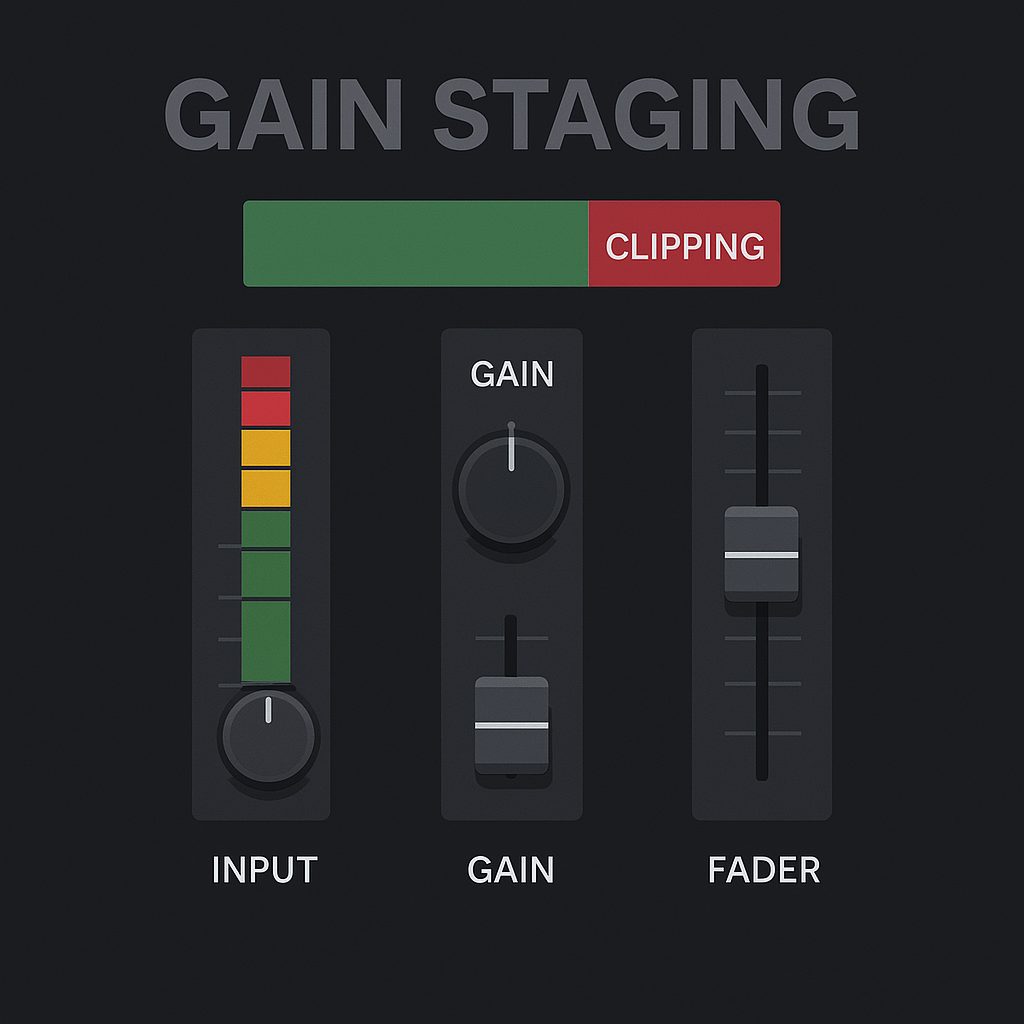
Gain staging is the process of controlling audio levels at each stage of the signal path. The goal is to avoid distortion, clipping, and noise by making sure the signal isn’t too loud or too soft when passing through effects, plugins, or faders.

Why it matters:

Prevents unwanted digital clipping

Gives compressors, EQs, and saturation plugins optimal signal input

Reduces noise and improves headroom

Sets a solid foundation for clean, pro-level mixing


Where Gain Staging Happens

Input Gain – Level at which a signal is recorded or enters your DAW

Clip Gain / Pre-Fader – Adjusting audio region gain before hitting plugins

Plugin Chain Gain – Each plugin should receive and output healthy levels

Channel Fader – Controls level going to buses or master

Bus/Master Output – The final gain stage before export

🎯 Your goal: Maintain a consistent level, ideally around -18 dBFS RMS (or -12 dB peak) at each stage.


How to Gain Stage in Your DAW (Step-by-Step)

Check Peak and RMS Levels – Use a level meter to measure the signal. Avoid peaks above -6 dBFS during mixing.

Adjust Clip Gain – Use region gain or trim to bring levels to a healthy range before plugins.

Level Plugin Chains – Make sure your EQ or compressor isn’t boosting or cutting too hard.

Watch the Meters – Don’t mix with tracks constantly hitting red.

Control the Master Bus – Leave headroom (around -6 dB) for mastering.

Useful Gain Staging Tools

Free Plugins

VUMT mini by Klanghelm – Emulates analog VU meters for consistent gain control
https://klanghelm.com/contents/products/VUMT/VUMT.php

MLoudnessAnalyzer – Analyze LUFS, peaks, and RMS
https://www.meldaproduction.com/MLoudnessAnalyzer

Youlean Loudness Meter – Broadcast and mastering-level meter
https://youlean.co/youlean-loudness-meter/

Paid Plugins

MeterPlugs Loudness Meter – Pro metering tools for gain and loudness
https://www.meterplugs.com/loudness-meter

iZotope Insight 2 – Deep metering, phase, loudness, stereo image
https://www.izotope.com/en/products/insight.html


Tips for Better Gain Staging

✅ Avoid gain stacking – Don’t boost gain at every plugin
✅ Use trim tools – Keep plugin input/output levels balanced
✅ Mix at low volume – Prevent ear fatigue and overcompensation
✅ Leave mastering headroom – Don’t normalize to 0 dBFS


Conclusion
Gain staging is the invisible glue that keeps your entire mix stable and balanced. It’s not flashy, but it’s essential for achieving clarity, punch, and power in your productions. When every track is gain staged correctly, your EQs behave better, your compressors respond properly, and your master stays clean and professional.
TAGGED:audio engineering gain stagingaudio headroom mixingaudio signal flowavoid clipping in mixclean audio signal chainclean mix workflowgain staging for beginnersgain staging mixinggain staging music productiongain staging tutorialgain structure music productionhow to set gain properlymixing fundamentalsmixing headroommixing levels dBFSmixing signal levelsmixing tips gainmusic production basicsoptimal audio levelsprevent clipping audiowhat is gain staging
Share This Article
Facebook Whatsapp Whatsapp Tumblr Telegram Threads Bluesky Email Copy Link Print
Free Music Production Resources
  • Free VST Plugins
    • Instrument VST Plugins
    • Audio Effects Plugins
    • Compressor Plugins
    • Reverb Plugins
    • Mastering Plugins
    • Delay & Echo Plugins
    • Vocal Plugins
    • EQ Plugins
    • Saturation Plugins
    • Panning Plugins
    • Chorus Plugins
    • Clipper Plugins
    • Limiter Plugins
  • Free Sample Packs
    • House Sample Packs
    • Hip-Hop & Rap
    • Afro House
    • Lo-Fi
    • Afrobeat & Afrobeats
    • R&B & Soul
    • Deep House
    • Multi-Genre
  • Free Presets
  • Free DAWs
  • Free Kontakt Libraries
  • Free DAW Templates

Lasts Posts

Sound engineer analyzing audio on a computer
AI Music Detectors Can Struggle With Edited Human Audio, New Study Finds
Breaking News
Technology professional with laptop in Bengaluru
Warner Music Is Building a Major Data and AI Engineering Team in Bangalore
Breaking News
Creator using a synthesizer and laptop for digital music production
Alibaba Is Preparing HappyShrimp, an AI Music Platform Built for Text-to-Song Creation
Breaking News
Runner using earphones during an urban workout
Spotify Running Mode Turns Personalized Music Into a Guided Workout
Breaking News

Buy Me A Coffee


Buy me a coffee

Popular

Galdr free wavetable and subtractive synth VST interface by Sognevo
Galdr: A Free Dark Wavetable Synth for Heavy Sound Design
Free Instrument VST Plugins Free VST Plugins
NEBO Calls for Unity with “Song of Peace”
Music New Music Releases Pop Music We Love
20 Free Serum 2 Presets for Melodic Techno and House
Free Music Production Resources Free Serum Presets Free VST Presets
TapeMachine 2 free tape emulation plugin by Dusk Audio
TapeMachine 2 by Dusk Audio: A Free Dual Tape Emulation Plugin
Free Audio Effects Plugins Free Music Production Resources Free VST Plugins

Find Us on Socials

News

  • AI Music Detectors Can Struggle With Edited Human Audio, New Study Finds
  • Warner Music Is Building a Major Data and AI Engineering Team in Bangalore
  • Alibaba Is Preparing HappyShrimp, an AI Music Platform Built for Text-to-Song Creation
  • Spotify Running Mode Turns Personalized Music Into a Guided Workout
  • D’Addario Admits Suno AI Was Used in Guitar Promo After Weeks of Denials

You Might Also Like

Music Production

Mute, Delete, Simplify: Why Better Productions Often Have Fewer Sounds

3 juillet 2026
Mixing & MasteringMusic ProductionStudio Gear & Audio Plugins

Best Compressor VST for Vocals: Clean Leveling vs Character (Beginner Settings Included)

21 décembre 2025
Music ProductionSound Design & Synthesis

Best Serum 2 Alternatives

24 mai 2026
Music ProductionStudio Gear & Audio Plugins

Can Listeners Really Hear the Difference Between Free and Paid VST Plugins?

5 août 2026
Previous Next
© Audiartist. All Rights Reserved.
Welcome Back!

Sign in to your account

Username or Email Address
Password

Lost your password?