Ill Sea has released Illthy Wines, a free wah VST3 plugin designed for guitarists, bassists and producers who want the response of a physical expression pedal inside a modern DAW.
Released in July 2026, the plugin combines a nonlinear zero-delay-feedback filter, three distinct voicings, MIDI expression-pedal calibration and a second control page for deeper tonal adjustment. It focuses on expressive movement rather than presenting another decorative virtual pedal that looks impressive until a real foot becomes involved.
What Is Illthy Wines?
Illthy Wines is a free wah audio effect developed by Ill Sea for Windows-based musicians and producers.
The plugin processes an existing guitar, bass, synthesizer or audio signal. It does not generate sound on its own and should be loaded as an insert effect inside a compatible VST3 host.
Its main objective is to provide smooth pedal-controlled filtering across the complete travel of a MIDI expression pedal. Ill Sea designed the sweep to avoid the abrupt level changes and dead zones that can make some software wah effects feel disconnected from the player.
A Nonlinear Zero-Delay-Feedback Wah Core
The central filter uses a nonlinear zero-delay-feedback design.
Zero-delay-feedback filters are commonly used when a developer wants a digital filter to respond more naturally at higher resonance settings. The nonlinear element adds additional character as the signal is pushed harder into the effect.
In practice, this gives Illthy Wines a more animated response than a completely clean automated filter. Stronger playing, higher input levels and increased Grit settings can make the wah feel more aggressive and harmonically active.
The plugin is not intended to provide transparent corrective filtering. Its purpose is movement, expression and tonal coloration.
Three Wah Voicings
Illthy Wines provides three different voicings for changing the overall filter character.
Each voicing adjusts the relationship between the frequency sweep, resonance and tonal response. This allows the plugin to move between smoother traditional wah movement and more pronounced modern filtering.
The three options can be useful when adapting the effect to different sources:
- Clean electric guitar
- Distorted rhythm and lead guitar
- Electric bass
- Synthesizer leads
- Clavinet and electric piano
- Vocal effects
- Drum and percussion loops
A bright guitar may require a different voicing from a dark bass or heavily distorted synthesizer. The best choice is therefore the one that fits the source rather than the one with the most dramatic solo sound.
Full Pedal Travel Without Dropout
One of the plugin’s most important features is its complete heel-to-toe response.
Some wah plugins produce abrupt changes or lose energy when the controller reaches the lowest or highest part of its travel. Illthy Wines is designed to maintain a continuous response across the full movement of the pedal.
This matters during performance because a physical expression pedal is rarely moved with the mechanical precision of a mouse. A guitarist may hold the pedal near one extreme, make small rhythmic movements or push quickly through the complete sweep.
A stable response helps these movements feel deliberate instead of exposing a technical gap in the effect.
Calibrate the Plugin to Your Expression Pedal
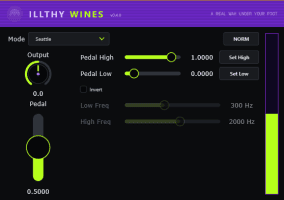
Illthy Wines includes Set Low and Set High controls for calibrating the effect to the physical travel of a connected MIDI expression pedal.
Expression pedals and MIDI controllers do not always transmit the complete theoretical range from 0 to 127. Mechanical tolerances, controller settings and pedal design can result in slightly different minimum and maximum values.
The calibration process allows the plugin to learn the real range produced by the connected hardware.
A typical setup involves moving the pedal to its lowest position, assigning that point with Set Low, then moving it to the highest position and confirming it with Set High.
The plugin can then map the complete wah sweep to the movement the performer actually has available.
MIDI Learn for Fast Control Assignment
The plugin supports MIDI learn for connecting controls to external hardware.
Right-click a compatible control, select the MIDI learning function and move the desired pedal, knob or slider. The plugin then associates the incoming MIDI CC message with that parameter.
This is particularly useful for:
- Assigning the main wah position to an expression pedal
- Controlling resonance from a MIDI knob
- Automating Grit during a performance
- Changing the sweep range from a hardware controller
- Recording real-time wah movements into the DAW
Once the movement has been recorded as automation or MIDI controller data, it can still be edited inside the project.
NORM and NERD Control Pages
Illthy Wines offers two interface views named NORM and NERD.
NORM Mode
NORM presents the essential wah controls for immediate use.
This view is designed for musicians who want to connect a pedal, choose a voicing and begin playing without opening a large collection of technical parameters.
NERD Mode
NERD exposes additional controls for Q, Grit and Sweep.
These parameters allow producers and guitarists to shape the behaviour of the filter more precisely.
- Q: Adjusts the resonance and emphasis around the active filter frequency
- Grit: Changes the amount of nonlinear character and harmonic aggression
- Sweep: Adjusts the frequency range travelled by the wah
The two-page design keeps the initial workflow simple while preserving access to deeper sound shaping when required.
Adjusting the Q Control
The Q control determines how strongly the filter emphasizes frequencies around its moving cutoff point.
Lower values create a broader and smoother tonal movement. This can work well for clean rhythm guitar, electric piano and subtle synthesizer modulation.
Higher values create a narrower and more pronounced resonant peak. The familiar vocal quality associated with strong wah effects becomes more obvious, but excessive resonance can also make certain notes feel sharp inside a dense mix.
When the guitar already contains significant distortion, a moderate Q setting may provide enough movement without making the upper midrange unnecessarily aggressive.
Adding Character With Grit
Grit controls the nonlinear character of the effect.
At lower settings, the wah remains cleaner and allows more of the original instrument tone to remain intact. Increasing Grit introduces additional harmonic density and a rougher response.
This can help clean guitar parts feel more animated or push synthesizers and basses toward a more aggressive sound.
Grit should be adjusted alongside the input level. A louder source may already drive the nonlinear section strongly, while a quieter signal may require more help from the control.
Customizing the Sweep Range
The Sweep control changes the frequency area covered by the pedal movement.
A wider sweep creates a more dramatic contrast between the heel and toe positions. A narrower range produces smaller tonal changes that can be easier to control during rhythm parts.
Reducing the highest point of the sweep may help distorted guitars avoid excessive brightness. Adjusting the lower range can prevent bass instruments from becoming too dark when the pedal moves toward the heel position.
The ideal range depends on the instrument, tuning, amplifier simulation and musical arrangement.
Using Illthy Wines on Clean Guitar
Clean guitar makes it easy to hear the shape of the wah filter.
A moderate Q setting can create expressive funk rhythms, chord movement and melodic phrases without making every note sound exaggerated.
Recording the pedal performance in real time usually produces a more natural result than drawing perfect automation curves. Small timing variations between the player’s picking and foot movement contribute to the groove.
Compression can be placed before the wah for a more consistent response or after it when the filter movement needs additional level control.
Using the Plugin Before Distortion
Placing Illthy Wines before an amplifier simulation or distortion plugin produces a classic signal flow.
The moving filter changes which frequencies reach the distortion stage. As a result, the amplifier or drive effect reacts differently throughout the pedal movement.
This can create a more organic relationship between the wah and distortion, particularly on lead guitar.
Higher Grit and Q settings can become intense in this position, so output levels should be monitored carefully.
Using the Plugin After Distortion
Placing the wah after distortion creates a more obvious filtering effect.
The complete distorted signal is shaped by the moving resonant filter, which can make the frequency sweep sound cleaner, broader and more dramatic.
This position can work well for electronic production, industrial guitar tones and automated effects where the movement should remain clearly audible.
Neither position is universally correct. The two signal chains simply produce different relationships between filtering and harmonic generation.
Using Illthy Wines on Bass
The plugin can also create expressive movement on electric or synthesized bass.
A restrained sweep helps preserve low-frequency weight while introducing movement in the upper harmonics. Higher resonance can make bass notes speak more clearly, but it may also create large level changes at particular frequencies.
A useful approach is to split the bass into two layers. Keep the deepest sub frequencies clean and apply Illthy Wines only to a filtered upper layer.
This preserves a stable low end while allowing the wah effect to move across the audible midrange.
Using the Wah on Synthesizers
Illthy Wines is not limited to guitar-based production.
It can add manual or automated movement to synthesizer leads, pads, arpeggios and sampled instruments. An expression pedal provides a playable alternative to drawing filter automation with a mouse.
The effect can be particularly useful on relatively static synthesizer patches. Moving the wah during selected phrases creates variation without changing the original preset.
Recording the processed result as audio also creates new material for chopping, reversing and resampling.
Creative Processing for Drums and Vocals
Drum loops can be processed through Illthy Wines to create rhythmic filter movement.
Automating the pedal position during fills and transitions can introduce contrast without applying the effect throughout the entire arrangement.
On vocals, the plugin can create telephone-like tones, animated backing textures and more experimental resonant effects. Parallel processing makes it possible to blend the filtered signal underneath the original vocal.
Strong resonant settings can increase particular frequencies quickly, so the processed channel may require level automation or a limiter.
Plugin Formats and Compatibility
- Operating system: Windows 10 or later
- Architecture: 64-bit
- Plugin format: VST3
- Plugin type: Wah audio effect
- Current version: 0.4.2
- Copy protection: None
A compatible 64-bit Windows DAW or VST3 plugin host is required.
No macOS, Linux, Audio Unit, AAX, VST2, CLAP or standalone edition is currently listed.
Free Download Without Registration
Illthy Wines is available as a completely free download.
No user account, newsletter registration, serial number, license manager or online activation is required. The Windows installer is signed and does not require an additional runtime package.
The developer also states that its software follows an anti-DRM approach and is designed to operate without a permanent internet connection.
Download Illthy Wines from the official Ill Sea website
Important Limitations
Illthy Wines is a focused wah effect rather than a complete guitar-processing suite.
It does not include an amplifier, cabinet simulation, delay, reverb, compressor or complete pedalboard environment.
The plugin is currently limited to 64-bit Windows systems and the VST3 format. Producers using macOS, Linux or Pro Tools cannot install the current edition.
Its best workflow also depends on having a MIDI expression pedal. The wah position can still be moved with a mouse or DAW automation, but hardware control provides the most immediate performance experience.
Final Verdict
Illthy Wines is a focused and thoughtfully designed free wah VST3 plugin for guitarists and producers who want expressive pedal control without registration or copy protection.
Its nonlinear filter core, three voicings, full heel-to-toe travel and hardware calibration system address several practical problems commonly found in software wah effects.
The NORM interface provides fast access for players, while the NERD page adds Q, Grit and Sweep controls for producers who want more detailed tonal shaping.
For guitar, bass, synthesizers, vocals and creative filtering, Illthy Wines is a distinctive free release that prioritizes playability over another beautifully rendered virtual stompbox collecting digital dust.