Helio: A Free Cross-Platform MIDI DAW for Composition
A lightweight music sequencer with advanced MIDI editing, microtonal tools, plugin hosting and a distraction-free workflow.
Helio is a free and open-source music sequencer designed for composers, electronic producers, game developers and musicians who work primarily with MIDI.
Rather than copying the crowded interface of a conventional digital audio workstation, Helio focuses on composition, arrangement and experimentation. Its streamlined workspace combines a detailed Piano Roll, pattern-based arrangement, MIDI recording, automation, plugin hosting and built-in project version control.
The current version, Helio 3.17, is available for Windows, macOS, Linux, iOS and Android. Desktop downloads are provided directly by the developer, with portable and installer options available for several operating systems.
Helio is completely free, contains no subscription and has a remarkably small installation footprint of less than 10 MB.
What Is Helio?
Helio is best described as a MIDI-focused DAW and composition environment. It is designed to help musicians develop melodic, harmonic and rhythmic ideas without spending most of the session managing windows and mixer channels.
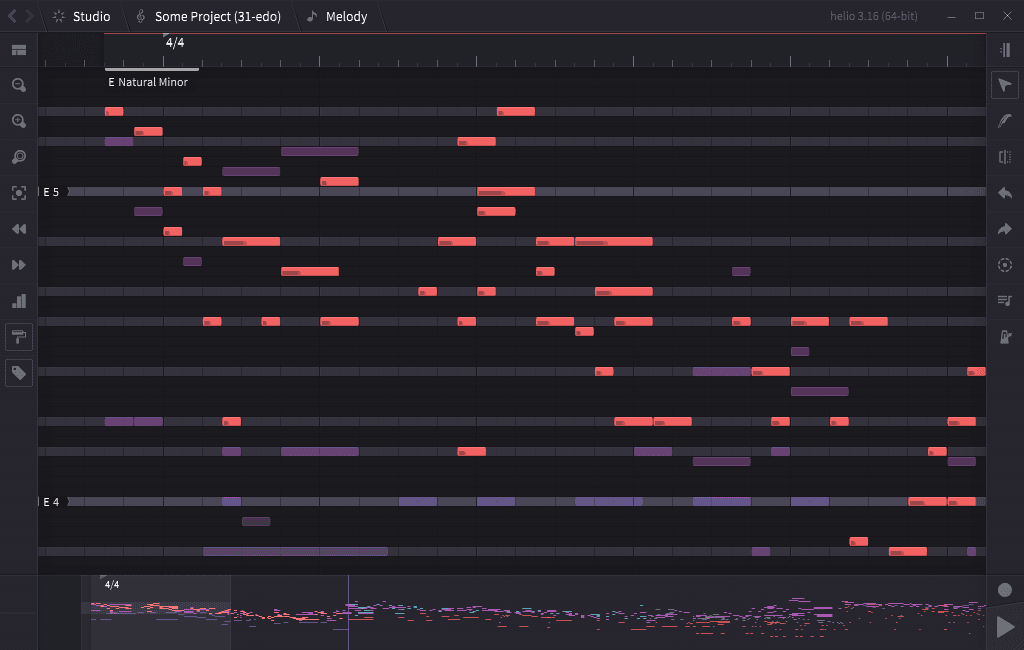
The interface is organised around two principal editing views. The Piano Roll is used for detailed note editing, while the Pattern Roll provides a wider view of the complete arrangement.
Projects can contain multiple tracks, tempo changes, key signatures, time signatures, annotations and automation. Helio can import existing MIDI files, making it useful for continuing arrangements created in notation software, hardware sequencers or another DAW.
It is important to understand that Helio is not primarily intended for conventional multitrack audio recording. Producers who need to record complete vocal sessions, guitars or live drums will require a separate recording DAW. Helio is strongest as a composition, MIDI sequencing and musical sketching tool.
Piano Roll and MIDI Editing
The Piano Roll is the central part of the Helio workflow. Notes can be drawn, moved, resized, divided, joined and transposed using the mouse, touchscreen controls or keyboard shortcuts.
Other tracks remain visible in a semi-transparent ghost mode while one track is being edited. This helps producers write harmonies and counter-melodies while keeping the complete arrangement visible.
The editor supports grid resolutions down to sixty-fourth notes. Holding the Alt key temporarily disables snapping, allowing notes to be positioned more freely when programming loose percussion, expressive chords or humanised melodic performances.
Velocity and automation editors appear in a panel beneath the Piano Roll. Producers can draw custom curves for note dynamics, expression, modulation and other MIDI controller data.
MIDI performances can also be recorded from an external keyboard. Helio automatically detects enabled MIDI input devices and records directly into the selected track or creates a new clip inside the arrangement.
Pattern-Based Arrangement
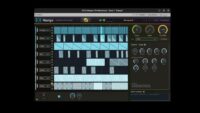
The Pattern Roll provides an overview of the complete composition. Clips can be duplicated, repositioned, transposed, muted or soloed without modifying the original notes.
This hybrid linear and pattern-based workflow works particularly well for electronic music, soundtrack sketches and arrangements built from repeating sections.
Different instances of the same musical pattern can use individual key offsets and velocity multipliers. A producer can therefore reuse a melodic phrase while changing its register, intensity or harmonic position in another section.
Tempo can be controlled through automation tracks, allowing gradual accelerations, slowdowns and more complex tempo maps. Time signatures can also be assigned to individual sections or tracks for compositions that move beyond a standard four-beat grid.
Instruments, SoundFonts and Plugins
Helio includes a simple internal instrument for previewing notes and scales. It also provides a built-in SoundFont player supporting SF2 and compressed SF3 libraries.
SoundFonts can supply pianos, orchestral instruments, drums, synthesizers and other sounds without requiring a commercial plugin collection. The player also supports Helio’s microtonal temperament system.
On desktop platforms, compatible third-party plugins can be scanned and organised inside a dedicated area called the Orchestra Pit. Instruments can contain multiple plugins connected through audio and MIDI routing.
The current release includes improvements for VST3 plugin windows and plugin scanning. Experimental LV2 hosting is also documented, although compatibility may vary according to the operating system and plugin.
Helio stores instrument configurations separately from individual projects. This allows frequently used instruments to remain available when moving quickly between musical sketches, although producers who need a completely different plugin setup for every project may prefer a conventional DAW workflow.
Scales, Chords and Microtonal Composition
Helio is particularly interesting for producers who want to explore musical systems beyond conventional major and minor scales.
Key signatures influence the highlighted notes inside the Piano Roll and provide harmonic information to the chord and arpeggiator tools. The software includes numerous scales and supports custom temperaments, non-octave tuning systems and equal divisions such as 19-EDO, 22-EDO, 26-EDO and 31-EDO.
Arpeggiators and chord tools can use the current harmonic context to generate or transform MIDI material. Recent versions also support non-destructive parametric modifiers, allowing musical patterns to remain editable after an arpeggiator or transformation has been applied.
These tools make Helio useful for experimental electronic music, game scores, generative composition and producers who have already exhausted the emotional possibilities of playing the same four chords in A minor.
Built-In Project Version Control
One of Helio’s most unusual features is its integrated version-control system. Producers can save different project states and return to an earlier revision when an experiment does not work.
This is more flexible than relying entirely on conventional Save As files. Individual changes can be reviewed, selected and restored without creating a folder containing twenty-seven projects named Final, Final New and Final Definitely Final.
The system is particularly useful during composition. A chord progression can be modified, an arrangement can be restructured and a completely different variation can be explored while the earlier version remains available.
Version 3.17 removed the previous online project-sync functions, so current desktop and mobile builds operate offline. Local project revisions and automatic saving remain available.
Compatibility and Installation
Helio provides stable downloads for desktop and mobile operating systems.
- Windows: Installer and portable 32-bit or 64-bit editions
- macOS: Disk image download
- Linux: Debian package, AppImage and compressed tarball
- Android: Direct package and F-Droid edition
- iOS and iPadOS: Available through the App Store
- Installation size: Less than 10 MB
- Price: Completely free and open source
Portable desktop editions can be extracted and opened without a conventional installation. Development builds are also available for users who want to test newer features and bug fixes before they reach the stable release.
Final Verdict
Helio is a distinctive free DAW for producers who care more about writing notes than recording large amounts of audio.
Its advanced Piano Roll, pattern-based arrangement, automation, SoundFont support, MIDI recording and microtonal tools provide a powerful environment for electronic composition, soundtrack work and musical experimentation.
The lack of conventional audio-track recording means it cannot replace a full studio DAW for vocalists, bands or engineers. It is better used as a specialised composition tool or as a MIDI sketchbook connected to favourite virtual instruments.
For a free application occupying less than 10 MB, Helio contains an impressive amount of musical depth. It proves that a DAW does not need seventeen mixer windows and a button labelled “Advanced Quantum Groove” to help somebody write a good melody.
« `