Multiply 2: A Free Chorus VST for Wider, Cleaner Mixes
Natural doubling, stereo widening and animated modulation without the thin metallic sound of a conventional chorus.
Multiply 2 is a free chorus and stereo-widening plugin developed by Acon Digital. Updated in July 2026, this redesigned version brings the company’s established chorus engine into a more modern interface with an expanded collection of presets.
The plugin can generate up to six additional voices from the incoming signal. Each voice is processed through a phase-randomizing filter designed to reduce the metallic comb-filtering that often makes basic chorus effects sound hollow, watery or excessively artificial.
Multiply 2 can be used for subtle vocal doubling, wider synthesizer pads, thicker guitars, animated electric pianos and more experimental modulation effects. It is a complete free plugin rather than a temporary trial or a restricted demonstration version.
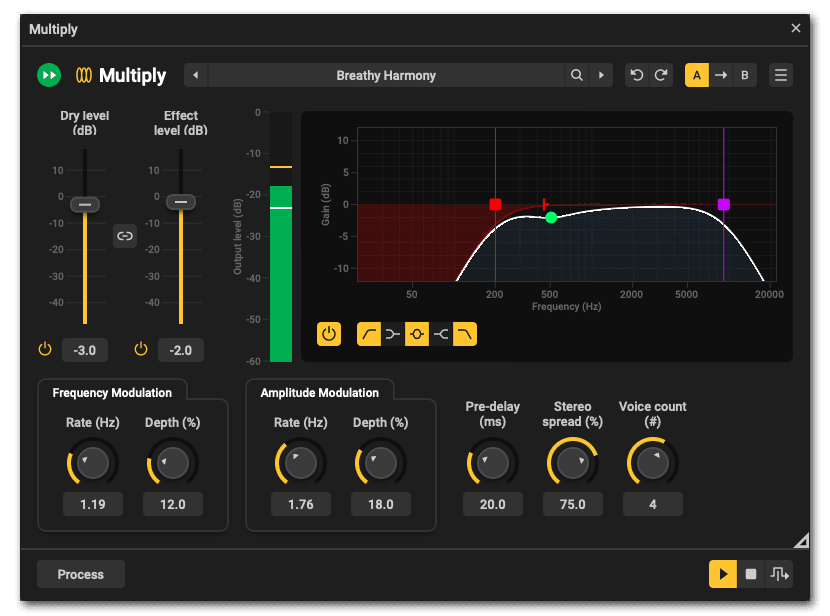
What Is Multiply 2?
Multiply 2 is based on the classic chorus principle of combining the original signal with slightly delayed and modulated copies. However, Acon Digital uses phase-randomizing filters to make these additional voices blend more naturally.
Traditional chorus effects can introduce strong comb-filtering when delayed signals interact with the dry source. This creates the familiar sweeping sound associated with chorus, but it can also make vocals, guitars and keyboards feel thinner or less focused.
Multiply 2 reduces this problem while preserving the movement and width that producers expect from a modulation effect. At restrained settings, it can sound more like several performers playing together. At stronger settings, it becomes a creative modulation and sound-design processor.
Up to Six Additional Voices
The Voice control determines how many processed copies are added to the original performance. A single additional voice can provide gentle doubling, while higher values create a broader and denser ensemble effect.
This flexibility makes Multiply 2 useful across several types of production. A lead vocal may only need one or two supporting voices, while a synthesizer pad can handle a larger number without losing its role in the arrangement.
The Stereo Spread control distributes the additional voices across the stereo field. Lower values keep the effect relatively focused, while wider settings can move the processed voices toward the sides of the mix.
The dry and effect levels can be adjusted independently, allowing producers to preserve the original signal while blending the chorus underneath it. This is often more effective than applying the modulation at full intensity.
Independent Pitch and Loudness Modulation
Multiply 2 separates frequency modulation from amplitude modulation. Each section provides independent Rate and Depth controls.
Frequency modulation changes the pitch of the generated voices over time. Low depth settings create subtle movement and natural detuning, while stronger values produce a more obvious chorus or vibrato character.
Amplitude modulation changes the loudness of the additional voices. This can make the chorus feel less static by causing the processed layers to rise and fall independently.
Using both sections together creates a more animated result than pitch modulation alone. For realistic doubling, keep the rates relatively slow and avoid excessive depth. For experimental textures, increase the movement and combine it with a wider stereo spread.
Built-In Five-Band Equalizer
Multiply 2 includes an equalizer that processes the effect signal without altering the original dry source.
The EQ provides low-cut, low-shelf, mid-bell, high-shelf and high-cut filters. Adjustable slopes allow producers to control how gently or aggressively the frequency range is shaped.
This is particularly useful when widening vocals or bass-heavy instruments. Low frequencies can be removed from the chorus while the central dry signal retains its natural weight.
On guitars, keyboards and pads, reducing some low-mid energy from the processed voices can prevent the stereo effect from making the arrangement cloudy. The high-cut filter can also soften an overly bright or metallic chorus.
Because the EQ is integrated into the plugin, producers can shape the widened signal without adding another processor to the channel.
Best Uses
Lead vocals: Add one or two quiet voices to create subtle doubling without making the performance sound heavily processed.
Backing vocals: Increase the voice count and stereo spread to build a wider vocal section around the lead.
Synthesizer pads: Use slow pitch modulation to introduce movement and width into static chords.
Electric pianos: Combine moderate pitch movement with pre-delay for a polished chorus sound that works well in Pop, House, Neo-Soul and Lo-Fi production.
Guitars: Create wider clean guitars or soften direct recordings that feel too narrow and dry.
Sound design: Use stronger modulation, long pre-delay and extreme stereo settings to produce unstable textures, diffuse echoes and animated effects.
How to Use Multiply 2
Insert Multiply 2 directly on the track that needs additional width or thickness. Begin with the dry level unchanged and reduce the effect level before adjusting the other controls.
Select one or two voices for subtle doubling. Increase the number only when the source can support a denser stereo image.
Set the Frequency Modulation Rate relatively low, then increase the Depth until the movement becomes audible. Reduce it slightly if the effect begins to sound unstable or out of tune.
Use the Stereo Spread control to position the processed voices. Check the mix in mono before committing to very wide settings, especially when the plugin is used on an important melodic element.
Finally, shape the effect with the integrated EQ. Removing low frequencies from the widened signal often improves clarity and preserves a solid centre image.
Production Tips
Avoid widening every track in the arrangement. Stereo width is more effective when it creates contrast with sounds that remain focused near the centre.
Keep kicks, sub-basses and other important low-frequency elements mostly mono. Multiply 2 can still be used on a higher bass layer, but the effect signal should be filtered carefully.
For vocals, try placing the plugin after corrective EQ and compression. This gives Multiply 2 a more controlled signal and prevents large vocal peaks from making the widening effect feel inconsistent.
The pre-delay section can separate the chorus from the dry source and create a more diffuse result. Short values work well for natural doubling, while longer settings move the plugin toward modulated echo effects.
Always compare the processed and bypassed versions at similar loudness. Width is impressive, but additional volume has been taking credit for good mixing decisions for several decades.
Compatibility
Multiply 2 is available for Windows and macOS and supports mono, stereo and true stereo processing.
- Windows: Windows 7, 8, 10 and 11
- Windows formats: VST, VST3 and AAX
- macOS: macOS 10.9 or later
- macOS formats: Audio Unit, VST, VST3 and AAX
- Mac processors: Native Intel and Apple Silicon support
- Sample rates: Up to 96 kHz
- Processing: Mono, stereo and true stereo
- Price: Full version available free
The plugin includes undo and redo functions, A/B comparison, preset management and the ability to save and organize custom presets.
Final Verdict
Multiply 2 is a flexible free chorus plugin that can move smoothly between natural doubling, stereo widening and more obvious modulation effects.
Its phase-randomized voice engine helps it avoid some of the hollow and metallic artifacts associated with simpler chorus processors. The independent pitch and loudness modulation controls provide useful movement, while the integrated EQ makes it easier to keep the widened signal under control.
The plugin is particularly effective on vocals, electric pianos, clean guitars, pads and atmospheric layers. Its straightforward workflow also makes it accessible to beginners without removing the deeper controls required for detailed sound design.
For producers looking for a free chorus VST with a polished interface and practical mixing features, Multiply 2 is an excellent addition to the plugin folder. It makes one performer sound like several, without requiring additional musicians, chairs or arguments about who played the wrong note.
Download Multiply 2 from the official Acon Digital website: