Glitch² by Illformed: A Free Sequenced Multi-Effect VST3
Create beat repeats, tape stops, reverses, granular stretching and controlled digital chaos with a legendary multi-effect plugin.
Glitch² is a sequenced multi-effect plugin created by British developer Kieran Foster, also known as Illformed and dBlue. Previously sold as a commercial plugin, Glitch² is now available as a completely free download in memory of its creator.
Version 2.1.5 also introduces VST3 support across Windows, macOS and Linux, making the plugin easier to install in current production environments. The macOS edition additionally supports Audio Unit, while VST2 remains available for compatible hosts.
Glitch² is designed to transform incoming audio through rhythmic effects including retriggering, reversing, tape slowdown, granular stretching, gating, distortion and delay. Its integrated sequencer allows several effects to run simultaneously, producing anything from restrained drum variations to complete digital destruction.
What Is Glitch²?
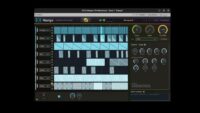
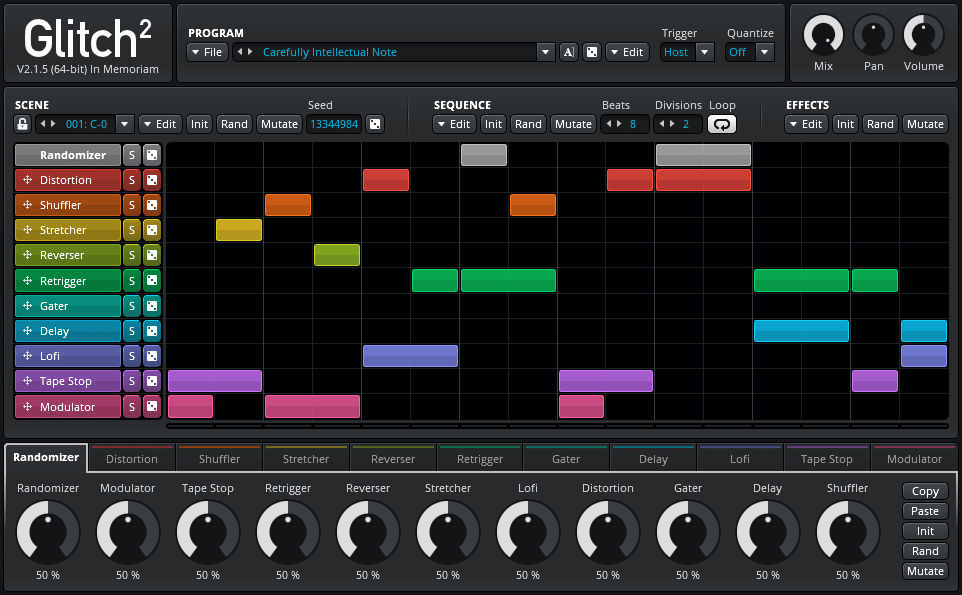
Glitch² processes audio through a collection of tempo-synchronised effects controlled by a graphical step sequencer. Producers can draw effect blocks directly onto the timeline, change their duration and layer several processors on the same musical step.
Unlike a conventional multi-effect that applies one permanent processing chain, Glitch² can activate different effects at precise moments. A drum loop might remain untouched for most of the bar, receive a short retrigger on the snare and finish with a tape stop or reverse effect.
The plugin can follow the host tempo and offers even, triplet, dotted and freely adjustable timing values. This makes rhythmic effects easier to integrate into an existing groove without manually editing and resampling every section.
Sequencer, Programs and MIDI Scenes
Each Glitch² program can contain up to 128 individual scenes. Every scene stores its own effect pattern, timing configuration and parameter settings.
The scenes correspond to MIDI notes, allowing producers to trigger different effect arrangements from a keyboard, pad controller or MIDI clip inside the DAW. One note could activate a subtle drum variation, while another launches a complete breakdown containing reverse, gating and granular processing.
The sequencer supports multiple effect lanes, so several processors can operate at the same time. Effect blocks can be drawn, moved, resized, split and joined directly inside the pattern editor.
The order of the effects can also be changed by dragging the modules into a different position. This matters because distortion before a delay produces a different result from distortion applied after the delayed signal.
Included Effect Modules
Glitch² contains ten audio-processing modules, together with a Randomizer that controls how effects are selected during automatic pattern generation.
- Modulator: Applies ring modulation and envelope-controlled frequency movement.
- Tape Stop: Slows the signal down or accelerates it back to normal playback speed.
- Retrigger: Captures short audio sections and repeats them to create stutters, rolls and bouncing effects.
- Reverser: Plays captured audio forwards and backwards inside an adjustable loop.
- Stretcher: Uses granular processing to slow audio and create metallic or heavily fragmented textures.
- Lo-Fi: Reduces fidelity for digital, degraded and retro-style processing.
- Distortion: Adds aggressive harmonic coloration and saturation.
- Gater: Creates rhythmic volume patterns with its own step sequencer.
- Delay: Produces tempo-synchronised repeats and spatial movement.
- Shuffler: Rearranges slices of incoming audio to generate unpredictable rhythmic variations.
Most modules also provide individual filtering, dry and wet mix, panning and output volume controls. This makes it possible to shape each effect before it enters the rest of the processing chain.
Best Uses
Electronic drums: Add retriggers, short reverses and gated variations to House, Techno, Drum and Bass, Breakbeat and EDM loops.
Vocal chops: Transform individual words or syllables with tape stops, granular stretching and pitch-based effects.
Synthesizer sequences: Introduce rhythmic interruptions and unexpected fills without rewriting the original MIDI pattern.
Transitions: Build breakdowns, fills and pre-drop effects by combining several modules inside a short scene.
Sound design: Randomise patterns, render the results to audio and extract the most interesting fragments for future projects.
Live performance: Trigger different scenes from MIDI pads or keyboard notes while the project is playing.
How to Use Glitch²
Insert Glitch² on a drum loop, vocal, synthesizer or group bus. Begin with an empty scene and create one short effect block rather than randomising the entire sequencer immediately.
Retrigger is a practical starting point for drums. Place a small block over the final beat of the pattern, then adjust the initial and final repeat speeds to create a controlled fill.
For transitions, combine Tape Stop with Delay or Reverser. Keep the effect section short so that the main groove returns clearly after the transition.
When using MIDI scene changes, create a separate MIDI track and route its output to Glitch². Each MIDI note can then trigger a different prepared effect pattern.
The Randomize and Mutate functions are useful for generating ideas. Randomize creates a completely different configuration, while Mutate applies smaller variations to the current scene. Render promising results to audio before another enthusiastic click sends them into another dimension.
Production Tips
Use Glitch² selectively. A short effect placed at the right moment usually has more impact than processing every beat of the arrangement.
Filter individual modules to prevent distorted or reversed effects from filling the entire frequency spectrum. High-pass filtering is particularly useful when the original kick and bass must remain stable.
Adjust the wet and dry balance of each processor instead of running every effect at 100 percent. Parallel processing can preserve the original groove while adding texture around it.
Render experimental scenes to audio. This allows the strongest sections to be chopped, rearranged and reused without depending on complex automation during the final mix.
Always check transitions at the full arrangement level. A spectacular solo effect may become unnecessarily dramatic when the vocal, drums and bass return at the same time.
Compatibility
Glitch² version 2.1.5 is available as a 64-bit plugin for Windows, macOS and Linux.
- Windows: Windows 7 or later, VST2 and VST3
- macOS: macOS 10.11 or later, VST2, VST3 and Audio Unit
- Mac processors: Intel and native Apple Silicon support
- Linux: Ubuntu 18 or a comparable distribution, VST2 and VST3
- Minimum display resolution: 1024 × 768
- AAX support: Not available
- Price: Completely free
The download is supplied as a ZIP archive from the official Illformed website. Producers upgrading from an earlier or demonstration version should remove the old plugin files before installing version 2.1.5.
Final Verdict
Glitch² remains one of the most distinctive sequenced multi-effects available for electronic music production. Its combination of visual pattern editing, simultaneous effect lanes, MIDI-triggered scenes and detailed randomisation provides considerably more control than a simple one-button glitch processor.
The interface reflects its long history, but the workflow remains powerful and surprisingly fast once the relationship between programs, scenes and effect lanes is understood.
Version 2.1.5 brings the plugin into modern VST3 workflows while preserving support for Windows, macOS and Linux. Making the complete version freely available also allows a new generation of producers to discover an influential creative tool.
Use it with intention and Glitch² can create memorable transitions, rhythmic edits and original sound-design material. Randomise every parameter at once, however, and the plugin may briefly become the producer.