
It’s a familiar frustration for music producers. After hours of mixing in the studio, the track sounds balanced, powerful, and polished. Every element seems perfectly placed. But the moment the track is played somewhere else — in the car, on headphones, or through a phone speaker — something feels wrong.
The bass may suddenly overwhelm the mix. The vocals might disappear. The entire track can feel dull or muddy compared to professional releases.
This phenomenon is known as poor mix translation, and it is one of the most common challenges producers face. The problem is rarely a single mistake. Instead, it usually stems from a combination of monitoring issues, room acoustics, frequency balance, and mixing habits.
Understanding why mixes fail to translate — and how to fix it — is a crucial step toward achieving professional results.
The Problem of Listening Environment
The environment where a mix is created plays a major role in how it sounds.
Most home studios exist in untreated rooms where sound waves bounce off walls, desks, and ceilings. These reflections alter the way frequencies are perceived. Certain frequencies may be exaggerated while others are reduced.
For example, if a room naturally amplifies low frequencies, a producer might reduce the bass in the mix without realizing it. The track may sound balanced inside that room but suddenly feel thin when played in a car.
Professional studios spend significant resources on acoustic treatment to minimize these problems. However, even small home studios can improve monitoring accuracy through simple solutions such as acoustic panels and bass traps.
Companies such as GIK Acoustics specialize in treatment systems designed for home studio environments.
Even modest acoustic improvements can dramatically improve how mixes translate outside the studio.
Studio Monitors vs Consumer Speakers
Another reason mixes change outside the studio is the difference between studio monitors and consumer playback systems.
Studio monitors are designed to reproduce sound as accurately as possible. They aim to deliver a neutral frequency response so producers hear the mix without coloration.
Consumer speakers, on the other hand, often emphasize certain frequencies. Car systems may boost low-end energy, while smartphone speakers typically exaggerate midrange frequencies and lack bass entirely.
If a mix only sounds good on one system, it may not be balanced enough to translate across multiple listening environments.
Many producers use popular studio monitors such as the Yamaha HS series, known for their clear and honest sound reproduction.
https://usa.yamaha.com/products/proaudio/speakers/hs_series/index.html
These monitors help reveal issues that might remain hidden on consumer speakers.
The Importance of Reference Tracks
Professional producers frequently rely on reference tracks when mixing. These are commercially released songs that represent the sonic quality they want to achieve.
By comparing their mix to a reference track, producers can evaluate whether the bass is too strong, the highs are too dull, or the vocals are too quiet.
Reference tracks act as a reality check. If a mix sounds dramatically different from a professionally mastered track within the same genre, it likely needs adjustment.
Many DAWs allow producers to import reference tracks directly into their sessions for comparison.
Frequency Balance and Masking
A mix that sounds good in the studio may fail elsewhere because of frequency masking. When multiple sounds occupy the same frequency range, they compete for attention.
In a controlled listening environment, this problem may go unnoticed. But on smaller speakers — such as car systems or earbuds — overlapping frequencies can cause certain elements to disappear.
Equalization plays a key role in solving this issue. By carefully carving space for each instrument, producers ensure that important elements remain audible on all playback systems.
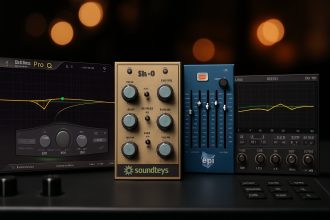
Plugins like TDR Nova, a precise dynamic EQ widely used by producers, allow detailed frequency control.
https://www.tokyodawn.net/tdr-nova/
More advanced tools such as FabFilter Pro-Q 3 offer visual frequency analysis and mid-side processing that help identify problematic areas in a mix.
https://www.fabfilter.com/products/pro-q-3-equalizer-plug-in
These tools make it easier to maintain a balanced frequency spectrum.
The Danger of Overly Loud Mixing
Mixing at high volume can also distort perception.
When the monitoring level is too loud, the human ear perceives bass and treble differently due to the Fletcher-Munson curves, which describe how our hearing sensitivity changes with volume.
A mix that sounds balanced at very high volume may become bass-heavy or harsh when played at normal listening levels.
Many experienced engineers mix at moderate volume levels, occasionally checking louder levels only briefly to evaluate energy.
This approach helps maintain a more realistic perception of the frequency balance.
Mono Compatibility
Another hidden issue that affects mix translation is stereo compatibility.
Some playback systems — including certain car setups or mobile devices — partially collapse stereo information into mono. If important sounds rely heavily on stereo effects, they may disappear or weaken in these environments.
Checking a mix in mono helps identify these issues early. Most DAWs include a mono monitoring function that allows producers to quickly evaluate how the track behaves without stereo separation.
Ensuring that essential elements remain audible in mono improves consistency across playback systems.
Testing Mixes on Multiple Systems
One of the simplest yet most effective solutions is to test mixes across multiple listening environments.
Producers often check their tracks on:
- car audio systems
- headphones
- laptop speakers
- smartphones
- Bluetooth speakers
Each system reveals different aspects of the mix. By identifying patterns in these listening tests, producers can adjust their mixes to achieve better translation.
This practice is a standard part of professional mixing workflows.
Using Metering Tools for Consistency
Visual metering tools can also help producers maintain balanced mixes.
Plugins such as Youlean Loudness Meter provide detailed loudness analysis and help ensure that levels remain consistent with modern streaming standards.
https://youlean.co/youlean-loudness-meter/
While meters cannot replace careful listening, they provide useful information that helps guide mixing decisions.
Final Thoughts
A mix that sounds great in the studio but fails elsewhere is not a sign of poor production skill. It is a normal challenge that every producer encounters while learning the craft.
By improving monitoring environments, using reference tracks, managing frequencies carefully, and testing mixes on multiple playback systems, producers can dramatically improve how their music translates outside the studio.
Professional mixes succeed not because they sound perfect in one room, but because they sound consistently good everywhere.
Achieving that level of translation is one of the most valuable skills a music producer can develop.