Free Windows DAW
Music Maker Free: An Easy DAW for Beginners
Record vocals, arrange loops, create beats, edit MIDI and mix complete songs with a permanently free Windows music production studio.
Music Maker Free is a free digital audio workstation developed by MAGIX for beginners, beatmakers and musicians looking for an accessible introduction to music production.
The software combines audio recording, MIDI editing, virtual instruments, Soundpool loops and mixing effects inside a visual drag-and-drop environment. It is designed to help new producers create complete arrangements without first learning a complex professional studio interface.
Music Maker Free is a permanent free edition rather than a temporary demonstration. Additional instruments, effects, Soundpools and advanced features are available through optional paid upgrades and the integrated store.
Music Maker Free at a Glance
| Developer | MAGIX |
| Software type | Audio and MIDI music production DAW |
| Included content | 6 Soundpools and 3 virtual instruments |
| Included effects | 9 effects, including EQ, delay and reverb |
| Platform | 64-bit Windows 10 and Windows 11 |
| Price | Permanently free with optional paid content |
A Drag-and-Drop Music Production Workflow
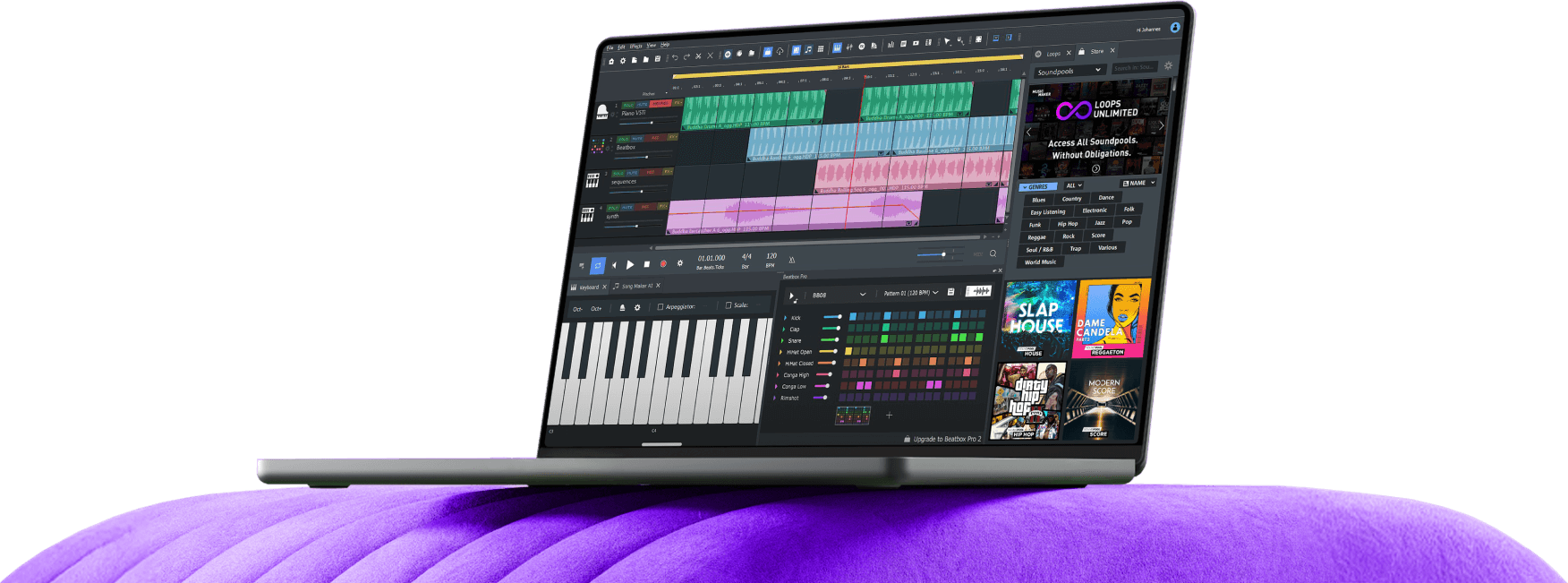
Music Maker Free is built around a simple arrangement timeline. Loops, recordings and instrument parts can be dragged into the project, moved between tracks and repeated to create complete song sections.
The Loop Browser provides access to the included Soundpools. These collections contain coordinated drums, basses, melodies, effects and other musical elements that can be combined without manually matching every tempo and musical key.
This workflow is particularly useful for beginners who want to understand song arrangement before exploring more technical production methods. A basic track can be assembled from an introduction, verse, chorus, breakdown and final section without programming every instrument from an empty project.
Six Soundpools Included
The current free edition includes six Soundpools covering several musical styles. Each Soundpool contains loops arranged into instrument categories and variations.
Producers can audition a loop inside the browser and drag it directly onto the timeline. Additional sections can be created by extending, cutting, copying or rearranging the audio objects.
More Soundpools are available through the integrated MAGIX store, but purchasing additional content is not required to open the software or complete a basic production.
Best Uses
Beginner music production, Hip-Hop beats, electronic music, Pop arrangements, vocal demos, loop-based songwriting, simple home recording and quick musical sketches.
Audio Recording for Vocals and Instruments
Music Maker Free can record vocals, guitars, keyboards and other external sources through a connected microphone or audio interface.
An empty track can be placed into audio recording mode before starting the main transport. The resulting performance appears as an audio object inside the arrangement, where it can be trimmed, moved, duplicated and processed.
This makes Music Maker Free more flexible than applications limited entirely to MIDI or pre-recorded loops. Singer-songwriters can build an instrumental arrangement and add their own vocal or instrument performances inside the same project.
The software is still aimed at accessible home production rather than complex multitrack recording sessions. Bands requiring large input counts, advanced comping or detailed studio routing may prefer a more extensive DAW.
MIDI Editing and Virtual Instruments
The free edition includes three virtual instruments that can be played with a MIDI keyboard or programmed directly inside the Piano Roll.
MIDI notes can be drawn, moved, lengthened and adjusted to create melodies, basslines, chords and rhythmic patterns. The Piano Roll provides more control than relying exclusively on ready-made loops.
Producers can combine MIDI instruments with Soundpool loops and recorded audio. A project might use loops for drums and percussion, a virtual instrument for bass, and a recorded vocal for the main performance.
Beatbox and Drum Programming
Music Maker includes a Beatbox environment for building drum patterns. Individual sounds can be arranged into rhythmic sequences and adjusted to fit the style of the project.
This provides a faster alternative to placing every drum sample manually on the arrangement timeline. Patterns can be created for verses, choruses and transitions, then combined with loops or virtual instruments.
The advanced Beatbox Pro system and larger drum libraries belong to paid editions, but the free workflow still provides a practical introduction to pattern-based beatmaking.
Nine Included Effects and a Mixer
Music Maker Free includes nine effects for shaping and mixing tracks. The official selection includes essential processors such as equalization, echo and reverb.
Effects can be used to control the tone of recordings, add space to vocals or give loops a more consistent place inside the mix. The mixer provides level, panning and processing controls for balancing the different parts of the arrangement.
The included collection is smaller than the effects library supplied with Music Maker Premium, but it covers the essential processing required for a first production.
Import and Export Formats
Music Maker Free supports common audio formats including WAV, AIFF, FLAC, MP3 and OGG Vorbis. Standard MIDI files can also be imported and exported.
Finished projects can be rendered as WAV, FLAC, MP3, OGG or AIFF files. This allows producers to create a high-quality master, a compressed listening copy or an audio file for sharing with collaborators.
The software also supports selected video formats and audio CD functions, although its main purpose remains music production.
Commercial Use and Soundpool Licensing
Music Maker itself can be used to create commercial productions. However, producers must distinguish between the software licence and the licence attached to the included Soundpool loops.
MAGIX states that included loops and Soundpools are generally licensed for personal use. A separate commercial licence may therefore be required before releasing, selling or monetizing music that contains those loops.
Original recordings, personally created MIDI parts and independently licensed samples are not automatically covered by the Soundpool restrictions. Producers should verify the licence attached to every external or included resource before distribution.
This distinction matters because a free DAW does not automatically make every included loop commercially royalty-free. The software costs nothing, but the licence agreement still enjoys reading the small print.
System Requirements
- Operating system: 64-bit Windows 10 or Windows 11
- Processor: 2 GHz or faster
- Memory: 2 GB RAM minimum
- Display: Minimum resolution of 1280 × 768
- Storage: At least 2 GB for the program installation
- Sound device: Integrated sound card or compatible audio interface
Music Maker Free is not available for macOS or Linux. Users on those systems should consider alternatives such as Waveform Free, LUNA or LMMS.
Main Limitations
The free edition uses a fixed number of tracks and contains fewer instruments, effects and Soundpools than the paid versions. Advanced features and additional content are presented through the integrated store.
The interface is optimized for beginners and loop-based production, which may feel restrictive to experienced engineers who require advanced routing, detailed automation and large recording sessions.
Commercial licensing for included Soundpool content also requires attention. Musicians planning a streaming release should verify the rights before using the supplied loops.
Final Verdict
Music Maker Free is a practical DAW for Windows users taking their first steps in music production. Its drag-and-drop arrangement, Soundpool browser, audio recording, MIDI editor and included effects make it possible to complete a basic song without purchasing the Premium edition.
It is less flexible than Waveform Free or LUNA for advanced production, but its accessible interface can help beginners understand arrangements, loops, instruments and mixing without being overwhelmed by hundreds of technical options.
For new beatmakers, vocalists and hobbyist musicians, Music Maker Free offers a genuinely free starting point. Creating the first track may take five minutes. Deciding that the snare needs to be exactly 0.7 dB louder will naturally require the rest of the evening.
Download Music Maker Free from the official MAGIX website: