Every producer knows the strange silence of a blank session. The DAW is open, the tempo is waiting, the first track is empty, and the idea that felt brilliant ten minutes ago suddenly looks less certain. Before the music even begins, there are instruments to load, routing to build, effects to insert, buses to create, sidechains to prepare, meters to place, and mix settings to organize. Inspiration can be fast. Technical setup rarely is.
This is why templates have become an essential part of modern music production. From bedroom producers to professional composers, many creators now start with a prepared session that already contains their favorite instruments, drum channels, vocal chains, reverbs, delays, group buses, mixbus settings, markers, reference tools, and routing. A good template is like entering a studio where the cables are already connected, the instruments are tuned, and the desk is ready. The creative work can begin before the technical friction kills the mood.
But templates are not perfect. They can save time, improve consistency, and help producers move faster. They can also push every track toward the same sound, the same arrangement habits, the same mix decisions, and the same creative reflexes. Used well, a template is a powerful workflow tool. Used badly, it becomes a comfortable cage with nice plugins inside.
What Is a Music Production Template?
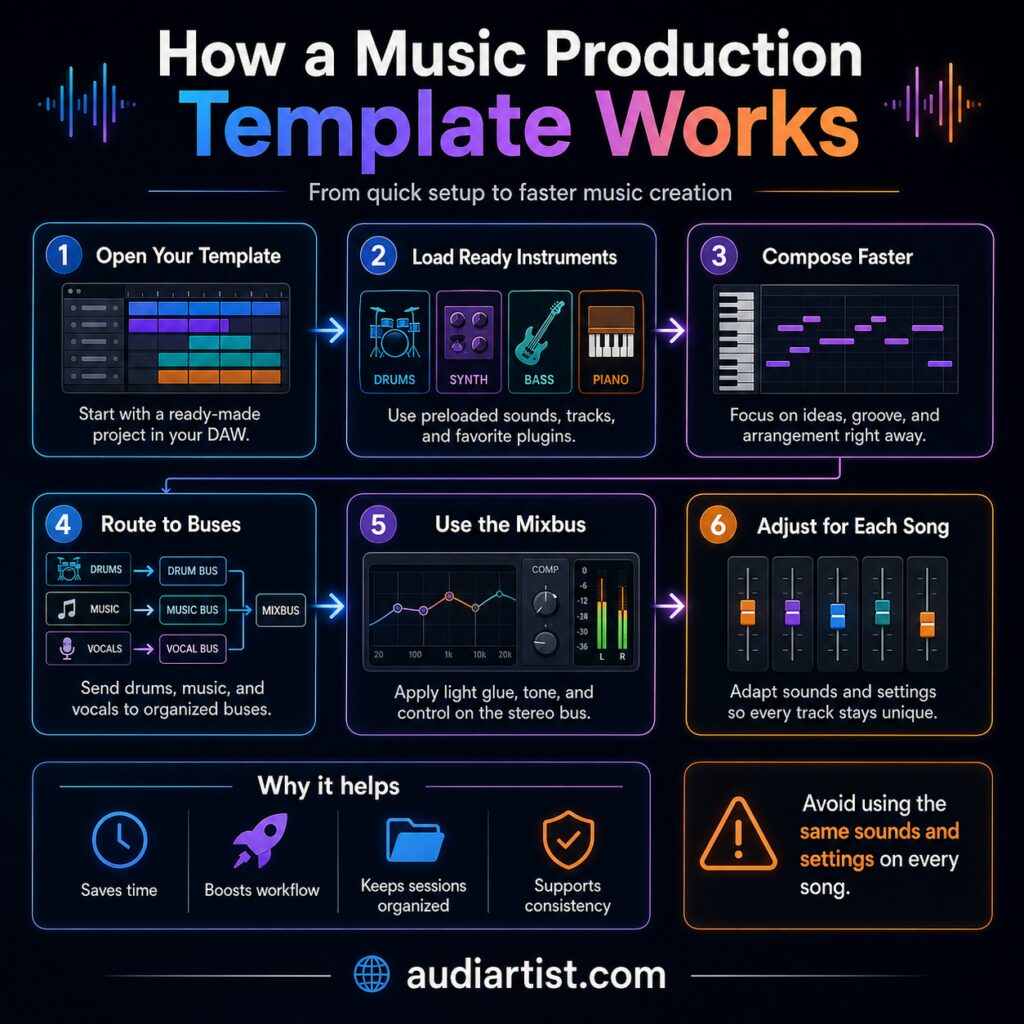
A music production template is a ready made session inside a DAW. Instead of starting from nothing, the producer opens a project where the basic structure is already prepared. This can include instrument tracks, audio tracks, drum racks, synthesizers, samplers, bass sounds, piano sounds, vocal channels, effect returns, group buses, mixbus processing, routing, sidechain settings, markers, reference tracks, color coding, and basic volume balance.
The purpose is not to write the song in advance. A template is not a finished track with the melody removed. It is a production environment. It gives the producer a familiar starting point, a technical frame, and a faster path toward making music. The best templates do not replace creativity. They remove repeated tasks so creativity has more room to appear.
For a house producer, a template may include a drum bus, sidechain routing, a sub bass channel, a few favorite synths, reverb sends, delay sends, and a light mixbus chain. For a lo fi producer, it may include a soft piano, tape saturation, vinyl noise, gentle compression, and a warm drum rack. For a composer, it may include orchestral sections, strings, brass, percussion, piano, cinematic effects, and a full stem structure. The idea is always the same: prepare the repeated technical work before the session starts.
Why Producers Use Templates
The main reason is simple: speed. Music production is full of small technical decisions that are necessary but not always creative. Loading the same drum sampler, creating the same reverb bus, setting the same vocal chain, routing the same groups, adding the same meters, preparing the same sidechain, and building the same mixbus can become tiring when repeated every day.
A template removes that friction. It allows the producer to start composing, arranging, recording, or mixing almost immediately. This is especially useful for artists who work regularly, beatmakers who create many tracks, composers working under deadline, producers making music for content, and independent musicians who manage everything alone.
In the modern home studio, time is often limited. Many artists produce between work, family, promotion, social media, mixing, mastering, uploading, and administrative tasks. A template helps protect the most valuable moment in the session: the first wave of inspiration.
The Advantages of Using a Template
It Saves a Huge Amount of Time
The most obvious benefit is the time saved at the beginning of a project. Instead of spending twenty or thirty minutes preparing a session, the producer can start writing almost instantly. The drums are ready. The favorite synths are loaded. The bass channel is prepared. The reverb and delay sends are already there. The mixbus meters are active. The routing is clean.
This does not only save time. It also saves energy. Creative focus is fragile. Every unnecessary technical step can move the producer further away from the original idea. A template keeps the session moving before hesitation arrives.
It Helps the Producer Focus on Creativity
A strong template allows the producer to think less about setup and more about music. Melody, rhythm, groove, emotion, arrangement, sound choice, and performance become the priority. The producer is no longer stuck building the studio before writing the song.
This can be especially powerful for artists who easily lose momentum. If opening a blank session feels intimidating, a template creates a sense of direction. It gives the brain a familiar environment, which can make the first creative decisions easier.
It Keeps Favorite Instruments Ready
Many producers have instruments they return to constantly. A favorite piano. A trusted bass patch. A go to drum rack. A synth lead with the right character. A pad that always works for intros. A vocal chain that gives a clean starting point. A template keeps these tools close.
This can help build a recognizable sound. If an artist regularly uses certain textures, instruments, or processing styles, the template becomes part of their sonic identity. The sound does not need to be rebuilt from zero every time. It is already waiting.
For example, a house template might include a sidechained bass channel, a punchy kick, percussion groups, and a music bus. A lo fi template might include soft saturation, filtered drums, and warm keys. A pop template might include vocal recording tracks, harmonies, delay throws, and a clean mix structure. These prepared elements make the session faster and more focused.
It Creates Cleaner Routing
Good routing can transform a session. Drum tracks can feed into a drum bus. Musical instruments can feed into a music bus. Vocals can go into a vocal bus. Effects can be placed on return channels. Reverbs and delays can be controlled more easily. The mixbus can receive a more organized signal.
A template helps keep this structure consistent. Instead of improvising routing every time, the producer begins with a clean map. This reduces mistakes, improves workflow, and makes mixing easier later. It also helps when projects become complex. A session with thirty, fifty, or one hundred tracks needs organization, otherwise the creative process can quickly turn into a small administrative disaster with kick drums.
It Prepares the Mixbus from the Beginning
The mixbus is the final stereo bus where the whole track passes before export. Many producers like to place light processing there to shape the overall sound. This can include subtle EQ, gentle compression, analog style saturation, a limiter used only for safety, a VU meter, a loudness meter, and a spectrum analyzer.
Having a mixbus ready inside a template can help the producer work with a general sonic color from the beginning. It can make the track feel more glued, more controlled, and closer to the final direction. This is useful when the processing is light and tasteful.
The key word is light. A mixbus should not crush the music before the mix even exists. If the template starts with too much compression, saturation, or limiting, the producer may be fooled by loudness and miss real balance problems.
It Helps Maintain Consistent Quality
A template can help an artist maintain a consistent sound across several productions. This is valuable for singles, EPs, albums, beat series, podcast music, sync work, YouTube music libraries, and any project where sonic identity matters.
Consistency does not mean every song should sound the same. It means the technical foundation stays reliable. The levels are easier to manage. The routing is familiar. The effects are controlled. The session is readable. This allows the producer to spend more time shaping the song and less time repairing the workflow.
It Can Help Producers Learn Mixing
A good template can also be educational. It shows how a session can be organized, how buses work, how sends are used, how mixbus processing is placed, and how different channels can be grouped. For beginners, this can make the logic of production easier to understand.
However, this only works if the producer tries to understand the template. Loading a complex session without knowing what the plugins do can create confusion. A template should teach structure, not hide the process behind mysterious chains of plugins.
The Disadvantages of Using a Template
It Can Make Every Track Sound the Same
The biggest danger is repetition. If every song starts with the same instruments, same drum sounds, same synth patches, same effects, same arrangement markers, and same mixbus color, the producer may slowly begin to write the same track again and again.
This can happen quietly. At first, the template feels efficient. Then the same bass sound appears in every production. The same drum groove returns. The same reverb space appears. The same intro structure becomes automatic. The producer is still creating, but the template is making too many decisions in advance.
Creativity needs familiarity, but it also needs friction, surprise, and risk. A template should make the workflow easier, not make the artistic decisions before the song has a chance to speak.
Preset Settings Do Not Work for Every Song
An EQ setting that works on one vocal may not work on another. A compressor setting that suits one bass may destroy another. A drum bus chain that adds punch in one track may make another track too aggressive. Music changes from song to song, and processing must react to the material.
This is especially true with instruments already processed in a template. A piano may need warmth in one song and brightness in another. A kick may need more weight in a club track and less weight in an acoustic pop production. A synth lead may need delay in one arrangement and dryness in another.
The template should be treated as a starting point, not a final answer. Every setting must remain open to adjustment.
A Heavy Mixbus Can Mislead the Ear
A mixbus that is too processed can create a false impression of quality. Heavy compression can make a weak mix feel exciting for a few minutes. Saturation can hide harshness. A limiter can make everything louder, and louder often feels better at first. But if the balance is wrong underneath, the problems will return later.
This is why many producers prefer to keep the mixbus very light during composition. Meters are useful. Subtle tone shaping can help. But strong limiting and aggressive compression should be handled carefully. The mix must be good before the mixbus tries to make it impressive.
It Can Reduce Spontaneity
Sometimes, starting from nothing is exactly what a song needs. A blank session can be frightening, but it can also be freeing. There are no expectations, no prepared instruments, no familiar channels, no hidden habits. The producer is forced to listen to the idea instead of following the usual path.
A template can sometimes push a song into a style too early. The producer opens a house template, so the track becomes house. The producer opens a lo fi template, so the drums become soft and dusty. The session already suggests an aesthetic before the first real idea arrives.
This is not always bad. But producers should remain aware of it. The template should serve the idea. The idea should not serve the template.
A Bad Template Can Slow Everything Down
Some templates are too heavy. Too many plugins, too many tracks, too many instruments, too many inactive options, too much routing, too many colors, too many folders. What was supposed to help becomes a maze.
A template should not feel like opening a spaceship dashboard when all you wanted was a piano and a beat. If the computer struggles before the music starts, the template is too heavy. If the producer spends ten minutes finding the right channel, the template is too complicated. If half the tracks are never used, the template needs cleaning.
The best templates are not the biggest. They are the most useful.
Copying Someone Else’s Template Can Be Limiting
Templates made by other producers can be helpful, especially for learning. They can reveal professional routing, sound design ideas, mix chains, and workflow structures. But they should not become a substitute for personal method.
Every producer has different plugins, habits, goals, genres, monitoring conditions, and creative instincts. A template designed for one person may not fit another. The smartest approach is to study external templates, take what is useful, remove what is unnecessary, and build a personal system over time.
How to Use Templates Without Losing Creativity
Build the Template Around Your Real Workflow
The best template is not the one with the most tracks. It is the one that matches how you actually work. If you produce house music, prepare the elements you use often. If you record vocals, build a clean vocal section. If you make cinematic music, organize your orchestral groups. If you produce lo fi beats, prepare your drums, keys, textures, and warm processing.
Do not add channels because they look professional. Add them because they help you make music faster.
Leave Space for Experimentation
A template should include empty tracks, open instrument slots, and room for new sounds. The goal is not to decide everything in advance. It is to prepare the boring parts so the exciting parts can still surprise you.
Leave room for accidents. Many great ideas come from trying the wrong sound, recording an unexpected noise, changing the structure, or replacing the obvious instrument with something strange. A template should accelerate the start, not close the door.
Keep Some Plugins Bypassed
Some processing can be loaded but inactive. A limiter, saturation plugin, heavy compressor, or final loudness chain can stay bypassed until the track needs it. This keeps the option ready without forcing the sound too early.
This is especially useful on the mixbus. You can keep meters active, but leave strong processing turned off until the mix is more developed. Your ears will make better decisions when they are not being tricked by loudness from the first bar.
Update the Template Regularly
A template should evolve with the producer. Remove instruments you no longer use. Replace weak sounds. Improve routing. Clean the mixbus. Delete unnecessary tracks. Add better markers. Adjust the workflow after every few projects.
A template that never changes can become a museum of old habits. The more your skills improve, the more your template should improve with you.
Create Different Templates for Different Styles
One universal template can become too broad. It may be better to create several focused templates: one for house, one for lo fi, one for vocal recording, one for mixing, one for cinematic music, one for beatmaking, one for quick ideas.
This keeps each template lighter and more relevant. It also prevents every track from being pushed through the same creative filter.
Template or Blank Session: Which One Is Better?
There is no single correct answer. A template is excellent for speed, consistency, organization, and professional workflow. A blank session is excellent for experimentation, originality, and breaking habits. The best producers often use both.
When the goal is to finish music faster, a template can be the right choice. When the goal is to discover a completely new direction, a blank session may be healthier. When the producer feels stuck in repetition, starting from zero can help. When the producer feels blocked by technical setup, a template can bring momentum back.
The most balanced approach is often a light template: enough structure to move quickly, enough freedom to stay creative.
Conclusion: A Template Is a Tool, Not a Producer
Using a template in music production can be a powerful advantage. It saves time, keeps instruments ready, improves routing, prepares the mixbus, supports consistent quality, and helps producers stay focused on creativity. For modern artists working in a DAW, it can turn the beginning of a session from a technical chore into an immediate creative moment.
But a template can also become dangerous when it makes too many decisions. It can create repetition, hide mix problems, overload the computer, reduce spontaneity, and push every song toward the same sound. The difference between a useful template and a creative trap is awareness.
A good template should not write the music for you. It should simply bring you faster to the place where the real work begins: the moment when a rhythm, a melody, a sound, or a feeling starts becoming a track. The template prepares the room. The artist still has to bring the fire.