NanoMix by FKFX Audio: A Free Humanizer VST Plugin for Subtle Level, Pan and MIDI Movement
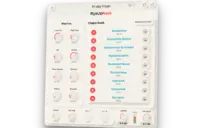
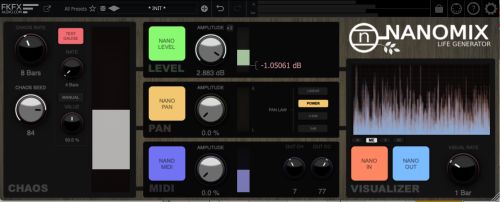
NanoMix by FKFX Audio is a free humanizer VST plugin designed to add slow, smooth and repeatable micro-variations to static tracks. Instead of forcing producers to draw small automation moves by hand, it generates controlled movement in level, pan and MIDI values directly inside the DAW.
The plugin is part of the KVR Developer Challenge 2026 and is available as a free forever edition. It does not require a license, user account, email registration or online activation. For producers who want movement without admin homework, that is already a small studio victory.
What Is NanoMix by FKFX Audio?
NanoMix is a humanizer and mix utility plugin. Its main job is to make rigid tracks feel more alive by creating subtle changes in volume, stereo position and MIDI output over time.
The plugin is not a chorus, tremolo, autopan or randomizer in the usual unstable sense. Its movement is deterministic and tied to the host timeline. That means the same position in the project produces the same variation every time, unless the seed is changed.
Official website: Visit the NanoMix product page on KVR
Download: Download NanoMix for Windows and macOS
Core Concept
NanoMix is built around a Controlled Chaos engine. The idea is to create movement that feels organic, but still remains predictable enough for serious production work.
In a mix, perfectly static parts can feel flat. A pad that never moves, a backing vocal locked in one stereo position, or a repeated loop with no small variation can make a track feel more programmed than intended. NanoMix gives those parts a small amount of life without changing their basic sound.
The plugin can be subtle or more obvious depending on the settings. At low values, it behaves like automatic micro-automation. At stronger values, it becomes a creative modulation tool for movement, drift and animated stereo placement.
Main Features
- Free humanizer VST plugin from FKFX Audio
- Controlled Chaos engine for smooth micro-movement
- Level variation for subtle volume motion
- Pan variation for stereo drift
- MIDI variation output for modulation-style workflows
- Timeline-locked behavior for repeatable playback and bounce
- Seed control for generating new movement patterns
- Adjustable amount and speed
- Real-time movement display
- Separate Level, Pan and MIDI sections
- No account, license or online activation required
Sound and Creative Direction
NanoMix is not designed to color the sound directly. It does not add saturation, compression, EQ, reverb or distortion. Its creative direction is movement.
That makes it useful for producers who already like the tone of a sound but want it to feel less static. A synth pad can breathe gently in level. A backing vocal can drift slightly in stereo. A loop can gain small motion without being chopped or heavily processed.
The plugin is also valuable because it keeps movement repeatable. Pure random modulation can be exciting, but it can also become a small gremlin during export. NanoMix avoids that by tying the variation to the project timeline.
Level Movement
The Level section creates smooth micro-variations in volume. This can help static parts sit more naturally in a mix without using compression or volume automation manually.
On pads, it can add a slow sense of breath. On backing vocals, it can prevent doubled parts from feeling too fixed. On loops, it can introduce small changes that reduce the mechanical feel of repetition.
For subtle mix work, the best approach is to start with a low amount and listen in context. If the movement is obvious, it may already be too much. The goal is often to feel the difference before clearly noticing the effect.
Pan Movement
The Pan section creates smooth stereo motion. This is useful for background layers, textures, pads, percussion details, vocal doubles and atmospheric elements.
Pan movement can make a mix feel wider and less static, but it should be used with care. Important lead vocals, kick drums, basses and central hooks usually need stability. Background elements can enjoy a little travel. The bass, however, should not be sent on holiday without supervision.
For best results, use pan variation on supporting parts rather than essential low-end material. This keeps the center of the mix strong while adding life around the edges.
MIDI Variation Output
NanoMix also includes MIDI variation output. This makes it more than a simple audio utility, since it can be used as a modulation source in compatible setups.
The MIDI section can help create repeatable random-style movement for instruments or parameters. Since the behavior is tied to the timeline, the result remains consistent during playback and bounce.
This is especially useful for producers who like generative movement but do not want every render to sound different. Predictable randomness sounds like a contradiction, but in production, it is often exactly what the session needs.
Timeline-Locked Random Behavior
One of NanoMix’s most important design choices is that it does not generate a new random result every time playback starts. The movement is deterministic and linked to the host timeline.
This matters for mixing. If a plugin changes unpredictably on every pass, it can become difficult to make reliable decisions. NanoMix behaves more like automatic micro-automation than unstable random modulation.
Changing the seed creates a different pattern. Once the seed is set, the movement stays consistent. That makes it easier to commit to a sound, export a final mix and avoid the classic “why does the bounce sound different now?” moment.
Compatibility and Technical Requirements
NanoMix is available for macOS and Windows. The KVR product page lists it as a virtual effect plugin that functions as a VST plugin, Audio Unit plugin and VST3 plugin.
The listed product version is 1.0.2. Windows requirements are listed as Windows 10, while macOS requirements are listed as macOS 11 Big Sur, with Intel and M1 native compilation.
- Plugin type: humanizer and mix utility effect
- Formats: VST3, AU and VST Legacy for MIDI
- Operating systems: macOS and Windows
- Windows requirement: Windows 10
- macOS requirement: macOS 11 Big Sur, Intel and M1 native compilation
- Copy protection: none listed
- Standalone version: not listed
- Current listed version: 1.0.2
Who Should Use NanoMix?
NanoMix is best suited to producers who want subtle movement without drawing long automation curves manually. It is especially useful for static tracks, repeated loops and supporting elements that need a more human feel.
- Electronic producers adding life to pads and textures
- Mixing engineers creating subtle level motion
- Vocal producers working with doubles and backing parts
- Beatmakers humanizing repeated loops
- Sound designers creating slow stereo movement
- Home studio users looking for a free humanizer VST plugin
- Producers who want repeatable random-style modulation
Creative Applications
On pads, NanoMix can add slow level movement and gentle pan drift, making a sustained sound feel less frozen. This works well in ambient, cinematic, deep house, techno and synthwave productions.
On backing vocals, small level variation can make stacked parts feel more natural. A tiny amount of pan movement can also help separate doubles without using heavy chorus.
On percussion loops, subtle level movement can reduce the overly rigid feel of repeated patterns. It works best when the groove already functions and only needs a little life.
On MIDI instruments, the MIDI section can be used for controlled movement where supported. This can help synth patches, samplers or modulation targets feel more animated without relying on hand-drawn automation.
Download and License Details
NanoMix KVRDC26 Edition is listed as free forever and fully functional. It does not require a license, user account, email registration or online activation.
The plugin is available through the KVR product page, with separate downloads for Windows and macOS. Since it is a KVR Developer Challenge entry, the download and voting flow is handled through KVR.
Product page: https://www.kvraudio.com/product/nanomix-by-fkfx-audio
Downloads page: https://www.kvraudio.com/product/nanomix-by-fkfx-audio/downloads
Production Tips
Start with very small movement values. NanoMix is often most effective when the listener does not notice the plugin directly.
Use Level movement before reaching for compression. If a part feels too static but not too dynamic, a small amount of controlled variation can be more musical than flattening it.
Use Pan movement on background elements first. Pads, textures, vocal doubles and small percussion layers are good candidates. Keep kick, bass and lead vocals stable unless the effect is intentional.
Change the seed when the movement pattern feels wrong for the part. A different seed can create a more natural placement without changing the overall amount or speed.
Always check the full mix. A movement that sounds exciting in solo can become distracting in context. Solo mode lies sometimes, politely, but with confidence.
Industry Context
Modern production often relies on loops, virtual instruments, quantized MIDI and grid-based editing. That precision is powerful, but it can also make tracks feel too static.
NanoMix fits into a useful category of free VST plugins that solve a real workflow problem rather than simply adding another tone-shaping effect. It helps producers introduce movement without committing to manual automation on every track.
The plugin is also a reminder that humanization does not always mean random timing changes. Sometimes it means tiny level shifts, slow pan motion and controlled variation that makes the mix feel less fixed.
Final Verdict
NanoMix by FKFX Audio is a practical and creative free humanizer VST plugin for producers who want subtle movement in level, pan and MIDI values. Its Controlled Chaos engine, repeatable timeline-locked behavior and clean utility focus make it useful for mixing, beatmaking, sound design and electronic music production.
Its strongest point is control. The plugin can create organic motion without making each playback unpredictable. That makes it more reliable than a simple randomizer and faster than drawing automation manually.
For producers looking for a free VST plugin, a free humanizer plugin or a mix utility that can make static tracks feel more alive, NanoMix is a smart download from FKFX Audio and KVR Developer Challenge 2026.