
Polytec Drum Machine: Free Analog-Style Drum VST
Eight drum channels, real hardware samples, individual sound shaping and character effects inside a lightweight free instrument.
Polytec Drum Machine is a free sample-based drum instrument developed by PolytecLab for electronic musicians, beatmakers and producers who want the sound of classic analog hardware without opening another enormous sample browser.
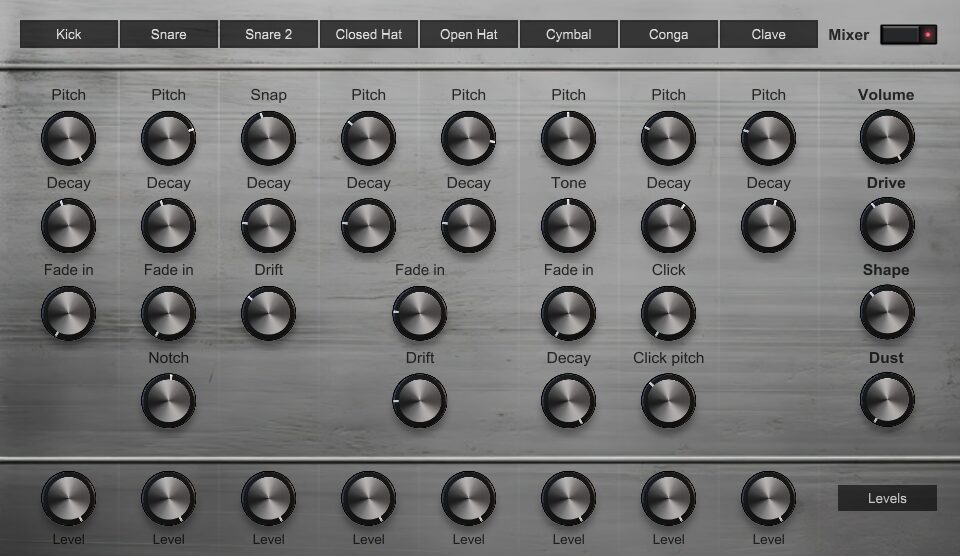
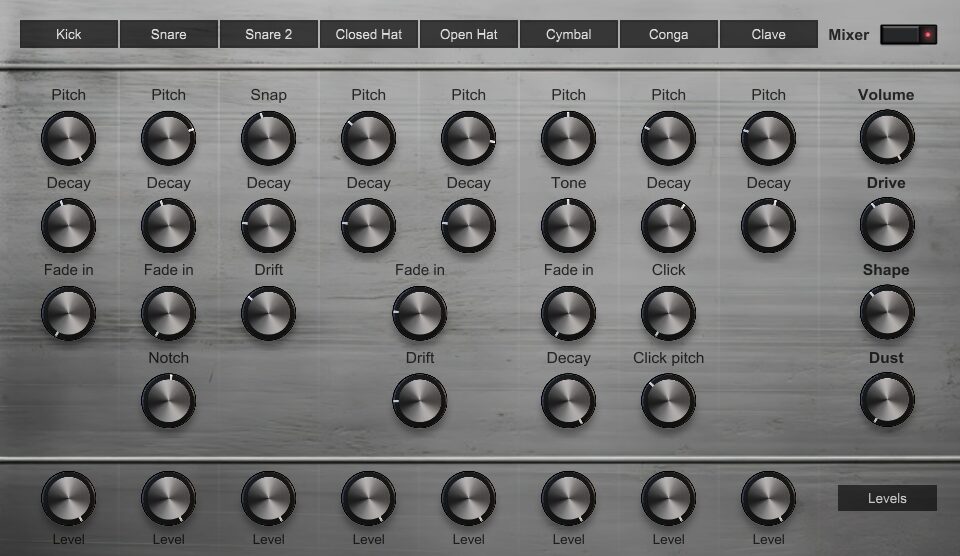
The plugin contains eight independent drum channels built around recordings of real machines. Each sound can be adjusted separately, while three master character controls add drive, shaping and dusty analog-style texture to the complete kit.
Polytec Drum Machine is currently offered as a free beta for Windows and macOS. The source code is also publicly available through the developer’s official GitHub repository.
Completely free: PolytecLab provides the complete drum instrument as a direct free download. No account, subscription, activation code or paid expansion is listed as a requirement.
What Is Polytec Drum Machine?
Polytec Drum Machine is an eight-channel virtual drum machine based on samples recorded from real analog hardware.
It is not simply a static collection of drum hits. Each channel includes dedicated controls for changing the tuning, decay and character of the loaded sound.
The instrument is designed for immediate drum programming. Load the plugin, trigger the voices through MIDI and adjust the controls until the kit fits the track.
Main advantage: The plugin combines the consistency of sampled analog hardware with enough sound-shaping control to prevent every pattern from sounding identical.
Eight Independent Drum Channels
The interface provides eight separate channels covering the essential components of an electronic drum kit.
- Kick
- Snare
- Second snare
- Closed hi-hat
- Open hi-hat
- Cymbal
- Conga
- Clave
Each voice has its own level control and a selection of parameters adapted to the sound. The available controls include pitch, decay, fade-in, drift, tone, click and notch filtering.
This channel-based approach allows the kick to remain short and controlled while the cymbal or open hi-hat receives a longer decay. The percussion sounds can also be tuned to support the key and atmosphere of the production.
Real Analog Hardware Samples
The factory sounds were created from recordings of actual hardware rather than being generated through a purely digital drum-synthesis engine.
This gives the plugin a ready-made analog character while preserving the convenience of software recall, MIDI programming and parameter automation.
The source material can work particularly well in House, Techno, Electro, Synthwave, Minimal and other styles that rely on compact electronic drum sounds.
Production tip
Begin with the unprocessed kit and create the main groove before increasing the character effects. Dust is useful. An archaeological excavation on every hi-hat is usually less urgent.
Pitch and Tuning Controls
Pitch controls allow several drum voices to be tuned higher or lower.
Lowering the kick can add weight, while raising it may help the transient remain audible above a dense bassline. Snare tuning can change the perceived size and energy of the drum without requiring another sample.
The conga and clave can also be tuned more musically. This is useful when the percussion becomes an important part of the groove rather than a small background detail.
Tuning tip: Adjust percussion while the complete arrangement is playing. A drum sound that feels impressive alone may compete with the bass, vocal or main melody once the track returns.
Decay and Envelope Shaping
Decay controls change the duration of individual drum voices.
A shorter kick can leave more space for the bass. A longer kick may work better in a sparse House or Techno groove where the low end needs additional sustain.
Shortening the hi-hats can produce a tighter rhythm, while longer settings create a more open and energetic character. Fade-in controls can soften selected transients or create unusual reversed-style movement.
Drift and Analog Movement
Selected channels include a Drift control that introduces variation into the sound.
Small differences between repeated hits can help a drum pattern feel less static. This is particularly useful for fast hi-hat patterns, repeated snares and percussion that would otherwise replay exactly the same sample on every step.
Recommended approach: Use subtle drift on repetitive elements. The goal is controlled variation, not making the drummer appear to be slowly rolling down a hill.
Drive, Shape and Dust
The master section contains three controls for changing the overall character of the kit.
Drive: Adds saturation and harmonic density to the complete drum signal.
Shape: Changes the overall contour and impact of the kit.
Dust: Introduces a rougher and less polished texture for vintage or lo-fi character.
These controls can move the instrument from relatively clean electronic drums to a more saturated and imperfect sound.
Moderate Drive can help the kit feel more cohesive. Stronger settings may work for distorted Techno, Electro and resampled drum loops.
Full MIDI Control
All eight drum channels can be triggered from the DAW through MIDI notes.
The current release uses notes from C2 to G2 for its drum voices. Patterns can therefore be recorded from a MIDI keyboard, programmed in the piano roll or generated through the DAW’s step sequencer.
Velocity variation can be used to create accents and more dynamic patterns when supported by the selected channel and host configuration.
Programming idea: Place the main kick and snare first, add closed hi-hats second and introduce the conga or clave only where the groove needs additional movement.
Complete Parameter Automation
The developer provides automation support for all plugin parameters.
This allows tuning, decay, level and master effects to change throughout the arrangement. A hi-hat can become longer during a transition, the Drive control can increase before a drop, or Dust can appear gradually during a breakdown.
Automation also makes the instrument useful for sound design. Record several bars while moving the controls, bounce the result to audio and cut the most interesting sections into a new drum loop.
Official Audio Demonstrations
PolytecLab provides audio demonstrations directly on the official product page. These examples were recorded from the plugin, with only subtle reverb added to some demonstrations.
The official demos include an electro-bass pattern and a longer four-on-the-floor kick groove at 128 BPM.
Listen to the Official Polytec Drum Machine Demos
Hear the plugin directly on the developer’s official product page.
Best Uses
House: Build compact four-on-the-floor grooves with tuned percussion and open hi-hats.
Techno: Increase Drive and Shape for harder kicks, snares and repetitive club patterns.
Electro: Combine the analog drum sounds with syncopated percussion and saturated basslines.
Synthwave: Use the snares, cymbal and dusty character controls for retro-inspired drum programming.
Lo-fi House: Increase Dust, shorten selected drums and process the result through filtering or tape effects.
Sampling: Render individual hits or complete patterns and process them further as audio.
Mixing Tips
Start by adjusting the individual channel levels before processing the complete instrument. The kick and snare should establish the main balance, while hats and percussion support the groove.
Use Drive carefully when the plugin is already feeding a saturated drum bus. Several distortion stages can add character, but they can also reduce transient definition.
When the kick competes with the bass, try shortening its decay or changing its pitch before applying aggressive equalization.
Low-end reminder: Check the kick and bass together in mono. Analog character remains charming, but phase cancellation is considerably less sentimental.
Compatibility and Requirements
- Current version: 0.1.0 beta
- Windows format: VST3
- macOS format: Audio Unit
- Architecture: 64-bit only
- Minimum memory: 4 GB RAM
- Recommended memory: 8 GB RAM
- Required storage: Approximately 300 MB
- MIDI control: Supported
- Parameter automation: Supported
- Linux version: Not currently listed
Beta notice: Polytec Drum Machine is still an early beta release. Test it in the DAW and save the project before using it in an important session or live performance.
How to Download Polytec Drum Machine
- Open the official Polytec Drum Machine product page.
- Select the free download button.
- Choose the Windows VST3 or macOS Audio Unit archive.
- Download and extract the supplied files.
- Follow the included macOS instructions when required.
- Open the DAW and rescan the plugin folders.
- Load Polytec Drum Machine as a virtual instrument.
Final Verdict
Polytec Drum Machine is a promising free instrument for producers who want analog-inspired electronic drums inside a simple interface.
Its eight channels cover the central components of a complete kit, while the individual tuning, decay and variation controls provide more flexibility than a fixed collection of one-shot samples.
The Drive, Shape and Dust controls make it easy to move from clean drum programming to saturated, vintage and lo-fi textures.
The plugin is still in beta and currently provides different formats for Windows and macOS. However, its free licence, direct download, low system requirements and open-source availability make it an interesting addition for House, Techno, Electro and Synthwave production.
Download Polytec Drum Machine for Free
Get the Windows or macOS edition directly from the official PolytecLab website.