
QDelay by TiagoLr, also known as Tilr, is a free open-source dual delay plugin built for producers who want deep, characterful echoes without paying for a premium delay unit. Where many free delays stop at basic ping-pong repeats, QDelay pushes further into tape-style saturation, pitch shifting, diffusion and swing timing, all wrapped into a single lightweight plugin.
Released as an ongoing free project and currently at version 1.1.2 from March 2026, QDelay positions itself as an alternative to commercial delays like SixthSample’s Deelay, without subscriptions, trimmed feature sets or online activation. It has quickly become a favorite among home and project studio producers looking for a serious delay tool that costs nothing.

What Is QDelay?
QDelay, short for quick-delay, is a stereo dual delay effect built around two independently timed delay lines. It began life as a simpler JSFX script for REAPER and has since been rebuilt from scratch in JUCE, gaining a proper graphical interface, better performance and a much larger feature set along the way.
The developer describes it as inspired by respected commercial delays such as Soundtoys EchoBoy and Native Instruments Replika XT, though it is not a clone of either. Instead, QDelay borrows the general idea of a flexible, character-rich delay and builds its own signal path around EQ, saturation, diffusion, pitch shifting and tape-style wow and flutter.
The plugin is hosted directly on the developer’s official GitHub repository as a complete, ready-to-use release, not a stripped-down teaser for a paid version. There is no license manager, no email requirement and no online activation step.
Why a Delay Like This Matters in 2026
Delay has always been a workhorse effect, but its role has grown more central as producers lean into dub-inspired echoes, glitchy stutters and tape-worn textures across electronic genres. A delay that can add grit, movement and stereo width in one plugin saves both CPU and screen space compared to chaining several separate effects.
This fits particularly well with UK Garage, Jungle and Drum and Bass, where swung, offset delay taps are part of the genre’s rhythmic identity. It also suits Afro House, Amapiano and Hypnotic Techno, where subtle ping-pong movement on percussion or vocal chops adds space without cluttering the mix, and it works just as naturally on guitars, keys and vocals in Alternative Pop, R&B and Trip-Hop production.
Delay Timing and Rhythmic Features
At its core, QDelay offers two independent delay lines that can run in classic, ping-pong or tap mode. In tap mode, one time control sets an offset tap while the other sets the main delay time, which is useful for building asymmetric rhythmic patterns rather than plain symmetric repeats.
Swing and Feel controls let producers push the whole delay line off the grid by up to a sixteenth note, while an accent function lets odd or even taps sit louder or quieter than the rest. Combined with reverse delay and ping-pong feedback width control, these tools make it easy to build patterns that breathe rather than repeat mechanically.
Tone Shaping, Saturation and Tape Character
QDelay includes parametric EQ on both the input and feedback path, letting producers carve out muddy low end or tame harsh highs before repeats build up. Diffusion can be applied pre or post delay, softening transients into a smoother, more reverb-like tail when pushed further.
Saturation is one of the plugin’s strongest features. It can run on the pre or post signal, or inside the feedback loop itself, where it behaves more like real analog tape by adding energy on every repeat. Color, Bias and Dynamics controls shape the character of that saturation, from gentle warmth to more aggressive, uneven harmonics. Tape wow and flutter, borrowed from the ChowDSP AnalogTapeModel project, adds pitch instability that mimics genuine tape machines.
Modulation, Pitch Shifting and Ducking
The delay line itself can be modulated for classic chorus-like movement inside the repeats, and a zero-latency pitch shifter can be applied to the feedback or post-delay signal for detuned, shimmering echoes. A ducking control automatically muffles the delayed signal in response to the input, keeping repeats from stepping on a lead vocal or melody.
All of this sits inside a documented signal chain running from input EQ through lo-fi and saturation stages, into the delay and modulation block, and back out through pitch, tape and diffusion processing. Producers who want to understand exactly where each control sits in that chain can find the full routing diagram in the plugin’s documentation.
Practical Uses in Modern Production
- UK Garage and Jungle: Build swung, offset delay taps on vocal chops and percussion breaks.
- Afro House and Amapiano: Add ping-pong movement to shakers, logs and pads without overcrowding the mix.
- Hard Techno and Hypnotic Techno: Use feedback saturation and modulation for evolving, hypnotic repeats on synth stabs.
- Alternative Pop and R&B: Add tape-flavored slap delay or shimmering pitch-shifted echoes to vocals and guitars.
- Ambient and cinematic music: Push diffusion and long feedback times for reverb-like, evolving textures.
QDelay works well on individual tracks, sends and full buses alike. It responds especially well to vocals, guitars, synth leads and percussion, and the saturation stage means it can double as a subtle tone-shaping tool even at short delay times.
Workflow and Interface
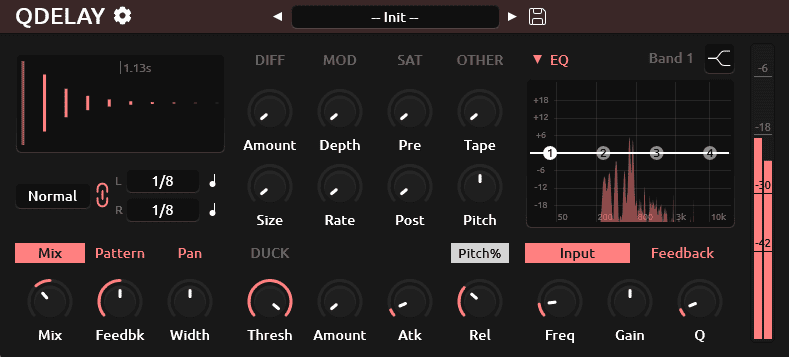
The interface groups its controls into clear sections: delay timing and modes on the main view, with EQ, diffusion, saturation, pitch and tape tools organized into their own tabs. A taps preview display gives visual feedback on the current pattern, which helps when working with tap mode or heavy swing settings.
A sensible starting point is to dial in delay time and feedback first, then bring in EQ to shape tone, and only then reach for saturation, diffusion or pitch shifting once the basic rhythm feels right. The repository does not document a factory preset browser or preset count, so producers should expect to build and save their own starting points rather than browse a large preset library.
Formats, Systems and Download Conditions
- Plugin formats: VST3 for Windows, VST3 and LV2 for Linux, AU and VST3 for macOS.
- Current version: QDelay 1.1.2, released in March 2026.
- Price: Free and open source.
- License: GPL-3.0.
- Registration: No account or email registration is documented.
- Activation: No license manager or online activation is documented.
- Host requirement: A compatible DAW or audio host supporting one of the available formats.
The build instructions include Apple Silicon and Intel architecture support for macOS. Mac users should note that the builds are unsigned, so the quarantine flag may need to be removed manually depending on system security settings, following the commands the developer provides in the documentation.
Visit the official QDelay repository for full documentation and source code. The latest builds are available from the official QDelay Releases page.
License and Commercial Music Use
QDelay is distributed under the GPL-3.0 license. The repository does not document any restriction on releasing music made with the plugin. Anyone planning to modify, bundle or redistribute the plugin itself should read the full license terms, but using it as an effect inside a DAW carries no documented limitation.
Important Limitations
QDelay is not a multi-tap delay in the sense of EchoBoy or Valhalla’s delay lines, since it works from two delay lines rather than a large tap sequencer, and the developer notes this as an area for possible future work. The repository does not advertise a standalone application, oversampling options or a factory preset library. Mac installation may require the manual security steps mentioned above, and as with any actively developed freeware project, features can continue to shift between releases.
Final Verdict
QDelay is a genuinely capable free dual delay that goes well beyond the basics, combining flexible timing modes, tone shaping, tape-style saturation and pitch shifting in one open-source plugin. It rewards a bit of exploration rather than offering instant presets, but for producers willing to build their own settings, it delivers character that many paid delays charge for.
It fits comfortably across UK Garage, Jungle, Afro House, Hypnotic Techno and vocal-driven pop and R&B production, and its tape and saturation stages give it real personality beyond a plain utility delay. Given its price of zero and its active development, QDelay earns a place in any producer’s free plugin toolkit.