Free DAW
Qtractor: A Free Linux DAW for Audio and MIDI Production
Qtractor combines unlimited audio and MIDI tracks, flexible routing, automation and modern plugin support in a completely free Linux production environment.
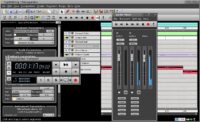
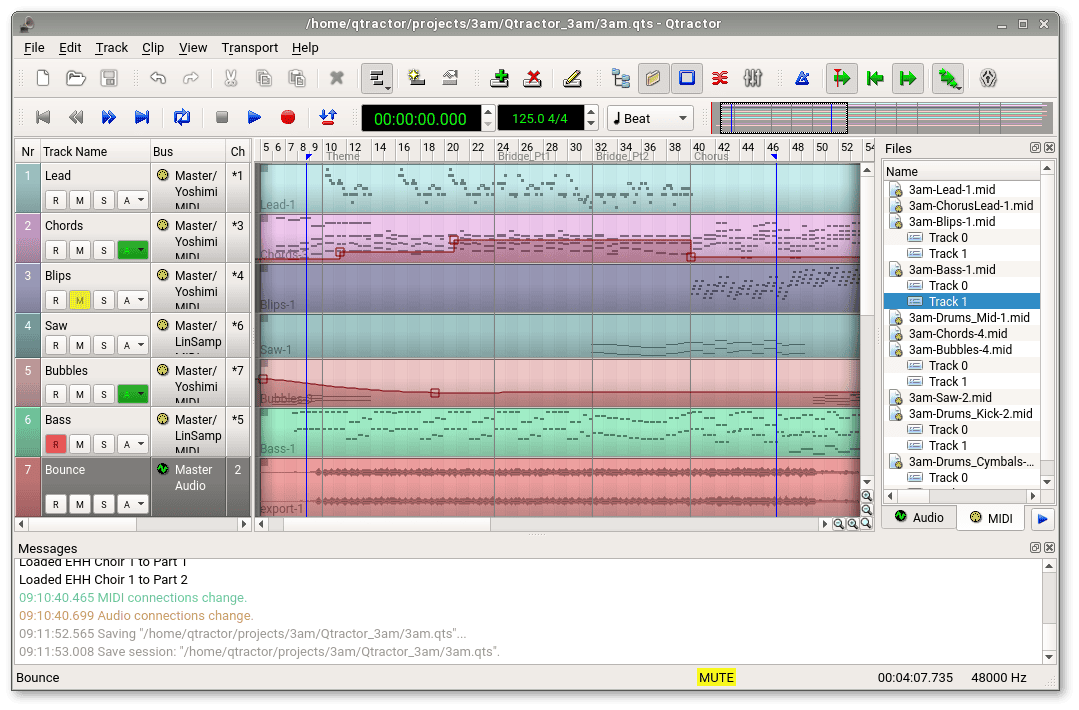
Qtractor is a free and open-source audio and MIDI workstation developed by Rui Nuno Capela for GNU/Linux. It follows a familiar multitrack recording workflow, with a horizontal timeline, audio and MIDI clips, mixer channels, buses, automation lanes and a dedicated MIDI editor.
The software is distributed under the GNU General Public License version 2 or later. There is no subscription, trial period, track restriction or paid edition required to unlock its core production tools. Qtractor is aimed primarily at home-studio musicians, electronic music producers, composers and Linux users who want a lightweight alternative to commercial DAWs.
Its workflow is built around JACK for audio and ALSA for MIDI. This provides flexible connections between Qtractor, audio interfaces, external hardware and other Linux music applications, although the initial configuration can be more technical than opening a conventional desktop DAW.
| Developer | Rui Nuno Capela |
|---|---|
| Software type | Audio and MIDI multitrack sequencer |
| Platform | GNU/Linux only |
| Audio recording | Multitrack recording with loop takes |
| MIDI production | Recording, piano roll, step input, controller mapping and external MIDI |
| Track limit | Unlimited audio and MIDI tracks |
| Plugin support | LADSPA, DSSI, VST2, VST3, LV2 and CLAP |
| Included content | Mixer, routing, automation, editing and export tools |
| Price | Free and open source |
Audio and MIDI Workflow
Qtractor uses a traditional timeline that will feel familiar to producers coming from other multitrack applications. Audio and MIDI material is placed in clips that can be moved, copied, split, merged, repeated or resized without modifying the original source files.
The software supports an unlimited number of tracks, overlapping clips, undo operations, tempo changes and location markers. Sessions can therefore grow from simple demo arrangements into detailed productions without encountering an artificial track ceiling.
Audio and MIDI tracks remain separate, which keeps projects organized and makes routing easier to understand. Files may be imported through the browser or dragged directly into the arrangement to create new tracks.
Recording and Audio Editing
Qtractor can record several audio tracks through a compatible JACK configuration. Track controls include record, mute, solo and monitoring, while loop recording allows several takes to be captured across the same section.
Editing is non-destructive. Producers can split clips, adjust gain, normalize audio, create fades and crossfades or change clip placement without rewriting the original recording. Time-stretching, pitch-shifting and sample-rate conversion are also available when the required supporting libraries are installed.
The software supports common formats such as WAV, FLAC, AIFF and OGG. MP3 support is intended primarily for playback, so lossless formats remain the safer choice for recording and production.
MIDI Sequencing and Piano Roll
The MIDI editor provides a conventional piano-roll environment for entering, recording and editing notes. Producers can adjust timing, velocity, duration and controller data, while step input offers a practical way to build programmed melodies, bass lines and drum sequences.
Standard MIDI files in formats 0 and 1 can be imported and exported. Qtractor also supports MIDI controller mapping, MIDI Clock, MMC, Song Position Pointer and System Exclusive data for users working with external synthesizers, drum machines or control surfaces.
SoundFont definitions and Cakewalk-style instrument definition files can be added, but Qtractor does not arrive with a large commercial-style instrument collection. Its strength comes from connecting external instruments and plugins rather than filling the hard drive with several gigabytes of presets before the first note is played.
Mixer, Routing and Automation
The integrated mixer provides monitoring, level control, panning, plugin chains, buses and send-and-return routing. Qtractor also includes a connection patchbay that can store JACK and ALSA routing with the project.
Track and plugin parameters can be automated with dynamic curves. Available automation shapes include sample-and-hold, linear and spline modes, allowing smooth filter movements, volume changes, panning effects and detailed control of compatible plugin parameters.
Routing is powerful but less automatic than in many commercial DAWs. Producers may need to create buses and connections manually, particularly when using external applications, sidechain inputs or complex multi-output instruments.
Modern Plugin Support
Qtractor supports a broad selection of Linux plugin formats, including LADSPA, DSSI, LV2 and CLAP. It can also host native Linux VST2 and VST3 plugins.
An unlimited number of plugins can be inserted on tracks and buses, with support for presets, parameter automation and send-and-return processing. This makes Qtractor suitable for producers who already maintain a collection of Linux-compatible instruments, samplers, drum machines and mixing effects.
Compatibility depends on the plugin being compiled for Linux. Windows or macOS plugins cannot be loaded natively simply because they use the VST format.
Export and Project Management
Audio and MIDI tracks can be exported through mix-down, rendering and merging tools. Producers can render complete songs, consolidate individual clips or export MIDI arrangements for use in another application.
Sessions can be stored as standard Qtractor project files, templates or compressed archive projects. Archive files are especially useful when moving a session because they can collect the required project data and audio files into one package.
Best Uses
- Linux-based home studios
- Audio and MIDI recording
- Electronic music production
- External synthesizer sequencing
- Songwriting and arrangement
- Plugin-based mixing
- Experimental routing and modular Linux setups
Compatibility and Installation
Qtractor runs exclusively on GNU/Linux and relies on JACK for audio and ALSA for MIDI. Required and optional components may vary depending on the Linux distribution and the features included in the chosen package.
The official project provides source archives and binary packages through its SourceForge download area. Qtractor may also be available through the software repositories of common Linux distributions, although repository versions can be older than the latest official release.
No online account, subscription, license manager or activation system is required. Once the software and its dependencies are installed, it can be used offline.
Main Limitations
- No native Windows or macOS version
- JACK and ALSA configuration may require technical knowledge
- No large factory instrument or sample library
- Linux-native plugins are required
- Routing is flexible but often less automatic than in commercial DAWs
- The project still describes the software as being in a beta development stage
Final Verdict
Qtractor is one of the most complete genuinely free options for recording and producing music on Linux. It combines unlimited audio and MIDI tracks, non-destructive editing, a capable piano roll, detailed automation and broad Linux plugin compatibility.
It is best suited to producers who are already comfortable with the Linux audio ecosystem or who are prepared to learn how JACK, ALSA and external plugins interact. Beginners looking for a large ready-made sound library may find it less immediate, but experienced users gain a flexible environment without subscriptions or artificial feature restrictions.
At least Linux will not ask for your credit card before allowing the snare to land on beat two.
For Linux musicians who value control, open-source software and traditional multitrack production, Qtractor deserves serious consideration.