Free DAW
Serato Studio Free: A Fast DAW for Beatmaking and Sampling
Build beats with drum sequencing, stem separation, automatic key and tempo matching, third-party plugins and an intuitive scene-based workflow.
Serato Studio Free is the permanent no-cost edition of Serato’s beatmaking and sample-based digital audio workstation. It is designed for producers who want to move quickly from a drum pattern or sample to a structured song without navigating a traditional studio interface.
The free mode is not a temporary demo. Projects created within its limits can be saved, reopened and exported without a subscription. However, the edition is restricted to four decks, four scenes, one audio track and no automation.
These limits make Serato Studio Free better suited to compact beat projects than large recording sessions. For Hip-Hop, Trap, lo-fi, electronic music, remixes and DJ edits, its sampling tools and automatic musical synchronization remain genuinely useful.
| Developer | Serato |
|---|---|
| Software type | Beatmaking and sample-based DAW |
| Platforms | Windows and macOS |
| Audio recording | Available, limited to one audio track in Free mode |
| Music production | Drum sequencing, sampling, instruments, scenes and MIDI hardware mapping |
| Plugin support | 64-bit VST2, VST3 and Audio Units |
| Free mode limits | 4 decks, 4 scenes, 1 audio track and no automation |
| Export | WAV, MP3 and individual stems |
| Price | Free with permanent feature limitations |
A Workflow Designed for Beatmakers
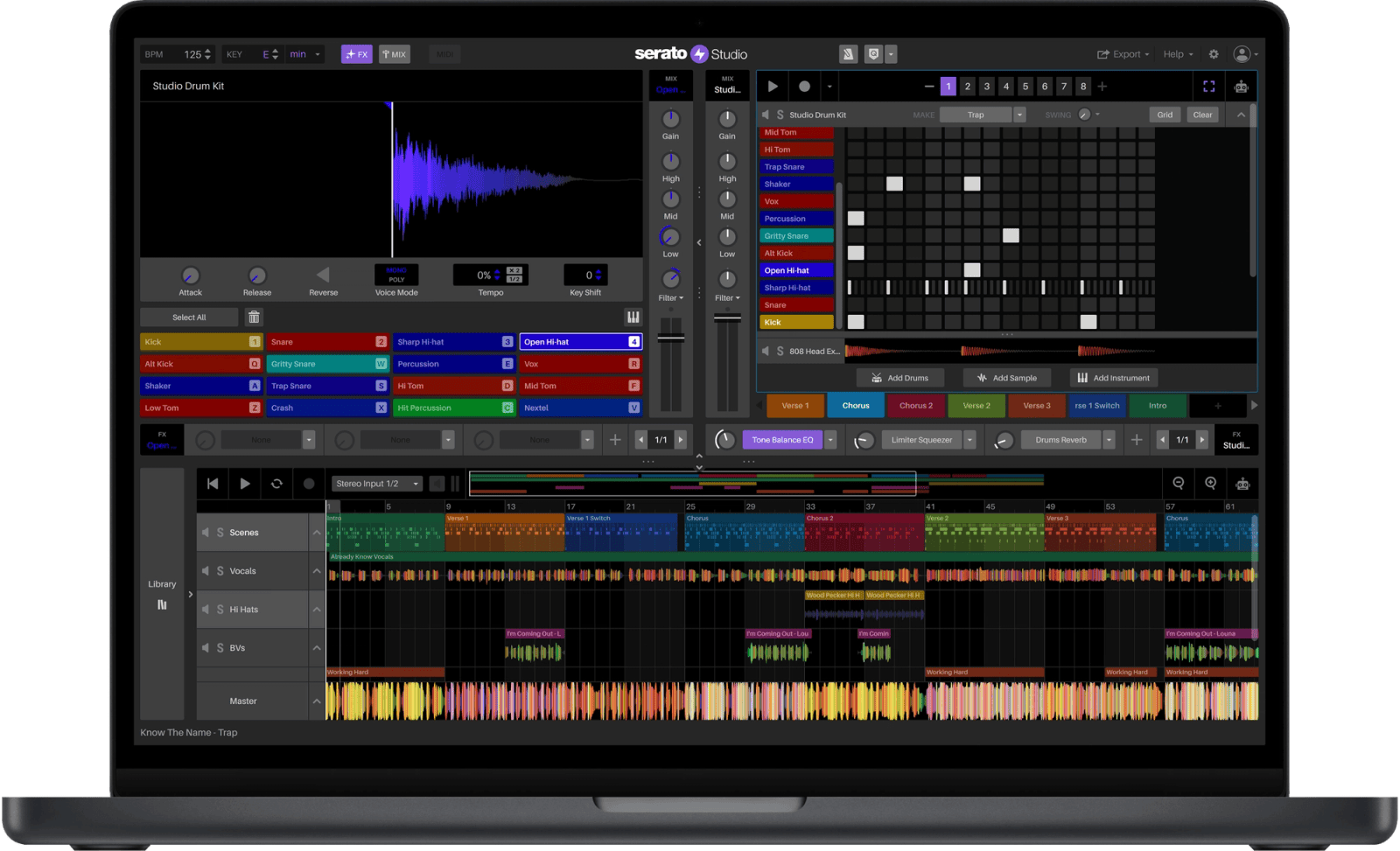
Serato Studio organizes productions around decks and scenes. A deck can contain drums, samples, an included instrument or a compatible third-party plugin. Scenes act as looping song sections such as an intro, verse, chorus or drop.
This structure encourages producers to develop short musical ideas before arranging them into a complete song. It is particularly effective for beatmaking because drums, samples and instruments remain accessible without opening several separate editing windows.
The free edition allows four decks and four scenes. A practical project could therefore contain a drum deck, a sampled melody, a bass instrument and a third-party synth, arranged across an intro, verse, chorus and outro.
Sampling and Stem Separation
Sampling is one of Serato Studio’s strongest areas. The dedicated Sample Deck can analyze imported audio, identify useful sections and assign up to 16 cue points for triggering and rearrangement.
Samples automatically follow the tempo and musical key of the project. Producers can change speed, transpose audio, reverse sections and play selected slices across a keyboard.
Serato Stems separates imported material into vocals, melody, bass and drums. This can help producers isolate an acapella, remove existing percussion, extract a bass-free melodic section or create a new arrangement from an older recording.
Stem processing creates additional files on the computer, so projects using several separated tracks can require more storage than a conventional sample-based session.
Drum Sequencing and Groove
The Drum Deck combines a pad-based kit with a step sequencer. Producers can generate patterns, add or remove hits, adjust velocity, change the rhythmic grid and introduce swing.
Each drum sound also receives its own piano-roll view, allowing rolls, repeated notes and detailed rhythmic variations to be programmed without treating the entire kit as one fixed loop.
The integrated library includes selected drum kits and patterns in the free edition. The complete commercial sound library is not included, but users can import their own one-shots and samples.
Instruments and Third-Party Plugins
Serato Studio Free includes access to a selected collection of built-in instruments. Available categories include basses, keys, synthesizers, pads, percussion and other production sounds.
Compatible third-party instruments and effects can also be loaded through Plugin Decks. Serato Studio supports 64-bit VST2 and VST3 plugins on Windows and macOS, along with Audio Units on Mac.
Because every Plugin Deck counts toward the four-deck free limit, loading several external synths will reduce the number of available drum, sample or instrument decks. The plugin folder may be unlimited, but the free session politely asks it to form a very short queue.
Audio Recording
Vocals, instruments, vinyl and other external audio sources can be recorded through a microphone, audio interface or compatible input device.
Free mode permits one audio track. This is sufficient for recording a lead vocal, guitar part, live percussion or a scratch performance, but it is not suitable for sessions requiring several independent microphones or multiple vocal layers.
Loop recording can capture several passes over the same section. Recordings are stored in the Serato Studio recordings folder and can be accessed from the integrated library.
Key, Tempo and MIDI Control
Serato Studio automatically keeps samples and musical material synchronized with the project key and BPM. Changing the global tempo or key can therefore reshape an entire production without manually processing every imported loop.
Play in Key limits notes to the selected musical scale, while Auto Chords can generate chords from individual notes. These tools can help beginners create harmonically coherent ideas without replacing the need to understand arrangement and musical tension.
External MIDI keyboards, pad controllers and other compatible devices can be mapped to transport controls, pads, parameters and mixer functions. Several popular controllers also receive predefined mappings.
Mixing and Effects
Serato Studio provides a dedicated mixer view with track levels, effects and master processing. Included effects cover compression, limiting, equalization, reverb, delay, distortion, modulation, sidechain processing and DJ-style transitions.
The free edition does not support automation. Volume, effect and stem parameters therefore cannot be drawn or recorded as evolving movements across the arrangement.
Static settings and scene changes still allow complete beats to be mixed, but producers who rely heavily on filter sweeps, detailed vocal rides or changing effect levels will encounter the free version’s most important creative limitation.
Best Uses
- Hip-Hop, Trap and lo-fi beatmaking
- Sample chopping and creative resampling
- Stem-based remixes and DJ edits
- Quick electronic music sketches
- Programming drums and grooves
- Recording one vocal or instrument track
- Producing with MIDI pads and controllers
- Learning scene-based song arrangement
Export Options
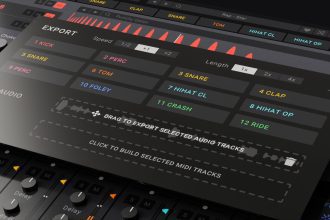
Completed productions can be exported as WAV or MP3 files. Serato Studio can also create individual stems for each deck and separate files for individual drum pads.
This makes it possible to begin a beat in Serato Studio Free and transfer the exported stems into another DAW for detailed automation, vocal recording, mixing or mastering.
Projects can also be saved with their samples inside a ZIP archive, helping producers move sessions between compatible computers without manually locating every imported audio file.
Compatibility and Installation
Serato Studio 2.5.0 supports Windows 10 and Windows 11. On Mac, the current version supports macOS Sonoma, Sequoia and Tahoe.
Serato recommends a computer from 2017 or later, an Intel Core i5 or compatible Apple Silicon processor, at least 8 GB of memory and approximately 15 GB of free SSD space for a typical installation with production content.
A Serato account and Internet sign-in are required. Users without a paid license or subscription are placed into Free mode after authentication.
Main Limitations
- Maximum of four decks per project
- Maximum of four scenes
- Only one audio track
- No automation
- Only selected instruments, kits and sound packs are included
- A Serato account and sign-in are required
- No official Linux version
- Projects exceeding Free mode limits cannot be saved or exported in Free mode
Final Verdict
Serato Studio Free is a capable permanent DAW for producers who prioritize beatmaking, sampling and speed over traditional multitrack recording.
Its Sample Deck, stem separation, drum sequencer, automatic key and tempo synchronization, plugin hosting and flexible exports provide enough tools to create complete beats and compact electronic productions.
The four-deck, four-scene and single-audio-track limits are significant, while the absence of automation prevents more detailed arrangements. These restrictions should be understood before beginning a larger project.
For Hip-Hop, Trap, lo-fi, remixes and DJ edits, Serato Studio Free remains a focused and approachable option. Producers who later need unlimited tracks and deeper arrangement control can export their stems or upgrade to the complete edition.