Vocal Gate: A Free AI Noise Gate VST3 Plugin for Voice Cleanup
Vocal Gate by Dan K is a free open-source audio plugin designed to remove coughs, sneezes, keyboard clicks, heavy breathing and other sudden microphone artifacts from spoken-word recordings.
Released in 2026, the plugin uses a lightweight machine-learning model to distinguish clean speech from unwanted interruptions. It is particularly useful for podcasts, YouTube videos, livestreams, voiceovers and other forms of spoken content.
What Is Vocal Gate?
Vocal Gate is a free noise-gate effect created for speech rather than conventional musical instruments.
A standard gate usually reacts only to signal level. This can become unreliable when a cough, keyboard click or loud breath is as strong as the voice the producer wants to preserve.
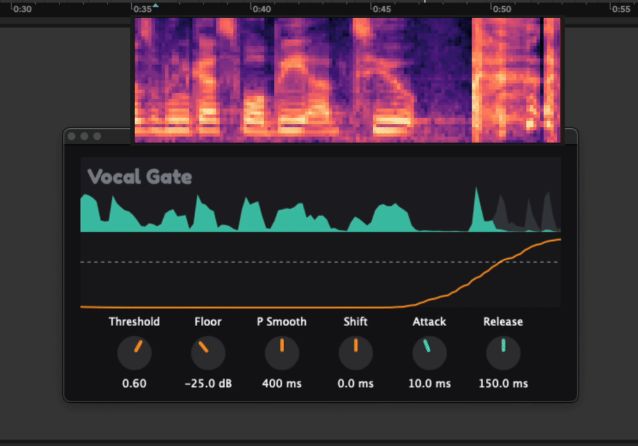
Vocal Gate instead analyzes the incoming signal and estimates whether it contains clean speech or an unwanted microphone artifact. When the probability crosses the selected threshold, the plugin reduces the signal according to the configured gate settings.
Designed for Podcasts, Streams and Video
The plugin is primarily intended for creators and editors working with spoken audio.
- Podcast recording and editing
- YouTube voiceovers
- Twitch and livestream production
- Online courses and tutorials
- Interview editing
- Video narration
- Speech recorded in home studios
- Removing isolated coughs and sneezes
It can also be tested on vocal recordings, although its model is designed around speech cleanup rather than musical vocal production.
AI Analysis Without Voice Generation
Vocal Gate does not synthesize, clone or generate voices.
Its machine-learning model analyzes a live spectrogram and classifies portions of the signal. The model is used only to decide when the gate should react.
This makes Vocal Gate a corrective editing tool rather than a generative audio application.
Main Controls
The interface provides direct controls for adjusting how the detection and gain reduction behave.
- Threshold: Sets the probability required before the gate reacts
- Floor: Determines how far the unwanted signal is reduced
- Probability Smooth: Smooths rapid changes in the model output
- Shift: Adjusts the timing relationship between detection and processing
- Attack: Controls how quickly the gain reduction begins
- Release: Controls how quickly the signal returns after processing
A visual display shows the incoming audio and the changing probability generated by the detection model.
Removing Coughs and Sneezes
Coughs and sneezes can be difficult to remove with a traditional gate because they are often louder than normal speech.
Vocal Gate is trained to recognize these types of interruptions and reduce them automatically. This can save time when editing long podcasts, interviews and recorded streams.
The result will still depend on the recording, microphone position and overlap between the voice and the unwanted sound. A cough occurring directly over an important word may still require manual editing.
Keyboard Click and Breathing Reduction
The plugin can also react to keyboard clicks and pronounced breathing sounds captured close to the microphone.
This is useful for streamers, tutorial creators and podcasters recording in untreated home environments where a computer keyboard is positioned close to the microphone.
The Floor setting can be used to reduce these artifacts without necessarily muting them completely, which may produce a more natural result.
750 ms Lookahead Latency
Vocal Gate requires approximately 750 milliseconds of lookahead so that the model can analyze the signal before applying gain reduction.
This latency is acceptable during post-production because most DAWs compensate for plugin delay automatically.
For livestreaming, the video, game capture and desktop audio must be delayed by the same amount to remain synchronized with the processed microphone.
The plugin is not suitable for live two-way communication such as Discord, Zoom, online gaming chat or remote musical performance, where a delay of three quarters of a second would be clearly noticeable.
Compatible Applications
The developer lists compatibility with several production environments:
- OBS Studio
- Streamlabs
- vMix
- DaVinci Resolve
- Adobe Premiere Pro
- Final Cut Pro
- REAPER
- Logic Pro
- FL Studio
- Ableton Live
- Audacity
The host application must support the appropriate VST3 or Audio Unit format.
Plugin Formats and System Requirements
- Windows: VST3, Windows 10 or later, x64
- macOS: VST3 and Audio Unit, macOS 11 or later
- Mac architecture: Apple Silicon
- Linux: VST3, Ubuntu 22.04 or later, x64
- Plugin type: Audio effect
An Intel macOS version is not currently listed by the developer.
Installation Notes
The Windows and macOS installers are currently unsigned.
Windows may display a SmartScreen warning. Select More Info, then Run Anyway after confirming that the installer was downloaded from the official GitHub repository.
On macOS, right-click the installer and select Open if the operating system blocks the package.
Linux users can extract the archive and place the supplied VST3 bundle inside the local VST3 folder:
~/.vst3/
Free and Open Source
Vocal Gate is completely free and distributed under the GPL-3.0 open-source license.
No account, subscription, license key or license manager is required. The compiled installers and source code are available directly from the official GitHub project.
Visit the official Vocal Gate GitHub repository
Download Vocal Gate version 1.0.5
Important Limitations
Vocal Gate is an experimental speech-cleanup tool rather than a complete noise-reduction suite.
It is not designed to continuously remove air-conditioning noise, electrical hum, room ambience or broadband background noise. A conventional denoiser may be more appropriate for those problems.
The 750 ms latency also prevents comfortable use during calls and other interactive voice applications.
Results depend on the source material, and manual editing may still be required when an unwanted sound overlaps important speech.
Final Verdict
Vocal Gate is an original free plugin for creators who regularly edit podcasts, streams, interviews and spoken-word recordings.
Its speech-aware detection provides a more targeted approach than a conventional level-based gate when dealing with coughs, sneezes, keyboard clicks and heavy breathing.
The substantial lookahead latency limits its use in live communication, but for post-production and synchronized streaming workflows, Vocal Gate can reduce repetitive editing work without requiring a subscription or cloud service.