ZL Spectrum Equalizer: A Free Dynamic Spectral EQ Plugin
Up to 24 linear-phase bands, frequency-domain dynamics, sidechain processing and detailed stereo control inside one open-source plugin.
ZL Spectrum Equalizer is a free and open-source dynamic spectral EQ developed by ZL Audio. Released in July 2026, it combines conventional equalization with frequency-domain dynamic processing powered by a high-performance FFT engine.
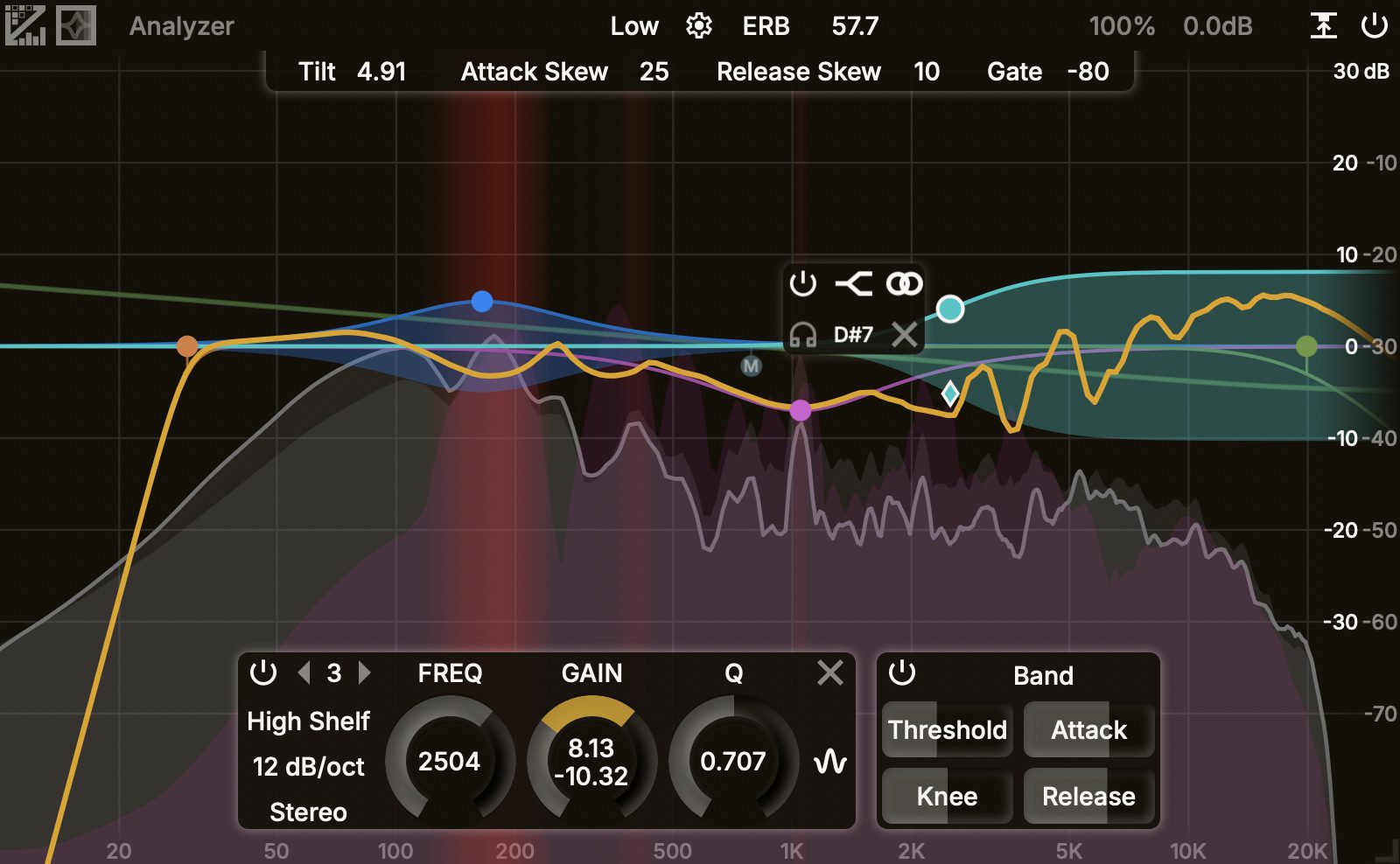
The plugin can create up to 24 linear-phase frequency bands and provides nine filter types, seven selectable slopes and five stereo placement modes. Each band can operate statically or react dynamically to the level of individual frequency bins.
This makes ZL Spectrum Equalizer useful for resonance control, vocal smoothing, de-essing, sidechain separation, corrective mixing and detailed mastering work. Unlike a conventional dynamic EQ that responds to the overall level of a wide frequency band, this plugin can process individual spectral components inside the selected range.
ZL Spectrum Equalizer is completely free and distributed under the AGPLv3 open-source licence. There is no paid edition, subscription, time restriction or feature lock.
What Is ZL Spectrum Equalizer?
ZL Spectrum Equalizer combines a visual parametric equalizer with spectral dynamics. Audio is divided into individual frequency bins using Fast Fourier Transform processing, allowing the plugin to control resonances and tonal changes with greater precision than a standard broadband compressor.
When dynamic processing is enabled, each frequency bin can move between a base gain and a target gain according to its own signal level. Threshold, attack, release and knee controls determine how quickly and smoothly the processing responds.
This approach is useful when a problem is not permanently present. A harsh vocal frequency, aggressive guitar resonance or excessive cymbal tone can be reduced only when it becomes dominant, leaving the rest of the performance relatively untouched.
Main Features
- Up to 24 bands: Build detailed corrective or creative EQ curves across the full frequency spectrum.
- Nine filter types: Peak, low shelf, high shelf, low-pass, high-pass, notch, band-pass, tilt shelf and flat tilt.
- Seven slopes: Choose values between 6 dB and 96 dB per octave, depending on the selected filter.
- Five stereo modes: Process stereo, left, right, mid or side information independently.
- Spectral dynamics: Control individual FFT bins with threshold, attack, release and knee parameters.
- External sidechain: Trigger frequency-dependent processing from another track.
- Collision detection: Visualise areas where the input, output or sidechain signals compete.
- Resizable interface: Adjust the plugin window and customise colours, curve thickness and analyser behaviour.
- Gain compensation tools: Compare processed and unprocessed signals at a more consistent perceived level.
Dynamic Modes and Sidechain Processing
The plugin provides three methods for calculating the dynamic threshold.
Absolute mode uses a fixed threshold. This is suitable for controlling resonances that consistently reach a predictable level.
Band mode calculates the threshold according to the loudness of the selected frequency area. This can create a more adaptive response when the overall performance changes in level.
Relative mode connects the threshold to the total sidechain loudness. It can be useful for more complex corrective processing and spectral ducking.
The external sidechain allows one sound to create space inside another. For example, a vocal can dynamically reduce competing frequencies in a guitar, synthesizer or instrumental bus without lowering the entire track.
Best Uses
Vocal resonance control: Create a dynamic band around harsh upper-mid frequencies and reduce them only when they become excessive.
De-essing: Target the sibilant area with a dynamic band instead of reducing the complete high-frequency range.
Kick and bass separation: Use the kick as an external sidechain source and dynamically reduce only the frequencies where both sounds collide.
Guitar and synth control: Reduce aggressive resonances that appear only on particular chords or notes.
Mix bus correction: Apply gentle dynamic processing to frequency areas that become unbalanced during louder sections.
Mid-side mastering: Control low-frequency information in the centre while treating stereo brightness or ambience separately in the side channel.
Choosing the Right Spectrum Resolution
ZL Spectrum Equalizer offers several processing resolutions. Lower settings provide reduced latency and faster time-domain response, while higher settings improve frequency precision at the cost of increased latency and CPU use.
- Extreme Low to Low: Approximately 12 to 46 milliseconds of latency. Useful for transient-heavy material and responsive mixing.
- Medium: Approximately 93 milliseconds. A practical balance for general mixing work.
- High to Extreme High: Approximately 186 to 743 milliseconds. Better suited to detailed low-frequency correction and narrow resonance control.
Higher resolution is not automatically better. Use the lowest setting that provides the required precision. Your mix does not receive bonus points because the plugin is using every available CPU cycle.
Production Tips
Begin with a moderate spectrum resolution and create only the bands that solve a clear problem. Twenty-four available bands do not mean every mix needs twenty-four active corrections.
For resonance suppression, use a narrow dynamic reduction with a soft knee. Adjust the threshold until the band responds only when the resonance becomes audible.
When using the external sidechain, avoid creating excessively deep cuts. A few decibels of spectral ducking may be enough to improve separation without making the processed track sound hollow.
Use the mid and side modes carefully during mastering. Low frequencies usually benefit from a stable centre image, while high-frequency ambience can often be adjusted more freely in the side channel.
Always compare the processed and bypassed signals at similar loudness. ZL Spectrum Equalizer includes gain compensation tools, but critical listening remains more reliable than trusting the graph alone.
Compatibility and Installation
The official installation page provides downloadable installers through the ZL Audio GitHub release system. Separate builds are offered according to the operating system and processor architecture.
On compatible Windows and Linux processors, the developer recommends the AVX2 build because it provides improved processing efficiency. Legacy builds are also available for older processors without AVX2 support.
The current 0.0.1 version is labelled as a pre-release. ZL Audio recommends loading the plugin in an empty DAW project and checking its operation before using it in an important production session.
AAX support is not included in the first release and is planned for a later version. Linux users should also review the current system requirements on the release page before installation.
Final Verdict
ZL Spectrum Equalizer is one of the most technically ambitious free EQ plugins released in 2026. Its combination of conventional filters, spectral dynamics, flexible stereo placement and sidechain processing provides a serious toolkit for corrective mixing and detailed mastering.
The interface is visual and highly configurable, but the plugin remains best suited to producers who already understand basic EQ and dynamic processing. Beginners can still use it, although the large number of options may require some time with the official manual.
The current pre-release status means it should be tested carefully before being added permanently to critical sessions. However, the open-source licence, active documentation and unusually deep feature set make it a promising free tool.
Used with restraint, ZL Spectrum Equalizer can solve problems that would otherwise require several separate processors. Used without restraint, it can also create twenty-four beautifully animated reasons why the mix sounded better before. The choice, as always, remains with the engineer.
Download ZL Spectrum Equalizer from the official website: