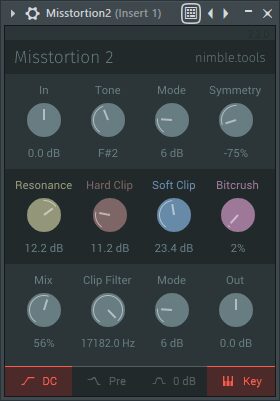

Misstortion 2.3 is a free distortion plugin developed by Nimble Tools for Hardstyle, Hardcore, EDM and aggressive electronic music production. Inspired by the workflow of Logic Pro’s Clip Distortion, it combines hard clipping, soft clipping, resonance, bitcrushing and frequency-focused processing inside a compact interface.
Updated in February 2026, the plugin remains completely free with an optional donation. It is available as a 64-bit VST3 for Windows and as VST3 and Audio Unit versions for macOS.
Main Features
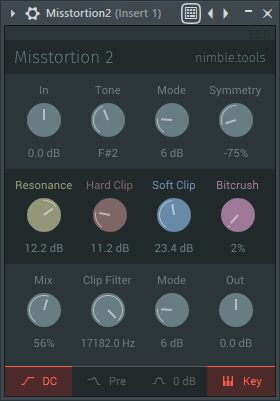
- Hard clip and soft clip distortion modes
- Waveform symmetry control
- Adjustable resonance
- Integrated bitcrusher
- Tone and clip filtering
- Filter frequency controlled by musical note
- DC offset filtering
- Independent input and output gain
- 64-bit VST3 support for Windows and macOS
- Audio Unit version for macOS
- Free name-your-own-price download
Designed for Hardstyle Kick Processing
Misstortion was originally developed with input from Hardstyle producers, and its controls are particularly effective for shaping distorted kick drums.
The hard clip mode can flatten peaks and create a more aggressive transient, while soft clipping produces a smoother form of saturation. Producers can combine the clipping stage with resonance and filtering to emphasize a specific tonal area before or after distortion.
The Symmetry control changes the balance between the positive and negative parts of the waveform. This can introduce additional harmonics and create more complex kick tails, basses and distorted synth sounds.
Because strong asymmetrical distortion can generate DC offset, Misstortion includes a dedicated DC Filter. This helps remove unwanted low-frequency displacement before the processed signal reaches the rest of the effects chain.
Key-Based Tone Filtering
One of the most useful features is the ability to set the tone filter according to a musical note. Instead of selecting only a frequency value, producers can tune the filter to the key of the track.
This is especially practical when creating pitched Hardstyle kicks. The filter can emphasize a tonal region connected to the root note, helping the distorted tail remain more musical.
Version 2.3 also introduces Off modes for the Tone and Clip filters. These options make it easier to bypass filtering completely when only the distortion and bitcrushing stages are required.
Best Uses
Hardstyle and Hardcore Kicks
Start with a clean kick or a short synthesized bass drum. Increase the input gain until the clip stage begins producing the required harmonics, then use the tone and resonance controls to shape the tail.
For a more controlled result, process the punch and tail separately. Keep the initial transient relatively clean while applying stronger distortion to the sustained section.
Bass and 808 Processing
Misstortion can add upper harmonics to basses and 808s, helping them remain audible on smaller speakers. Use soft clipping for additional density or hard clipping for a more aggressive sound.
Keep a clean sub layer underneath when extreme settings weaken the fundamental frequency.
Synth Leads and Screeches
Resonance, filtering and bitcrushing can transform simple synth patches into sharper leads, screeches and industrial textures. Automating the Tone control can create movement during builds and transitions.
Parallel processing is useful when the original synth needs to remain clear. Blend a heavily distorted duplicate underneath the cleaner signal rather than processing the complete sound at maximum intensity.
Drum Buses and Percussion
Subtle clipping can reduce drum peaks and increase perceived loudness. Use conservative settings on complete drum buses, as extreme bitcrushing and resonance can quickly make cymbals and hi-hats unnecessarily harsh.
Production Tips
Reduce the output level: Match the processed signal to the bypassed volume before deciding whether the distortion has improved the sound.
Use the filters before clipping: Focus the distortion on selected frequencies while preserving clarity elsewhere.
Check for DC offset: Activate the DC Filter when asymmetrical processing moves the waveform away from its centre line.
Work in layers: Combine a clean transient, a distorted midrange layer and a controlled sub rather than forcing one sound to perform every role.
Resample the result: Record several processed versions, then select and edit the strongest sections as audio.
Compatibility
Misstortion 2.3 is available as a 64-bit VST3 plugin for Windows. The macOS download includes VST3 and Audio Unit formats.
The plugin can be used in compatible hosts such as Studio One, Ableton Live, FL Studio, Cubase, Reaper and Bitwig Studio. Logic Pro users should install the Audio Unit version.
The February 2026 release also introduces a new macOS installer and additional performance optimizations. No Linux or AAX version is currently provided on the official download page.
Final Verdict
Misstortion 2.3 is a focused free distortion plugin that remains particularly useful for Hardstyle kicks, aggressive basses and electronic sound design.
Its combination of clipping, symmetry, resonance, bitcrushing and key-based filtering offers more control than a basic distortion effect, while the interface remains fast enough for practical production work.
It will not design a complete festival kick with one click, but it can certainly make a polite waveform reconsider its life choices.
Download Misstortion 2 from the official website:
https://nimble.itch.io/misstortion