
osci-render by James H Ball is a free open-source synthesizer that turns images, text, 3D objects and animations into audio designed to draw shapes on an oscilloscope. Updated in April 2026, the plugin combines music production, visual synthesis and experimental sound design inside a single creative environment.
Unlike a conventional virtual instrument focused only on musical timbres, osci-render generates sound and visuals simultaneously. Producers can control it from a DAW, play it with MIDI, automate its parameters and use Lua scripts to create custom sounds, movements and effects.

What Is osci-render?
osci-render is a synthesizer created for oscilloscope music, an audiovisual technique in which stereo audio signals are used to draw lines and shapes on an XY oscilloscope display.
The plugin can load and render several types of visual material, including:
- SVG vector graphics
- Text files
- 3D OBJ models
- Blender scenes and animations
- JPG and PNG images
- Animated GIF files
The resulting audio can be heard as an experimental synthesizer while the same signal generates the corresponding visual pattern. This makes osci-render useful for music, live visuals, social content, installations and audiovisual performances.
A Synthesizer Controlled From the DAW
osci-render works as both a standalone application and an audio plugin. Inside a compatible DAW, its parameters can be automated like those of a conventional synthesizer.
MIDI notes can control pitch and performance, while automation lanes can move, rotate, distort or reshape the visual object over time. Producers can synchronize these changes with drums, transitions and arrangement sections.
This creates a direct relationship between what the audience hears and what it sees. A pitch change alters the sound and the drawing, while modulation can animate both elements at once.
Main Creative Features
- 3D object rendering: load OBJ files and convert their outlines into oscilloscope audio.
- SVG and text support: draw logos, typography, geometric shapes and custom vector graphics.
- Blender integration: connect animated Blender scenes to osci-render.
- Software oscilloscope: preview the generated visual without requiring external hardware.
- MIDI control: play and manipulate the synthesizer from a keyboard or controller.
- DAW automation: automate movement, effects and synthesis parameters.
- Lua scripting: program custom visuals, audio effects and synthesizer behavior.
- Project management: save and reload complete visual and sound projects.
Built-In Audio and Image Effects
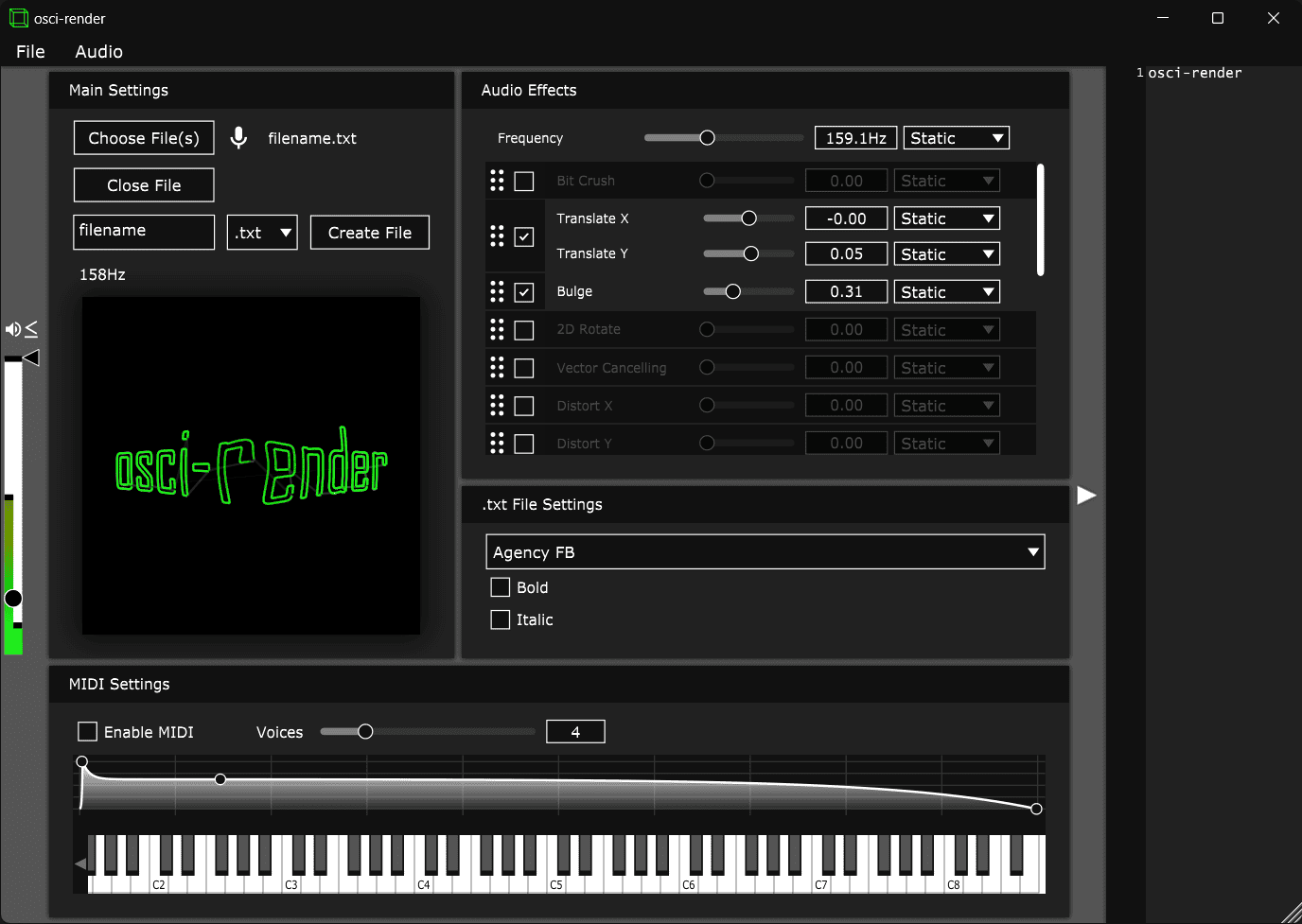
osci-render includes several effects for changing the appearance and sound of the generated material. Available processing includes bit crushing, horizontal and vertical distortion, image wobble, smoothing and tracing.
The order of the effects can be rearranged, and their parameters can be animated or controlled from the DAW. This allows a simple shape to become an evolving rhythmic or melodic visual.
Bit crushing can create rough digital textures, while distortion effects stretch and deform the image. Smoothing produces cleaner movement, and tracing changes how the object is drawn over time.
Because the visual and audio signals remain connected, an effect is rarely decorative. Bend the image too enthusiastically and the sound will usually join the argument.
Lua Scripting and Custom Synthesis
The built-in Lua system makes osci-render more programmable than a typical visualizer. Users can write scripts that generate custom shapes, synthesis methods, animation behaviors and audio effects.
This is particularly valuable for experimental producers, artists and developers who want to create material that cannot be produced through the standard interface alone.
Scripts can interact with DAW parameters, allowing custom processes to remain playable and automatable. Beginners can use the included tools without programming, while advanced users can build more personal instruments and visual systems.
Useful for Current Music and Visual Content
osci-render does not target one conventional genre, but it fits several creative directions that remain important in 2026:
- IDM and glitch: create geometric sounds, unstable textures and synchronized digital visuals.
- Ambient music: use slowly rotating forms and evolving drones for immersive performances.
- Experimental techno: synchronize visual distortion with repetitive sequences and automation.
- Synthwave: create retro oscilloscope graphics, typography and wireframe objects.
- Cinematic production: design mechanical drones, signals and abstract audiovisual sequences.
- Alternative pop: generate distinctive visualizers for releases, social clips and live projections.
- Sound installations: build interactive pieces where one signal controls both image and audio.
The plugin can also help independent artists create visuals that react directly to their music rather than relying on another generic waveform floating above a blurred photograph.
Blender Integration
osci-render includes an official Blender add-on for sending line-art scenes and animations to the synthesizer. A Blender camera can define the view while osci-render converts the visible outlines into audio.
This workflow allows producers to create rotating objects, animated logos and more complex 3D scenes. The results can be controlled alongside the music from the DAW.
Blender integration requires more preparation than loading a simple SVG file, but it greatly expands the visual possibilities for live sets, installations and audiovisual releases.
Free Version and Premium Edition
The free edition includes the core tools needed to create oscilloscope music from images, text, vector graphics, objects and Blender animations.
The paid Premium edition adds several advanced features:
- MP4 and MOV video support
- Live video input through Syphon or Spout
- MP4 recording and export
- Additional effects such as Twist, Kaleidoscope, Vortex and Multiplex
- Enhanced analogue oscilloscope simulation
- Advanced framerate and resolution controls
- Improved text-rendering quality
The free version is therefore a permanent creative instrument rather than a time-limited demo. Premium is mainly intended for users who need video input, recording and more advanced visual processing.
Formats and Compatibility
- Latest official repository release: version 2.8.9.18
- Release date: April 19, 2026
- Price: Free edition available
- Windows: standalone application and VST3
- macOS: standalone application, VST3 and Audio Unit
- Linux: source-build instructions are provided for standalone and VST3 use
- MIDI: supported
- DAW automation: supported
- License: GPLv3 for the source code
No official AAX, CLAP or LV2 edition is documented. Pro Tools users therefore do not have a native AAX version.
The Windows and macOS downloads are supplied through the official website after completing the free checkout. A download link is delivered by email.
Visit the official osci-render website to access the free or Premium edition.
The source code, documentation and development files are available from the official osci-render GitHub repository.
Updates can be followed through the official GitHub Releases page.
License and Commercial Work
The source code is licensed under GPLv3. This license governs the use, modification and redistribution of the software itself. The project name, logos and branding are covered by separate trademark conditions.
The official pages do not publish a royalty system for music or visuals created with the synthesizer. Producers who modify or redistribute the program should follow the GPLv3 requirements, while normal musical use does not involve repackaging the software.
Important Limitations
osci-render is a specialist audiovisual instrument rather than a traditional subtractive or wavetable synthesizer. Producers looking for conventional pads, pianos or ready-made bass presets will need another instrument.
Its workflow also requires some understanding of stereo signals, oscilloscopes and visual preparation. Blender and Lua integration add considerable depth but introduce a steeper learning curve.
The free edition does not include video files, live video input, recording or the complete Premium effect collection. Linux users may also need to compile the software from source.
Oscilloscope synthesis can generate bright and aggressive signals, so initial testing should be performed at a moderate monitoring level.
Final Verdict
osci-render is one of the most original free audio plugins available in 2026. It connects synthesis, animation, MIDI performance and visual design in a way that conventional instruments and music visualizers do not.
Its ability to render text, vector images, 3D objects and Blender scenes makes it particularly valuable for experimental musicians, audiovisual artists and independent producers creating distinctive release content.
The workflow is more specialized than a normal synthesizer, and several video features remain exclusive to Premium. For producers interested in oscilloscope music, live visuals and genuinely connected audio-visual creation, however, the free edition offers an unusually deep creative platform.