Pigments Play by Arturia: A Free Multi-Engine Synth VST
Explore 100 modern presets, six synthesis types, 68 filter modes and 20 effects through a fast, audio-reactive interface.
Pigments Play is a free software synthesizer developed by Arturia and powered by the sound engine behind its flagship Pigments instrument.
It provides a more approachable way to explore Pigments sounds without opening the complete synthesis, modulation and sequencing environment. Producers can browse 100 curated presets, reshape them through focused controls and use the instrument directly inside a DAW or as standalone software.
The included sounds cover modern pop, R&B, garage, house, drum and bass, trap, ambient music and other contemporary production styles.
Completely free: Pigments Play is a permanent free instrument rather than a time-limited demo. An Arturia account and the Arturia Software Center are required for installation and activation.
What Is Pigments Play?
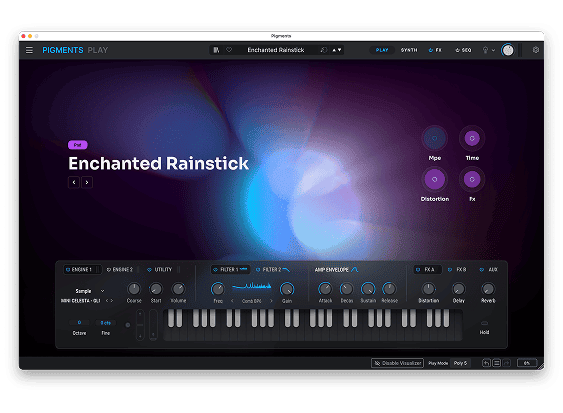
Pigments Play is a streamlined version of Arturia Pigments built around its audio-reactive Play View. Instead of presenting the complete modulation system, sequencer and advanced editing pages, it focuses on preset browsing and immediate sound shaping.
Each preset opens with a visual display that reacts to the notes being played. Producers can then modify important characteristics without navigating through a large synthesis interface.
This makes Pigments Play particularly suitable for beginners, preset-focused musicians and producers who prefer to find a sound quickly before returning to writing and arranging.
Main concept: Pigments Play keeps the sonic foundations of Pigments but presents them through a smaller selection of musically useful controls.
100 Curated Presets
The free instrument includes 100 presets created by professional sound designers. The library covers several important sound categories, including keys, pads, basses, leads, sequences and atmospheric textures.
The preset browser can filter sounds by instrument and type, making it easier to move between different production roles without scrolling through one enormous list.
The factory library includes sounds for:
- Modern pop and R&B
- House and garage
- Drum and bass
- Trap and bass music
- Ambient production
- Electronic and cinematic textures
- Melodic sequences
- Basses, leads, keys and pads
Six Synthesis Types
Pigments Play uses the same six synthesis families available in the complete version of Pigments. The amount of editing is more limited, but the underlying presets can still draw from several different sound-generation methods.
Virtual Analog: Generates traditional oscillator-based sounds such as warm basses, leads, plucks and classic synth textures.
Wavetable: Uses evolving digital waveforms for animated leads, modern basses and moving electronic sounds.
Sample: Builds instruments and textures from recorded audio material.
Granular: Divides samples into small particles for atmospheric, fragmented and evolving sounds.
Harmonic: Uses additive synthesis principles to create detailed digital timbres and complex tonal structures.
Modal: Produces resonant, physical and acoustic-inspired textures through modal synthesis.
The selected synthesis type can be changed from the simplified interface, with several essential controls remaining available for adjusting its character.
Four Performance Macros
Each preset includes four main macro controls labelled Brightness, Timbre, Time and Movement.
The precise parameters controlled by these macros can vary from one preset to another. This allows the sound designer to assign changes that make musical sense for each individual patch.
Brightness generally changes the amount of high-frequency detail or filter intensity.
Timbre modifies the tonal identity of the preset.
Time can affect envelopes, delays or other time-based characteristics.
Movement adjusts animation, modulation or rhythmic variation already programmed into the sound.
The result is more useful than four completely generic controls. A bass preset and an atmospheric pad may respond very differently, even though the macro names remain consistent.
Filters and Effects
Pigments Play provides access to the 68 filter modes available in the Pigments sound engine. Filter cutoff and resonance can be adjusted from the main interface, allowing significant tonal changes without opening the complete synthesis pages.
The instrument also includes 20 effect algorithms. The simplified effect section provides fast access to modulation effects, delay and reverb, depending on the selected preset and effect configuration.
Useful limitation: Pigments Play does not provide the complete FX routing and detailed modulation control found in the paid version. It is designed for fast sound shaping rather than building an entire effect architecture from an empty patch.
Audio-Reactive Play View
The central interface changes visually as notes are played. This audio-reactive design provides immediate feedback on the behaviour and general character of a preset.
The visualiser does not replace traditional synthesis controls, but it can make preset browsing more engaging and help producers identify movement, intensity and tonal changes more quickly.
Users working with less powerful graphics hardware can disable the visualiser when needed.
Official Pigments Video
The official Arturia walkthrough below demonstrates the redesigned Pigments Play View and the synthesis environment that powers the free instrument.
Arturia Pigments Play View and Sound Engine
What Is Missing Compared With Pigments?
Pigments Play is generous for a free instrument, but it does not provide the complete programming environment of Pigments.
- Parameter editing is more limited
- The full modulation system is not available
- There is no complete Main View
- There is no complete FX View
- The advanced sequencer page is not included
- The full version includes more than 1,700 presets
- Pigments Play includes 100 factory presets
These restrictions clearly separate the free instrument from the paid version, but they do not prevent Pigments Play from functioning as a useful and playable synthesizer.
Best Uses
Fast songwriting: Browse finished sounds quickly and begin writing melodies or chords without designing a patch first.
House and electronic music: Use modern keys, plucks, basses, pads and animated sequences for melodic arrangements.
Trap and R&B: Explore atmospheric keys, deep basses, moving textures and softer melodic sounds.
Ambient production: Modify granular, modal and sample-based presets for spacious backgrounds and evolving layers.
Learning synthesis: Compare the six synthesis types and hear how filters, envelopes, effects and macros influence different presets.
MIDI Controller Support
Pigments Play can be controlled through Arturia keyboards such as MiniLab, KeyLab and KeyStep models. Compatible parameters are mapped automatically when supported Arturia hardware is connected.
Producers using third-party MIDI controllers can assign the available controls manually. The instrument can also be played through its virtual keyboard when running in standalone mode.
System Requirements and Compatibility
- Windows: Windows 10 or later, 64-bit
- macOS: macOS 11 or later
- Apple processors: Intel and Apple Silicon support
- Windows ARM: Not supported
- Plugin formats: VST, VST3, AU and AAX
- Standalone application: Included
- RAM: 4 GB minimum
- Processor: Four-core CPU at 3.4 GHz or compatible Apple Silicon processor
- Storage: Approximately 4 GB of free space required
- Graphics: OpenGL 2.0 compatible GPU
How to Download Pigments Play
Pigments Play is available directly from the official Arturia website. Enter an email address on the product page to receive the download link.
Installation and activation are managed through the Arturia Software Center. Users who do not already have an Arturia account will need to create one before activating the instrument.
- Visit the official Pigments Play page.
- Enter your email address to receive the download link.
- Install the Arturia Software Center.
- Create or sign in to your Arturia account.
- Install and activate Pigments Play.
- Open the standalone version or rescan your DAW plugins.
Final Verdict
Pigments Play is one of the more substantial free synthesizer releases available to modern producers. Its 100 presets cover a useful range of electronic and contemporary styles, while the six synthesis types provide considerably more variety than a basic preset player.
The limited modulation and editing system means it cannot replace the full version of Pigments for advanced sound design. However, the macros, filters, envelopes and effects provide enough control to adapt presets rather than simply accepting them unchanged.
For beginners, it offers an approachable introduction to several forms of synthesis. For experienced producers, it provides a fast source of polished sounds that can be loaded without turning every writing session into a small research project in modulation theory.
Download Pigments Play for Free
Get the free multi-engine synthesizer directly from the official Arturia website.