Psypan 2 Free: Creative Stereo Panning and Width Plugin
Binaural positioning, stereo width and creative spatial processing inside a distinctive free plugin for mixing and sound design.
Psypan 2 Free Edition is a stereo panning and spatial processing plugin developed by Auburn Sounds. Released in July 2026, it revisits the company’s original GFM Psypan binaural panner and expands the concept into a more versatile stereo toolbox.
The free edition provides ten processing modes for positioning sounds, modifying stereo width and creating movement. These include binaural algorithms, conventional volume-based panning and several creative spatial effects.
Psypan 2 is suitable for vocals, synthesizers, guitars, percussion, reverb returns, ambient textures and sound-design layers. It can perform practical mixing tasks, but it is equally capable of creating exaggerated movement and intentionally unnatural stereo images.
The official website provides a permanent Free Edition download rather than a time-limited trial. A paid edition is available with seven additional modes, but the free version contains enough tools to function as a useful standalone stereo processor.
What Is Psypan 2?
Psypan 2 is built around a selection of processing modes rather than a single fixed panning algorithm. Each mode changes the function of the main controls and offers a different method for positioning or widening a signal.
The plugin includes the original Psy-1 algorithm from GFM Psypan, preserving the character of the 2011 plugin. It also introduces Psy-2, a more advanced binaural mode using a 64-bit internal signal path and longer interpolation.
Psy-2 applies frequency-dependent shaping according to the selected angle. Auburn Sounds designed this behaviour to make a sound appear to rotate in front of the listener rather than simply moving from one headphone channel to the other.
The result is particularly noticeable with headphones, although the plugin can also be used on loudspeaker-based mixes. As with any stereo processor involving phase and inter-channel delay, checking the result in mono remains important.
Ten Modes in the Free Edition
Psypan 2 Free Edition contains ten of the seventeen modes available in the complete plugin. The selection covers realistic positioning, standard stereo adjustment and more creative processing.
- Psy-1: The original linear-phase binaural panning algorithm.
- Psy-2: The updated default mode with spectral shaping and more precise front-facing rotation.
- Balance: A conventional balance control with selectable centre compensation.
- Dual Pan: Independent positioning for the left and right channels of a stereo source.
- Chorus Panner: A modulated effect that combines chorus-style density with directional positioning.
- Creative stereo modes: Additional tools for width, delay-based movement and frequency-dependent placement.
The paid Full Edition adds seven more modes for producers who need additional mid-side variations, advanced binaural options and specialised doubling or directional processing.
The free version is therefore not simply a disabled demonstration. It covers the central Psypan workflow and can be used for complete mixing and sound-design tasks.
Binaural Panning and Stereo Movement
Traditional panning mainly changes the relative volume of the left and right channels. Binaural panning also uses timing and spectral differences to reproduce some of the directional cues heard by human ears.
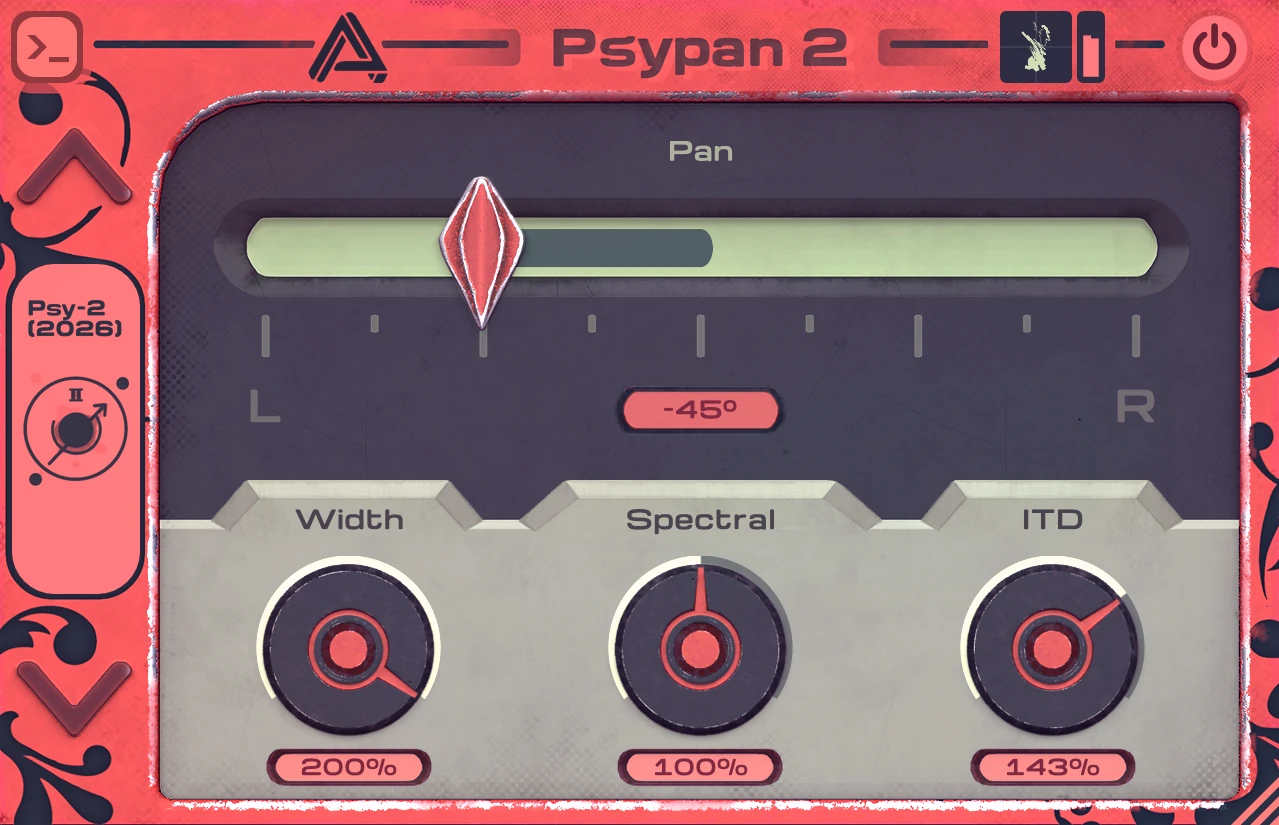
Psypan 2 provides controls such as stereo width, spectral intensity and Interaural Time Difference. The available parameters change according to the selected mode.
The ITD control adjusts the timing difference between the two channels. Small differences can strengthen directional perception, while larger values create a more obvious and less natural spatial effect.
The Spectral control changes the amount of frequency-dependent shaping used by the Psy-2 algorithm. Moderate settings can improve the impression of movement, while stronger values may be useful for experimental sound design.
These tools are especially effective on mono sources that need a more animated stereo position. They can also reshape existing stereo recordings, although aggressive processing may alter their original balance.
Best Uses
Background vocals: Move backing layers away from the centre while keeping the lead vocal focused.
Synthesizer textures: Automate the Pan control to create slow movement across pads, drones and atmospheric sounds.
Reverb returns: Process a reverb bus to change its stereo direction without moving the dry source.
Guitars and keyboards: Adjust stereo width or reposition recordings that feel unbalanced inside the arrangement.
Percussion: Add subtle movement to shakers, hand percussion and secondary rhythmic elements.
Sound design: Use exaggerated ITD, spectral and width settings to create transitions, rotating effects and less predictable spatial textures.
The plugin can also be used during headphone-focused production, where binaural cues are easier to perceive. However, the final result should still be checked on speakers and in mono.
Production Tips
Begin with the plugin in Balance or Dual Pan mode before moving to the more complex binaural algorithms. This provides a useful reference for deciding whether the source genuinely needs additional spatial processing.
When using Psy-2, start with moderate Width, Spectral and ITD values. Increase one parameter at a time while listening to the centre image and the tonal balance.
Automation can be more effective than a permanently extreme setting. A synthesizer may remain relatively stable during the verse, then move gradually across the stereo field during a transition.
Be careful when widening bass-heavy sounds. Large timing differences between the left and right channels can weaken low-frequency mono compatibility. Keep the sub region centred or process only a higher layer of the sound.
On reverb and delay returns, try placing Psypan 2 after the spatial effect. This allows the complete wet signal to move independently from the dry source.
Finally, compare the processed and bypassed signals at similar levels. Stereo width is exciting, but excitement has occasionally persuaded perfectly respectable producers to turn every channel into a panoramic tourist attraction.
Compatibility
Psypan 2 is available for Windows, macOS and Linux. Auburn Sounds provides several plugin formats for compatibility with a broad selection of DAWs.
- Windows: Windows 7 or later
- macOS: macOS 10.15 or later
- Linux: Ubuntu 22.04 or later
- Formats: VST2, VST3, Audio Unit, AAX, CLAP, LV2 and FLP
- Supported sample rates: 22.05 kHz to 192 kHz
- Price: Free Edition available
Windows and macOS users can install the plugin with the supplied installer. Linux users can copy the required VST3, CLAP or LV2 files into the standard plugin directories used by their system.
Final Verdict
Psypan 2 Free Edition is a distinctive stereo processor that combines practical panning controls with more experimental binaural and spatial algorithms.
The conventional Balance and Dual Pan modes make it useful for everyday mixing, while Psy-1, Psy-2 and the creative processors provide more unusual options for movement, width and sound design.
Its ten included modes offer enough variety for vocals, synthesizers, reverbs, guitars, percussion and ambient textures. Producers who need the additional mid-side and specialised algorithms can consider the paid edition, but the free version is already a complete and useful tool.
Psypan 2 will not replace careful arrangement or intelligent stereo placement. It will, however, make moving a sound from left to right considerably more entertaining than dragging another ordinary pan control.
Download Psypan 2 Free Edition from the official website: