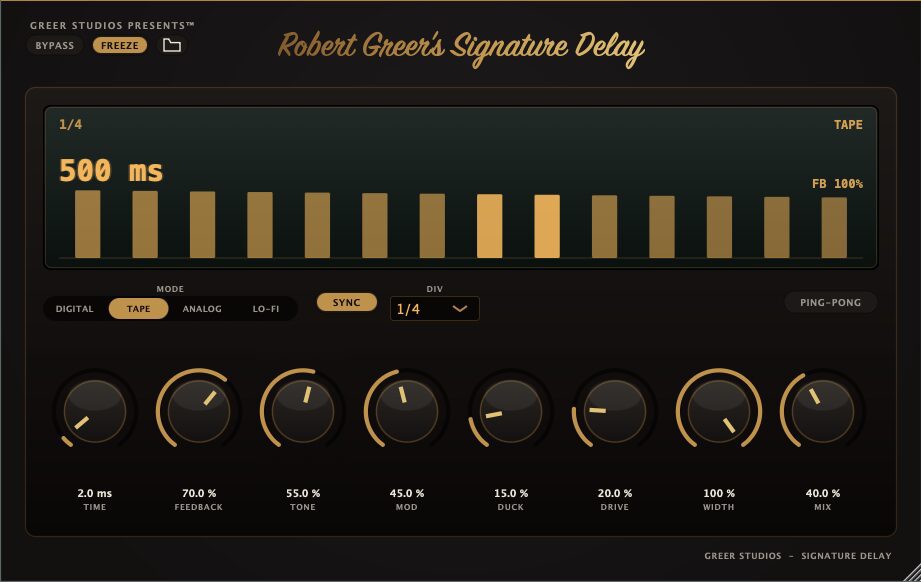

Signature Delay is a permanently free delay plugin developed by Greer Studios Presents for Windows producers. Released in July 2026, it combines four distinct delay characters with ducking, stereo ping-pong, modulation, freeze and tempo synchronization inside a focused interface.
The plugin is available as a 64-bit VST3 effect and a standalone Windows application. There is no mandatory payment, subscription, user account or iLok authorization. A valid email address is required because the download link and installation guide are delivered directly to the user’s inbox.
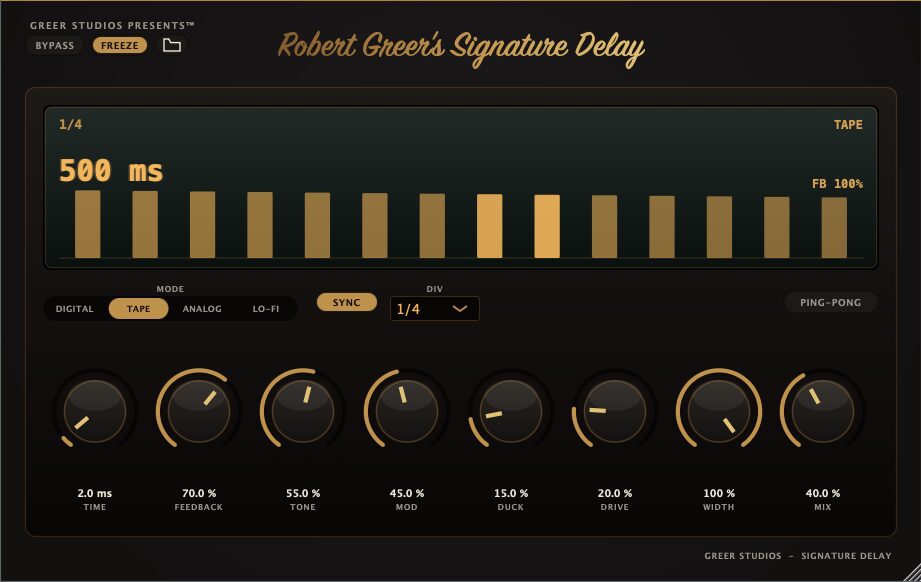
Four Different Delay Characters
Signature Delay is built around four processing modes that allow the same rhythmic pattern to take on a different tonal character.
- Digital: intended for cleaner and more precise repeats.
- Tape: adds a softer and more colored delay character.
- Analog: offers warmer repeats suited to musical echo effects.
- Lo-Fi: creates more degraded and deliberately imperfect textures.
This selection makes the plugin suitable for both conventional mixing and more creative sound design. A clean vocal throw can be programmed in Digital mode, while Tape or Analog can provide softer echoes for guitars, electric pianos and synthesizers. Lo-Fi mode is better suited to unstable textures, transitions and deliberately damaged repeats.
Main Features
- Digital, Tape, Analog and Lo-Fi delay modes
- Host tempo synchronization
- Musical note divisions
- Delay feedback control
- Dry and wet mix adjustment
- Tone shaping
- Drive control
- Delay modulation
- Adjustable stereo width
- Ping-pong stereo mode
- Built-in delay ducking
- Freeze function for sustained repeats
- Global bypass
- VST3 and standalone versions
Signature Delay does not attempt to become a large modular multi-effect. Its controls cover the most useful delay functions without hiding them behind several pages or complicated routing menus.
Why Ducking Matters
Ducking is one of the most practical features in Signature Delay. When the original signal is present, the plugin reduces the level of the delayed repeats. As the dry signal becomes quieter, the echoes rise back into the available space.
This technique is particularly useful for vocals. A delay can remain expressive and audible at the end of each phrase without masking the words while the singer is performing. The same principle works on synth leads, guitars, melodic hooks and sound-design elements.
Without ducking, producers often need to automate the delay return manually or use a separate compressor with a sidechain input. Signature Delay places the process directly inside the effect, making it quicker to create clear and animated echoes.
Ping-Pong, Modulation and Freeze
Ping-pong mode moves the repeats between the left and right channels. It can widen vocal phrases, synth stabs and percussion without requiring a separate stereo-routing setup.
The modulation controls add movement to the delay timing and pitch. At subtle settings, modulation can soften static digital repeats and introduce a more organic quality. Stronger settings can produce chorus-like echoes, unstable pitch movement and more experimental textures.
Freeze holds the delayed material indefinitely. This can transform a short note, vocal fragment or percussion hit into a sustained layer. Automating Freeze during transitions can create drones, tension beds and evolving backgrounds without loading another dedicated granular or looping plugin.
Best Uses
Signature Delay can handle short vocal throws, rhythmic synth echoes, guitar ambience, percussion movement and atmospheric transitions. The four modes also make it suitable for House, Techno, modern R&B, Trap, Synthwave, Ambient and cinematic electronic production.
For a clear vocal delay, begin with Digital mode, synchronize the timing to the project and increase the ducking until the repeats move behind the main performance. Use the tone control to reduce excessive brightness.
For a warmer synth or guitar effect, select Tape or Analog mode and introduce a small amount of drive and modulation. Keep the feedback moderate unless the delay is intended to become a prominent part of the arrangement.
Lo-Fi mode can be used on drum loops, sampled melodies and effects when cleaner repeats feel too predictable. Combine it with ping-pong and modulation to create movement across the stereo field.
Production Tips
Use the delay on an auxiliary channel when several tracks need the same spatial character. Set the plugin to a fully wet signal if the routing allows it, then control the amount of echo using each track’s send level.
For vocals, remove unnecessary low frequencies from the signal before or after the delay. Low-end repeats can accumulate quickly and make an otherwise clean mix feel cloudy.
Always compare the processed and unprocessed signals at a similar perceived volume. Drive and feedback can make a delay appear more exciting simply because it is louder. The ears are clever, but they remain surprisingly easy to bribe.
Freeze is most effective when used briefly. Capture one note or phrase, automate the effect during a transition, then release it before the sustained layer begins competing with the next section.
Compatibility and Download
Signature Delay is currently available for 64-bit Windows in VST3 and standalone formats. A macOS version is planned but was not available when this article was prepared.
The download is permanently free. Users must provide an email address to receive the installer and installation guide, but no account, subscription or iLok authorization is required.
Signature Delay is an audio-processing effect and does not include a sample library. The developer does not publish restrictions preventing producers from commercially releasing music processed with the plugin.
Final Verdict
Signature Delay is a useful free effect for Windows producers who want several delay characters without opening a complicated workstation. Its four modes cover clean, warm and degraded echoes, while ducking, ping-pong and freeze provide enough flexibility for both practical mixing and creative sound design.
The Windows-only release limits its initial audience, but the permanent free licence and simple download process make it easy to recommend. It will not decide where the delay throw belongs in the song, but at least it provides four different ways to repeat the mistake.
Download Signature Delay from the official website:
https://greerstudiospresents.com/product/signature-delay