
Orra Audio Tone Zone: A Smart Tonal Curve Corrector for Cleaner, More Balanced Mixes
Every mix tells the truth somewhere in its frequency curve. Sometimes the drums hit hard, the bass feels right, the vocal sits well, but the overall balance still feels slightly cloudy, too sharp, too thin, or too heavy. Orra Audio Tone Zone is built for that exact moment, when a producer needs to see the tonal shape of a mix and correct it without jumping between a meter, an EQ, and another tone-shaping plugin.
Tone Zone is a tonal curve corrector designed to help producers analyze, correct, and sculpt the frequency balance of a track in one focused interface. It is part visual guide, part corrective EQ, part manual tone-shaping tool, and part creative saturation processor. For modern producers, beatmakers, mixing engineers, and musicians working inside busy DAW sessions, that combination can make tonal decisions faster, clearer, and more musical.
What Is Orra Audio Tone Zone?
Orra Audio Tone Zone is a tonal balance and correction plugin that shows where your mix sits against professional target curves, then gives you tools to adjust that balance directly. Instead of simply displaying a spectrum and leaving the correction work to another plugin, Tone Zone brings analysis, auto-correction, manual EQ, reference learning, and saturation into the same workflow.
The plugin is offered as a free or pay-what-you-can tool, but its value is not only in the price. Its real strength is the way it connects visual feedback with practical mix correction. It helps producers understand the broad tonal shape of their music, then gives them ways to refine that shape with both automatic and manual controls.
Video Overview
A Tonal Balance Tool That Goes Beyond Metering
Many tonal analysis tools are useful, but they often stop at diagnosis. They show the curve, reveal the problem, and then the producer has to open an EQ, make a change, return to the meter, compare again, and repeat the process. Tone Zone takes a more direct approach.
It displays the tonal curve of your mix against genre-based targets, then allows correction and manual shaping inside the same plugin. That matters in real production work because tonal balance is rarely solved with one quick move. It usually requires listening, comparing, adjusting, and refining until the mix feels more controlled without losing its identity.
40-Band Spectral Analysis
Tone Zone uses a smooth 40-band spectral analysis to show the big picture of your mix. Instead of reacting nervously to every tiny transient, the display is designed to show the broader tonal shape. This makes it easier to understand whether a track is too dark, too bright, too scooped, too heavy in the low mids, or lacking presence.
For producers who struggle with mix translation, this kind of visual feedback can be very useful. A track may sound balanced in one room but feel muddy in the car, harsh on headphones, or thin on small speakers. Tone Zone helps reveal those broad tonal tendencies before they become a problem at the final stage.
24 Genre Target Curves for Faster Decisions
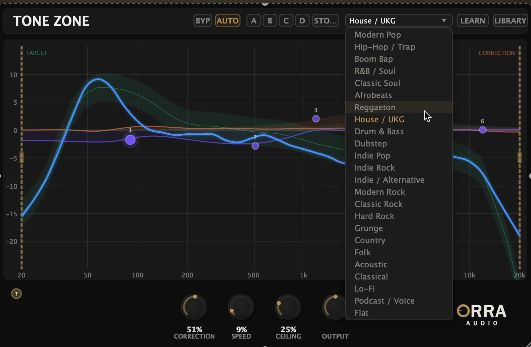
One of the most interesting parts of Tone Zone is its collection of 24 genre target curves. These targets are calibrated from professional masters and give producers a reference point for different musical contexts.
This does not mean every mix should be forced into the same shape. A great mix still needs personality, dynamics, arrangement, and taste. But genre targets can help producers understand where their track sits in relation to a familiar tonal zone. A modern pop mix, a hip-hop beat, a house track, a cinematic cue, and a rock production do not always need the same low-end weight, midrange density, or top-end brightness.
Reference Track Learning
Tone Zone also allows users to create custom tonal targets by learning from reference tracks. This can be useful when the goal is not to match a generic genre curve, but to move toward the tonal world of a specific song, artist, playlist, or production style.
For producers working on EPs, albums, sync tracks, or playlist-focused releases, this can help maintain tonal consistency across multiple songs. It also gives beatmakers and mixers a more practical way to compare their work with commercial references without relying only on memory or guesswork.
Auto-Corrective EQ With Musical Control
Tone Zone includes an FFT-based auto-corrective EQ that gently nudges the frequency balance toward the selected target. This is where the plugin becomes more than a meter. Instead of only showing what is happening, it can actively help reshape the curve.
The correction is designed to be adjustable, with controls for depth, speed, and ceiling. That makes it possible to use the feature subtly rather than letting the plugin take over the mix. Used carefully, it can help smooth broad tonal issues while leaving room for the producer’s own decisions.
Level-Aware Processing
A useful detail is the level-aware behavior. Tone Zone is designed to respond differently depending on whether the track is in a full section or a sparse arrangement. This matters because tonal correction can become too aggressive during breakdowns, intros, transitions, or moments where fewer instruments are playing.
By adapting correction intensity to the musical context, Tone Zone feels more suited to real songs than a static automatic EQ curve. It understands that a stripped-back verse should not always be corrected the same way as a full chorus or drop.
Manual EQ for Final Decisions
Automatic correction can be helpful, but no plugin should make every tonal decision for the producer. Tone Zone includes a 6-band parametric EQ overlay with draggable nodes, giving users the ability to fine-tune the result by hand.
This is important because tonal balance is not only technical. Sometimes a vocal needs to stay slightly forward. Sometimes a bass-heavy track should remain heavier than the target. Sometimes a dark cinematic cue should not be brightened too much. The manual EQ gives producers the final say.
Per-Band Saturation
Tone Zone also includes per-band analog saturation options, including Tube, VCA, and British-style character. This turns the plugin into more than a corrective utility. It can also add harmonic richness to specific frequency areas.
For example, a producer can add warmth to the low mids, presence to a vocal range, or subtle harmonic color to the top end without placing another saturation plugin after the EQ. Used with taste, this can help a corrected mix feel more musical and less clinical.
Sound and Character
Tone Zone is not designed to impose one obvious sound on every track. Its character depends on how it is used. At subtle settings, it can make a mix feel more controlled, balanced, and translation-friendly. Push the correction harder, add saturation, and shape the EQ more actively, and it can become a stronger tone-sculpting processor.
The plugin is especially useful on mix buses, mastering chains, production buses, instrumental stems, and reference-checking sessions. It can help producers find low-mid buildup, excessive brightness, weak bass energy, harsh presence, or uneven tonal curves before the final export.
Creative Uses in Music Production
Mix Bus Tone Shaping
On a mix bus, Tone Zone can help producers understand the overall tonal balance of a track and make broad corrective decisions. It is useful when a mix feels close but still does not translate well across speakers.
Mastering Preparation
Before sending a track to mastering, Tone Zone can be used as a final tonal check. It can help reveal whether the mix is too bass-heavy, too sharp, too scooped, or lacking energy in important frequency areas.
Beatmaking and Instrumental Production
Beatmakers can use Tone Zone to check full instrumentals before sending them to artists, labels, or collaborators. This is especially useful when working quickly with samples, 808s, synths, drums, and layered loops.
Reference-Based Mixing
The reference learning feature makes Tone Zone interesting for producers who want to compare their tracks with a specific sonic direction. It can help build a target curve from a reference track, then guide tonal shaping more clearly.
Why Tone Zone Is Worth Trying
Orra Audio Tone Zone is worth trying because it brings together several tools that usually live in separate plugins. It analyzes tonal balance, compares it with targets, applies corrective EQ, allows manual adjustment, and adds saturation where needed.
That combination makes it useful for both learning and professional workflow. Beginners can better understand frequency balance. More experienced producers can use it as a fast tonal decision tool. Mixing engineers can use it as a second opinion. Beatmakers can use it to make instrumentals feel more polished before delivery.
Who Is Tone Zone Best Suited For?
Tone Zone is best suited for producers, beatmakers, mixing engineers, mastering-minded creators, and musicians who want better control over tonal balance. It is especially useful for electronic music, hip-hop, pop, house, techno, cinematic music, rock, lo-fi, and any style where mix translation matters.
It will also appeal to creators who work in untreated rooms or headphone-based studios. When monitoring is not perfect, a tool that shows broad tonal balance against reliable targets can help avoid common mistakes. It does not replace the ear, but it gives the ear better information.
Compatibility and Workflow
Tone Zone is designed for modern DAW-based production. Producers should check the official Orra Audio download page for the latest available formats and system requirements before installation.
The workflow is simple: load Tone Zone on a track or bus, choose a genre target or create a reference curve, analyze the tonal balance, apply correction if needed, then fine-tune with the 6-band EQ and optional per-band saturation. A/B/C/D comparison slots make it easier to test different settings without losing previous choices.
Official Website and Download Link
Orra Audio Tone Zone is available from the official Orra Audio website.
Official product page:
https://www.orraaudio.com/products/orra-tone-zone
Conclusion: A Practical Tonal Assistant for Modern Producers
Orra Audio Tone Zone is the kind of plugin that can change how producers think about mix balance. It does not simply show a spectrum and leave the rest to another tool. It connects analysis, correction, manual EQ, saturation, and reference comparison inside one practical workflow.
For producers who want cleaner mixes, better translation, faster tonal decisions, and a clearer understanding of how their music sits against professional targets, Tone Zone is a smart plugin to explore. Load it on a mix, compare the curve, make small moves, and let the track find its zone.
Product Description
Orra Audio Tone Zone is a tonal curve corrector for modern music production, mixing, and mastering preparation. It combines 40-band spectral analysis, 24 genre target curves, reference track learning, FFT-based auto-corrective EQ, level-aware processing, a 6-band parametric EQ, per-band saturation, internal bypass, and A/B/C/D comparison slots. It is designed to help producers analyze, correct, and sculpt tonal balance inside one focused plugin.
Official website or download link:
https://www.orraaudio.com/products/orra-tone-zone